

Video conferencing is real-time communication between two or more people in different locations using live video and audio. Participants connect through computers, smartphones, tablets, browsers, or dedicated meeting-room systems and can usually combine the conversation with screen sharing, messaging, files, presentations, and other collaboration tools.
Unlike email or team messaging, video conferencing is synchronous: participants exchange information at the same time. Unlike a basic video call, a conferencing system can also support structured meetings, multiple participants, room systems, recording, administration, and collaboration features.
For businesses, video conferencing can range from a quick one-to-one conversation to a large meeting connecting employees, customers, partners, virtual classrooms, or conference rooms.
How Does Video Conferencing Work?
A video conference looks simple from the user’s perspective: join a meeting, turn on the microphone and camera, and start talking.
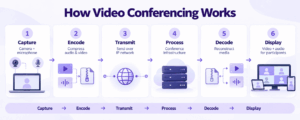
Behind that interface, the system continuously captures, compresses, transmits, processes, and reconstructs audio and video.
1. Audio and Video Are Captured
A camera captures the participant’s image, while a microphone captures speech and other sound.
The source may be:
-
a laptop camera;
-
a USB webcam;
-
a smartphone;
-
a conference-room camera;
-
dedicated audio and video equipment.
2. Media Is Encoded
Raw audio and video require too much bandwidth to send efficiently.
Video conferencing software therefore uses codecs to compress the media into smaller streams.
The receiving device later decodes those streams so participants can see and hear each other.
3. Media Travels Across the Network
The encoded streams are transmitted across an IP network.
Depending on the platform, they may pass through:
-
a public cloud service;
-
a private cloud;
-
an organization’s own conferencing server;
-
dedicated meeting infrastructure;
-
a combination of local and cloud components.
The network architecture affects latency, bandwidth use, data location, infrastructure control, and whether the system depends on external services.
4. Conferencing Infrastructure Coordinates Participants
In a multiparty meeting, the conferencing system has to decide how audio and video reach each participant.
It may:
-
forward individual media streams;
-
combine several streams;
-
adapt quality to available bandwidth;
-
manage participant roles;
-
connect meeting rooms;
-
control access;
-
bridge other communication systems.
5. Participants Receive the Meeting in Real Time
The client decodes incoming streams and displays the meeting.
This happens continuously in both directions.
As a result, video conferencing is sensitive to network problems. High latency, packet loss, congestion, or insufficient bandwidth can cause frozen video, delayed speech, distorted audio, or reduced image quality.
The entire process can be summarized as:
Capture → Encode → Transmit → Process → Decode → Display
What Do You Need for Video Conferencing?
At its simplest, video conferencing requires five things.
A Device
A computer, smartphone, tablet, browser-capable device, or dedicated room endpoint.
A Camera
The camera captures the participant or meeting room.
For individual calls, the built-in laptop camera may be sufficient. Meeting rooms often use wider-angle or PTZ cameras.
A Microphone
A microphone captures speech and other sound.
Speakers or Headphones
Participants need an audio output device.
Conference rooms may use integrated speakers, speakerphones, or dedicated room audio systems.
Video Conferencing Software or Infrastructure
The conferencing platform connects participants, processes media, manages access, and provides meeting features.
Main Types of Video Conferencing
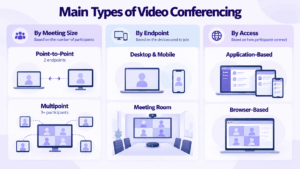
Video conferencing can be classified in several ways.
By Meeting Size
Point-to-point video conferencing connects two participants or endpoints.
Examples include:
-
two employees;
-
a manager and employee;
-
two conference rooms;
-
a customer and consultant.
Multipoint video conferencing connects three or more participants.
This requires the system to distribute multiple media streams and manage different devices, connection speeds, layouts, and roles.
By Endpoint
Desktop and mobile conferencing runs on personal devices such as computers, phones, and tablets.
It is common for remote and hybrid work because users do not need dedicated room equipment.
Room-based video conferencing uses equipment installed in a meeting room.
A room system may include:
-
one or more displays;
-
cameras;
-
microphone arrays;
-
speakers;
-
a room computer or codec;
-
a touch controller.
By Access Method
Application-based conferencing requires a desktop or mobile client.
Browser-based conferencing allows participants to join through a web browser.
Browser access can be useful when meetings frequently include customers, candidates, suppliers, or other external guests.
Common Video Conferencing Features
Modern video conferencing usually includes more than live camera feeds.
Common features include:
-
screen sharing;
-
meeting chat;
-
file exchange;
-
presentations;
-
recording;
-
captions;
-
transcription;
-
participant controls;
-
reactions;
-
virtual backgrounds;
-
breakout rooms;
-
polls;
-
remote desktop control.
These features turn a video meeting into a broader synchronous collaboration environment.
Video Conferencing vs Related Formats
Several communication terms overlap with video conferencing.
The boundaries are not strict. Modern platforms often combine several of these models in one product, so actual capabilities matter more than terminology.
Benefits of Video Conferencing
Video conferencing is most useful when communication benefits from immediate feedback and visual context.
Key benefits include:
-
faster discussion of complex issues;
-
communication between people in different locations;
-
reduced need for some business travel;
-
visual explanation through cameras, presentations, and shared screens;
-
collaboration with files, applications, and meeting tools in real time.
Its main advantage is not simply that people can see each other. It is that discussion and visual context happen at the same time.
Limitations and Challenges
Video conferencing also introduces constraints that do not exist in asynchronous communication.
Network Quality Matters
Real-time media has limited tolerance for unstable networks.
Packet loss, latency, bandwidth limitations, or wireless congestion can quickly affect meeting quality.
Audio Problems Are Usually More Disruptive Than Video Problems
A participant can often continue working with slightly blurred video.
Broken or delayed audio makes discussion much harder.
For meeting rooms in particular, microphone placement, echo cancellation, room acoustics, and speaker quality can matter as much as the camera.
Meeting Size Changes the Communication Model
A five-person project meeting and a 500-person event are not simply the same conference with more participants.
As the audience grows, the system may need:
-
moderator roles;
-
controlled microphones;
-
different layouts;
-
webinar modes;
-
stronger server capacity;
-
stricter access rules.
The useful question is not only:
How many participants does the system support?
It is:
How is communication supposed to work at that scale?
Not Every Conversation Needs Video
Short updates, links, simple questions, and non-urgent discussions are often better handled in messaging.
Video conferencing works best when synchronous interaction adds value.
Common Uses of Video Conferencing
Different use cases shift the priority between guest access, scale, collaboration tools, and infrastructure control.
Cloud, Self-Hosted, and Hybrid Video Conferencing
One of the most important architectural differences between conferencing systems is where the service runs.
Cloud Video Conferencing
In a cloud service, the provider operates most or all of the conferencing infrastructure.
This can reduce internal IT workload and simplify deployment.
The organization, however, depends on the vendor’s infrastructure and service architecture.
Self-Hosted Video Conferencing
A self-hosted system runs on infrastructure controlled by the organization.
Depending on the platform, this can give the customer control over:
-
conferencing servers;
-
user accounts;
-
media processing;
-
recordings;
-
messaging;
-
network access.
Self-hosting is relevant when communication needs to remain inside corporate infrastructure or when reliance on a public conferencing service is undesirable.
The trade-off is operational responsibility. The organization may need to manage servers, updates, monitoring, backups, capacity, and network configuration.
Hybrid Video Conferencing
A hybrid model combines customer-controlled infrastructure with selected cloud services.
This can be useful when some workloads need to stay local while other functions can remain cloud-based.
Cloud, hybrid, and self-hosted should not be treated as simple security rankings.
They mainly describe where infrastructure runs and who operates it.
How Is Video Conferencing Secured?
Video conferencing security can be evaluated across three layers.
Access
Check how the system controls who can enter meetings.
This may include:
-
passwords;
-
SSO;
-
guest policies;
-
waiting rooms;
-
participant roles;
-
host approval.
Media Protection
Audio, video, messaging, and signaling may use encryption.
The important questions are:
-
what is encrypted;
-
where encryption terminates;
-
whether servers process readable media;
-
how access is controlled.
Stored Meeting Data
Meetings can generate:
-
recordings;
-
chat messages;
-
files;
-
transcripts;
-
logs;
-
metadata.
Organizations should understand where these data types are stored and how long they remain available.
Deployment model changes who controls the infrastructure, but it does not replace correct security configuration.
How to Choose a Video Conferencing System
Before comparing products, answer five questions:
-
How many participants need to communicate interactively?
-
Are most meetings internal, external, or both?
-
Do conference rooms or SIP/H.323 systems need to connect?
-
Should chat and files continue outside the meeting?
-
Can the platform depend on a public cloud, or must core services run inside your infrastructure?
These answers usually narrow the market faster than comparing long feature lists.
Can Video Conferencing Work Without the Internet?
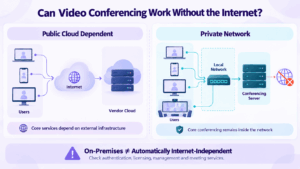
Some video conferencing systems can operate inside a private or isolated network without public Internet access.
However, the phrase on-premises does not automatically guarantee this.
A platform may still depend on external services for:
-
authentication;
-
licensing;
-
management;
-
push notifications;
-
meeting coordination;
-
updates.
Organizations that require isolated operation should verify whether core conferencing can continue when the public Internet is unavailable.
This is an architectural requirement, not a feature checkbox.
When Video Conferencing Is Not the Best Choice
Video is useful when participants need real-time discussion.
It is less useful when the task can be handled asynchronously.
Use messaging or another asynchronous format when:
-
the issue is simple;
-
no immediate answer is required;
-
information should remain easy to search;
-
participants work across different time zones;
-
a meeting would interrupt more people than necessary.
Use video when:
-
discussion matters;
-
participants need immediate feedback;
-
visual explanation helps;
-
several people need to reach a decision;
-
a text conversation would become excessively long.
The goal is not to maximize the number of meetings. It is to use live communication when it reduces friction.
Video Conferencing and Unified Communications
Video conferencing increasingly sits inside unified communications platforms that also provide messaging, voice, files, corporate directories, and room integration.
The practical advantage is continuity: a discussion can begin in chat, move into a live meeting, and continue afterward without losing context.
Private Video Conferencing With Secumeet
Secumeet is relevant when the architectural questions described above — where media is processed, where business data is stored, and whether core communication depends on external infrastructure — are part of the buying decision.
The platform combines:
-
video conferencing;
-
personal and group messaging;
-
file and screen sharing;
-
centralized administration;
-
private deployment;
-
collaboration tools.
This approach treats a meeting as part of a broader private communication environment rather than as an isolated video call.
For organizations evaluating private video conferencing, the key question is not only whether the platform can host a meeting.
It is who operates the communication environment and where business communication is processed and stored.
FAQ
What is video conferencing in simple terms?
Video conferencing is a live meeting in which people in different locations use cameras, microphones, and communication software to see and hear each other in real time.
How does video conferencing work?
Cameras and microphones capture video and audio, software compresses the media, and the data is transmitted across an IP network. Conferencing infrastructure distributes the streams, and other devices decode them so participants can communicate in real time.
What equipment is needed for video conferencing?
Participants usually need a computer, smartphone, tablet, or room system with a camera, microphone, speakers or headphones, network connectivity, and conferencing software.
What is the difference between video conferencing and video calling?
A video call usually refers to a simple live audio-video conversation. Video conferencing often describes a more structured meeting environment with multiple participants, administration, screen sharing, recording, presentations, or room systems.
Is video conferencing only cloud-based?
No. Video conferencing can be cloud-hosted, self-hosted, deployed in a private cloud, or use a hybrid architecture.
Can video conferencing work without the Internet?
Some self-hosted systems can support meetings inside a private network without public Internet access. This depends on whether authentication, licensing, conferencing, administration, and other core functions require external vendor services.
Conclusion
Video conferencing connects people in different locations through real-time audio and video.
Choosing a business platform, however, requires more than comparing image quality or participant limits. Network conditions, audio, room systems, guest access, messaging, administration, and infrastructure architecture all affect the result.
The key question is not simply whether a platform supports video meetings, but what communication environment needs to exist around them.
Author
Helga Afon is a technology writer specializing in video conferencing, collaboration software, and workplace communication. She writes articles and reviews that help readers better understand enterprise communication tools and industry trends.