

Team messaging platforms have become a central part of modern workplace communication.
Today, many organizations use enterprise instant messaging solutions, also known as corporate messengers or business messaging platforms, to manage internal communication, group conversations, file sharing and collaboration workflows.
Unlike consumer chat applications, enterprise messaging software is designed around:
-
managed user identities;
-
administration controls;
-
security policies;
-
communication governance;
-
integration with business systems.
Modern enterprise messengers help organizations replace fragmented communication across email, personal messaging apps and disconnected collaboration tools with a controlled business communication environment.
This guide compares team messaging platforms and enterprise instant messaging solutions based on:
-
deployment model;
-
security requirements;
-
administration capabilities;
-
integrations;
-
collaboration features.
What Is Enterprise Instant Messaging?
Enterprise instant messaging is persistent text-based communication designed specifically for organizational use.
Unlike consumer messaging applications, enterprise instant messaging software provides companies with control over:
-
user accounts;
-
communication spaces;
-
permissions;
-
message history;
-
integrations;
-
security policies.
A corporate messenger is not only a chat application.
It is part of an organization’s communication infrastructure that helps employees, departments and teams exchange information through managed accounts and approved communication channels.
A useful way to understand enterprise messaging is:
identity → conversation → action → record
Organizations need to understand:
-
who can access communication spaces;
-
where discussions take place;
-
how conversations support business processes;
-
how communication history is stored and managed.
Team Messaging vs Enterprise Instant Messaging
Although these terms are often used interchangeably, they describe different priorities.
Team messaging platforms help employees communicate faster.
Enterprise instant messaging solutions add additional layers of control required for larger organizations.
Enterprise Messaging Software for Business Communication
Enterprise messaging software provides organizations with a structured environment for internal communication.
Unlike consumer chat applications, business messaging software is designed around organizational requirements:
-
managed user accounts;
-
centralized administration;
-
communication policies;
-
integrations;
-
security requirements;
-
message management.
Organizations use enterprise messaging software to create controlled communication environments where employees exchange information through approved channels and managed accounts.
A corporate messenger helps businesses manage not only conversations but also access, security and communication workflows.
What Features Should an Enterprise Messaging Platform Have?
Choosing an enterprise messaging platform requires evaluating more than the ability to send messages.
Deployment Model
Organizations should understand where communication infrastructure operates.
Common deployment models include:
-
vendor cloud;
-
private cloud;
-
self-hosted deployment;
-
on-premise infrastructure.
The deployment model affects:
-
data location;
-
administration;
-
integrations;
-
security controls;
-
operational responsibility.
Identity Management
Enterprise messengers usually require centralized user management.
Important capabilities include:
-
corporate accounts;
-
directories;
-
groups;
-
administrator roles;
-
authentication integration;
-
access policies.
Group Chats and Channels
Business communication rarely happens only in private conversations.
Important collaboration features include:
-
group chats;
-
channels;
-
project spaces;
-
announcements;
-
message search;
-
conversation history.
Security and Governance
Enterprise messaging platforms are often selected based on security requirements.
Important capabilities include:
-
encryption;
-
access control;
-
audit logs;
-
retention policies;
-
administrator management;
-
secure deployment options.
Enterprise Messaging Governance and Compliance
For many organizations, messaging history is part of business communication records.
Enterprise messaging solutions may need to support:
-
message retention;
-
conversation archiving;
-
audit trails;
-
access restrictions;
-
administrator review;
-
information lifecycle management.
A mature enterprise messenger should help organizations understand:
-
who participated in conversations;
-
when messages were created;
-
who can access communication history;
-
where data is stored;
-
how long information remains available.
These capabilities are especially important for organizations with strict internal policies or regulatory requirements.
Message Retention and Archiving
Enterprise messaging platforms are often evaluated by how they manage communication history.
Important capabilities include:
-
configurable retention policies;
-
searchable message history;
-
audit records;
-
backup and recovery processes;
-
administrator access controls.
For some organizations, the ability to review and manage communication records is as important as real-time messaging itself.
Secure Enterprise Messaging
Security is one of the main reasons organizations choose enterprise messaging platforms instead of consumer chat applications.
A secure enterprise messenger typically includes:
-
protected communication channels;
-
authentication mechanisms;
-
user access management;
-
administrator controls;
-
encryption capabilities;
-
controlled deployment options.
However, security depends not only on encryption.
Organizations should also consider:
-
who manages the platform;
-
where communication data is stored;
-
how users authenticate;
-
how permissions are configured;
-
how message history is handled.
Enterprise Messenger vs Collaboration Platform
Enterprise messengers and collaboration platforms often overlap, but they solve slightly different problems.
An enterprise messenger focuses primarily on communication management.
A collaboration platform usually combines messaging with additional productivity tools.
Best Enterprise Messaging Platforms Comparison
Best Team Messaging Platforms and Enterprise Instant Messaging Solutions
1. TrueConf
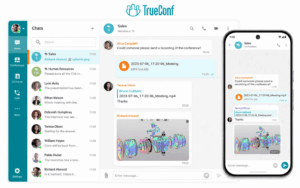
Best for: Enterprise messaging combined with video conferencing.
Deployment: Self-hosted enterprise deployment.
Enterprise messaging capabilities:
-
personal chats;
-
group chats;
-
file sharing;
-
presence;
-
directory integration;
-
video meetings;
-
SIP/H.323 interoperability.
Main advantage:
TrueConf combines enterprise instant messaging and video communication in one platform.
Unlike standalone chat applications, TrueConf provides a unified communication environment where messaging and video collaboration use the same organizational infrastructure.
Limitations:
-
Requires infrastructure management compared with cloud-only platforms.
-
Best suited for organizations that need more than simple team chat.
2. Secumeet
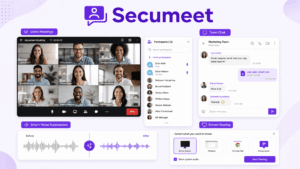
Best for: Secure enterprise messaging and collaboration.
Deployment: Controlled deployment environment.
Enterprise messaging capabilities:
-
secure messaging;
-
group communication;
-
file exchange;
-
collaboration features;
-
video communication.
Main advantage:
Secumeet focuses on organizations that need secure business communication with greater control over communication environments.
Limitations:
-
Better suited for organizations with defined security requirements.
-
May provide more capabilities than teams looking only for basic chat.
3. Microsoft Teams
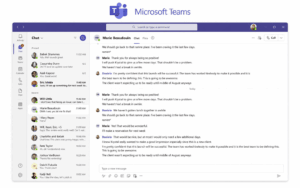
Best for: Organizations using Microsoft 365.
Deployment: Cloud.
Enterprise messaging capabilities:
-
chats;
-
channels;
-
meetings;
-
file collaboration;
-
Microsoft 365 integration.
Main advantage:
Microsoft Teams combines enterprise messaging with Microsoft’s productivity ecosystem.
Limitations:
-
Best value comes inside Microsoft environments.
-
Infrastructure control is limited compared with self-hosted platforms.
4. Slack
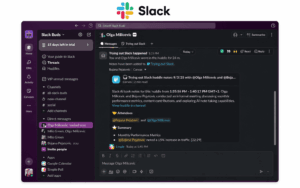
Best for: Teams focused on workflows and integrations.
Deployment: Cloud.
Enterprise messaging capabilities:
-
channels;
-
direct messaging;
-
automation;
-
application integrations.
Main advantage:
Slack provides flexible team communication with a large ecosystem of integrations.
Limitations:
-
Primarily cloud-based.
-
Limited infrastructure control.
5. Rocket.Chat
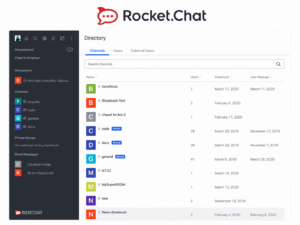
Best for: Organizations needing a customizable enterprise messenger.
Deployment: Self-hosted.
Enterprise messaging capabilities:
-
direct messages;
-
group chats;
-
channels;
-
file sharing;
-
integrations.
Main advantage:
Rocket.Chat provides flexibility for organizations that want more control than standard cloud messaging services.
Limitations:
-
Requires technical resources.
-
Organization manages deployment and maintenance.
6. Mattermost

Best for: Technical teams and operational communication.
Deployment: Self-hosted.
Enterprise messaging capabilities:
-
channels;
-
messaging;
-
integrations;
-
workflow automation;
-
administration.
Main advantage:
Mattermost focuses on secure collaboration and controlled communication environments.
Limitations:
-
Requires internal administration resources.
7. Element

Best for: Open and federated communication.
Deployment: Self-hosted/federated.
Enterprise messaging capabilities:
-
secure messaging;
-
federation;
-
self-hosting;
-
open protocol architecture.
Main advantage:
Element provides organizations with a communication model based on the Matrix protocol.
Limitations:
-
Requires more technical expertise compared with traditional SaaS messengers.
8. Google Chat

Best for: Google Workspace organizations.
Deployment: Cloud.
Enterprise messaging capabilities:
-
Spaces;
-
direct messaging;
-
Google Drive integration;
-
Workspace administration.
Main advantage:
Google Chat integrates enterprise messaging with Google’s productivity ecosystem.
Limitations:
-
Best suited for organizations already using Google Workspace.
How to Choose an Enterprise Messaging Platform
Before selecting a platform, organizations should evaluate several questions.
Do you need cloud or self-hosted deployment?
Cloud platforms provide:
-
faster deployment;
-
lower infrastructure responsibility;
-
vendor-managed updates.
Self-hosted platforms provide greater control over:
-
infrastructure;
-
data location;
-
administration;
-
integrations.
Do you need messaging only or unified communication?
Some organizations need only chat.
Others require:
-
messaging;
-
video conferencing;
-
file exchange;
-
presence;
-
collaboration tools.
Platforms such as TrueConf and Secumeet combine messaging and video communication in one environment.
Do you need governance features?
Enterprise buyers should evaluate:
-
retention;
-
archiving;
-
audit capabilities;
-
access policies;
-
administrator controls.
Which Enterprise Messaging Platform Fits Different Scenarios?
Frequently Asked Questions
What is an enterprise instant messaging solution?
An enterprise instant messaging solution is a managed communication platform that provides persistent messaging together with identity management, administration, security controls and organizational governance.
What is an enterprise messenger?
An enterprise messenger is a communication application designed for business environments where organizations need controlled user access, administration and secure internal communication.
What is the difference between team messaging and enterprise messaging?
Team messaging focuses on collaboration between groups.
Enterprise messaging adds organization-wide control over users, permissions, security policies and communication management.
What features should an enterprise messenger have?
A modern enterprise messenger should support:
-
message history;
-
user management;
-
permissions;
-
file sharing;
-
integrations;
-
security controls;
-
administration.
Can enterprise messaging software be self-hosted?
Yes.
Some platforms support deployment on infrastructure controlled by the organization, while others operate only as cloud services.
What is the most secure enterprise messaging platform?
Security depends on requirements, deployment model and organizational policies.
Companies usually evaluate encryption, access control, administration capabilities and infrastructure ownership when selecting a secure enterprise messenger.
Conclusion
Team messaging platforms have evolved into broader enterprise communication systems that combine messaging, collaboration and administration.
The best enterprise instant messaging solution depends on organizational priorities:
-
cloud convenience;
-
infrastructure control;
-
security requirements;
-
integration needs;
-
governance capabilities.
Organizations looking for unified messaging and video communication may consider platforms such as TrueConf and Secumeet.
Companies already invested in productivity ecosystems may prefer Microsoft Teams or Google Chat.
Organizations prioritizing customization and infrastructure control may evaluate Rocket.Chat, Mattermost or Element.
The right enterprise messaging platform is the one that matches not only how employees communicate today, but also how the organization needs to manage communication in the future.
Author
Helga Afon is a technology writer specializing in video conferencing, collaboration software, and workplace communication. She writes articles and reviews that help readers better understand enterprise communication tools and industry trends.