
A virtual classroom is a live online learning environment where instructors and learners communicate, study shared content and participate in structured educational activities remotely.
It typically combines video and audio communication with tools such as:
-
presentations;
-
screen sharing;
-
chat;
-
whiteboards;
-
polls;
-
breakout groups;
-
hand raising;
-
recordings;
-
attendance or engagement tracking.
The important distinction is that a virtual classroom is not defined simply by the presence of video.
A normal meeting platform answers whether people can communicate live. A virtual classroom must also support teaching, learner participation, classroom management and the wider learning process before and after the session.
Virtual Classroom at a Glance
What Is a Virtual Classroom?
A virtual classroom is the synchronous part of online learning.
Teacher and learners are present at the same time and interact through a digital communication environment.
A typical session may include students joining through institutional or guest accounts, the instructor presenting material, learners asking questions through chat or voice, polls or group activities, screen or document sharing and follow-up after the lesson.
Purpose-built virtual classroom platforms go further than ordinary meeting software by organizing these interactions around teaching rather than around general business communication.
Virtual Classroom vs Video Conferencing vs LMS
These categories overlap, but they solve different parts of the education workflow.
An institution may therefore use an LMS to manage enrollment, curriculum and grades, while a separate virtual classroom platform delivers the live lesson.
How a Virtual Classroom Works
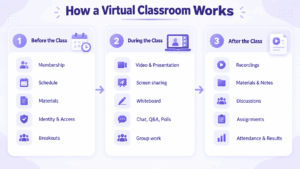
A useful way to understand a virtual classroom is to look at the complete class lifecycle.
Before the Class
The institution may need to manage:
-
course or class membership;
-
schedules;
-
invitations;
-
reading materials;
-
presentation files;
-
student identity;
-
access permissions;
-
breakout-group setup.
During the Class
The platform becomes the teaching environment.
Typical activities include:
-
video lecture;
-
presentation;
-
screen sharing;
-
whiteboard work;
-
questions;
-
chat;
-
polls;
-
small-group discussions;
-
collaborative exercises.
The key requirement is not the number of available features, but how easily the instructor can manage them while teaching.
After the Class
Students may need access to recordings, shared materials, notes, group discussions, assignments or follow-up questions.
Instructors may need attendance data, engagement information, assessment results and class records.
A useful virtual classroom should therefore support preparation before the lesson, live instruction and participation during the lesson, and follow-up activities afterward.
Four Types of Virtual Classroom Platforms
1. Purpose-Built Virtual Classrooms
These platforms are designed specifically around teaching.
They usually emphasize:
-
instructor controls;
-
learner engagement;
-
breakout activities;
-
classroom participation;
-
assessment;
-
teaching analytics.
Examples include Class, Engageli and BigBlueButton.
2. Collaboration Suites Adapted for Education
Microsoft Teams and Google Workspace provide virtual learning through broader collaboration ecosystems.
They work particularly well when the institution already uses the same environment for identity, documents, calendars and communication.
3. LMS-Connected Virtual Classrooms
Some virtual classroom platforms act primarily as the synchronous layer inside a wider LMS environment.
The LMS manages course structure, enrollment, assignments and grades, while the virtual classroom delivers live instruction.
4. Customer-Operated Classroom Communication
Some institutions require the communication environment to run on infrastructure they control.
TrueConf and Secumeet address different versions of this model by combining live communication and collaboration with customer-operated deployment.
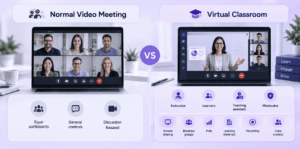
What Makes a Virtual Classroom Different From a Normal Video Meeting?
The main difference is instructional control.
A business meeting usually assumes relatively equal participants.
A classroom has different roles, such as:
-
instructor;
-
learner;
-
teaching assistant;
-
moderator.
That changes the workflow.
A teacher may need to decide who can speak, control screen sharing, organize small groups, run polls, present learning materials, record the session and preserve class context afterward.
A platform becomes more classroom-oriented when these actions are part of the normal teaching workflow rather than generic meeting controls.
7 Features That Matter in Virtual Classroom Software
1. Instructor Control
A teacher may need to control:
-
microphones;
-
cameras;
-
chat;
-
screen sharing;
-
speaking rights;
-
participant admission.
The required level of control depends on age group and teaching format.
2. Learner Participation
Useful participation mechanisms include:
-
hand raising;
-
reactions;
-
chat;
-
polls;
-
quizzes;
-
whiteboards;
-
shared notes.
The tools should support the teaching model rather than simply add more interface controls.
3. Small-Group Learning
Breakout rooms or persistent student groups matter when classes include:
-
exercises;
-
discussion;
-
language practice;
-
peer learning;
-
workshops.
The important question is not only whether breakout rooms exist, but whether the instructor can monitor and manage them effectively.
4. Content and Presentation Workflow
Teachers may need to work with:
-
slides;
-
documents;
-
screen sharing;
-
whiteboards;
-
shared notes;
-
video content.
The platform should make it easy to move between explanation, presentation and discussion.
5. Attendance and Engagement
Meeting attendance answers who joined.
A virtual classroom may also need to show:
-
who participated;
-
how long learners attended;
-
who responded to activities;
-
which students may need attention.
6. LMS Integration
Institutions already using Moodle, Canvas, Blackboard or another LMS should determine how the live classroom fits into that environment.
The ideal student experience should connect the course and live session rather than forcing users to navigate unrelated systems.
7. Identity and Deployment
Institutions may also require:
-
SSO;
-
school-managed accounts;
-
restricted guest access;
-
specific data locations;
-
self-hosting;
-
customer-operated infrastructure;
-
internal-network operation.
These requirements can narrow the shortlist before classroom features are compared.
Synchronous vs Asynchronous Virtual Learning
A virtual classroom primarily supports synchronous learning, where teacher and learners participate at the same time.
Typical activities include lectures, discussions, tutoring, workshops, oral assessments and demonstrations.
Asynchronous learning happens at different times through recorded lessons, readings, assignments, quizzes, discussion boards and self-paced course content.
A strong online-learning workflow often combines both. Learners may prepare with materials before the lesson, participate in a live class, practice together and then review content or complete assignments afterward.
Virtual Classroom for K-12, Higher Education and Corporate Training
Different learning environments create different priorities.
K-12 schools may prioritize stronger teacher controls and supervised access.
Universities often place more emphasis on LMS integration, lecture scale, seminars, recordings and persistent course access.
Corporate training programs may focus on onboarding, certification, attendance, completion, employee identity and infrastructure requirements.
Cloud vs Self-Hosted Virtual Classroom
Self-hosting is not automatically better.
It provides greater infrastructure control while transferring more responsibility for operation, capacity and maintenance to the institution.
Virtual Classroom Security and Student Access
Security in a virtual classroom includes classroom governance as well as technical protection.
Institutions should determine:
-
who can create classes;
-
whether learners need accounts;
-
whether anonymous participants can join;
-
when students are allowed to enter;
-
who can record;
-
who can share screens;
-
whether students can message each other privately;
-
how access is removed when the course ends.
The required access model may differ substantially between a primary school, university and employee training environment.
What Happens Before and After the Class?
This is one of the strongest ways to evaluate virtual classroom software.
Before the lesson, the instructor may need to prepare materials, configure access, organize learner groups and schedule the session.
During the lesson, the platform needs to support teaching, participation, discussion, presentations and shared content.
Afterward, learners may need recordings, materials and follow-up communication, while instructors may need attendance and engagement information.
A platform that works well only during the live video session can still create a fragmented learning workflow.
How to Choose a Virtual Classroom
1. Define the Teaching Model
Determine whether the session is primarily a:
-
lecture;
-
seminar;
-
tutoring session;
-
workshop;
-
language class;
-
corporate training course.
2. Determine Class Size
A ten-person interactive class and a 300-person lecture require different controls.
3. Define the Required Participation Model
Determine whether learners need:
-
polls;
-
breakout groups;
-
whiteboards;
-
presentations;
-
shared notes;
-
open discussion.
4. Separate Classroom and LMS Requirements
Decide which platform will manage:
-
course enrollment;
-
assignments;
-
grades;
-
progress;
-
curriculum.
Do not expect a video platform to become a complete LMS automatically.
5. Map Student Identity
Ask:
-
who creates accounts;
-
whether guests can join;
-
whether SSO is required;
-
when users lose access;
-
whether external participants are allowed.
6. Evaluate the Full Class Lifecycle
Check how well the platform supports preparation before the class, live teaching during the class and communication or records afterward.
7. Decide Who Should Operate the Infrastructure
For many institutions, cloud deployment reduces administration.
Organizations with specific infrastructure or network requirements may instead prefer self-hosted or customer-operated platforms.
Virtual Classroom Platforms Compared
The table below compares different types of virtual classroom platforms rather than ranking them as if they solved exactly the same problem.
How to Read the Table
The products represent different approaches.
Class, Engageli and BigBlueButton put teaching workflows at the center.
Microsoft Teams, Google Classroom + Meet and Zoom adapt broader collaboration ecosystems to educational use.
Adobe Connect and VEDAMO connect live instruction more closely to structured training and course management.
TrueConf and Secumeet are more relevant when the institution also evaluates who operates the communication infrastructure.
Where Secumeet Fits in a Virtual Classroom
Secumeet should not be treated as a replacement for a full LMS or a purpose-built teaching system.
Its role is the live communication and collaboration layer around a class.
Secumeet combines video meetings, personal and group messaging, screen sharing, presentations and shared-content collaboration inside a customer-operated communication environment.
This can support a class in which students and instructors communicate before the lesson, meet live for teaching and content discussion, and continue communication afterward in persistent group messaging.
This model can fit:
-
corporate training;
-
workshops;
-
internal academies;
-
tutoring;
-
institutional online classes where course management already exists elsewhere.
If an organization also needs curriculum management, assignments, grading or long-term learner progress, a separate LMS should handle those functions.
Common Virtual Classroom Mistakes
Frequently Asked Questions
What is a virtual classroom?
A virtual classroom is a synchronous online environment where instructors and learners communicate through video, audio and shared learning tools.
It is designed around teaching rather than ordinary meetings.
How does a virtual classroom work?
Students join a scheduled digital class, the instructor presents material and participants interact through video, chat, polls, whiteboards, breakout groups or shared content.
Materials, recordings or follow-up communication may remain available after the lesson.
What is the difference between a virtual classroom and video conferencing?
Video conferencing is designed primarily for communication.
A virtual classroom adds teaching-specific workflows such as instructor control, learner participation, small-group work and connection to the wider learning process.
What is the difference between a virtual classroom and an LMS?
A virtual classroom handles live teaching.
An LMS manages longer-term course structure, including enrollment, assignments, grades and learning progress.
What features should a virtual classroom have?
Typical requirements include video, teacher controls, presentations, chat, screen sharing, breakout groups, whiteboards, polls, recordings and LMS integration.
The exact requirements depend on the teaching model.
Can a virtual classroom be self-hosted?
Yes.
BigBlueButton can be self-hosted, while platforms such as TrueConf and Secumeet provide customer-operated communication environments.
Can Secumeet be used as a virtual classroom?
Secumeet can provide the synchronous communication and collaboration layer through video meetings, messaging, presentations, screen sharing and shared content.
If an institution requires curriculum management, assignments, grading or detailed learner-progress tracking, it should combine Secumeet with a separate LMS.
Conclusion
A virtual classroom is more than a video meeting for students.
Its value depends on how well it supports preparation before the lesson, instructor-led teaching and participation during the lesson, and communication or learning activities afterward.
Purpose-built virtual classrooms focus on teaching workflows, broader collaboration suites integrate classes into existing productivity ecosystems, and customer-operated platforms address institutions that also need greater control over their communication infrastructure.
For Secumeet, the relevant role is live teaching and persistent communication around the class rather than full course management.
When choosing a platform, institutions should first define the teaching model, class lifecycle, participation requirements, LMS workflow, identity model and deployment requirements.
Author
Helga Afon is a technology writer specializing in video conferencing, collaboration software, and workplace communication. She writes articles and reviews that help readers better understand enterprise communication tools and industry trends.