

A unified communications platform merges voice calling, video conferencing, instant messaging, presence, file sharing, and often contact center functionality into one interface and one vendor relationship. It replaces the patchwork of separate phone systems, video tools, and chat apps most organizations have accumulated over the last two decades. Instead of switching between a desk phone, a video app, an email client, and a messaging tool to finish one conversation, employees work inside a single client where a chat can escalate into a call, a call into a video meeting, and a meeting into a shared document — without losing context along the way. For IT teams, that consolidation means one admin console, one security policy, one vendor contract, and one set of logs to audit, instead of five disconnected systems that each need their own patching, provisioning, and support process.
The market for these platforms has grown fast because hybrid work turned communication infrastructure from a back-office utility into something closer to strategic plumbing. When a third or more of a company’s meetings involve someone working from a different location, the reliability, security, and integration depth of the communication layer directly affects how fast decisions get made and how well customer relationships hold up. Global giants like Microsoft and RingCentral compete here alongside security-first specialists like Secumeet and TrueConf, and the gap between them is bigger than most comparison charts let on.
What unified communications actually means
Unified communications, usually shortened to UC, integrates real-time channels (voice, video, instant messaging, presence) with asynchronous ones (voicemail, email, SMS) so all of them run on consistent identity, routing, and data rules instead of operating as isolated silos. The concept didn’t start in the cloud. It grew out of enterprise telephony in the early 2000s, when PBX vendors began bolting messaging and presence onto voice systems. Since then it’s gone through three generations: on-premises PBX-centric systems, hybrid setups that layered cloud video and chat on top of legacy phone hardware, and the current generation of natively cloud or hybrid-cloud platforms that treat voice as one channel among several rather than the anchor of the whole system.
What actually defines unified communications isn’t how many tools get bundled together — it’s the continuity between them. A colleague’s status showing they’re on a call. A chat thread that escalates into a video huddle with one click. A voicemail transcript landing in the same inbox as email. These are functional signs of unification, not just a shared login screen stretched across otherwise separate apps. The distinction matters because plenty of vendors market a suite of standalone products as “unified communications” when the underlying systems still run on separate databases and separate presence engines. A status update in one tool doesn’t propagate to another, and users end up doing the integration work by hand. Genuine UC removes that manual translation layer. That’s precisely what buyers should test for during a proof of concept, not something to take on faith from a marketing page.
The benefits, cost and otherwise
The case for unified communications combines measurable cost reduction with harder-to-quantify but very real productivity gains, and vendors tend to lean on the first while underselling the second. On the cost side, consolidating voice, video, and messaging into one contract eliminates redundant licensing, hardware maintenance, and vendor-management overhead that comes from running a legacy PBX, a separate video subscription, and a standalone chat tool at the same time. Cloud-hosted UC removes the capital expenditure tied to on-site telephony hardware and shifts costs to a predictable operating expense — for many mid-sized organizations, this is the single largest line-item saving in the whole business case.
The productivity gains are less visible on a spreadsheet but tend to matter more over time. When every channel lives inside one client with shared presence and directory data, employees lose far less time hunting for the right contact method, waiting on callbacks, or re-explaining context after switching tools mid-conversation. Distributed teams benefit disproportionately: a unified platform gives a remote employee the same access to colleagues, meeting rooms, and call routing that someone sitting in the office has, which closes a gap that used to make remote work feel like a lesser version of being in the building. There’s a resilience angle too, one that’s easy to overlook — centralizing communications onto a platform with built-in redundancy reduces the odds that a single point of failure, say one office’s internet outage, cuts an entire team off from customers, since calls and messages can reroute through cloud infrastructure automatically.
There’s also a compliance dimension that’s becoming decisive on its own. Centralized call recording, message retention, and analytics dashboards let management monitor service quality, coach customer-facing staff, and meet regulatory retention rules from one system instead of reconciling logs pulled from five places. In healthcare, financial services, and government especially, this single source of truth is often what actually tips a purchasing decision — the cost of a compliance failure dwarfs the price difference between competing platforms.
What a unified communications platform actually is
A unified communications platform is the concrete software product that implements all of the above, whether delivered as UCaaS (unified communications as a service) from the public cloud, as a privately hosted cloud deployment, or as an on-premises server. When people search for this term, they’re usually looking for something they can buy, deploy, and roll out to employees — not the abstract strategy of “unifying communications.” That’s why deployment model matters as much as the feature list.
Three deployment models coexist right now, and the right one depends heavily on an organization’s regulatory environment. Public cloud UCaaS — the model Microsoft Teams, Zoom, and RingCentral use — hosts everything on the vendor’s infrastructure and bills per user per month, trading direct control over data location for fast deployment and minimal IT overhead. On-premises or self-hosted UC, exemplified by TrueConf Server and Secumeet Server, keeps every call, message, and file inside the organization’s own network or a private cloud it controls, which is the deciding factor for government agencies, defense contractors, financial regulators, and healthcare providers that can’t accept any ambiguity about who can technically access communication content. Hybrid deployments sit in between, often using cloud infrastructure for scale while keeping sensitive workloads, recordings, or directory data on private servers — a middle path that’s becoming more common as data sovereignty rules tighten across the EU and elsewhere.
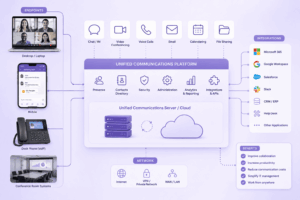
The features a real UC platform needs
Voice calling and enterprise telephony
At the core sits a full-featured business phone system capable of replacing a traditional PBX, and the depth of this layer is what separates a genuine UC platform from a video tool with a calling add-on bolted on. That means direct inward dialing, auto attendants and IVR menus that route callers without human intervention, call queuing with configurable overflow rules, call transfer and park, and voicemail with automatic transcription so messages can be scanned as text instead of played back one by one. For organizations operating internationally, the phone layer also needs local number provisioning across the countries where the business operates — forcing every office to dial through one country’s carrier network introduces cost and latency problems that undermine the point of unifying anything. How granular the call-routing logic is, and how easily an admin can build a multi-level IVR tree without paying for vendor professional services, is one of those things that looks identical across data sheets and turns out wildly different once someone actually tries to configure it.
Video conferencing and meeting infrastructure
Video is the default medium now, for internal collaboration and client meetings alike, so the conferencing layer needs to handle a two-person ad hoc call and a company-wide town hall without switching tools. That includes HD and increasingly UHD video, adaptive bitrate that holds up on unstable networks, screen sharing with annotation, virtual backgrounds and noise suppression, and meeting recording with searchable transcripts. Larger organizations should look closely at webinar capabilities — registration pages, Q&A moderation, audience limits well past the standard meeting cap — because plenty of platforms that handle internal meetings fine still charge extra or degrade once attendee counts move into the hundreds. Interoperability with meeting-room hardware through SIP and H.323 gateways is another one of those gaps that only shows up once an organization has already invested in conference rooms and discovers the new platform can’t talk to them without a separate bridge.
Team messaging and persistent collaboration
Messaging inside a UC platform needs to go well past one-to-one chat: persistent group channels by team or project, threaded replies that keep long discussions readable, file sharing with version history, and searchable archives that make institutional knowledge findable months later. Presence — whether a colleague is available, in a meeting, or offline — is what lets messaging and calling function as one experience rather than two apps that happen to share a login. Whether presence actually syncs reliably across devices is worth testing directly rather than trusting the feature list; it’s one of the areas where marketing and real-world behavior diverge most.
Security, encryption, and compliance controls
Security has moved from a differentiator to a baseline requirement. Buyers in 2026 should expect end-to-end encryption for messaging and video as the default, not a premium add-on. Beyond encryption in transit, the more meaningful split is architectural: some platforms encrypt content on the vendor’s own servers, where the vendor technically retains the ability to decrypt it, while others use a genuine end-to-end model where even the platform operator can’t access session content. For legal, government, defense, and healthcare organizations under strict confidentiality obligations, that difference matters enormously. Administrative controls matter just as much as the cryptography — SSO and MFA integrated at the communication server layer rather than bolted on through an external connector, granular role-based access control, detailed audit logging, and DLP policies that can restrict recording, screen sharing, or file transfer for specific groups. For regulated sectors, keeping data in a specific country, or entirely off the public internet through an air-gapped deployment, is frequently the one feature that decides the shortlist before any other comparison begins.
AI-powered features and automation
AI moved from experimental add-on to core expectation across the UC market during 2026. The platforms competing at the top now bundle automatic meeting transcription, real-time translation, AI-generated summaries and action items, sentiment analysis on customer calls, and increasingly agentic capabilities that can schedule follow-ups or update a CRM record based on what happened in a call. Worth separating out: which AI features actually save time (accurate transcription, action-item extraction) and which exist mostly as a marketing checkbox. Transcription and summarization accuracy varies a lot between vendors, even when the feature list on paper reads identically.
Integrations with business systems
A UC platform earns most of its value when it connects to the tools employees already use — CRM systems like Salesforce and HubSpot, project management tools, helpdesk software, identity providers for SSO. Depth matters more than the count vendors advertise: a CRM integration that only logs that a call happened is far less useful than one that pops up the customer’s record automatically, logs call outcomes back into the pipeline, and lets an agent dial straight from the CRM. Organizations already standardized on Microsoft 365 or Google Workspace should weigh native ecosystem integration heavily. A UC platform that requires constant manual reconciliation with the productivity suite a company already runs on tends to generate ongoing friction that quietly erodes whatever consolidation benefit it was supposed to deliver.
Contact center and customer engagement capabilities
Many organizations eventually need their internal UC platform to connect to customer-facing communication. Vendors leading this convergence bundle omnichannel contact center functionality — voice, chat, email, social messaging — directly into the same admin console used for internal collaboration. That eliminates the old silo between employees who talk to each other and agents who talk to customers, letting a subject matter expert get pulled directly into a live customer call from the same client they already use for internal meetings. Not every organization needs this depth right away, but choosing a platform that can grow into it later avoids a second, costlier migration once customer engagement needs mature.
Mobility, device flexibility, and reliability
Finally, a real UC platform needs to work identically well across desktop, mobile, and browser access with no mandatory install, because hybrid and field employees expect the same functionality regardless of device. Reliability commitments — typically an uptime SLA in the 99.99 percent range or higher for enterprise vendors — along with documented disaster recovery and geographic redundancy, are worth verifying directly in the contract rather than assuming from marketing copy. An outage in the communication layer has a much bigger blast radius than an outage in almost any other business system.
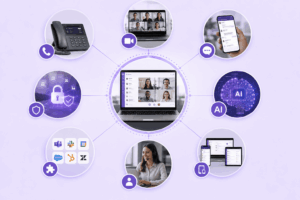
Top 12 unified communications platforms for 2026
The table gives a fast comparative view before the detailed profiles below, since the right platform depends heavily on deployment model, industry, and scale rather than any single universal winner.
-
Microsoft Teams is the default choice for organizations that are already standardized on Microsoft 365; Phone, meetings, and chat are included in licenses most enterprises are already paying for and it coexists natively with Outlook, SharePoint, and the rest of Office. Outside that ecosystem, the value drops off a cliff. Calling plans aren’t available in many markets, requiring a separate Direct Routing setup via a third-party SIP provider, and Teams is consistently the vendor admins most frequently report as having the most complex licensing model.
-
Zoom built its reputation on quality and work-from-home lockdowns made it synonymous with easy video and audio conferencing. A virtual background feature to hide messy bookshelves early became a showpiece for how the company could iterate more rapidly than competitors on user feature requests. It has since expanded to a full UC suite, adding Zoom Phone, team chat, and AI meeting summaries to its original conferencing core. Voice with Zoom is one of the easiest to deploy and to have outsiders join a meeting on, but contact center and other calling add-ons require other bolt-on products to sit on top.
-
RingCentral is recognized as one of the most feature-rich UCaaS platforms. Its enterprise-oriented feature set enables businesses to access communication and collaboration services from a single platform while providing integration with more than 300 applications through the RingCentral App Gallery.
-
Cisco Webex focuses on security-conscious enterprises in healthcare, finance, and government. It offers AI noise cancellation and benefits from Cisco’s experience in enterprise networking. Organizations already using Cisco equipment may find integration easier, while companies starting from scratch may face higher costs.
-
8×8 combines UCaaS and CCaaS under one licence and provides international PSTN coverage across more than 45 countries. It is suitable for large, globally distributed organizations with contact center and hardware integration requirements, but may be excessive for smaller businesses.
-
Vonage, now an Ericsson company, targets the mid-market with unlimited calling, messaging, video, and communication APIs for custom workflows. Its analytics and AI capabilities are less developed than those of RingCentral, Cisco, and Microsoft, while the Ericsson integration may create some roadmap uncertainty.
-
Nextiva positions itself as a customer experience platform that combines voice, video, messaging, and interaction history in one timeline. It targets small and mid-sized businesses, although organizations should check the depth of CRM integrations and which functions require higher-priced plans.
-
Dialpad is built around artificial intelligence and is particularly relevant to sales and support teams. Its live assistant can provide prompts during calls, but many of its more advanced AI capabilities are limited to Pro and Enterprise plans.
-
GoTo Connect combines voice, video, messaging, configurable meeting rooms, and visual call routing. It is suitable for organizations that need a straightforward cloud phone system without extensive customization, although its per-user price can be higher than that of budget competitors.
-
3CX offers annual licensing, softphone and mobile applications, cloud hosting options, and integrations with common CRM systems. It can reduce licensing costs, but deployment, support, and troubleshooting depend heavily on internal technical expertise.
-
TrueConf is an on-premises and private-cloud UC platform that combines encrypted video, persistent messaging, and presence through TrueConf Server. It can operate without internet connectivity and offers perpetual licensing, while features such as load balancing, DLP, MFA, and the global directory are available in the Enterprise edition.
-
Secumeet is a European security-focused video conferencing and UC platform for organizations that cannot allow external data exposure. It supports zero-trust sessions, end-to-end encryption, air-gapped deployment, encrypted file transfer, and secure whiteboarding, but requires dedicated IT resources for deployment and administration.
How to choose the right platform for your business
Start from the organization’s non-negotiable constraints, not a feature comparison chart — the same feature list rules a vendor in for one company and out entirely for another depending on regulatory obligations. The first and most consequential question is where data must legally or contractually live. If recordings, messages, and metadata can’t leave a specific country, data center, or air-gapped network, the realistic shortlist narrows immediately to on-premises or private-cloud vendors like TrueConf, Secumeet, or Cisco’s on-prem options — public cloud UCaaS providers should be dropped regardless of how good their feature list looks, because no amount of functionality compensates for a compliance failure.
Once data residency is settled, the next filter is existing ecosystem alignment. Organizations deep in Microsoft 365 extract disproportionate value from Teams because calling, meetings, and chat are already bundled into licenses most employees hold; Google Workspace shops see the same dynamic with Meet. Forcing a parallel ecosystem onto either group usually adds friction without adding proportional value. Scale matters just as much: a twenty-person consulting firm evaluating GoTo Connect or 3CX has fundamentally different needs than a two-hundred-agent contact center evaluating RingCentral or 8×8, and it’s worth modeling headcount and call volume three years out rather than optimizing purely for current size, since migrating mid-growth is disruptive and expensive.
Budget conversations should account for total cost of ownership, not the advertised per-user price alone. Implementation services, calling plan add-ons, premium AI features, and international number provisioning routinely push the real monthly cost well above what’s printed on the pricing page — this shows up across vendors from Microsoft Teams Phone to Zoom Phone. And run a genuine proof of concept before committing: test call quality on the organization’s actual network, verify presence and integrations behave as advertised rather than as described in a sales deck, and confirm support responsiveness meets the bar the business needs. Support quality varies a lot between vendors and rarely shows up in a feature comparison until something breaks in production.
How to implement a unified communications platform
-
Step one: audit current infrastructure and requirements. Before evaluating any vendor, get a precise inventory: how many phone lines and extensions exist, which video and messaging tools are actively used across departments, what current call volume and peak concurrency look like, and which existing systems — CRM, helpdesk, identity provider — the new platform needs to talk to. This audit should also capture industry-specific regulatory obligations. A healthcare provider or government contractor needs those constraints documented before a single vendor conversation happens, not after a contract’s signed. Skipping this step is the most common reason UC implementations run over budget; requirements that surface mid-deployment (a compliance team objecting to data storage location, say) tend to force a costly change of direction.
-
Step two: define success criteria and build the shortlist. Translate requirements into concrete, testable criteria — a maximum acceptable call setup latency, a required uptime percentage, a mandatory data residency location, a specific list of integrations that must work natively rather than through a third-party connector. These become the scoring rubric for the three to five vendors that best match deployment model, industry, and scale, and the shortlist should include at least one platform from each relevant deployment category so the comparison isn’t just several near-identical cloud vendors.
-
Step three: run a structured pilot with a representative user group. Rather than going company-wide immediately, run a pilot with one department or a cross-functional group of twenty to fifty users — ideally including a team with demanding requirements like sales or support — for two to four weeks under real working conditions. Test call and video quality across the organization’s actual office and remote network conditions, not a demo environment. Confirm presence, chat history, and integrations sync correctly across desktop, mobile, and browser. And gather structured feedback from pilot participants directly, not just the technical team’s assessment — usability issues that frustrate end users are often invisible from an admin console.
-
Step four: plan data migration and security configuration. Map out how existing phone numbers will port over without service interruption, how historical voicemail, recordings, or chat archives get migrated or archived, and how the new platform’s security settings (SSO, MFA, RBAC, DLP) will be configured to match or exceed the existing security posture. Number porting has a lead time that’s easy to underestimate — carriers can take anywhere from a few days to several weeks depending on the country and number type — so this step should start well ahead of the planned cutover.
-
Step five: train users and communicate the rollout plan. A UC platform only pays off if employees actually adopt the new workflows instead of reverting to old habits or shadow tools. A structured training plan — live walkthroughs, short reference guides for common tasks, a designated internal support channel during the transition — meaningfully affects how fast that adoption happens. Communicate the timeline well in advance, be specific about what changes for each department, and identify departmental champions who can field peer questions informally.
-
Step six: execute a phased cutover and monitor closely. Rather than switching everyone over at once, a phased cutover by department, office, or business unit limits the risk of any single configuration issue and lets the team fix problems in an early wave before they hit the whole organization. During and right after each wave, actively watch call quality metrics, support ticket volume, and integration error logs — the first two weeks after cutover reliably surface edge cases that didn’t show up during the smaller, more predictable pilot.
-
Step seven: review, optimize, and expand. Once the full organization has migrated, schedule a formal review — typically thirty to ninety days post-migration — to check whether the original success criteria were actually met, gather feedback on underused or friction-causing features, and adjust configuration (IVR routing, notification settings) to improve daily usability. This is also the right moment to plan expansion into whatever the organization deliberately deferred, like contact center functionality or deeper CRM integration. Trying to deploy every possible feature at once during the initial cutover is one of the more common causes of implementation fatigue.
Market statistics
The UC and UCaaS market kept expanding through 2026, and the numbers reflect how central this category has become to enterprise IT spending. Independent research firms currently size the broader unified communications market somewhere between 80 and 230 billion US dollars for 2026, depending on methodology, with compound annual growth commonly forecast at 13 to 20 percent through the early 2030s — sustained demand, not a pandemic-era spike that’s fading out. The cloud-delivered UCaaS segment specifically is growing even faster, with some analyst estimates placing it above 25 percent CAGR through 2031, driven by subscription voice, video, and messaging displacing legacy on-premises PBX investments. North America still holds the largest regional share, commonly cited around 35 to 37 percent, thanks to widespread BYOD adoption and early cloud migration, while Europe is the fastest-growing region in relative terms, pushed along by stronger regulatory emphasis on data sovereignty. Three structural trends keep coming up across industry analysis: UCaaS and CCaaS converging into single licensed platforms, zero-trust architecture and regional data residency shifting from niche requirement to competitive differentiator, and AI moving from passive transcription toward agentic systems that take autonomous action on a user’s behalf.
Wrapping up
A unified communications platform is core infrastructure now, not an optional efficiency upgrade, for any organization managing distributed teams, multi-channel customer relationships, or compliance-sensitive communication. The right choice depends far less on which vendor has the longest feature list and far more on matching deployment model, security architecture, and ecosystem fit to actual constraints — whether that’s a Microsoft 365 shop defaulting to Teams, a contact-center-heavy business leaning toward 8×8 or RingCentral, or a government agency needing the zero-knowledge, air-gapped architecture that Secumeet and TrueConf were built for.
Getting real value out of a UC platform depends as much on implementation discipline as on vendor selection. A thorough infrastructure audit, a structured pilot, a phased cutover, and a genuine post-migration review consistently separate the organizations that see the productivity and cost benefits from those that end up with an expensive tool nobody fully adopted.
Frequently asked questions
What’s the difference between unified communications and UCaaS?
Unified communications is the broader concept — integrating voice, video, messaging, and presence into one continuous experience. UCaaS refers specifically to delivering that through a cloud subscription rather than on-premises hardware. A platform can achieve unified communications through an on-premises deployment, as TrueConf and Secumeet show, without being UCaaS at all.
Can a unified communications platform fully replace a traditional PBX?
Yes. Modern UC platforms provide equivalent or better call routing, voicemail, and extension management through software instead of hardware. Organizations typically decommission their PBX entirely once number porting and call routing are verified during the pilot.
Is it possible to keep all UC data on-premises?
Yes — TrueConf and Secumeet are built specifically for on-premises and private-cloud deployment, keeping video, messaging, and call data entirely within an organization’s own network, including fully air-gapped environments. This is a common requirement in government, defense, healthcare, and financial services.
How long does a typical implementation take?
It varies by size and complexity, but a phased rollout typically spans six to twelve weeks from infrastructure audit through company-wide cutover, including a two- to four-week pilot. Larger enterprises with complex integrations or strict compliance review often stretch this to several months.
What happens to existing phone numbers when switching platforms?
They can almost always be ported without changing the number itself, though the process has carrier-dependent lead times ranging from a few days to several weeks. Plan this well ahead of the intended cutover date.
Do UC platforms integrate with CRM systems like Salesforce?
Most major platforms — RingCentral, Nextiva, Dialpad, 3CX among them — offer native Salesforce, HubSpot, and Dynamics integrations, though the depth varies from simple activity logging to full bidirectional sync with click-to-dial. Test the actual behavior during a pilot rather than assuming feature parity from marketing claims.
Which platform is best for a small business on a limited budget?
3CX’s perpetual licensing and free tier for small teams, along with GoTo Connect’s straightforward setup, are the usual starting points. The right pick still depends on whether the business wants cloud simplicity or is comfortable managing a self-hosted deployment for lower long-term cost.
Author
Helga Afon is a technology writer specializing in video conferencing, collaboration software, and workplace communication. She writes articles and reviews that help readers better understand enterprise communication tools and industry trends.