
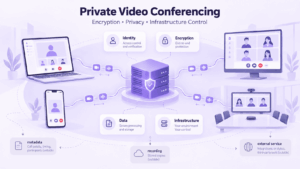
A video call can be encrypted and still not be private.
Encryption protects specific data. Privacy is broader. It also depends on who can join the meeting, how users are identified, where recordings and files are stored, what metadata is retained, which administrators can access the system, and who ultimately controls the infrastructure.
For ordinary meetings, a strong combination of authentication, access controls, encryption, and secure storage may be enough. For organizations handling regulated, confidential, or operationally sensitive information, the deployment model and external dependencies can become just as important as the encryption itself.
The useful question is therefore not simply:
Is this video conference encrypted?
It is:
Who can access the meeting, what data exists before and after the call, where is that data processed, and who controls each part of the system?
Private Video Conferencing Is More Than Encryption
The terms private, secure, encrypted, and confidential are often used interchangeably, but they describe different parts of the problem.
This distinction changes how a platform should be evaluated.
An encrypted media stream can protect the conversation while it is travelling across the network. It does not automatically answer what happens to the recording afterwards.
A password can limit casual access to a meeting. It does not prove who actually joined.
A self-hosted server can give an organization greater infrastructure control. It does not automatically protect the system if accounts, permissions, or updates are poorly managed.
Privacy is the result of several layers working together.
Where Video Conferencing Privacy Can Break
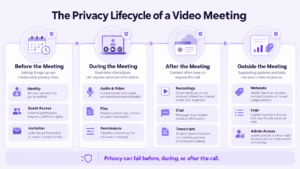
The easiest way to evaluate video conferencing privacy is to follow the meeting through its lifecycle rather than checking a generic list of security features.
Before the meeting
Privacy begins before anyone turns on a camera.
The first questions are about identity and access:
-
Who can create meetings?
-
How are users authenticated?
-
Can guest access be restricted?
-
Are accounts connected to a corporate identity system?
-
Can administrators remove inactive users?
-
Can meeting links be reused or forwarded?
-
Can hosts approve participants before entry?
A meeting link alone is not an identity mechanism.
For sensitive communication, the system should provide some way to distinguish an intended participant from anyone who obtained the invitation.
During the meeting
Once participants are connected, the system needs to protect both communication content and meeting controls.
This includes:
-
audio and video;
-
screen sharing;
-
chat;
-
shared files;
-
participant roles;
-
microphone and camera permissions;
-
recording rights;
-
invitation permissions.
Encryption protects communication in transit, but authorization still determines what an authenticated participant is allowed to do.
For example, a legitimate participant may still receive more access than necessary if everyone can record, share files, or invite external users.
After the meeting
The privacy problem does not disappear when the call ends.
A single meeting may leave behind:
-
recordings;
-
chat history;
-
uploaded files;
-
transcripts;
-
attendance information;
-
connection logs;
-
backups.
Each of these becomes another data asset that needs its own access and retention policy.
Recording is a good example. It improves documentation, but it also turns a temporary conversation into a persistent file that can be copied, downloaded, retained, backed up, or exposed later.
For confidential meetings, organizations should decide who can record, where recordings are stored, who can retrieve them, and when they are deleted.
Outside the meeting
Some of the most overlooked privacy questions concern data that users do not directly see.
A conferencing platform may process:
-
participant names;
-
account identifiers;
-
IP addresses;
-
meeting titles;
-
connection times;
-
device information;
-
call duration;
-
administrative events;
-
network logs.
This metadata may remain visible even when audio and video are encrypted.
For highly sensitive communication, that distinction matters.
Knowing that two executives, legal advisers, or government officials joined the same meeting at a particular time can itself reveal useful information, even without access to the conversation.
Encryption Solves Only Part of the Problem
Encryption answers an important question:
Who can read protected data?
It does not answer:
-
Who can join the meeting?
-
Who controls the server?
-
Who can access the recording?
-
What metadata is retained?
-
Which third-party services receive data?
-
How long is information stored?
That is why video conferencing security should not be reduced to a single encryption label.
Several encryption layers may exist in the same system.
Transport encryption
Transport encryption protects network traffic as it moves between clients, servers, and other components.
This can include signaling traffic as well as data transported over protected network connections.
Media encryption
Media encryption specifically protects real-time audio and video.
The critical question is where that protection begins and ends.
For example, a system may encrypt media between a client and conferencing server while the server still processes the stream.
Encryption at rest
Data that remains after a meeting may also require encryption.
Examples include:
-
recordings;
-
chat history;
-
uploaded files;
-
transcripts;
-
backups;
-
logs.
Encryption at rest protects stored information, but access-control policy still determines who is authorized to retrieve it.
End-to-end encryption
End-to-end encryption is designed so that protected content can be decrypted only by intended endpoints.
This can reduce the number of systems that need to be trusted with meeting content.
However, it also creates trade-offs.
Server-side features may depend on access to media or other meeting data. Depending on the product and meeting mode, this can affect:
-
recording;
-
transcription;
-
moderation;
-
media processing;
-
interoperability with other systems.
The useful question is not simply whether a platform advertises end-to-end encryption. It is which data are protected, in which meeting modes, and which functions remain available when it is enabled.
What Data Should a Secure Video Conferencing Platform Protect?
A secure video conferencing platform should be evaluated across the full data lifecycle.
The strongest video conferencing privacy model is not necessarily the one with the longest feature list. It is the one where these questions have clear answers that match the organization’s risk requirements.
The Deployment Model Changes Who You Have to Trust
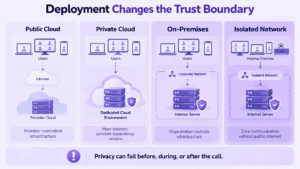
Two platforms can use similar encryption and still provide very different privacy models because they place different parties inside the trust boundary.
That makes deployment architecture one of the most important differences between secure conferencing systems.
Public cloud
In a public cloud model, the provider operates most of the infrastructure.
That reduces the customer’s maintenance burden, but it also means that the provider’s servers, operational processes, storage systems, and dependencies are part of the security model.
This can be perfectly acceptable for many organizations.
The question is whether that trust model matches the sensitivity of the communication.
Private cloud
A private cloud can provide greater separation or dedicated infrastructure.
However, the term alone does not tell you who operates every component or where external dependencies remain.
A private cloud should therefore be evaluated by architecture, not by label.
On-premises and self-hosted deployment
An on-premises system places more of the communication infrastructure under organizational control.
That can change who manages:
-
servers;
-
storage;
-
authentication;
-
backups;
-
administrator accounts;
-
network boundaries;
-
internal integrations.
This is particularly relevant when communication data must remain within infrastructure selected or operated by the organization.
Greater control also creates greater operational responsibility. Server hardening, patching, account management, monitoring, and backups become the organization’s responsibility.
Isolated networks
Some environments need a secure video teleconference system that can continue operating without the public internet.
In that case, it is not enough for the media server to be local.
Every critical dependency needs to be checked:
-
authentication;
-
licensing;
-
signaling;
-
notifications;
-
storage;
-
monitoring;
-
updates;
-
external APIs.
If a core function still requires an external service, the system is not fully isolated.
This is one reason why deployment architecture can matter more than a long list of security features.
Security Always Involves Trade-Offs
There is no architecture that maximizes convenience, privacy, interoperability, administration, and simplicity at the same time.
That makes trade-offs more useful than generic claims such as “enterprise-grade security.”
Convenience vs identity assurance
A public meeting link is easy to distribute.
It also provides less certainty about who actually joins.
Managed accounts and corporate identity systems provide stronger identity control but create more administrative overhead.
End-to-end encryption vs server-side processing
End-to-end encryption can reduce access to meeting content by intermediate systems.
Some server-side capabilities may then become more difficult or unavailable.
Cloud convenience vs infrastructure control
Cloud deployment reduces operational work.
Self-hosting gives the organization more control over where data is processed and who operates the infrastructure.
Neither is automatically the correct choice.
Recording vs confidentiality
Recording creates value for training, documentation, and compliance.
It also creates a persistent copy of a sensitive conversation.
Integration vs attack surface
Integrations can connect conferencing to calendars, storage, identity systems, bots, and business applications.
Every additional integration introduces another permission model and trust relationship.
For sensitive deployments, the relevant question is not “How many integrations does the platform support?” but “Which integrations are actually required?”
How to Eliminate the Wrong Platform Quickly
A secure platform evaluation does not have to begin with a large feature comparison.
Start with requirements that can immediately disqualify an option.
If recordings must remain inside your infrastructure
Ask where recordings are created, stored, backed up, and downloaded from.
If the platform cannot meet the required storage model, there is little reason to continue the evaluation.
If public internet access cannot be required
Check more than meeting traffic.
Verify whether these functions depend on external services:
-
authentication;
-
licensing;
-
DNS;
-
notifications;
-
software activation;
-
analytics;
-
monitoring.
If participant identity is critical
Guest links may not provide enough assurance.
Look for managed accounts, corporate directories, SSO, or other mechanisms that establish user identity.
If metadata is sensitive
Ask which logs are retained and who can access them.
Do not limit the review to audio and video streams.
If end-to-end encryption is mandatory
Verify:
-
which meeting modes support it;
-
which participants or endpoints can use it;
-
which features become unavailable;
-
whether recording or interoperability changes.
If administrators need to enforce policy centrally
Check whether administrators can control:
-
guest access;
-
recording;
-
participant permissions;
-
file sharing;
-
account lifecycle;
-
retention;
-
software policies.
If data location is a hard requirement
Confirm where each category of data is actually stored.
“Regional hosting” and “organization-controlled infrastructure” are not the same thing.
This disqualifier approach is usually more useful than comparing dozens of features before identifying whether the basic architecture fits.
Where Different Secure Video Conferencing Platforms Fit
Platforms should be compared against the security model required by the organization rather than ranked by a generic label such as “most secure.”
Secumeet

Secumeet is relevant when an organization needs more than an isolated video meeting tool.
Its communication model combines meetings with messaging and other collaboration functions inside a server-based environment.
The main questions for a security-focused deployment are therefore architectural:
-
where the server runs;
-
where communication data is stored;
-
how accounts are managed;
-
which administrative policies can be enforced;
-
whether the deployment model matches internal requirements.
This makes Secumeet more relevant when the goal is to create a controlled organizational communication environment rather than simply issue meeting links.
TrueConf
TrueConf fits a different requirement: greater control over deployment and communications infrastructure.
It is particularly relevant when the conferencing system needs to operate:
-
on premises;
-
within internal corporate networks;
-
under centralized administration;
-
together with internal identity and communication infrastructure.
For restricted environments, this deployment model may matter more than small differences in individual meeting features.
Microsoft Teams
Microsoft Teams is relevant when an organization already works extensively within Microsoft 365 and accepts a provider-managed cloud architecture.
Meetings, chat, channels, files, and identity are integrated into the broader Microsoft environment.
For organizations with strict infrastructure-isolation requirements, that cloud architecture becomes a fundamental evaluation point rather than simply another feature difference.
Security Is Also an Operational Problem
Even a well-designed platform can be used insecurely.
Strong video conferencing security therefore depends partly on what happens after deployment.
Identity and access need maintenance
Inactive accounts should be removed. Administrator permissions should be reviewed. Guest access should follow an explicit policy rather than being enabled by default for every meeting.
Security controls lose value when old accounts and unnecessary privileges accumulate.
Recordings need their own policy
Recording should not be treated as a harmless meeting feature.
Before enabling it for sensitive meetings, define:
-
who may start a recording;
-
where it is stored;
-
who can download it;
-
how long it remains available;
-
when backups are removed.
Permissions should match the meeting
Not every participant needs permission to record, share files, share a screen, or invite additional users.
Reducing unnecessary permissions limits the impact of mistakes and compromised accounts.
Updates still matter
Encryption and access controls cannot protect vulnerabilities that remain unpatched.
Servers and client applications need a defined update process.
Users can bypass good architecture
A confidential meeting can still expose information if a participant shares credentials, forwards an invitation, records the screen externally, or displays sensitive material unintentionally.
User training cannot replace technical controls, but technical controls cannot eliminate user behavior either.
These considerations become especially important in healthcare, legal services, financial organizations, R&D, government, defense, and critical infrastructure, where meetings may contain regulated information, intellectual property, privileged communication, or operational data.
FAQ
Is encrypted video conferencing always private?
No. Encryption protects specific data, but privacy also depends on participant identity, access control, recordings, metadata, storage, administrative access, and deployment architecture.
Is on-premises video conferencing more private than cloud conferencing?
On-premises deployment gives an organization more direct control over infrastructure, storage, network boundaries, and administration. It does not automatically guarantee better security, because configuration, maintenance, access management, and patching still need to be handled correctly.
Can secure video conferencing work without internet access?
Yes, if the platform supports internal or isolated deployment and does not depend on external services for critical functions such as authentication, licensing, signaling, or meeting operation.
Conclusion
A secure video conferencing platform should not be judged by whether the product page contains the words private, secure, or encrypted.
The useful evaluation starts with the trust model.
Who verifies participant identity? Who can access the meeting? Where are recordings, files, logs, and transcripts stored? What metadata remains visible? Who operates the server? Which external services are required?
Encryption is one part of that answer. Access control, storage policy, administration, and deployment architecture complete the picture.
For confidential communication, the strongest platform is the one whose security model matches the actual risks and infrastructure requirements of the organization.
Author
Helga Afon is a technology writer specializing in video conferencing, collaboration software, and workplace communication. She writes articles and reviews that help readers better understand enterprise communication tools and industry trends.