
Digital communication technologies are electronic tools and systems that allow people and organizations to create, exchange, store, and share information digitally. They include software, devices, networks, and platforms used for text, voice, video, files, collaborative content, and other forms of electronic communication.
These technologies differ not only by format. More important differences are when communication happens, how interactive it is, who participates, whether information remains available afterward, and who controls the infrastructure carrying it.
For organizations, choosing a digital communication technology is therefore less about selecting a particular application and more about matching the communication model to the task.
Digital Communication Technologies: Key Points
Digital communication technologies include email, messaging, voice, video conferencing, shared documents, project systems, social platforms, and unified communications. What separates them is not simply the type of application, but how communication behaves.
Two dimensions explain many of the differences: synchronicity describes whether people communicate at the same time, while interactivity describes how much participants can respond to or jointly create the communication.
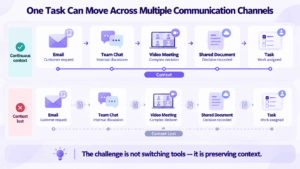
Businesses normally need several communication modes. A workflow may move from email to team chat, then to a video meeting, shared document, and finally a project task. The main challenge is preserving context as communication moves between systems.
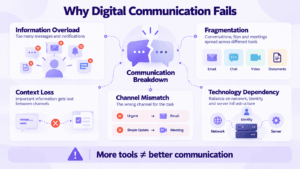
More communication tools do not necessarily improve communication. Information overload, fragmented conversations, channel mismatch, and disconnected records can make an organization less effective even when every individual application works correctly.
Scale changes the problem. For small teams, communication is mainly about exchanging information. At corporate scale, identity, permissions, guest access, retention, search, governance, and infrastructure capacity become part of the communication system itself.
Infrastructure should be evaluated as a chain: User → Client → Identity → Communication Service → Storage → External Services. A useful question is not simply whether a platform is cloud-based or self-hosted, but which parts of that chain remain under organizational control.
How Digital Communication Technologies Differ
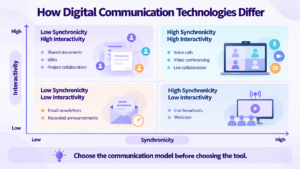
Two characteristics explain why different digital communication technologies are suited to different tasks: synchronicity and interactivity.
Synchronicity
Synchronicity describes whether participants communicate at the same time.
Voice and video are synchronous. Email and document comments are asynchronous. Team messaging can support both modes depending on how it is used.
Interactivity
Interactivity describes how much participants can respond to, modify, or jointly create the communication.
A recorded announcement has relatively low interactivity. A group chat, shared document, or video meeting can be highly interactive.
The right technology therefore depends partly on whether information needs to be delivered or developed together, and whether that interaction needs to happen immediately.
Main Types of Digital Communication Technologies
These categories overlap. A messaging platform may support calls, while a conferencing system may include chat and files.
The communication model is usually more useful than the product label alone.
Synchronous vs Asynchronous Digital Communication
The distinction between synchronous and asynchronous communication determines how quickly participants are expected to respond.
Synchronous Communication
Synchronous communication happens in real time.
Examples include:
-
voice calls;
-
video conferences;
-
live chat;
-
virtual workshops.
It works best when immediate feedback matters, ambiguity must be resolved quickly, or several people need to reach a decision together.
The trade-off is interruption: participants usually need to be available at the same time.
Asynchronous Communication
Asynchronous communication allows participants to respond later.
Examples include:
-
email;
-
message threads;
-
document comments;
-
task updates;
-
recorded presentations.
It works well when participants are in different time zones, information should remain searchable, or people need time to prepare a response.
The strongest communication environments usually support both rather than forcing every interaction into one mode.
One-to-One, One-to-Many, and Many-to-Many Communication
The audience is another important distinction.
One-to-One
Examples include direct messages, private email, voice calls, and one-to-one video calls.
This model is suitable for focused communication between two participants.
One-to-Many
Examples include company announcements, newsletters, webinars, and broadcast channels.
The primary goal is information distribution rather than collaborative discussion.
Many-to-Many
Examples include group chats, video conferences, team workspaces, collaborative documents, and online communities.
This model works when several participants need to contribute to the same communication process.
A technology optimized for broadcasting should not automatically be treated as a collaboration tool, and an interactive team environment may be unnecessary for a simple announcement.
How Digital Communication Works in Practice
Most digital communication systems follow a similar logical chain.
1. Content Is Created
A user creates a message, voice stream, video, file, task, document, or another digital object.
2. The Platform Gives It Structure
The application determines whether the content becomes:
-
a private message;
-
a channel post;
-
a live meeting;
-
a document comment;
-
a task notification;
-
a broadcast.
That structure affects who can respond, edit, forward, or retrieve the information later.
3. A Network or Service Distributes It
The information may travel through:
-
the public Internet;
-
a corporate LAN;
-
a private WAN;
-
a mobile network;
-
cloud or private infrastructure.
4. Identity and Permissions Control Access
The system determines:
-
who can receive the information;
-
who can modify it;
-
who can invite others;
-
whether guests are allowed;
-
whether the information is private or shared.
5. The Information May Persist
Communication may remain:
-
searchable;
-
editable;
-
archived;
-
exportable;
-
linked to a task or document.
Persistence can turn a temporary conversation into part of organizational knowledge.
How Businesses Combine Communication Technologies
Businesses rarely solve every communication problem with one medium.
A typical workflow may look like this:
Email → Team Chat → Video Meeting → Shared Document → Task
For example, a customer request may arrive by email. Employees discuss it internally in chat. A video meeting is used when the issue becomes complex. The decision is recorded in a shared document, and the resulting work becomes a project task.
Each technology solves a different part of the communication problem.
The difficulty is preserving context as information moves between them.
A company can therefore have excellent individual applications and still have poor communication if employees constantly need to reconstruct what happened elsewhere.
Choosing the Right Communication Mode
The quality of digital communication often depends more on the medium than on the software brand.
Use Messaging When
-
the issue is short;
-
an immediate response is unnecessary;
-
several people need lightweight coordination;
-
the information should remain searchable.
Use Voice When
-
immediate discussion is useful;
-
visual context adds little value;
-
explaining the issue verbally is faster than writing it.
Use Video When
-
visual context matters;
-
screen sharing is required;
-
several people need live discussion;
-
the group needs to reach a decision.
Use Email When
-
communication is formal;
-
external recipients are involved;
-
a longer structured message is appropriate.
Use Documents or Project Systems When
-
information should become part of the work itself;
-
tasks or decisions need persistent structure;
-
several people need to edit or review the same material.
No communication technology is universally better. The medium should match the urgency, complexity, audience, and required level of interaction.
Benefits of Digital Communication Technologies
Digital communication technologies allow organizations to:
-
communicate across offices and time zones;
-
combine real-time and delayed interaction;
-
preserve searchable communication history;
-
collaborate on shared digital content;
-
connect communication with business workflows.
Their main advantage is flexibility: different media can be used according to the context rather than forcing every interaction into email, chat, or meetings.
Where Digital Communication Breaks Down
More technology does not automatically create better communication.
Information Overload
Employees may receive messages, emails, meeting invitations, task notifications, document comments, and application alerts simultaneously.
When every system competes for attention, important information becomes harder to identify.
Communication Fragmentation
A decision may begin in email, continue in chat, move into a meeting, and finish in a document.
If those systems are disconnected, people may know that a decision was made without knowing where to find its reasoning or supporting information.
Loss of Context
Text removes many nonverbal signals present in live communication.
A meeting can provide richer context but may leave little searchable information afterward unless the outcome is documented.
Channel Mismatch
Sometimes the problem is not the message but the channel used for it.
Examples include:
-
an urgent issue sent by email and noticed hours later;
-
a complicated disagreement handled through short chat messages;
-
a simple status update turned into a 30-minute meeting;
-
a decision made verbally but never documented.
A suitable communication channel should match the urgency, complexity, interactivity, and persistence the situation requires.
Technology Dependency
Digital communication depends on more than the visible application.
It may also depend on:
-
identity systems;
-
networks;
-
servers;
-
storage;
-
vendor infrastructure;
-
integrations.
Failure in one critical dependency can affect several communication modes at once.
Internal, External, and Public Communication
The audience changes what makes a communication technology suitable.
An internal messenger may prioritize directory integration, while a customer meeting may prioritize easy browser access and a public webinar may prioritize audience management.
What Changes at Corporate Scale?
A communication platform used by 20 people is not the same system when used by 2,000.
At larger scale, communication becomes an infrastructure problem.
Organizations may need:
-
directory integration;
-
SSO;
-
automated provisioning;
-
granular permissions;
-
guest lifecycle management;
-
retention rules;
-
archiving;
-
moderation;
-
search;
-
infrastructure capacity planning.
The challenge shifts from simply sending information to governing how communication moves through the organization.
Where Does Digital Communication Actually Live?
Terms such as cloud, private cloud, and self-hosted can hide how many components are involved in a communication system.
A more useful model is:
User → Client → Identity → Communication Service → Storage → External Services
The important question is which components the organization controls.
Client
Users may communicate through:
-
desktop applications;
-
mobile apps;
-
browsers;
-
room systems.
Identity
Authentication may rely on:
-
vendor accounts;
-
a corporate directory;
-
SSO;
-
an internal identity provider.
Communication Service
Messages, calls, or meetings may be processed by:
-
vendor infrastructure;
-
a private cloud;
-
company servers;
-
a combination of environments.
Storage
Messages, files, recordings, transcripts, and logs may be stored separately from the systems that process live communication.
Processing location and storage location are therefore not necessarily the same.
External Services
Even a privately deployed platform may depend on external systems for functions such as:
-
licensing;
-
authentication;
-
notifications;
-
analytics;
-
updates;
-
service coordination.
The useful architectural question is therefore:
Which parts of the communication chain are controlled by the organization, and which still depend on a provider?
More Tools Can Create Worse Communication
Organizations sometimes respond to every communication problem by adding another application.
They may end up with:
-
email for formal communication;
-
one messenger for employees;
-
another messenger for partners;
-
a separate video platform;
-
a file-sharing service;
-
a project-management system.
Each application may work correctly while the overall communication environment becomes harder to use.
Employees then need to remember where a conversation happened, where a file was shared, which version is current, and whether a decision was made in chat or during a meeting.
The useful metric is not how many communication features are available.
It is how easily information moves between communication modes without losing context.
Unified Communication and Context Continuity
Unified communications reduces fragmentation by connecting messaging, voice, video, files, corporate directories, and other communication functions.
Its main advantage is continuity.
A discussion can begin in chat, move into a live meeting when synchronous interaction becomes useful, and continue afterward without requiring participants to reconstruct the conversation in another system.
How to Evaluate Digital Communication Technologies
Before comparing products, answer seven questions:
-
Does communication need to happen in real time?
-
How interactive should participants be?
-
Is communication one-to-one, group-based, or broadcast?
-
Are participants internal, external, or public?
-
Does the information need to remain searchable or editable later?
-
Should messages, meetings, files, and tasks share context?
-
Which parts of the communication infrastructure should the organization control?
These questions usually identify the appropriate type of technology before vendor comparison begins.
Private Digital Communication With Secumeet
Secumeet is relevant when messaging and video need to operate as part of a private business communication environment rather than as separate external services.
The platform combines:
-
personal and group messaging;
-
file exchange;
-
screen sharing;
-
collaboration tools;
-
centralized administration;
-
private deployment.
This becomes particularly relevant when the organization needs to evaluate the complete communication chain: identity, processing, storage, administrative control, and dependence on external infrastructure.
The distinction is therefore not simply whether a platform supports chat or video.
It is how much of the communication environment remains under organizational control and whether context can continue across different communication modes.
FAQ
What are digital communication technologies?
Digital communication technologies are electronic tools and systems used to create, exchange, store, and share information digitally. They include software, devices, networks, and platforms for text, voice, video, files, and collaborative content.
What are examples of digital communication technologies?
Examples include email, instant messaging, team chat, VoIP, video conferencing, shared documents, project-management systems, social platforms, and unified communications.
What is the difference between synchronous and asynchronous digital communication?
Synchronous communication happens in real time, such as voice calls and video conferences. Asynchronous communication allows participants to respond later, such as email, message threads, document comments, or task updates.
What is interactivity in digital communication?
Interactivity describes how much participants can respond to, influence, or jointly create the communication. A broadcast has relatively low interactivity, while group chat, collaborative documents, and video meetings can be highly interactive.
Why are digital communication technologies important for business?
They allow organizations to communicate across locations, combine real-time and asynchronous work, preserve communication history, collaborate on shared content, and connect communication with business processes.
What are the main problems with digital communication?
Common problems include information overload, fragmented communication, loss of context, using the wrong communication channel, dependence on technology, and difficulty managing information across multiple systems.
How should a business choose a digital communication technology?
Start with the communication requirement: how quickly participants need to respond, how interactive the exchange should be, who needs access, whether information must remain searchable, which workflows need to connect, and who should control the supporting infrastructure.
Conclusion
Digital communication technologies define more than the format in which a message is sent.
They determine when people communicate, how interactive the exchange is, who participates, how long information remains available, and where the communication environment operates.
The most useful way to evaluate them is therefore not by counting applications or features, but by determining which communication model matches the task, how context moves between technologies, and which parts of the communication chain the organization needs to control.
Author
Helga Afon is a technology writer specializing in video conferencing, collaboration software, and workplace communication. She writes articles and reviews that help readers better understand enterprise communication tools and industry trends.