

UCaaS, or Unified Communications as a Service, is a cloud delivery model that combines business communication capabilities such as calling, video meetings, team messaging and presence in a unified service.
The important distinction is:
UC = what communication capabilities are unified
UCaaS = how those capabilities are delivered
With UCaaS, the provider operates the central communications infrastructure and customers access the service through desktop and mobile applications, browsers, desk phones and meeting-room systems.
A platform can therefore provide unified communications without being UCaaS.
The as a service part matters.
What Does UCaaS Mean?
UCaaS stands for:
Unified Communications as a Service
The term combines two concepts.
Unified Communications
Unified communications, or UC, brings multiple communication modes into a connected environment.
Common capabilities include:
-
business calling;
-
video meetings;
-
team messaging;
-
presence;
-
voicemail;
-
mobility.
Instead of employees using independent systems for every communication method, UC connects these capabilities through common users, administration and communication workflows.
As a Service
The second part describes the operating model.
With UCaaS, the provider operates the service infrastructure and generally manages areas such as:
-
platform operation;
-
software updates;
-
capacity;
-
service availability;
-
cloud infrastructure.
The customer manages its users, policies, integrations and service configuration within the capabilities provided by the platform.
This means an on-premises platform can provide unified communications without technically being UCaaS.
How Does UCaaS Work?
A simplified UCaaS architecture looks like this:
employees and devices → enterprise network / internet → UCaaS provider → calling + messaging + meetings
Users may connect through:
-
desktop applications;
-
mobile applications;
-
web browsers;
-
desk phones;
-
meeting-room systems.
The value of UCaaS is not simply having several communication applications under one brand.
The services should work together.
For example:
message → voice call → video meeting → follow-up chat
A unified platform can maintain common:
-
identities;
-
presence;
-
policies;
-
contacts;
-
administration;
-
communication context.
That continuity is what distinguishes meaningful unification from a bundle of disconnected tools.
Core Components of UCaaS
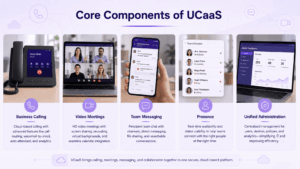
The exact feature mix differs between providers, but most UCaaS platforms combine several core functions.
Business Calling
Business telephony is traditionally one of the defining UCaaS capabilities.
Depending on the service, this can include:
-
business numbers;
-
extensions;
-
inbound and outbound calling;
-
call routing;
-
transfers;
-
voicemail;
-
auto attendants;
-
PSTN connectivity.
Coverage and telephony features can vary significantly by country and provider.
Video Meetings
UCaaS platforms commonly provide:
-
one-to-one video calls;
-
group meetings;
-
screen sharing;
-
meeting controls;
-
recording;
-
guest access;
-
room-system support.
Video conferencing is therefore often integrated into the same communication environment as calling and messaging.
Team Messaging
Persistent messaging provides communication between meetings and calls.
Typical capabilities include:
-
direct messages;
-
group conversations;
-
channels;
-
file sharing;
-
message history.
Presence
Presence indicates whether colleagues are available, busy, offline or already in a meeting.
It helps employees choose how and when to contact someone.
Unified Administration
IT teams can often manage several communication services from the same administrative environment.
This can include:
-
users;
-
calling policies;
-
licenses;
-
devices;
-
security settings;
-
analytics.
The depth of each area differs considerably between vendors, so the term UCaaS alone does not guarantee equivalent functionality.
UCaaS vs UC, VoIP, CCaaS and CPaaS
Several communication terms frequently appear alongside UCaaS.
UCaaS vs Unified Communications
Unified communications describes the integration of communication capabilities.
UCaaS describes a particular way of delivering them.
An organization can operate UC:
-
on its own infrastructure;
-
through private or managed infrastructure;
-
as provider-operated UCaaS.
Therefore:
all UCaaS is UC, but not all UC is UCaaS.
UCaaS vs VoIP
VoIP is primarily a voice technology.
UCaaS is a broader service environment.
A useful distinction is:
VoIP → voice
UCaaS → voice + messaging + meetings + presence + administration
A cloud phone system may therefore use VoIP without providing complete UCaaS functionality.
UCaaS vs CCaaS
UCaaS primarily supports general employee communication.
CCaaS, or Contact Center as a Service, is designed for structured interactions between organizations and customers.
Typical CCaaS functions include:
-
queues;
-
agent routing;
-
IVR;
-
workforce management;
-
contact-center analytics.
Some vendors provide both UCaaS and CCaaS, but their primary jobs are different.
UCaaS vs CPaaS
CPaaS provides communication capabilities that developers can embed into applications.
These may include:
-
voice APIs;
-
video APIs;
-
messaging APIs;
-
SMS;
-
authentication services.
The distinction is:
UCaaS → ready-to-use employee communications
CPaaS → communication building blocks for software development
Benefits of UCaaS
The main benefits of UCaaS come from combining communication functions with a provider-operated delivery model.
Less Infrastructure to Operate
The organization does not need to maintain the complete central communications platform itself.
This can reduce responsibility for:
-
communication servers;
-
platform upgrades;
-
infrastructure capacity;
-
some availability management.
A More Unified User Experience
Employees can move between calling, messaging and meetings without relying on unrelated communication systems.
For example:
chat → call → meeting
can remain part of one workflow.
Support for Distributed Teams
Cloud delivery is well suited to employees working across:
-
offices;
-
homes;
-
mobile environments;
-
multiple countries.
Service-Based Scaling
Organizations can typically add users or services without deploying a new central communications platform for every expansion.
Provider-Managed Updates
The provider can deploy service improvements centrally instead of requiring customers to upgrade every communications server themselves.
UCaaS Tradeoffs
UCaaS also moves important dependencies outside the customer’s infrastructure.
Provider Dependency
If the provider’s service is unavailable, communication can be affected.
Organizations should evaluate availability architecture and service-level commitments.
Network Dependency
Cloud communications depend heavily on connectivity between users and the provider.
Important factors include:
-
internet reliability;
-
WAN design;
-
latency;
-
packet loss;
-
branch connectivity.
Less Infrastructure Control
Customers usually have less control over:
-
backend infrastructure;
-
update timing;
-
server architecture;
-
some data-processing decisions.
Data and Jurisdiction
Organizations may need to understand:
-
where communication data is processed;
-
where records are stored;
-
which entities operate the service;
-
which jurisdictions apply.
Migration Dependency
Changing providers can affect:
-
phone numbers;
-
devices;
-
integrations;
-
policies;
-
communication data.
Portability should therefore be evaluated before deployment, not only when migration becomes necessary.
UCaaS Deployment and Hybrid Architectures
UCaaS itself is cloud-delivered, but the wider enterprise communication environment may include local components.
Public Cloud UCaaS
The provider operates the central communication environment as a shared or logically separated cloud service.
This is the standard UCaaS model.
Dedicated Provider-Operated Service
Some providers offer more isolated or dedicated cloud environments.
The key distinction is that the service remains provider-operated.
Dedicated infrastructure does not automatically make the system customer-operated UC.
Hybrid Architecture
Organizations can combine UCaaS with components such as:
-
local PSTN gateways;
-
existing PBXs;
-
survivable branch infrastructure;
-
meeting-room systems;
-
other enterprise communications platforms.
The local components do not themselves become UCaaS.
They participate in a wider architecture that includes UCaaS.
What Should You Evaluate in a UCaaS Platform?
A long feature list is less useful than testing the communication workflows the organization actually needs.
Also test an end-to-end workflow:
employee receives a call → contacts a colleague → moves to video → shares information → continues in persistent messaging
The more disconnected applications, identities or administration layers required, the less unified the communication experience becomes.
UCaaS Platforms and Unified Communications Alternatives
The market includes both conventional cloud UCaaS services and customer-operated UC platforms with similar employee-facing capabilities.
They should not be treated as the same deployment model.
RingCentral RingEX
Best fit: Businesses looking for a conventional cloud UCaaS environment centered on business calling.
RingCentral combines cloud telephony, messaging and video in a provider-operated service.
Its architecture represents the classic UCaaS model: communications infrastructure remains with the provider while customers manage users and service configuration.
Microsoft Teams + Teams Phone
Best fit: Organizations already centered on Microsoft 365.
Teams combines messaging, meetings and collaboration, while Teams Phone adds business telephony capabilities required for a broader UCaaS environment.
Its strongest advantage is integration with Microsoft’s wider identity and productivity ecosystem.
Cisco Webex
Best fit: Enterprises combining cloud communications with extensive meeting-room infrastructure.
Webex combines calling, meetings, messaging and room capabilities.
Cisco’s broader portfolio also makes it relevant to enterprises where cloud UCaaS needs to coexist with existing telephony and conferencing infrastructure.
Zoom Workplace + Zoom Phone
Best fit: Organizations that want a video-centered cloud communication environment with integrated business calling.
Zoom expanded beyond meetings into messaging and telephony through Zoom Workplace and Zoom Phone.
The result is a provider-operated UCaaS model combining multiple everyday communication modes.
8×8
Best fit: Businesses looking for cloud business telephony combined with messaging and meetings.
8×8 provides cloud communication services spanning business calling, messaging and video.
Its portfolio also extends into customer-engagement functions, which can be relevant to organizations evaluating UCaaS and contact-center services together.
TrueConf Server
Best fit: Organizations that want unified communications capabilities while operating the core platform on their own infrastructure.
TrueConf Server combines persistent messaging, voice and video calls, video meetings, presence, file exchange and integration with SIP/H.323 communication systems.
Its delivery model is the important distinction.
TrueConf Server is customer-operated rather than a conventional provider-hosted UCaaS service.
It therefore provides many of the communication workflows associated with UC while fitting organizations that prioritize private infrastructure or local network operation.
Secumeet
Best fit: Organizations looking for customer-operated messaging and video communication.
Secumeet combines personal and group messaging with video meetings, screen sharing, presentations, file exchange and remote assistance.
It supports meetings with up to 1,500 participants and is designed for deployment on customer infrastructure.
Like TrueConf Server, Secumeet should not be classified as conventional UCaaS solely because several communication functions are available in one platform.
Its distinguishing characteristic is the customer-operated delivery model.
UCaaS or Customer-Operated UC?
Platforms with similar communication functions can use very different architectures.
Consider two systems that both provide:
messaging + calls + meetings
One runs as a provider-operated subscription service.
The other runs inside the customer’s infrastructure.
For employees, the communication workflow may appear similar.
Operationally, the models are different.
The choice is therefore not simply:
cloud or old-fashioned on-premises?
It is:
Who should operate the communications infrastructure?
That question affects:
-
administration;
-
connectivity;
-
data;
-
continuity;
-
maintenance;
-
integrations.
When Is UCaaS a Good Fit?
UCaaS is particularly suitable when an organization wants:
-
cloud business calling;
-
provider-operated infrastructure;
-
messaging and meetings in the same service;
-
support for distributed users;
-
subscription-based scaling;
-
less responsibility for communications servers.
Common scenarios include:
-
replacing legacy PBX systems;
-
consolidating several cloud communication tools;
-
supporting multiple offices;
-
enabling hybrid and remote employees.
Customer-operated UC may be a better architectural fit when private-network operation, infrastructure ownership or reduced dependence on provider-operated communication services is a central requirement.
Frequently Asked Questions
What does UCaaS stand for?
UCaaS stands for Unified Communications as a Service.
It refers to unified business communications delivered through a provider-operated cloud service.
What is UCaaS?
UCaaS is a cloud delivery model that combines communication capabilities such as business calling, video meetings, messaging and presence in a unified service.
What is the difference between UC and UCaaS?
UC describes the integration of communication channels.
UCaaS is one delivery model for UC where the central communication environment is provided as a cloud service.
Is UCaaS the same as VoIP?
No.
VoIP is primarily a technology for transmitting voice over IP networks.
UCaaS can use VoIP for calling while also providing messaging, meetings, presence and administration.
What is the difference between UCaaS and CCaaS?
UCaaS supports general employee communications.
CCaaS is focused on structured customer-service operations involving agents, queues and interaction routing.
Can UCaaS be on premises?
Customer-operated on-premises systems are generally described as unified communications rather than UCaaS.
A hybrid enterprise architecture can combine UCaaS with on-premises communication components.
What are alternatives to UCaaS?
Organizations that need greater infrastructure control can use customer-operated unified communications or communication platforms rather than a provider-operated UCaaS service.
Conclusion
UCaaS is not simply a collection of calling, messaging and video features.
It is a delivery model for unified communications.
The key distinction is:
UC = communication capabilities are unified
UCaaS = those capabilities are delivered as a service
That explains why platforms with similar employee-facing features can belong to different categories.
RingCentral, Teams Phone, Webex, Zoom Phone and 8×8 represent cloud UCaaS approaches.
Customer-operated platforms such as TrueConf Server and Secumeet provide a different operating model.
The central buying question is therefore not only:
Which communication features do we need?
It is also:
Who should operate the infrastructure behind them?
Author
Helga Afon is a technology writer specializing in video conferencing, collaboration software, and workplace communication. She writes articles and reviews that help readers better understand enterprise communication tools and industry trends.