
Why Your Office Communication Systems Need an Overhaul
If your company is still juggling a landline PBX, a separate video conferencing app, and three different chat tools that do not talk to each other, you are not alone, and you are almost certainly losing time and money because of it. Hybrid work, distributed teams, and rising expectations for instant, secure collaboration have made fragmented communication stacks a genuine business liability rather than a minor annoyance.
An office communication system is the technology backbone that lets a company talk, meet, message, and share information as a single, coordinated organization instead of a patchwork of disconnected tools. The right system does not just replace your desk phone; it unifies voice, video, messaging, and file sharing into one governed environment that IT can secure and employees actually want to use.
This guide explains what an office communication system is, the types available in 2026, the benefits and features that matter most, and a ranked comparison of the ten leading platforms so you can choose the right fit for your organization’s size, industry, and security requirements.
At a Glance: What This Guide Covers
What Is an Office Communication System?
An office communication system is a set of integrated technologies that allow employees, teams, and departments to exchange information in real time and asynchronously, typically combining voice calling, video conferencing, instant messaging, file sharing, and presence status into a single platform or a tightly integrated suite.
Unlike a single-purpose tool such as a video conferencing app, an office communication system is meant to be the primary channel through which a company runs its internal and external communication. It typically connects to other business systems (CRM, calendar, helpdesk, HR platforms) through APIs or native integrations, and it is managed centrally by IT rather than adopted informally, department by department.
Modern office communication systems fall under two closely related industry terms that are often used interchangeably:
-
UC (Unified Communications): the technology stack itself, combining voice, video, messaging, and collaboration.
-
UCaaS (Unified Communications as a Service): the cloud-delivered, subscription version of UC, hosted by a vendor rather than run on company servers.
Types of Office Communication Systems
Not every organization needs the same architecture. The main categories in 2026 are:
-
On-premises communication systems. Hardware and software are hosted and maintained inside the company’s own data center or server room. This model gives organizations maximum control over data and infrastructure, which is why it remains common in government, defense, finance, and healthcare, but it requires dedicated IT staff and higher upfront capital investment.
-
Cloud-based systems (UCaaS). Delivered as a subscription service and hosted by the vendor, these systems require minimal infrastructure, scale quickly, and are updated automatically. This is now the dominant deployment model for small and mid-sized businesses.
-
Hybrid systems. A combination of on-premises and cloud components, often used by regulated organizations that need to keep certain data (such as call recordings or video sessions) on local servers while still benefiting from cloud scalability for less sensitive functions.
-
Private cloud and self-hosted systems. A middle ground between on-premises and public cloud: the software runs on infrastructure the customer controls (their own servers or a private cloud instance) but is managed with the flexibility of modern UC software. This model has grown in popularity among enterprises and public-sector bodies with strict data-sovereignty or air-gapped-network requirements.
-
Industry-specific systems. Purpose-built platforms tailored to sectors like healthcare (HIPAA-compliant video), legal (privileged communication safeguards), or government (classified-network compatibility).
Benefits of an Office Communication System
A well-implemented system delivers measurable gains across several dimensions:
-
Productivity. Employees spend less time switching between apps and more time on actual work, since voice, video, and messaging live in one place.
-
Cost reduction. Consolidating a legacy phone system, a separate video tool, and standalone chat software into one platform typically lowers total licensing and maintenance costs.
-
Faster decision-making. Presence indicators, instant messaging, and integrated video mean questions get answered in minutes instead of waiting for an email reply or a scheduled call.
-
Better customer experience. Sales and support teams that can move seamlessly from chat to call to video close issues faster and with fewer handoffs.
-
Support for hybrid and remote work. A unified system gives remote employees the same access to meetings, calls, and internal channels as those in the office.
-
Improved employee retention. Communication friction is a well-documented driver of workplace frustration; removing it correlates with higher engagement scores.
-
Stronger security posture. Centralizing communication onto one governed platform, instead of a mix of unsanctioned consumer apps, gives IT a single point of control for encryption, access policy, and auditing.
Features of Office Communication Software: 7 Features You Need to Look For
When evaluating vendors, these seven features separate a genuinely useful platform from a checkbox product:
-
HD voice and video conferencing. Reliable, high-definition calls that scale from a two-person conversation to a company-wide town hall without degrading quality.
-
Persistent team messaging. Threaded, searchable chat organized by channel or project, with file sharing built in.
-
Presence and status management. Real-time visibility into who is available, in a meeting, or offline, reducing unnecessary interruptions.
-
Cross-device continuity. The ability to start a conversation on desktop and pick it up seamlessly on mobile without losing context.
-
Native integrations. Direct connections to calendar, CRM, project management, and helpdesk tools so communication happens where the work already is.
-
Administrative controls and analytics. Centralized user management, usage reporting, and policy enforcement for IT and compliance teams.
-
End-to-end and transport encryption. Protection for calls, messages, and file transfers both in transit and, ideally, at rest, with clear documentation of the encryption standards used.
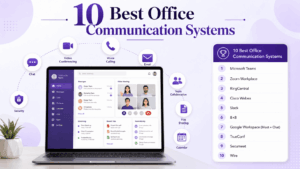
The 10 Best Office Communication Systems for 2026
Below is a vendor-neutral comparison of ten platforms that represent the current market, spanning global UCaaS giants, enterprise collaboration suites, and specialized secure-communication providers.
Vendor Profiles
Microsoft Teams
A unified communication and collaboration hub built into the Microsoft 365 ecosystem, combining chat, video meetings, and file collaboration through deep Office app integration.
Main features: Native Word/Excel/PowerPoint co-authoring, large-scale webinars and town halls, extensive third-party app marketplace.
Downsides: Can feel heavy and resource-intensive; full value requires an existing Microsoft 365 subscription.
Zoom Workplace
Originally a video conferencing specialist, Zoom has expanded into a broader workplace platform including chat, phone, and AI-assisted meeting tools.
Main features: Consistently reliable video quality, AI meeting summaries, a large ecosystem of integrations.
Downsides: Historical security scrutiny means some regulated industries still require extra vetting; advanced features are spread across multiple paid tiers.
RingCentral
A cloud communications provider built around business phone systems, extended over time into full UCaaS with video and team messaging.
Main features: Strong cloud PBX and contact-center capabilities, wide range of telephony integrations.
Downsides: Interface can feel less modern than newer entrants; pricing scales quickly with add-ons.
Cisco Webex
An enterprise-grade communication suite from Cisco, combining meetings, calling, and messaging with the networking hardware many large enterprises already run.
Main features: Strong device and hardware ecosystem, granular enterprise admin controls, AI-powered noise and video enhancements.
Downsides: Steeper learning curve and higher cost for smaller teams; best value is realized alongside other Cisco infrastructure.
Slack
A channel-based messaging platform that has become a default hub for asynchronous team communication, with growing voice and huddle features.
Main features: Powerful search, extensive app integrations, flexible channel and workflow automation.
Downsides: Video conferencing capabilities are less mature than dedicated platforms; channel sprawl can become difficult to manage without governance.
8×8
An all-in-one cloud communications provider aimed at small and mid-sized businesses that want voice, video, and chat under a single contract and support relationship.
Main features: Bundled pricing, built-in contact-center options, straightforward international calling plans.
Downsides: Advanced enterprise features lag behind larger competitors; UI updates have been slower to modernize.
Google Workspace (Meet + Chat)
Google’s communication layer within Workspace, pairing Meet for video and Chat for messaging with Gmail and Calendar.
Main features: Frictionless scheduling from Calendar, browser-based access with no heavy client needed, tight Gmail integration.
Downsides: Fewer advanced collaboration features compared to Teams or Slack; best suited to organizations already committed to Google’s ecosystem.
TrueConf
A video communication platform designed for organizations that need control over where their communication infrastructure lives, offering cloud, on-premises, and private hybrid deployment models rather than a cloud-only architecture.
Main features: Flexible deployment on the customer’s own servers, support for large-scale video conferencing and telepresence-style meeting rooms, integration with directory and SIP/H.323 infrastructure for organizations with existing telephony investments.
Downsides: Smaller third-party app ecosystem than the major cloud-first players; self-hosted deployments require more internal IT capacity to manage than a pure SaaS product.
Secumeet
A security-first communication platform built around confidentiality and regulatory compliance, aimed at organizations in finance, healthcare, government, and legal sectors where protecting sensitive conversations is the top priority.
Main features: Encrypted messaging and video by design, granular access and retention controls, deployment options that support strict data-handling policies.
Downsides: Narrower feature set outside its security focus compared to general-purpose UC suites; may require more configuration to match the breadth of everyday collaboration features offered by mainstream platforms.
Wire
A secure collaboration platform popular with government agencies, defense contractors, and legal teams, built around end-to-end encryption as a default rather than an add-on.
Main features: Encrypted messaging, calls, and file sharing by default, guest room access for external collaborators, on-premises deployment options.
Downsides: Smaller ecosystem and fewer productivity integrations than mainstream UC platforms; interface prioritizes security controls over everyday convenience features.
2026 Market Snapshot
The category continues to grow quickly as hybrid work becomes permanent policy rather than a temporary accommodation. According to market research firm Mordor Intelligence, the global unified-communication-as-a-service market stood at roughly 70.56 billion dollars in 2026 and is projected to reach 221.14 billion dollars by 2031, a compound annual growth rate of about 25.67 percent. Adoption is being driven in large part by workplace policy: a 2025 industry survey found that 68 percent of enterprises maintain formal work-from-anywhere rules, and 81 percent plan to grow their seat counts by at least 15 percent a year through 2028. At the same time, regulated industries are increasingly favoring hybrid architectures that keep local voice gateways in place even as public cloud remains the dominant deployment model overall, reflecting the growing weight that security and data-sovereignty requirements now carry in purchasing decisions.
How to Choose Employee Communication Software
There is no universal “best” system, only the best fit for your organization’s size, industry, and risk profile. Use this framework:
-
Start with deployment requirements. If your organization is bound by strict data-residency, air-gapped-network, or on-premises mandates (common in government, defense, and parts of finance and healthcare), narrow your list to vendors offering self-hosted or private cloud options, such as TrueConf or Secumeet, rather than cloud-only platforms.
-
Map your existing tech stack. If you already run Microsoft 365 or Google Workspace company-wide, the native communication tool in that ecosystem often delivers the fastest time to value.
-
Weigh company size against feature depth. Smaller teams generally benefit from bundled, all-in-one pricing (8×8, Zoom Workplace), while large enterprises need granular admin controls and integration depth (Webex, Teams).
-
Evaluate security requirements against your industry. Healthcare, legal, financial services, and government organizations should treat encryption standards and compliance certifications as a shortlist filter, not a final checkbox.
-
Pilot before committing. Run a 30-to-60-day pilot with a representative group of employees across departments to surface real-world usability issues before a company-wide rollout.
-
Check integration coverage. Confirm the platform connects natively to your CRM, calendar, and helpdesk tools; a communication system that lives outside your workflow will see lower adoption.
-
Ask about support and SLAs. Uptime guarantees and support response times matter more once communication becomes mission-critical infrastructure rather than a convenience tool.
Security and Compliance
Security is no longer a secondary consideration in office communication systems; for many organizations it is the primary purchasing filter. When evaluating a vendor, examine:
-
Encryption standards. Look for transport encryption (TLS) as a baseline and end-to-end encryption for sensitive conversations, particularly for platforms handling legal, medical, or financial discussions.
-
Data residency and sovereignty. Understand exactly where call recordings, messages, and files are stored, and whether the vendor can guarantee data stays within a specific jurisdiction.
-
Deployment flexibility. Organizations with strict internal policies often need the option to self-host or run a private cloud instance rather than relying solely on a vendor’s public cloud, which is a key differentiator for platforms like TrueConf and Secumeet compared with cloud-only competitors.
-
Regulatory certifications. Depending on your industry, check for relevant compliance frameworks such as HIPAA (healthcare), SOC 2, ISO 27001, or GDPR alignment for organizations handling EU personal data.
-
Access controls and audit logging. Role-based permissions, single sign-on, and detailed audit trails are essential for demonstrating compliance during regulatory reviews.
-
Vendor incident history and transparency. Review a vendor’s public track record on security incidents and how transparently they were disclosed and resolved.
Conclusion
Office communication systems have moved from a back-office IT decision to a core piece of business strategy, directly shaping how productive, secure, and resilient an organization is across hybrid and distributed teams. The market now spans everything from all-in-one cloud suites like Microsoft Teams and Zoom Workplace to security-first and flexible-deployment platforms like Secumeet and TrueConf, meaning there is a genuinely good fit for nearly any combination of company size, industry, and compliance requirement.
The right choice comes down to matching deployment model, feature depth, and security posture to your organization’s actual constraints rather than defaulting to the most popular name. Start by identifying your non-negotiables, whether that is data residency, integration with an existing ecosystem, or budget per seat, and use the comparison and decision framework above to build a shortlist before running a real-world pilot.
Frequently Asked Questions
What is the difference between UC and UCaaS?
UC (Unified Communications) refers to the overall category of integrated voice, video, and messaging technology, while UCaaS (Unified Communications as a Service) specifically describes the cloud-hosted, subscription-based delivery of that technology. Vendors like TrueConf offer both models, including on-premises UC deployments, while a platform like Secumeet focuses on secure, compliance-oriented delivery of similar capabilities.
Do office communication systems work for remote and hybrid teams?
Yes, most modern systems are built specifically to support distributed teams, offering mobile apps, cloud access, and cross-device continuity so remote employees have the same access as those in an office. Cloud-first vendors handle this natively, while platforms such as TrueConf also support hybrid architectures for organizations that need some infrastructure to stay on-premises.
How much does an office communication system cost?
Pricing typically ranges from around 10 to 30 dollars per user per month for cloud-based SMB-focused platforms, rising significantly for enterprise tiers with advanced security and admin features. Self-hosted or private-deployment vendors like TrueConf and Secumeet often price differently, factoring in infrastructure and support rather than a flat per-seat cloud fee, so it is worth requesting a direct quote based on your deployment model.
Which office communication systems are best for regulated industries?
Organizations in healthcare, finance, legal, and government should prioritize vendors with strong encryption, clear data-residency guarantees, and flexible deployment options. Secumeet and TrueConf are both frequently considered in this category because they support private or on-premises deployment models that give organizations more direct control over where sensitive communications are processed and stored.
Can I migrate from my current phone system without downtime?
Most vendors offer migration support and phased rollout plans specifically to avoid downtime, including number porting and parallel running of old and new systems during transition. It is best practice to pilot the new platform, whether that is a cloud suite or a self-hosted option like TrueConf, with one department before a full company-wide cutover.
What features should a small business prioritize versus a large enterprise?
Small businesses generally benefit most from bundled, easy-to-manage pricing and simple onboarding, making all-in-one platforms attractive, while large enterprises need granular administrative controls, deep integrations, and compliance certifications. Security-focused vendors like Secumeet and flexible-deployment platforms like TrueConf tend to see more demand from larger or more regulated organizations that have specific infrastructure and compliance requirements.
How do I know if a vendor’s encryption claims are trustworthy?
Ask for specifics: which encryption standard is used, whether it applies end-to-end or only in transit, and whether the vendor has any independent security audits or certifications such as SOC 2 or ISO 27001. Vendors built around security as a primary selling point, such as Secumeet, and those offering self-hosted deployment for full data control, such as TrueConf, are generally more transparent about these details since compliance-minded customers demand it upfront.
Author
Helga Afon is a technology writer specializing in video conferencing, collaboration software, and workplace communication. She writes articles and reviews that help readers better understand enterprise communication tools and industry trends.