

Electronic communication is any exchange of information through digital or electronic systems.
In business, that can include email, instant messaging, video meetings, voice calls, SMS, collaboration platforms, intranets and other digital channels.
The challenge is not finding ways to communicate. Most companies already have many.
The harder problem is deciding which channel should be used for which type of communication, how those channels fit together, and how messages, files, meeting records and access are governed over time.
A quick question can work well in chat. A formal approval may belong in email. A complicated discussion may be faster over video. An urgent alert may require SMS.
Electronic communication becomes more effective when each channel has a clear role.
Electronic Communication at a Glance
No single channel is best for every task.
A more useful question is:
How urgent, complex, sensitive and permanent does the communication need to be?
What Is Electronic Communication?
Electronic communication is the transmission of information through electronic systems.
In everyday business use, the term covers digital communication methods such as:
-
email;
-
business messaging;
-
video conferencing;
-
internet-based voice calls;
-
text messaging;
-
collaboration software;
-
social platforms;
-
web portals.
The information being transmitted may include text, audio, video, images, files, structured data, recordings or metadata.
The term also has a specific legal meaning in the United States. Under 18 U.S.C. § 2510, federal law defines electronic communication in relation to transfers of signs, signals, writing, images, sounds and data through electronic systems.
That legal meaning should not automatically be treated as identical to the broader way the term is used in everyday business communication.
How to Choose the Right Electronic Communication Channel
Instead of comparing channels only by feature, businesses can evaluate them through five practical questions.
1. How Urgent Is the Message?
If the recipient needs to respond immediately, suitable channels may include:
-
instant messaging;
-
voice;
-
SMS.
If the communication can wait, email or other asynchronous channels may be more appropriate.
2. How Complex Is the Topic?
Simple information works well in text.
Complex topics may require:
-
voice;
-
video;
-
screen sharing;
-
presentation or content review.
If a chat thread repeatedly requires clarification, the problem may be the communication medium rather than the participants.
3. Who Is the Audience?
A message can be:
-
one-to-one;
-
for a small group;
-
company-wide;
-
customer-facing;
-
public.
The channel should fit both the size and type of audience.
4. Does the Communication Need to Persist?
Some communication needs to be referenced later.
Persistence may be important for:
-
approvals;
-
customer commitments;
-
project decisions;
-
compliance;
-
legal discovery.
A live discussion may therefore need a written follow-up if the decision matters later.
5. How Sensitive Is the Information?
Sensitive communication may require tighter controls around:
-
identity;
-
guest access;
-
encryption;
-
recording;
-
retention;
-
infrastructure.
The more sensitive the communication, the more important its architecture becomes.
How Businesses Actually Use Electronic Communication
The most useful way to understand electronic communication is not by channel name, but by business task.
Coordinate Work
Teams need fast exchanges for:
-
status updates;
-
quick questions;
-
short decisions.
Instant messaging and collaboration platforms usually work well here because they keep the conversation close to ongoing work.
Make a Formal Commitment
Some communication benefits from more structure.
Examples include:
-
approvals;
-
customer commitments;
-
contractual discussions;
-
formal notices.
Email is often more appropriate because recipients, subject and message content are clearly defined and easier to reference later.
Resolve Ambiguity
Text becomes inefficient when participants repeatedly misunderstand each other or need immediate clarification.
Voice or video can reduce that delay by adding:
-
tone;
-
visual context;
-
rapid back-and-forth;
-
screen sharing.
Reach People Urgently
Short, time-sensitive communication may require SMS, mobile alerts or another high-priority channel.
The purpose is speed, not detailed discussion.
Publish Durable Information
Policies, procedures and internal reference material should not depend on employees finding an old message.
Intranets and internal portals work better when information needs to remain discoverable over time.
Communicate Externally
Customer, supplier and public communication may span email, messaging, video, SMS or social media.
The channel should reflect the level of formality, urgency and audience.

How Different Electronic Communication Channels Behave
The major channels differ less by what they technically support than by the way communication behaves inside them.
Email remains useful when communication needs formality, structure or a durable record.
It works particularly well for detailed messages, external correspondence and approvals.
Its weakness appears when long chains are used for fast-moving discussion.
Instant Messaging
Messaging is better suited to conversational work.
It supports quick coordination and short group discussions while preserving history.
The trade-off is interruption: if every message is treated as urgent, messaging can create notification overload.
Video Conferencing
Video is valuable when communication needs more context than text can provide.
It works well for meetings, demonstrations, presentations and discussions that would otherwise generate long message threads.
Its main limitation is persistence. Without recording, transcription or written follow-up, the details of the conversation may disappear.
Collaboration Platforms
Collaboration platforms combine several communication modes, such as messaging, group spaces, files and live meetings.
Their main value is continuity between different types of work.
Their main challenge is governance as workspaces, channels, guests and retained content accumulate.
Synchronous vs Asynchronous Electronic Communication
Electronic communication generally falls into two broad models.
Synchronous Communication
Participants interact at the same time.
Examples include:
-
voice calls;
-
live webinars.
This works well when immediate clarification matters.
Asynchronous Communication
Participants respond at different times.
Examples include:
-
email;
-
most business messaging;
-
intranet posts;
-
recorded updates.
This gives employees more control over when they respond.
Most businesses need both models.
The important issue is knowing when one stops being efficient and the conversation should move to the other.
When Should Text Become a Live Conversation?
Not every discussion should remain in chat or email.
A live conversation often becomes more efficient when:
-
the thread contains repeated clarification;
-
several participants misunderstand one another;
-
someone needs to demonstrate a screen;
-
visual material needs review;
-
a decision requires rapid discussion;
-
the topic is emotionally sensitive.
Live communication helps resolve ambiguity. Persistent communication preserves the decision.
After a call, important conclusions should therefore return to a durable channel.
A team may discuss a problem in group chat, move to a video meeting to resolve it, and then document the outcome in the same group conversation.
That keeps the communication context intact.
Benefits and Trade-Offs of Electronic Communication
Every benefit creates a corresponding management challenge.
The goal is not to remove these trade-offs.
It is to design communication rules around them.
Why Too Many Communication Tools Become a Problem
Adding another communication application may solve one problem while creating several others.
A fragmented environment can separate:
-
employee identities;
-
message history;
-
files;
-
meeting records;
-
notifications;
-
guest accounts;
-
administrative policies.
A project may begin in email, move to chat, continue in a video meeting and finish with a file stored somewhere else.
Each system may work well independently.
The problem is the loss of context between them.
For users, this creates search and notification problems.
For administrators, it creates multiple systems for:
-
provisioning;
-
access removal;
-
retention;
-
security policies;
-
auditing.
Integrated communication platforms can reduce some of these handoffs by keeping multiple communication modes under the same organizational environment.
How Communication Architecture Affects Security
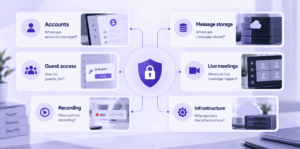
Electronic communication security is broader than encryption.
Organizations should understand how identity, communication, storage and administration fit together.
Where Are Accounts Managed?
Corporate identity reduces reliance on personal accounts and can simplify onboarding and offboarding.
Where Are Messages Stored?
Persistent messages, files and recordings create long-term data that may need retention policies.
How Do Guests Join?
External communication requires controls around:
-
invitations;
-
permissions;
-
account creation;
-
access expiration.
Where Do Live Meetings Happen?
If messaging and video use separate providers, one business conversation may cross multiple security and compliance boundaries.
Who Controls Recording?
Meeting recordings and transcripts may contain more sensitive information than ordinary messages.
Who Operates the Infrastructure?
Cloud-hosted and customer-operated systems create different operational responsibilities.
Security therefore depends not only on individual security features but on the architecture of the entire communication environment.
Electronic Communication as a Business Record
In many U.S. organizations, electronic communication is not just conversation.
It can become a business record.
Depending on industry, organization and message content, relevant communications may include:
-
email;
-
SMS;
-
collaboration-platform messages;
-
social media;
-
voice and video communication;
-
meeting recordings.
Regulated organizations may need systems for:
-
capture;
-
retention;
-
supervision;
-
search;
-
legal discovery;
-
production of records.
This is particularly relevant in sectors such as financial services, healthcare and government, where electronic communications may need to be retained or produced later.
The practical consequence is important:
Introducing a new communication channel can also introduce a new recordkeeping obligation.
Electronic Communication in U.S. Law
The phrase electronic communication also has a defined meaning under U.S. federal law.
18 U.S.C. § 2510(12) uses the term for certain transfers of signs, signals, writing, images, sounds, data or intelligence through electronic systems.
For business readers, the distinction is important.
Everyday workplace use of electronic communication broadly includes channels such as email, messaging and video.
Legal and regulatory documents may use the same term in a more specific statutory context.
Organizations dealing with litigation, monitoring, retention or regulated communications should therefore evaluate the applicable legal requirements separately rather than relying only on a general business definition.
How to Build an Electronic Communication Policy
A useful communication policy should define not only which tools are approved, but how they should be used.
The exact rules depend on industry and organization size.
The important point is that employees should understand what each channel is for.
Where Secumeet Fits
Secumeet is relevant to organizations that want to combine several common forms of internal electronic communication inside one managed environment.

It brings together:
-
personal messaging;
-
persistent group chats;
-
video meetings;
-
screen sharing;
-
presentations;
-
content collaboration;
-
customer-operated infrastructure.
The value is not simply having multiple features in one product.
It is reducing the number of times a work conversation needs to leave one communication environment.
Employees can begin with a group discussion, move into a live video meeting when the issue becomes too complex for text, review shared content together and then continue communication afterward in the persistent group context.
Secumeet does not replace every form of electronic communication.
Organizations may still use email for formal external correspondence, SMS for alerts or specialized systems for customer interaction.
Its role is primarily in internal and controlled organizational communication where messaging and live collaboration need to remain connected.
Meetings with 1,500 users
Let your team naturally flow from a chat conversation to an immersive 4K meeting in just one click! Bring up to 1,500 participants to your call.
Team messaging
Connect with colleagues and teams before, during and after meetings in personal and group chats.
Collaboration Tools & AI
Collaborate on projects with AI: share a screen with sound, show presentations and manage remote computers.
Common Electronic Communication Mistakes
Frequently Asked Questions
What is electronic communication?
Electronic communication is the exchange of information through electronic systems.
Common examples include email, messaging, video conferencing, voice calls, SMS, collaboration platforms and digital portals.
What are examples of electronic communication in business?
Examples include:
-
email;
-
team chat;
-
video meetings;
-
VoIP calls;
-
SMS;
-
collaboration platforms;
-
intranet communication;
-
social media.
Why is electronic communication important in business?
It allows employees, customers and partners to communicate across locations and time zones.
It also supports both real-time and asynchronous work and can create searchable communication records.
What are the disadvantages of electronic communication?
Potential disadvantages include:
-
information overload;
-
interruptions;
-
loss of nonverbal context;
-
communication fragmentation;
-
security risks;
-
dependence on technology;
-
additional retention requirements.
How should businesses choose between email, chat and video?
The choice should depend on urgency, complexity and persistence.
Email works well for formal or detailed communication, chat for quick coordination, and video for complex discussions requiring immediate clarification or visual context.
What electronic communication should businesses retain?
There is no universal retention rule for every business or communication type.
Retention depends on the organization, industry, legal requirements and content of the communication.
Email, messaging, SMS, social content, meeting recordings and other electronic records may all become subject to retention or legal discovery requirements.
Can electronic communication become a business record?
Yes.
Depending on the business context, electronic messages, collaboration content, SMS, social communications and meeting records may need to be retained, searched or produced later.
Conclusion
Electronic communication in business is not a single tool.
It is a system of channels with different strengths, levels of urgency, context and persistence.
Businesses can make better communication decisions by evaluating each need according to urgency, complexity, audience, persistence and sensitivity.
Governance matters just as much as channel choice: organizations need clear rules for access, retention, recording and how communication moves between text and live interaction.
Author
Helga Afon is a technology writer specializing in video conferencing, collaboration software, and workplace communication. She writes articles and reviews that help readers better understand enterprise communication tools and industry trends.