

Collaboration software for business covers much more than team chat. Some platforms organize work around conversations, others around tasks, documents, shared canvases, or company knowledge. A separate group focuses on messaging and meetings running on infrastructure the organization controls.
That distinction matters because products such as Slack, Asana, Miro, Notion, TrueConf, and Secumeet solve different parts of the same collaboration problem. Comparing them only by feature count makes the category look more interchangeable than it really is.
The useful starting point is not “Which platform has the most features?” It is:
What should employees collaborate around, where should the authoritative record of that work live, and who should control the underlying infrastructure?
This guide compares 11 business collaboration platforms across seven work models and explains when one platform is enough, when a specialized stack is more practical, and how the communication, work, knowledge, visual, and automation layers should fit together.
Business Collaboration Software at a Glance
What Is Collaboration Software for Business?
Business collaboration software gives employees a shared environment for communicating, creating information, coordinating work, or making decisions.
The category can be divided into seven models according to the object around which collaboration happens.
These models overlap, but they are not interchangeable.
A discussion in Slack, a deadline in Asana, a procedure in Notion, a workshop in Miro, and a video meeting on TrueConf can all belong to one business process while serving different informational roles.
The First Question: What Is the Source of Truth?
Before comparing vendors, define where the final version of each type of information should live.
For example:
This distinction prevents a common collaboration problem: the same decision existing in several places with no clear authoritative version.
A task mentioned in chat is not necessarily a tracked task. A meeting discussion is not automatically organizational knowledge. A whiteboard idea is not automatically an approved project.
How to Choose Business Collaboration Software
-
Identify What Employees Collaborate Around
Start with the primary object of work.
Choose a communication focused platform when daily work revolves around questions, discussions, rapid decisions, and live interaction.
Choose work management software when ownership, due dates, dependencies, and progress determine whether work succeeds.
Choose a knowledge workspace when policies, specifications, processes, research, and institutional information need a durable home.
Choose visual collaboration when teams work through maps, diagrams, brainstorming, workshops, customer journeys, or design concepts.
Choose controlled communication infrastructure when chat and meetings themselves need to remain inside infrastructure managed by the organization.
-
Separate Communication From Work Management
The presence of comments, chat, or task lists does not make two products equivalent.
Slack can support project discussion, but a conversation channel is not the same as a portfolio management system.
Asana can hold discussions around tasks, but task comments are not a full replacement for instant messaging and meetings.
The better question is:
Where should the completed action, decision, document, or conversation be recorded after the collaboration ends?
-
Decide Between Synchronous and Asynchronous Collaboration
Not all teams need to work at the same time.
Distributed teams across time zones may need stronger asynchronous workflows. Teams working on incidents, customer calls, sales discussions, or operational coordination may need faster synchronous communication.
Most businesses need both, but the ratio matters.
Slack, for example, supports real time Huddles as well as asynchronous Clips and persistent channel history.
-
Decide Whether You Need One Platform or Several Layers
There are two valid approaches.
All in One vs Specialized Collaboration Stack
ClickUp is an example of the all in one approach. Its current platform combines tasks, documents, chat, whiteboards, dashboards, meetings, knowledge functions, forms, and automations in one environment.
A different organization might use TrueConf for messaging and video, Asana for execution, and Notion for documentation.
The number of tools is not the main problem. The problem begins when two tools perform the same job and employees do not know which one contains the final record.
-
Evaluate External Collaboration Separately
Customers, suppliers, contractors, agencies, and consultants change the collaboration model.
Check:
-
whether guests need full accounts;
-
whether external users can join shared workspaces;
-
whether browser access is available;
-
what files external users can see;
-
how guest access expires;
-
whether meetings and documents use the same identity;
-
whether external organizations remain administratively separate.
Slack, for example, supports external collaboration through Slack Connect channels, with administrative controls depending on the selected plan.

-
-
Decide Where Collaboration Data May Live
Infrastructure can eliminate products before feature comparison begins.
Common models include:
-
vendor managed public cloud;
-
private or dedicated cloud;
-
customer hosted server;
-
private corporate network;
-
restricted or disconnected environment.
Google Workspace is a cloud productivity suite combining products such as Gmail, Meet, Chat, Drive, Docs, Sheets, and other business applications.
TrueConf Server follows a different model. Its official documentation describes on premises deployment, corporate messaging, video conferencing, LDAP and Active Directory integration, and SIP/H.323 interoperability. The server can operate inside LAN/VPN environments, and supported editions can work without an internet connection.
Secumeet uses a server connected client model. Its current download page describes personal and group chats and states that connection to Secumeet Server is required for full use of the application. Exact customer hosting, offline dependencies, licensing, identity integration, and high availability should be confirmed for the intended deployment.
Mattermost also supports self hosted collaboration, including messaging, calls, screen sharing, workflows, and deployments for controlled or disconnected environments.
-
-
Check Identity, Administration, and Offboarding
Collaboration platforms eventually contain sensitive operational history.
Evaluate:
-
SSO;
-
Active Directory or LDAP;
-
SCIM;
-
user provisioning;
-
role based permissions;
-
guest controls;
-
retention;
-
message and file export;
-
audit data;
-
account deactivation;
-
ownership transfer when employees leave.
This matters more as the organization grows.
A tool that works well for 20 employees may become difficult at 2,000 users if user lifecycle, access control, or retention remain manual.
-
-
Match Governance to Company Size
Company size changes the buying criteria.
Small teams
Often prioritize:
-
fast setup;
-
low administration;
-
free or simple pricing;
-
few integrations;
-
minimal training.
Growing businesses
Often need:
-
reusable processes;
-
integrations;
-
external collaboration;
-
better permissions;
-
team level reporting;
-
stronger onboarding and offboarding.
Large organizations
Often need:
-
centralized identity;
-
multiple departments;
-
data retention;
-
granular administration;
-
compliance controls;
-
portfolio visibility;
-
infrastructure and data location choices;
-
interoperability with existing enterprise systems.
Do not assume the same feature has equal importance at every organizational scale.
-
-
Evaluate Visual Collaboration as Its Own Requirement
Brainstorming and visual planning deserve a separate evaluation.
Miro uses an infinite collaborative canvas for brainstorming, workshops, planning, mapping, diagrams, and cross functional visual work.
Visual platforms are especially useful for:
-
product discovery;
-
service design;
-
workshops;
-
retrospectives;
-
architecture diagrams;
-
customer journey mapping;
-
planning sessions.
They should not be treated as substitutes for persistent messaging, project portfolios, or organizational knowledge systems.
-
-
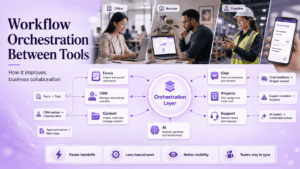
Evaluate Workflow Orchestration Between Tools
Sometimes the collaboration problem is not the absence of another workspace.
The problem is that work does not move automatically between the tools the business already uses.
Examples:
-
a form should create a task;
-
a CRM update should notify a channel;
-
approved content should trigger the next workflow;
-
a support escalation should create an incident;
-
feedback from chat should be recorded in a project system;
-
AI output should trigger a controlled business action.
Zapier positions its collaboration automation around task handoffs, feedback capture, role synchronization, and connecting existing applications so updates move between systems automatically.
This creates a separate workflow orchestration layer above the applications where people actually work.
-
-
Review AI as an Architecture Decision
AI is increasingly embedded in collaboration software, but the important question is not simply whether a platform has an assistant.
Ask:
-
what information AI can access;
-
where meeting audio is processed;
-
whether company documents are available to the model;
-
whether administrators can disable functions;
-
whether results inherit existing permissions;
-
whether an external AI service is required;
-
whether AI can only suggest actions or can execute them.
For organizations handling sensitive meetings or documents, the processing architecture can matter as much as the feature itself.
-
-
Calculate the Cost of the Collaboration Stack
Do not compare only the advertised entry price.
Pricing models differ:
-
per user SaaS subscription;
-
productivity suite subscription;
-
work management subscription;
-
usage based automation;
-
platform licensing;
-
self hosted software plus infrastructure;
-
enterprise quote.
Zapier, for example, currently uses a task based usage model for its automation platform.
For self hosted products, infrastructure, administration, storage, backup, monitoring, and support also contribute to total cost.
The useful comparison is:
What will the complete collaboration stack cost after the new platform is deployed?
-
-
Estimate Migration and Adoption Cost
A technically suitable platform can still fail if migration requires too much organizational change.
Before switching, determine:
-
which data must be migrated;
-
whether historical conversations can be retained;
-
whether existing documents and project structures can be imported;
-
which integrations must be rebuilt;
-
how users will be trained;
-
whether employees will temporarily use both old and new tools;
-
which application will become authoritative on launch day;
-
how external users will be transitioned.
Migration cost is partly technical and partly behavioral.
A platform that saves licensing cost but creates months of duplicate workflows may not reduce the real cost of collaboration.
-
Business Collaboration Software Comparison
Product capabilities and licensing change by edition. Procurement decisions should use current vendor documentation rather than assuming every capability applies to every plan.
11 Business Collaboration Software Platforms Compared
1. Microsoft Teams
Best for: Businesses already centered on Microsoft 365.
Teams combines chat, meetings, calls, file sharing, and collaboration in one application, while the wider Microsoft environment connects communication with productivity and identity services. Microsoft currently positions Teams around meeting, chat, file sharing, and real time collaboration.
-
What it does differently: Communication sits inside a broader productivity environment instead of operating as a standalone messenger.
-
Main trade off: Its strongest differentiation is reduced when the organization does not already depend on Microsoft applications and identity.
-
Do not choose it when: Customer operated communication infrastructure or a lightweight independent tool is the main requirement.
2. Slack
Best for: Teams whose daily coordination happens through fast conversation.
Slack organizes collaboration around channels and direct messages. Huddles provide audio, video, multi person screen sharing, and a persistent discussion thread attached to the conversation.
-
What it does differently: Keeps conversation, integrations, quick calls, and external partner communication close to day to day work.
-
Main trade off: Structured projects and organizational knowledge can become fragmented unless Slack is connected to systems that own those records.
-
Do not choose it when: Work execution requires deep portfolio management or customer controlled communications infrastructure.
3. Google Workspace
Best for: Businesses centered on collaborative documents, email, files, calendars, and browser based communication.
Workspace combines products including Gmail, Meet, Chat, Drive, Docs, Sheets, and other business applications. Google Docs supports simultaneous editing, comments, permissions, version history, and contextual collaboration.
-
What it does differently: Makes cloud documents and familiar office applications the main collaborative surface.
-
Main trade off: Complex portfolio and project execution remain less specialized than in dedicated work management platforms.
-
Do not choose it when: The core requirement is customer hosted collaboration infrastructure.
4. Asana
Best for: Organizations where ownership, projects, deadlines, and goals must remain structured.
Asana organizes work into goals, portfolios, projects, tasks, and subtasks, with reporting and workflow capabilities around that hierarchy.
-
What it does differently: Makes formal work ownership the collaboration anchor.
-
Main trade off: Most teams still need another platform for richer instant messaging and live meetings.
-
Do not choose it when: Your main problem is communication rather than work tracking.
5. monday.com
Best for: Businesses that want configurable project and operational workflows.
monday work management supports projects, portfolios, boards, dependencies, views, automations, integrations, and organization wide process design.
-
What it does differently: Allows teams to model many different business processes around configurable boards and automation.
-
Main trade off: Flexibility can produce inconsistent structures if departments build unrelated workflows without governance.
-
Do not choose it when: Messaging, video meetings, or knowledge management are the main collaboration requirement.
6. Notion
Best for: Organizations that want company knowledge, documentation, and project context in one workspace.
Notion combines documents, wikis, databases, comments, projects, and integrations. Its documentation model supports co editing, asynchronous comments, and linking knowledge directly to project work.
-
What it does differently: Makes organizational knowledge and documents the durable center of collaboration.
-
Main trade off: It is not primarily a real time enterprise communications platform.
-
Do not choose it when: Rich live communication or customer operated messaging infrastructure is the primary requirement.
7. ClickUp
Best for: Businesses attempting to consolidate multiple collaboration categories into one workspace.
ClickUp currently combines tasks, documents, chat, whiteboards, dashboards, wikis, forms, automations, screen recordings, and meeting functions. Its Whiteboards can connect ideas directly to tasks and documents.
-
What it does differently: Tries to reduce the boundary between communication, work management, knowledge, and visual collaboration rather than specializing in only one layer.
-
Main trade off: A broad workspace requires careful configuration. Teams that only need one specialized function may prefer a simpler product.
-
Do not choose it when: Infrastructure ownership or a dedicated communications server is a primary procurement condition.
8. Miro
Best for: Brainstorming, workshops, visual planning, mapping, and cross functional discovery.
Miro centers collaboration on an infinite shared canvas and supports remote workshops, brainstorming, research, planning, mapping, diagramming, and visual coordination.
-
What it does differently: Gives teams a shared visual object rather than organizing work primarily around messages or task lists.
-
Main trade off: Visual work still needs another authoritative system for persistent communication, formal execution, or company knowledge.
-
Do not choose it when: You need an organization wide messenger or project portfolio system as the main collaboration layer.
9. TrueConf
Best for: Businesses that want persistent messaging and native video collaboration to run on infrastructure they control.
TrueConf Server is a software based video conferencing and team messaging platform that operates in LAN/VPN environments. Its documentation describes personal and group messaging, video conferences, centralized user management, LDAP/Active Directory integration, SSO options, WebRTC, and SIP/H.323 interoperability.
This makes TrueConf relevant when communication itself is part of the organization’s managed infrastructure. Employees can use the same communication environment for persistent discussions and live video without making a public cloud meeting provider the core communications layer.
-
What it does differently: Combines corporate messaging and a full native video conferencing system on customer controlled infrastructure.
-
Main trade off: It is communication focused rather than a replacement for specialized work management systems such as Asana or monday.com. Running the platform also requires infrastructure administration.
-
Do not choose it when: The business only needs lightweight cloud documents or task tracking and has no reason to manage its own communications environment.
Why it stands out: TrueConf can serve as the communication layer of a best of breed collaboration stack. A business can keep meetings, chat, directory integration, and room interoperability under internal control while using specialist applications for projects or knowledge.
10. Secumeet
Best for: Organizations evaluating a server connected collaboration environment where messaging and meetings need to be considered together with infrastructure requirements.
The current Secumeet client is designed around messaging, meetings, and collaboration, with personal and group chats and a required connection to Secumeet Server for full use.
That gives Secumeet a different role from project and document centered SaaS products. It belongs in the communications layer of the collaboration stack rather than in the same functional category as Asana, Notion, or Miro.
-
What it does differently: Approaches collaboration from the messaging and live communication side through a server connected product environment.
-
Main trade off: Public technical documentation is currently less detailed than for several larger enterprise platforms. Buyers should confirm customer hosting options, server architecture, identity integration, external network dependencies, offline licensing, retention, high availability, audit functions, and security characteristics for the intended deployment.
-
Do not choose it when: The main requirement is project portfolio management, visual workshops, collaborative document editing, or a large public cloud application ecosystem.
Why it stands out: Secumeet is relevant when the shortlist is shaped by the communication environment itself, not just by SaaS convenience. On a Secumeet deployment, that architecture should be validated through current technical documentation and a proof of concept rather than assumed from broad security claims.
11. Mattermost
Best for: Technical, operational, incident response, and mission oriented teams that want self hosted messaging and workflows.
Mattermost supports channels, direct messaging, threaded discussions, Playbooks, workflow automation, calls, and screen sharing. Its documentation includes self hosted and air gapped deployment scenarios.
-
What it does differently: Combines channel based communication with repeatable operational workflows and strong infrastructure control.
-
Main trade off: It assumes more internal technical ownership than mainstream cloud collaboration products, and its live meeting model is not the same as a video first conferencing suite.
-
Do not choose it when: The organization wants a simple public cloud workspace with minimal administration.
Where Workflow Orchestration Fits
Workflow automation tools should not necessarily replace collaboration software.
They solve a different problem: moving work between the systems that remain.
A typical business collaboration stack may look like:
This architecture explains why choosing one “best collaboration app” is often the wrong objective.
The stronger goal is to define which layer owns each type of information and minimize unnecessary overlap.
Common Collaboration Software Selection Mistakes
Choosing by Feature Count
A product having chat, documents, tasks, and meetings does not mean every one of those functions is equally suitable for the business.
Choose the primary collaboration model first.
Treating Chat as the Source of Truth for Work
Messages are useful for coordination but weak as permanent records for deadlines, dependencies, ownership, or approved decisions.
Move important outcomes into the system that owns the work.
Treating Task Comments as a Full Communication Layer
The opposite problem also occurs.
Instant questions, meetings, live problem solving, presence, and informal coordination often need a communication environment rather than a chain of comments attached to tasks.
Ignoring Visual Collaboration
Teams frequently discover that project software is poor at workshops, mapping, or early ideation.
If visual thinking is part of the workflow, evaluate it separately.
Adding Another Application Without Defining Authority
New software can increase fragmentation.
For every major type of information, define which application owns the final version.
Assuming All in One Is Automatically Simpler
A single broad platform can reduce context switching, but it can also introduce functions that are weaker than specialist alternatives.
Evaluate the actual workflows that would be consolidated.
Assuming a Best of Breed Stack Is Automatically Better
Specialist products create more integration, identity, governance, and training requirements.
The benefit only exists when the added specialization matters.
Confusing Self Hosted With Fully Disconnected
Software installed on customer infrastructure may still rely on external licensing, identity providers, push services, AI services, software repositories, or other dependencies.
Test disconnected operation separately.
Ignoring Adoption and Migration
A collaboration platform that employees do not adopt creates another information silo.
Plan migration, training, source of truth rules, and retirement of previous tools before deployment.
Treating AI as a Simple Feature Checkbox
AI can access conversations, documents, meetings, tasks, and customer information.
Review data access, processing location, permissions, and administrative controls independently.
Which Collaboration Software Is Best for Your Business?
There is no universal winner because business collaboration happens around different objects.
Choose Microsoft Teams when Microsoft 365 already defines the broader productivity environment. Choose Slack when rapid conversation and connected workflows drive day to day work. Choose Google Workspace when documents, files, email, calendars, and browser based communication are the center of collaboration.
Choose Asana when ownership, goals, portfolios, and structured execution matter most. Choose monday.com when teams need configurable business processes. Choose Notion when organizational knowledge and documentation should remain close to project context.
Choose ClickUp when reducing the number of separate work applications is itself an objective. Choose Miro when collaborative work is highly visual and depends on workshops, diagrams, mapping, or shared ideation.
Choose TrueConf when persistent employee communication and native video meetings should operate as an internally managed communication layer. It is particularly relevant when the organization also needs enterprise identity integration or interoperability with existing SIP/H.323 infrastructure.
Evaluate Secumeet when the collaboration requirement begins with a server connected messaging and meeting environment and infrastructure constraints form part of the procurement process. Verify the intended architecture and dependencies before treating it as suitable for restricted or disconnected deployment.
Choose Mattermost when technical and operational teams need self hosted messaging combined with repeatable workflows and internal infrastructure control.
The final decision should answer three questions:
-
What object does the team collaborate around?
-
Which application should contain the authoritative record?
-
Who is allowed to control the infrastructure and data behind that collaboration?
Once those questions are answered, the list of suitable products becomes much shorter.
Author
Helga Afon is a technology writer specializing in video conferencing, collaboration software, and workplace communication. She writes articles and reviews that help readers better understand enterprise communication tools and industry trends.