

Business video conferencing can mean very different things depending on how a company actually works.
For one organization, it may simply mean employees joining meetings from laptops and smartphones. For another, it means equipped conference rooms with cameras, microphones and displays. Larger organizations often need both at the same time, connecting personal devices, meeting rooms, mobile users and external participants.
That makes the first selection question simple:
Where do people actually meet?
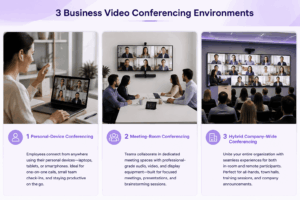
For most businesses, the answer points to one of three environments: personal-device conferencing, meeting-room conferencing or a hybrid company-wide system.
The next questions are just as important: are meetings mainly internal or external, and does the company need only scheduled video calls or persistent communication around those calls?
These distinctions are more useful than comparing platforms by feature count alone.
What Is Business Video Conferencing?
Business video conferencing is the software and supporting infrastructure companies use to hold real-time video meetings between employees, clients, partners and other participants.
Unlike simple consumer video calling, a business environment may also need centralized administration, corporate accounts, directory integration, external guest access, meeting rooms, recordings and persistent communication.
The exact system depends on how meetings happen inside the company.
A remote-first business may need only reliable desktop and mobile meetings. A company with multiple offices may need conference-room integration. A larger enterprise may need one communication environment that connects rooms, personal devices and remote employees.
Three Business Video Conferencing Environments
Personal-Device Conferencing
This is the simplest model.
Employees join meetings individually from laptops, desktop computers, smartphones or tablets.
It works well for remote teams, distributed companies, sales calls, interviews, client meetings and smaller internal discussions.
In this environment, dedicated room infrastructure matters less. The main requirements are usually reliable audio and video, screen sharing, calendar integration and a joining process that does not create unnecessary friction.
For companies with frequent external meetings, the guest experience becomes particularly important.
A platform may work perfectly for employees with corporate accounts but still be inconvenient for a customer joining for the first time.
Meeting-Room Conferencing
The requirements change when several employees participate from the same physical room.
A typical conference room may include a camera, microphones, speakers, one or more displays and a dedicated room controller or conferencing device.
Now the platform is only one part of the system.
A small huddle room may need little more than a video bar and display. A boardroom may need wider microphone coverage, multiple screens and more flexible camera positioning.
For companies with a significant meeting-room estate, hardware compatibility and centralized management can matter as much as the meeting application itself.
Existing equipment also affects migration decisions. Replacing cameras, room endpoints, PBXs or SIP/H.323 systems can make a platform change much more expensive than the software license suggests.
Hybrid Company-Wide Conferencing
Many businesses need both models at once.
A typical meeting may include people in a conference room, remote employees on laptops, mobile users and external participants.
This creates a company-wide communications environment rather than a simple video call.
The platform may need to connect room systems, personal devices, corporate identities, external guests and persistent team communication within one managed environment.
This is where architecture becomes more important.
The company is no longer selecting only a meeting application. It is deciding how different communication environments should work together.
Internal and External Meetings Are Different
Where people meet is only one part of the decision.
The other is who they meet with.
Internal meetings usually involve employees who already have company accounts, calendar access and a place inside the corporate directory. In these environments, integration with the existing productivity stack can matter more than guest simplicity.
A company already centered on Microsoft 365 may find Teams a natural fit because meetings sit inside the same environment as Outlook and other Microsoft services.
External meetings create a different problem.
Customers, suppliers, candidates and partners may not have accounts in the company’s communication system. They may join only once.
For those meetings, the critical question becomes:
How easily can someone outside the organization join?
A platform can be excellent for internal collaboration and still create too much friction for external business meetings.
Companies with frequent sales calls, interviews or partner meetings should therefore test internal and external workflows separately.
Meeting Tool or Communication Platform?
Another important distinction is what happens before and after the call.
A meeting-centric workflow often looks like this:
invite → meeting → meeting ends
That can be enough for organizations where video is mainly used for scheduled calls.
Other teams communicate continuously. They discuss a problem in chat, start a video meeting, share a presentation and continue the conversation afterwards.
That workflow is closer to:
message → discussion → video meeting → presentation → follow-up
In that case, persistent messaging and video are parts of the same communication process.
This distinction matters because a company may not actually need the most feature-rich meeting platform. It may need a communication environment that makes the transition between asynchronous and real-time work easier.
Which Business Environment Should You Optimize For?
The purpose of this table is not to choose the vendor.
It is to identify the business environment first.
Once that is clear, product comparisons become much more useful.
One Platform or Several?
A small or mid-sized business often benefits from using one primary platform.
This reduces training, administration and support complexity.
Larger organizations may have legitimate reasons to use more than one system. Internal collaboration, external webinars and specialized conference rooms can create different requirements.
The problem is not having several platforms.
The problem is accidental overlap.
If employees have three different applications capable of starting the same type of meeting, communication becomes fragmented without gaining much functionality.
A multi-platform strategy works best when every system has a clear role.
Business Video Conferencing Platforms
Several major platforms represent different business conferencing models.
Zoom
Zoom is a strong general-purpose option when meetings themselves are the main requirement.
It is particularly relevant for client calls, interviews, webinars and other sessions where external participants need a familiar joining experience.
Its role is primarily meeting-centric rather than persistent team communication.
Microsoft Teams
Teams fits organizations already centered on Microsoft 365.
Meetings exist alongside persistent chat, channels, files and the broader Microsoft environment.
Its strongest advantage is usually not video conferencing in isolation, but the fact that meetings are part of the collaboration stack employees already use.
Google Meet
Google Meet is a natural option for companies working primarily in Google Workspace.
Integration with Calendar and Gmail reduces scheduling friction, while browser-based joining can simplify participation.
It is most attractive when lightweight meetings and ecosystem integration matter more than a broad enterprise communications architecture.
Cisco Webex
Webex is more relevant to larger enterprises where conference rooms, centralized administration and broader communications infrastructure are significant parts of the deployment.
It can be a stronger fit when video conferencing extends well beyond employee laptops.
TrueConf
TrueConf is most relevant when a business needs customer-operated communications infrastructure or integration with existing SIP/H.323 systems.
It fits environments where video conferencing must connect personal devices, meeting rooms, existing enterprise video infrastructure and private networks.
RingCentral
RingCentral is more appropriate when video conferencing is part of a broader project involving telephony and business messaging.
It may be unnecessarily broad for a company that only needs standalone video meetings.
Where Secumeet Fits
Secumeet is most relevant when video conferencing is part of ongoing team communication rather than an isolated meeting workflow.
The platform combines personal chats, group chats, video meetings, screen sharing, presentations, collaboration tools and remote assistance.
The important difference is not simply the number of meeting features.
It is the continuity of communication.
A fragmented workflow might look like:
discussion in a messenger → meeting in another application → follow-up back in the messenger
A communication-centric environment can keep those activities closer together:
message → discussion → video meeting → presentation or screen sharing → follow-up
That matters for teams that communicate throughout the day and use video as an extension of ongoing work.
Secumeet therefore fits businesses that want persistent messaging and real-time video collaboration inside the same communication environment.
Meetings with 1,500 users
Let your team naturally flow from a chat conversation to an immersive 4K meeting in just one click! Bring up to 1,500 participants to your call.
Team messaging
Connect with colleagues and teams before, during and after meetings in personal and group chats.
Collaboration Tools & AI
Collaborate on projects with AI: share a screen with sound, show presentations and manage remote computers.
What to Check Before Choosing a Platform
Once the business environment is defined, a small number of practical tests matter more than a long feature checklist.
First, test how quickly both employees and external guests can join.
Then test the platform on the devices people actually use, including employee laptops, mobile devices and conference rooms.
For organizations with existing infrastructure, verify whether current room systems and communications equipment can remain in service.
Administration should also be tested as a real workflow. IT teams need to understand how accounts are provisioned, policies are applied and access is removed.
Finally, evaluate deployment requirements.
Cloud services reduce infrastructure responsibility. Customer-operated platforms provide greater infrastructure control but require more internal administration.
The better model depends on the company’s actual operating environment.
Business Video Conferencing Cost Is More Than the License
A low subscription price does not necessarily produce the lowest-cost conferencing environment.
The complete cost can include software licenses, room hardware, network capacity, administration, support, recording storage and training.
Customer-operated systems may also require server infrastructure and internal IT resources.
For room-heavy companies, hardware replacement can become a larger cost than conferencing software itself.
The useful comparison is therefore not simply:
What does the license cost?
It is:
What will this communication environment cost to deploy and operate?
Frequently Asked Questions
What is business video conferencing?
Business video conferencing is software and infrastructure used by companies to hold real-time video meetings between employees, clients, partners and other participants.
It can include personal-device meetings, conference rooms, centralized administration, messaging and enterprise integrations.
What is the best business video conferencing platform?
There is no universal best platform.
The correct choice depends first on whether employees mainly meet from personal devices, conference rooms or both.
It also depends on whether meetings are mainly internal or external and whether the company needs only scheduled calls or persistent communication around those meetings.
What is the difference between business video conferencing and a regular video call?
Business platforms generally add organizational capabilities such as corporate accounts, centralized administration, room support, guest management and integration with existing business systems.
Is Zoom or Microsoft Teams better for business?
They solve somewhat different problems.
Zoom is strongly meeting-centric and is particularly useful for organizations with frequent external calls.
Teams fits companies where video meetings are part of the broader Microsoft 365 collaboration environment.
Do businesses need dedicated video conferencing hardware?
Not always.
Employees joining individually can usually use laptops, webcams and headsets.
Dedicated hardware becomes more important when several people regularly join from the same meeting room.
Should business video conferencing include team messaging?
Only when persistent communication is part of the work pattern.
For companies where teams discuss issues before and after meetings, combining messaging and video can reduce tool switching and keep communication context together.
Is cloud or customer-operated video conferencing better?
Cloud platforms generally reduce infrastructure and administration requirements.
Customer-operated platforms provide greater control over where the communication environment runs and may be more appropriate for businesses with private infrastructure or existing enterprise communication systems.
Conclusion
Business video conferencing should be selected around the way a company actually communicates.
The first distinction is where meetings happen: personal devices, meeting rooms or both.
The second is who participates: internal employees or external guests.
The third is what happens around the call: a standalone meeting or persistent team communication.
Once these questions are answered, platform selection becomes much easier.
Zoom fits broad general-purpose and external meetings.
Microsoft Teams and Google Meet fit companies already centered on their respective productivity ecosystems.
Webex is relevant to room-heavy enterprise deployments.
TrueConf fits customer-operated and SIP/H.323-connected environments.
Secumeet fits businesses that want persistent messaging and video collaboration to remain part of the same communication workflow.
The most useful question is not:
Which platform has the longest feature list?
It is:
Which system matches where our people meet, who they meet with and how communication continues before and after the call?
Author
Helga Afon is a technology writer specializing in video conferencing, collaboration software, and workplace communication. She writes articles and reviews that help readers better understand enterprise communication tools and industry trends.