
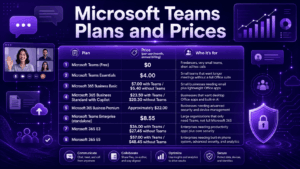
Microsoft Teams is not sold as one standalone product. It is a feature layered into Microsoft 365 subscriptions, sold as a lightweight standalone tier for small teams, and sold again as an enterprise suite with phone, security, and AI add-ons stacked on top. That structure is exactly why “how much does Teams cost” rarely has a one-line answer.
As of mid-2026, paid Microsoft Teams access ranges from $4.00 per user per month for Teams Essentials, billed annually, up to $57.00 per user per month for the full Microsoft 365 E5 enterprise suite.
In between sit business bundles, calling add-ons, meeting-room hardware licenses, and an AI layer, Copilot, that is priced separately from everything else. Most of the confusion buyers run into does not come from the list prices themselves. It comes from figuring out which bundle actually includes Teams, which one requires an add-on for calling, and which “Business Standard” price is quoting Copilot as a default inclusion rather than an option.
This guide lays out every current plan, what each one actually includes, the add-ons that push real-world spend well above the sticker price, and a practical framework for choosing between them.
At a Glance: Microsoft Teams Plans and Prices (2026)
Add-ons such as Teams Phone, Teams Premium, Teams Rooms licensing, and Microsoft 365 Copilot are billed on top of any of these base plans, and they are where budgets most commonly get thrown off.
How Microsoft Teams Pricing Actually Works
Before comparing numbers, it helps to understand the three separate paths Microsoft sells Teams through:
-
Standalone Teams licenses. Teams Essentials for small business and Teams Enterprise for large organizations give you chat, meetings, and calling without buying the rest of Microsoft 365.
-
Bundled inside Microsoft 365. Business Basic, Business Standard, Business Premium, E3, and E5 all include Teams as one app among several, alongside Exchange email, Office apps, and storage.
-
Add-ons layered on top. Calling, Teams Phone, advanced meeting features, Teams Premium, meeting-room hardware licensing, Teams Rooms, and AI, Microsoft 365 Copilot, are all priced and purchased separately from the base plan.
Every paid tier, regardless of price, includes the same core meeting mechanics: unlimited chat with search, video meetings supporting up to 300 or 1,000 interactive participants depending on tier, screen sharing, and cloud-recorded meetings.
What changes between tiers is storage, Office app access, security tooling, device limits, and whether calling and AI are included or sold separately.
Insight: the deciding factor for most buyers is not the Teams features at all. Since chat, video, and screen sharing are functionally similar from Essentials all the way up to E5, the real decision usually comes down to whether you need the surrounding Microsoft 365 apps, such as Word, Excel, Exchange email, and SharePoint, or just the meeting and chat layer.
Microsoft Teams Free Plan
The free tier is designed for individuals and very small groups who need basic video calls and chat without any commitment. It includes:
-
Unlimited one-to-one and group chat
-
Video meetings capped at roughly 60 minutes per session
-
Support for up to about 100 participants
-
Screen sharing and basic file sharing
-
Around 5 GB of shared cloud storage per user
The free plan works fine for freelancers running quick client calls or small groups doing daily standups. The limitations show up fast once meetings regularly run past an hour, teams need more than 100 attendees, or anyone wants meeting recordings, since recording is not available on the genuinely free tier.
Business Plans Breakdown
Business plans are aimed at organizations of up to 300 employees. All of them include core Teams functionality with unlimited chat, video meetings up to 30 hours long, and up to 300 participants per meeting. Where they differ is storage, Office app access, and whether business email and AI are bundled in.
Microsoft Teams Essentials is the only plan on this list that does not require a Microsoft 365 subscription. It adds real-time collaboration features on top of the free tier, including file sharing, task assignment, polling, meeting recordings with transcripts, and English-language live captions.
If your organization already uses Gmail or another email provider and just wants better meetings and chat, Essentials fills that gap without paying for Office apps you will not use.
Microsoft 365 Business Basic costs a few dollars more than Essentials but includes a custom business email address, 1 TB of cloud storage per user versus 10 GB on Essentials, and web and mobile versions of Word, Excel, PowerPoint, and Outlook. For most small businesses that need email plus Teams, Basic is a more complete deal than Essentials for a modest premium.
Microsoft 365 Business Standard with Copilot is where pricing gets more interesting in 2026. Microsoft’s current comparison page lists Business Standard at $23.50 per user per month with Copilot bundled in by default, rather than offering a lower-priced Copilot-free version as the headline option.
A no-Teams, no-Copilot equivalent exists at $20.30, but the plain “Business Standard without Copilot, with Teams” configuration that many buyers remember from previous years is no longer the primary listed offer.
Insight: this is a meaningful shift for budgeting. Organizations that assumed Business Standard would still land around $12 to $15 per user per month, a price point many third-party comparison sites still reference, should verify current figures directly, since Microsoft has restructured the plan to include Copilot Business as a default component rather than a pure add-on.
Microsoft 365 Business Premium adds advanced identity and access management, cyberthreat protection, and device security on top of everything in Business Standard, but it does not automatically include Teams Premium features like AI meeting recaps, which still require separate licensing.
Enterprise Plans Breakdown
Enterprise plans are built for organizations with more than 300 users, or those needing compliance tooling, advanced analytics, or a built-in phone system.
The gap between E3 and E5 is more than $20 per user per month, but that gap can shrink or disappear once phone calling enters the picture. E3 does not include Teams Phone; adding it separately costs $10 per user per month for the base license, plus a calling plan on top.
E5 includes Teams Phone’s calling capability as part of the suite along with Power BI Pro, extended detection and response, XDR, and hybrid identity protection.
Insight: for a large organization that needs desk phone replacement across the workforce, comparing E3 plus Teams Phone plus a calling plan against E5 directly is essential, because once calling minutes and security add-ons are priced in, E5 can end up costing about the same as, or even less than, a fully loaded E3 deployment, while also including analytics and security features E3 lacks outright.
Teams Phone and Calling Add-Ons
Teams Phone is the most commonly underestimated line item in a Teams budget. The base license alone does not enable calls outside your organization; it only turns on the cloud phone system architecture.
Insight: the regional gap in what you get for the same $17 price point is significant. US, UK, and Canadian customers on the Domestic Calling Plan receive 3,000 outbound minutes per user per month, while customers in most other regions receive only 1,200 minutes for the identical price, a 60 percent smaller allowance at the same cost.
Organizations with 200 or more users and existing telecom contracts often skip Microsoft’s calling plans entirely and use Direct Routing instead, which only requires the $10 Teams Phone base license plus a Session Border Controller, typically $2,000 to $50,000 depending on scale, and their existing carrier’s per-minute rates.
This route usually reaches a breakeven point against Microsoft’s calling plans within 18 to 24 months for larger deployments, though it adds infrastructure and maintenance overhead that smaller organizations rarely find worthwhile.
Teams Premium, Teams Rooms, and Copilot
Beyond calling, three more add-ons commonly appear in real deployments:
-
Teams Premium costs $10.00 per user per month and adds AI-generated meeting recaps, live translation across more than 40 languages, custom meeting branding, and watermarking for sensitive content.
-
Teams Rooms Basic is free with a certified meeting-room device, limited to 25 rooms, and covers one-touch meeting join and wireless content sharing.
-
Teams Rooms Pro costs $40.00 per room per month and adds AI-optimized audio and video, enterprise device management, and IT service management integration, aimed at organizations managing meeting rooms at scale.
-
Microsoft 365 Copilot as a standalone add-on costs $18.00 to $21.00 per user per month for business plans and $30.00 per user per month for enterprise plans, layering AI chat and content generation across Word, Excel, PowerPoint, and Teams.
Hidden Costs to Budget For
Published per-user prices rarely reflect what an organization actually pays once real usage patterns kick in. Three categories consistently catch buyers off guard:
-
Calling costs stacked on top of Teams Phone. The jump from the $10 base license to a working PSTN calling setup can add $7 to $24 per user per month.
-
AI add-ons priced separately from the base plan. Copilot is never bundled for free into Business Basic, Business Premium, E3, or standalone Teams Enterprise; it is always an additional per-user charge, ranging from $18 to $30 depending on plan tier.
-
Storage overages for large or long-tenured teams. Business Basic and Business Standard include 1 TB of OneDrive storage per user, but organizations doing heavy meeting recording or large file collaboration at scale may need additional storage.
How to Choose the Right Plan
A simple decision path for most organizations:
-
Just need better meetings, no email or Office apps: Teams Essentials at $4.00 per user per month.
-
Need business email plus lightweight Office apps: Microsoft 365 Business Basic at $7.00 per user per month.
-
Need full desktop Office apps and built-in AI: Microsoft 365 Business Standard with Copilot at $23.50 per user per month.
-
Need advanced security and device management for a small-to-mid business: Microsoft 365 Business Premium at approximately $22.00 per user per month.
-
Large organization, Teams only, no other Microsoft 365 apps: Microsoft Teams Enterprise standalone at $8.55 per user per month.
-
Large organization needing productivity apps and core security: Microsoft 365 E3 at $36.00 per user per month.
-
Large organization needing built-in phone system, advanced security, and analytics: Microsoft 365 E5 at $57.00 per user per month.
More Affordable Microsoft Teams Alternatives
Microsoft Teams can be cost-effective for companies already using Microsoft 365, but it is not always the cheapest option once calling, AI features, meeting-room licensing, and enterprise add-ons are included.
Organizations that mainly need secure messaging, video meetings, screen sharing, and collaboration tools may find better value in more focused platforms.
Here are several Microsoft Teams alternatives that may offer a lower total cost of ownership depending on deployment model, required features, and team size.
Microsoft Teams Alternatives
Secumeet
Secumeet is suitable for companies that need secure video meetings, team messaging, and collaboration without the full Microsoft 365 stack. It may be cheaper than Microsoft Teams because it focuses on communication features rather than bundling email, Office apps, Copilot, and multiple paid add-ons.
TrueConf
TrueConf is suitable for organizations that prefer self-hosted video conferencing and collaboration, including private network or on-premises deployment. It can reduce recurring per-user costs for companies that want to keep communications on their own infrastructure instead of paying for multiple cloud licenses.
Google Workspace
Google Workspace is suitable for teams that need email, cloud storage, documents, and video meetings in one lightweight business suite. It may be more predictable for companies that do not need advanced Teams Phone, Microsoft security bundles, or Copilot.
Zoom Workplace
Zoom Workplace is suitable for teams focused mainly on video meetings, webinars, and external collaboration. It can be simpler to budget for if meetings are the main use case and the company does not need the broader Microsoft 365 ecosystem.
Slack
Slack is suitable for companies that prioritize team messaging, channels, and integrations over enterprise video infrastructure. It may be more efficient for teams that already use separate tools for documents, email, and video meetings and only need a strong collaboration hub.
Key Takeaways
Bottom Line First
The right choice depends less on the headline subscription price and more on what the organization actually needs. If Microsoft 365 apps, Outlook, SharePoint, Teams Phone, Copilot, and advanced security are all required, Teams can make sense as part of a larger bundle.
What Most People Get Wrong
Teams may look inexpensive at the entry level, but the real cost can rise quickly once phone calling, Copilot, Teams Premium, Teams Rooms, storage, and enterprise security add-ons are included.
If the goal is mainly secure communication, video conferencing, and internal collaboration, alternatives such as Secumeet, TrueConf, Google Workspace, Zoom Workplace, or Slack may provide a simpler and potentially cheaper setup.
Frequently Asked Questions
Is Microsoft Teams free to use?
Yes, a genuinely free version exists with unlimited chat, video meetings limited to around 60 minutes, support for roughly 100 participants, and about 5 GB of shared storage. It suits freelancers and very small teams but lacks meeting recording and the longer meeting durations available on paid tiers.
What is the cheapest paid Microsoft Teams plan?
Microsoft Teams Essentials is the cheapest paid option at $4.00 per user per month when billed annually. It is a standalone plan, meaning it does not require a Microsoft 365 subscription, and it extends meetings to 30 hours with up to 300 participants.
Does Microsoft Teams pricing include phone calling?
No. The base Teams Phone license costs $10.00 per user per month and only enables the cloud phone system architecture. Actual outbound calling requires an additional calling plan, which raises the effective cost to between $13.00 and $34.00 per user per month depending on the calling plan selected.
Is Microsoft 365 Copilot included in any Teams or Microsoft 365 plan by default?
Copilot is bundled by default in Microsoft 365 Business Standard with Copilot at $23.50 per user per month. For every other business and enterprise plan, including Business Basic, Business Premium, standalone Teams Enterprise, and E3, Copilot is sold as a separate add-on ranging from $18.00 to $30.00 per user per month.
Is Microsoft 365 E5 worth the extra cost over E3?
It depends on whether your organization needs a built-in phone system. E3 costs $36.00 per user per month and does not include Teams Phone calling, while E5 costs $57.00 per user per month but bundles the phone system, Power BI Pro, and advanced security features. For organizations already planning to add Teams Phone and advanced security to E3 separately, E5’s all-in price can end up comparable or lower.
Can I switch from the free version of Teams back to free after upgrading?
No. Once an account converts from free to a paid subscription, that email address cannot revert to a free account. A different email address would be needed to create a new free account, for both the organization admin and each individual user.
How does Teams pricing compare to Zoom, Slack, and Google Workspace?
At the entry level, Teams Essentials at $4.00 per user per month is generally the least expensive option compared to Zoom, Google Workspace Business tiers, and Slack. Once calling, Copilot, and full Microsoft 365 apps are added, however, total costs across these platforms tend to converge.
Author
Helga Afon is a technology writer specializing in video conferencing, collaboration software, and workplace communication. She writes articles and reviews that help readers better understand enterprise communication tools and industry trends.