
A video call can be encrypted and still be insecure.
Someone may be unable to intercept the audio and video in transit while an attacker can still take over an account, join through a leaked invitation, access a recording, compromise a participant’s device, or collect metadata about who communicated with whom.
That is why secure video calling should not be reduced to one question:
Does this app use encryption?
A more useful security model is:
device → identity → access → media → metadata → stored data → infrastructure
Each layer protects against a different threat.
The right video calling tool is therefore the one that matches the risks your organization or users actually need to control.
Key Findings
-
Encryption is necessary, but it protects only part of the video call security chain.
-
End-to-end encryption can prevent the service provider from decrypting supported meeting content, but it does not automatically protect compromised endpoints, account credentials, invitations, recordings, or every type of metadata.
-
Identity verification and access control matter because an encrypted conversation is not private if the wrong participant is admitted.
-
Recordings, transcripts, chats, files, and AI summaries can remain sensitive after the live call ends.
-
Privacy and security are related but different. A service can protect call content while still processing information about accounts, devices, or communication patterns.
-
Personal privacy-first apps and enterprise video conferencing systems solve different security problems and should not be ranked using one universal score.
-
Self-hosting changes who operates the infrastructure, but it also transfers more security responsibility to the organization.
-
E2EE can disable functions that require server-side processing, including some recording, transcription, AI, interoperability, and telephony features.
-
The safest configuration depends on the threat model rather than on the platform with the longest security feature list.
What Makes a Video Call Secure?
A secure video call protects more than the video stream.
It should address several questions:
-
Who can join?
-
How is each participant authenticated?
-
Can another party intercept the media?
-
Can the service provider decrypt the call?
-
What metadata does the service retain?
-
What happens if the meeting is recorded?
-
Can transcripts or AI summaries be created?
-
Is the participant’s device trustworthy?
-
Who operates the communication infrastructure?
This leads to seven major security layers.
The 7 Layers of Video Call Security
A weakness in any layer can undermine the whole conversation.
1. Device Security
The security chain begins before the video application starts.
If a participant’s laptop or phone is compromised, malware can potentially access information:
-
before it is encrypted;
-
after it is decrypted;
-
through screenshots;
-
through microphone or camera access;
-
through stolen account credentials.
End-to-end encryption does not solve endpoint compromise.
For sensitive calls, organizations should therefore consider:
-
operating system updates;
-
supported devices;
-
device encryption;
-
screen locking;
-
endpoint protection;
-
application permissions;
-
managed-device policies.
For highly sensitive communication, a trusted endpoint can matter more than choosing between two strong encryption protocols.
2. Identity Security
Encryption answers:
Can someone intercept the communication?
Identity answers:
Who are we actually communicating with?
A secure system should provide an appropriate way to verify users.
Depending on the environment, this may involve:
-
account authentication;
-
MFA;
-
enterprise SSO;
-
corporate directory integration;
-
verified contact identities;
-
participant security codes.
For an executive discussion, legal consultation, or incident-response call, knowing that the connection is encrypted is not enough if an attacker has taken control of a legitimate participant account.
3. Meeting Access Security
Identity and meeting admission are related but separate.
Even legitimate users should not automatically have access to every call.
Useful controls include:
-
unique meeting links;
-
meeting passwords;
-
waiting rooms;
-
authenticated-user restrictions;
-
lobby admission;
-
meeting locks;
-
participant removal;
-
host permissions.
A common security failure is not broken encryption.
It is an invitation link being forwarded to someone who should never have received it.
4. Media Encryption
Media encryption protects:
-
audio;
-
video;
-
screen sharing
while communication is taking place.
There are two concepts that are often confused.
Transport Encryption
The connection between participants and communication infrastructure is encrypted.
This helps prevent network interception.
The server may still participate in processing the media and key management.
End-to-End Encryption
With E2EE, supported content is encrypted at the sending endpoint and decrypted at participating endpoints.
Properly implemented E2EE prevents the intermediate communication service from decrypting that content.
This provides stronger protection against threats involving:
-
compromised communication servers;
-
infrastructure administrators;
-
certain third-party access scenarios.
But E2EE is not a complete video call security model.
What End-to-End Encryption Does Not Protect
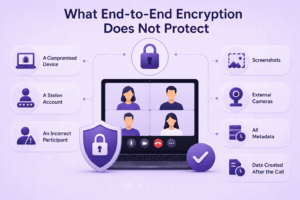
E2EE is powerful, but its boundaries matter.
It does not automatically protect against:
A Compromised Device
If malware can read what appears on the screen or capture microphone input, E2EE does not help.
A Stolen Account
An attacker authenticated as a legitimate user may become a legitimate endpoint in the encrypted conversation.
An Incorrect Participant
Encryption protects communication with the people who are present.
It does not decide whether those people should be there.
Screenshots
A participant can capture information after it has been decrypted and displayed.
External Cameras
Nothing prevents someone in the room from photographing or recording another screen.
All Metadata
The provider may still need some technical information to:
-
route traffic;
-
authenticate users;
-
operate sessions;
-
prevent abuse.
Data Created After the Call
A transcript, recording, exported chat, or AI summary can create a new copy of sensitive information outside the original encrypted session.
The practical rule is:
E2EE protects the communication channel, not every system or person around it.
5. Metadata Privacy
Video call content is not the only sensitive information.
Metadata can include:
-
participant identities;
-
account identifiers;
-
IP addresses;
-
device information;
-
meeting times;
-
call duration;
-
interaction frequency;
-
technical logs.
Consider two executives communicating every evening during an acquisition.
Even without knowing what they discuss, the communication pattern itself may reveal useful information.
Privacy-focused products may therefore attempt to minimize the metadata they retain in addition to protecting meeting content.
This is where security and privacy begin to diverge.
Secure vs Private Video Calls
A secure video call focuses on preventing unauthorized access, interception, manipulation, and account compromise.
A private video call also considers how much information is available to:
-
the platform provider;
-
analytics systems;
-
other participants;
-
connected services;
-
third parties.
A platform can therefore be technically secure without minimizing all possible data collection.
Likewise, a privacy-focused service still needs:
-
reliable authentication;
-
secure software;
-
protected devices;
-
sensible access controls.
For sensitive communication, buyers should evaluate both.
6. Recordings, Transcripts, Chat, and AI
The attack surface often expands when the live conversation ends.
Consider this lifecycle:
video call → recording → transcript → AI summary → storage → sharing → retention
Each step can create another copy of sensitive information.
Recording
Ask:
-
Who can start recording?
-
Are participants notified?
-
Where is it stored?
-
Who can download it?
-
When is it deleted?
Transcript
A transcript can be easier to:
-
search;
-
copy;
-
export;
-
index
than a video recording.
That can increase both usefulness and exposure.
Meeting Chat
Sensitive information may also be typed into:
-
meeting chat;
-
persistent chat;
-
shared notes.
AI Assistants
AI functionality can require access to:
-
audio;
-
transcripts;
-
chat;
-
meeting context;
-
documents.
For sensitive meetings, determine whether AI processing is appropriate before the call rather than after confidential content has already been processed.
7. Infrastructure and the Control Plane
Every video calling system needs infrastructure that manages some combination of:
-
authentication;
-
signaling;
-
media routing;
-
meeting creation;
-
access policies;
-
key exchange;
-
recording;
-
administration.
This infrastructure can be:
-
vendor-operated cloud;
-
hybrid;
-
customer-hosted.
The choice affects who operates the control plane.
Vendor Cloud
The provider manages most of the system.
Advantages include:
-
easier deployment;
-
automatic scaling;
-
vendor-managed updates.
The trade-off is that the organization does not directly operate the communication infrastructure.
Customer-Hosted
The organization operates the communication environment itself.
This can provide greater infrastructure control and enable use inside private networks.
The trade-off is increased responsibility for:
-
patching;
-
server security;
-
identity;
-
backups;
-
monitoring;
-
availability.
Self-hosting removes one type of dependency but creates operational obligations.
Common Video Call Threats
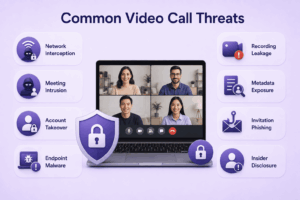
Understanding threats first makes product comparison more useful.
Network Interception
An attacker attempts to capture communication traffic.
Primary defense:
strong transport encryption and, where appropriate, E2EE
Meeting Intrusion
An unauthorized user obtains access to a call.
Primary defenses:
-
authentication;
-
unique links;
-
waiting rooms;
-
admission controls;
-
meeting locks.
Account Takeover
An attacker steals a user’s credentials.
Primary defenses:
-
MFA;
-
SSO;
-
phishing resistance;
-
session management.
Endpoint Malware
An attacker compromises the user’s device.
Primary defenses:
-
endpoint security;
-
updates;
-
application controls;
-
managed devices.
Recording Leakage
A legitimate recording becomes accessible to the wrong person.
Primary defenses:
-
recording permissions;
-
access control;
-
secure storage;
-
retention policies.
Metadata Exposure
Communication patterns reveal sensitive information.
Primary defenses vary by provider architecture and privacy model.
Invitation Phishing
An attacker sends a fake meeting invitation designed to steal credentials or install malware.
Primary defenses:
-
verify the sender;
-
check meeting domains;
-
avoid unknown downloads;
-
use organizational meeting systems.
Insider Disclosure
A legitimate participant deliberately shares information.
No encryption protocol can fully prevent this.
Security must include:
-
participant selection;
-
policy;
-
information classification;
-
user awareness.
Secure Video Calling Tools by Use Case
There is no useful universal ranking from “most secure” to “least secure.”
A privacy-focused personal application and an enterprise customer-hosted conferencing server have different threat models.
The more useful comparison is by use case.
Privacy-First Video Calling
Signal
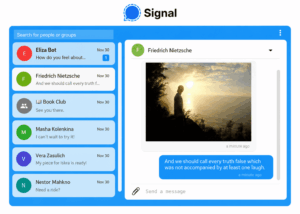
Best for: Personal and small-group communication where end-to-end encrypted communication and a privacy-oriented design are priorities.
Signal provides encrypted messaging, voice calls, and video calls within the same application.
The main advantage is consistency:
message → call → video
uses the same privacy-oriented communication environment.
Why it fits
Signal is appropriate when users want:
-
direct communication;
-
minimal workflow complexity;
-
encrypted messaging and calling together.
Trade-off
It is not a replacement for a full enterprise collaboration environment with:
-
conference rooms;
-
corporate directory administration;
-
webinars;
-
centralized meeting governance.
FaceTime

Best for: Private video calls between users in the Apple ecosystem.
FaceTime uses end-to-end encryption for conversations.
Its main strength is that secure video communication is integrated directly into Apple devices and identity.
Why it fits
For people already using supported Apple devices, there is little additional setup.
Trade-off
It is not designed as a vendor-neutral enterprise communication system.
Organizations needing broad administrative controls or mixed-device enterprise workflows should evaluate business platforms instead.
Proton Meet
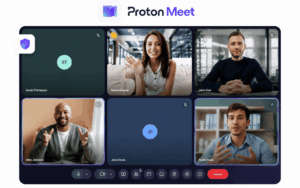
Best for: Users and teams wanting privacy-oriented browser-based meetings with end-to-end encryption.
Proton Meet uses end-to-end encryption for meeting content and is designed to minimize the provider’s access to communication content.
It represents a different model from messaging-first applications such as Signal:
meeting link + privacy-first architecture
Why it fits
It is relevant when users want the simplicity of a meeting tool while prioritizing confidentiality from the service provider.
Trade-off
It is a newer meeting platform with a smaller business ecosystem than established enterprise collaboration suites.

Best for: Small-group personal video calls where participants already use WhatsApp.
WhatsApp combines end-to-end encrypted messaging with encrypted voice and video calling.
Its biggest practical advantage is existing adoption.
Why it fits
No additional communication platform may need to be introduced.
Trade-off
Consumer messaging is generally not a substitute for centralized enterprise video governance.
Organizations should distinguish employee convenience from organizational control requirements.
Secure Business and Enterprise Video Calling
TrueConf
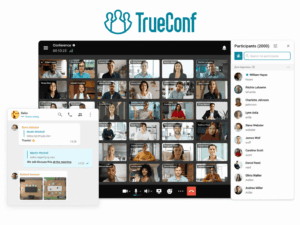
Best for: Organizations that need video communication on customer-operated infrastructure.
TrueConf Server can operate inside infrastructure managed by the organization, including LAN and VPN environments.
It combines:
-
video meetings;
-
personal and group messaging;
-
user administration;
-
recording;
-
content sharing;
-
SIP/H.323 interoperability.
This creates a different trust model from a conventional vendor-hosted SaaS platform.
Why it fits
Organizations can keep the communication server and associated infrastructure inside their own environment.
This is relevant when the threat model includes:
-
public-cloud dependency;
-
infrastructure sovereignty;
-
restricted networks;
-
existing private communication infrastructure.
Important distinction
Customer-hosted infrastructure does not automatically make every call secure.
Administrators still need to protect:
-
servers;
-
credentials;
-
endpoints;
-
recordings;
-
backups;
-
network access.
Trade-off
The organization assumes more infrastructure and security-management responsibility.
Zoom

Best for: Organizations that need strong meeting security controls together with broad external collaboration.
Zoom provides encrypted meetings by default and also supports an optional end-to-end encrypted meeting mode.
When E2EE is enabled, participant devices generate and hold the meeting encryption keys rather than Zoom’s servers.
E2EE trade-off
Some features that depend on server-side access cannot operate normally in an end-to-end encrypted session.
These can include:
-
cloud recording;
-
live transcription;
-
AI functions;
-
certain integrations;
-
telephony or room interoperability.
This demonstrates an important security principle:
Stronger isolation can reduce server-assisted functionality.
Why it fits
Zoom is useful when organizations need a combination of:
-
external meetings;
-
enterprise administration;
-
configurable higher-security sessions.
Trade-off
The standard service remains vendor-operated cloud infrastructure.
Microsoft Teams

Best for: Microsoft 365 organizations that need meeting security integrated with enterprise identity and administration.
Teams provides security through the wider Microsoft environment, including:
-
identity management;
-
MFA;
-
administrative policy;
-
meeting access controls;
-
auditing;
-
device management.
Teams also supports end-to-end encryption for appropriately configured meetings.
E2EE trade-off
End-to-end encrypted Teams meetings can disable features that require Microsoft services to process meeting content.
Examples can include:
-
recording;
-
transcription;
-
live captions;
-
Copilot;
-
PSTN participation.
Why it fits
The security advantage for Microsoft organizations is not one encryption feature.
It is the connection between:
identity → device → meeting → policy → audit
Trade-off
The platform depends on Microsoft’s cloud environment and carries substantial complexity for organizations that only need simple video calling.
Cisco Webex
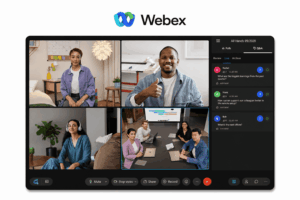
Best for: Enterprises needing detailed security controls, identity integration, room-system support, and advanced meeting protection.
Webex provides security options for both standard enterprise communication and higher-sensitivity meetings.
Its security architecture can include:
-
encrypted communication;
-
meeting access controls;
-
enterprise identity;
-
Zero Trust meeting configurations;
-
administrative policy.
Why it fits
Webex is particularly relevant where secure communication must coexist with:
-
physical conference rooms;
-
large organizations;
-
centralized IT administration.
Trade-off
Its breadth can introduce more configuration complexity than a privacy-first personal calling application.
Pexip
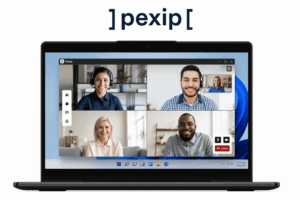
Best for: Organizations that require secure enterprise video interoperability and greater deployment control.
Pexip Infinity can be self-hosted on:
-
customer premises;
-
private cloud;
-
hybrid infrastructure.
This makes it relevant when video calling must integrate with existing enterprise systems while keeping infrastructure under organizational control.
Why it fits
Pexip addresses a security problem different from Signal or FaceTime.
The priority is not personal privacy.
It is controlled enterprise video infrastructure and interoperability.
Trade-off
It is a specialized enterprise solution rather than a lightweight everyday calling app.
Open-Source and Self-Hosted Video Calling
Jitsi Meet
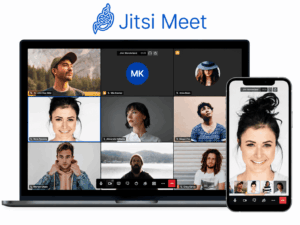
Best for: Technical teams that want open-source video conferencing and the option to operate their own meeting infrastructure.
Jitsi Meet protects normal network media traffic using WebRTC security mechanisms and also supports optional end-to-end encryption for supported audio, video, and screen-sharing scenarios.
Jitsi can also be self-hosted.
Why it fits
Self-hosting changes the trust boundary.
Instead of relying on a public instance, the organization can operate its own conferencing environment.
Important limitation
Jitsi itself points out that E2EE does not necessarily cover every collaboration feature.
For example, audio/video protection and other features such as chat or polls can have different encryption boundaries.
This is another reason not to use:
E2EE: Yes
as the only security metric.
Trade-off
Self-hosting requires technical capacity and ongoing security maintenance.
Security Comparison by Threat Model
This is not a universal security ranking.
The correct choice depends on the threat.
When Do You Need E2EE?
E2EE becomes particularly relevant when the threat model includes the possibility that communication infrastructure itself should not have access to meeting content.
Examples may include:
-
confidential executive discussions;
-
sensitive legal conversations;
-
security incident response;
-
investigative journalism;
-
confidential negotiations;
-
high-value intellectual property.
But E2EE is not automatically required for every routine business meeting.
Organizations need to balance:
content isolation vs required functionality
A normal team call may need:
-
transcription;
-
recording;
-
telephony;
-
room systems;
-
AI summaries.
A board discussion may prioritize confidentiality over all of those capabilities.
The same organization can therefore use different security configurations for different meetings.
When E2EE Is Not Enough
Consider a hypothetical board meeting.
The application uses strong E2EE.
But:
-
One director uses a compromised laptop.
-
Another forwards the invite.
-
A third records the meeting with another device.
-
The host exports sensitive notes afterward.
The encryption protocol worked perfectly.
The meeting was still compromised.
This is why secure video calling should be treated as a chain rather than a feature.
Security Checklist Before a Sensitive Video Call
Before starting a sensitive conversation, check the following.
Participants
-
Do you know who should attend?
-
Can participant identity be verified?
-
Have unnecessary invitees been removed?
Invitation
-
Is the meeting link unique?
-
Has it been shared only through appropriate channels?
-
Is additional authentication required?
Meeting Settings
-
Is a waiting room appropriate?
-
Should participants be admitted manually?
-
Should the meeting be locked after everyone joins?
-
Who can share the screen?
-
Who can record?
Encryption
-
What encryption mode is active?
-
Does the meeting require E2EE?
-
Can participants verify the secure session where supported?
Devices
-
Are participants using trusted devices?
-
Are operating systems and applications current?
-
Are unnecessary applications closed?
Physical Environment
-
Can other people hear the conversation?
-
Are smart speakers or other recording devices nearby?
-
Is the screen visible from outside the room?
Recording
-
Is recording actually necessary?
-
Who receives the recording?
-
How long will it be stored?
AI and Transcription
-
Are transcription or AI assistants enabled?
-
Are they required?
-
What additional data do they create?
How to Configure Video Calls More Securely
Use Unique Meeting Links
Avoid repeatedly using the same public meeting room for unrelated sensitive discussions.
Require Authentication Where Appropriate
For internal calls, organizational identity can be preferable to anonymous joining.
Enable MFA
Protect the account hosting the meeting.
Use Waiting Rooms
Especially useful when:
-
external participants are joining;
-
invitations may have been forwarded;
-
the meeting topic is sensitive.
Restrict Screen Sharing
Allow only the people who actually need it.
Minimize Recording
Do not automatically convert every sensitive live conversation into stored data.
Disable Unnecessary Features
For a highly sensitive meeting, consider whether you really need:
-
bots;
-
external apps;
-
recording;
-
transcription;
-
AI assistance.
Each additional service can enlarge the processing surface.
Verify E2EE
If E2EE is required, confirm that:
-
it is actually enabled;
-
participants use supported clients;
-
the application indicates the expected encryption mode.
Do not assume that because a product supports E2EE, every call automatically uses it.
Cloud vs Self-Hosted Video Call Security
Neither architecture is universally safer.
They assign security responsibility differently.
A well-operated cloud platform can be more secure than a poorly maintained self-hosted server.
Likewise, a well-operated self-hosted environment can satisfy security requirements that a public-cloud architecture cannot.
The question is:
Which trust boundary matches your threat model and operational capability?
Common Secure Video Calling Mistakes
Looking Only for the Word “Encrypted”
Almost every major communication platform uses encryption somewhere.
Ask what is encrypted, when, and who controls the relevant keys.
Assuming E2EE Makes the Entire Platform Private
E2EE primarily protects supported content.
It does not automatically eliminate all metadata or protect endpoints.
Ignoring Identity
A perfectly encrypted conversation with an attacker is still a security failure.
Reusing Meeting Links
Persistent public links enlarge the opportunity for accidental or unauthorized access.
Recording Everything
Stored recordings create a long-lived target.
Ignoring Meeting Chat
Sensitive data can leave the spoken conversation and remain in chat history.
Enabling Every AI Feature by Default
AI meeting features may create additional:
-
transcripts;
-
summaries;
-
stored outputs.
Use them based on the information sensitivity of the meeting.
Assuming Self-Hosting Is Automatically Secure
The organization becomes responsible for server security.
Comparing Personal Apps and Enterprise Platforms as if They Solve the Same Problem
Signal and TrueConf can both support video communication, but their operational security models and target workflows are fundamentally different.
How to Pilot a Secure Video Calling Platform
Do not evaluate only call quality.
Test the security workflow.
Test Access
Try joining:
-
anonymously;
-
from an unauthorized account;
-
through a forwarded invitation.
Test Account Protection
Review:
-
MFA;
-
SSO;
-
session management;
-
account recovery.
Test E2EE
When supported:
-
enable it;
-
confirm every participant can join;
-
identify which features disappear;
-
verify the encryption indicator.
Test Recording
Create a test recording.
Determine:
-
where it goes;
-
who can see it;
-
whether it can be downloaded;
-
how it is deleted.
Test User Removal
Remove an employee or test user.
Confirm that access to:
-
meetings;
-
recordings;
-
persistent chat;
-
files
is actually revoked.
Test a Compromised Workflow
Ask:
If a participant accidentally forwards this invitation, what prevents an unauthorized person from joining?
That question often reveals more about practical security than an encryption table.
Decision Matrix
Frequently Asked Questions
What is secure video calling?
Secure video calling uses technical and operational controls to protect conversations against unauthorized access, interception, account compromise, data leakage, and other threats.
Encryption is one component, but secure calling also depends on:
-
identity;
-
access;
-
endpoint security;
-
recordings;
-
metadata;
-
infrastructure.
What is the safest way to make a video call?
There is no universal safest platform for every threat model.
For a highly sensitive call:
-
Use trusted devices.
-
Verify participants.
-
Protect accounts with MFA.
-
Restrict meeting access.
-
Use E2EE if the threat model requires it.
-
Disable unnecessary recording, transcription, and integrations.
-
Protect the physical environment.
Are encrypted video calls secure?
Encryption substantially reduces the risk of network interception.
But an encrypted call can still be compromised through:
-
stolen credentials;
-
malware;
-
unauthorized participants;
-
leaked recordings;
-
human disclosure.
What is the difference between encrypted and end-to-end encrypted video calls?
Transport-encrypted systems protect communication while it moves across the network, but the communication infrastructure may participate in key management or media processing.
With properly implemented E2EE, supported content is encrypted so that intermediate servers do not possess the keys needed to decrypt it.
Can a video call provider see an end-to-end encrypted call?
With properly implemented E2EE, the provider should not possess the keys needed to decrypt the supported meeting content.
However, the provider may still process technical information required to operate the service.
Does E2EE hide metadata?
Not necessarily.
A service may still need technical information relating to:
-
account activity;
-
routing;
-
device connections;
-
abuse prevention.
The amount retained depends on the specific architecture and privacy model.
Can Zoom calls use end-to-end encryption?
Yes.
Zoom provides an optional E2EE meeting mode for supported clients.
Enabling it changes the meeting feature set because services that require server-side access to meeting content cannot operate in the same way.
Does Microsoft Teams support E2EE?
Yes, Teams supports end-to-end encrypted meetings under supported configurations.
The feature is intended for meetings requiring heightened confidentiality and limits several capabilities that depend on server-side processing.
Can video calls work securely on a private network?
Yes.
Customer-hosted platforms can operate within private infrastructure.
TrueConf Server, for example, can run inside an organization’s LAN or VPN environment.
The organization must still secure the servers, endpoints, identities, and network.
Is self-hosted video calling safer than cloud video calling?
Not automatically.
Self-hosting increases infrastructure control but also increases operational responsibility.
A secure deployment depends on:
-
patching;
-
network configuration;
-
access management;
-
monitoring;
-
administrator security.
Should sensitive video calls be recorded?
Only when there is a clear business, legal, or operational reason and suitable controls are in place.
A live conversation disappears from the communication channel when it ends.
A recording becomes a stored information asset that must continue to be protected.
Conclusion
Secure video calling is not one feature.
It is a chain:
device → identity → access → media → metadata → stored data → infrastructure
Encryption protects an important part of that chain.
End-to-end encryption can strengthen it further by preventing intermediate infrastructure from decrypting supported meeting content.
But neither protects a meeting from every threat.
A stolen account can bypass encryption.
A compromised laptop can expose decrypted content.
A forwarded invitation can admit the wrong participant.
A recording can leak long after a perfectly secure live call has ended.
The right video calling tool therefore depends on what you are trying to protect against.
For privacy-first personal communication, products such as Signal, FaceTime, Proton Meet, and WhatsApp address different combinations of encrypted calling and privacy.
For managed business communication, Zoom, Microsoft Teams, and Cisco Webex provide broader identity, administration, and meeting security controls.
For organizations that need greater infrastructure control, TrueConf and Pexip offer customer-hosted approaches, while Jitsi provides an open-source self-hosting path.
Do not begin with:
Which app says it is secure?
Begin with:
What could realistically compromise this conversation, and which layers need to prevent it?
That threat model determines which security features, architecture, and platform actually matter.
Author
Helga Afon is a technology writer specializing in video conferencing, collaboration software, and workplace communication. She writes articles and reviews that help readers better understand enterprise communication tools and industry trends.