
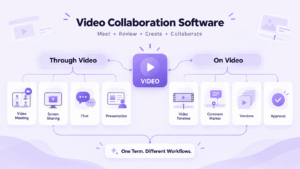
Video collaboration software can describe two very different types of work.
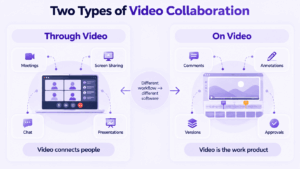
In one case, video is the communication channel. People meet live, share screens, discuss projects, exchange messages, present information, and make decisions.
In the other, video is the work product. Teams review footage, leave comments at specific moments, compare versions, request changes, and approve media before delivery.
Both are forms of video collaboration, but they require different capabilities.
The most useful distinction is:
Collaborating through video is not the same as collaborating on video.
A good selection process therefore starts with the workflow rather than the vendor:
video workflow → synchronous or asynchronous work → collaboration requirements → infrastructure → software
Key Findings
-
Video collaboration can mean communication through video or collaboration on a video asset.
-
Live meetings and professional video review require very different capabilities.
-
Synchronous vs asynchronous work is a second decision axis, not a complete software category by itself.
-
Infrastructure matters when communication or media must remain inside an organization’s controlled environment.
-
Some teams can use one broad collaboration platform, while others need both a meeting platform and a specialized video review tool.
What Is Video Collaboration Software?
Video collaboration software is technology that lets people work together using video either as a communication medium or as a shared digital asset.
Video conferencing is one form of video collaboration focused mainly on live audiovisual meetings. Video collaboration is broader and can also include asynchronous video communication, media review, version management, annotations, and approval workflows.
That creates two broad categories.
Collaborating Through Video
Here, video connects people.
Typical capabilities include:
-
video meetings;
-
audio calls;
-
screen sharing;
-
presentations;
-
chat;
-
whiteboards;
-
recording;
-
persistent communication.
This model is commonly used for project discussions, client calls, remote support, training, sales presentations, and internal communication.
Collaborating on Video
Here, the video itself is being reviewed, edited, or approved.
Typical capabilities include:
-
time-coded comments;
-
frame-specific feedback;
-
annotations;
-
versions;
-
approval stages;
-
external review;
-
asset sharing;
-
production handoff.
This model is more relevant to editors, agencies, marketing teams, production teams, and content reviewers.
A video meeting platform and a video review platform may both support comments and file sharing, but they solve fundamentally different workflow problems.
Video Collaboration Has Two Axes
Classifying software only as live or asynchronous is not enough.
The first question is what role video plays.
The second is whether people need to participate at the same time.
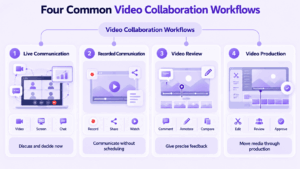
This gives four common workflows.
Live Communication
Participants join at the same time to discuss work.
Typical capabilities:
-
video and audio;
-
screen sharing;
-
chat;
-
participant roles;
-
presentations;
-
meeting recording.
Recorded Asynchronous Communication
One person records information and others view it later.
Typical examples include:
-
project updates;
-
product walkthroughs;
-
onboarding;
-
training;
-
recorded feedback.
The main benefit is schedule independence.
Video Review
The video file itself becomes the object of collaboration.
The important question changes from:
Can everyone see and hear each other?
to:
Can reviewers identify the exact issue in the exact version of the asset?
Useful capabilities include:
-
time-coded feedback;
-
frame-accurate navigation;
-
annotations;
-
version management;
-
approval status;
-
reviewer permissions.
Video Production Collaboration
Larger production workflows may extend beyond review.
They can include:
capture → editing → review → approval → delivery
In this environment, meeting participant limits matter much less than:
-
asset size;
-
playback performance;
-
metadata;
-
versioning;
-
review precision;
-
editing handoff;
-
final approval.
This is why a single universal feature table for all video collaboration software can be misleading.
How to Choose a Video Collaboration Tool
The right video collaboration tool depends on the job the team is trying to complete.
1. Is Video the Communication Channel or the Work Product?
This is the primary filter.
If video connects people, start with meeting and communication platforms.
If the team is reviewing, editing, or approving media, start with professional video review tools.
2. Does the Work Need to Happen in Real Time?
Use synchronous collaboration when immediate discussion matters.
Examples include:
-
planning;
-
sales calls;
-
design discussions;
-
troubleshooting;
-
training;
-
decision-making.
Use asynchronous collaboration when people can respond later.
Examples include:
-
updates;
-
walkthroughs;
-
recorded explanations;
-
media review;
-
approval workflows.
A team may need both.
3. What Happens Before and After the Video Session?
For business communication, the meeting is often only one step in a larger workflow.
Ask whether the team also needs:
-
persistent chat;
-
file exchange;
-
project channels;
-
meeting history;
-
recordings;
-
follow-up communication.
A meeting-only tool can create unnecessary fragmentation if employees must move to another application immediately after the call.
4. What Level of Review Precision Is Required?
If the team collaborates on video files, ordinary comments may not be enough.
A useful pilot should test:
-
timecodes;
-
frame-level navigation;
-
annotations;
-
version comparison;
-
review links;
-
approvals.
Feedback such as “fix the transition near the middle” is much less useful than feedback attached to the exact frame.
5. What Scale Actually Matters?
Scale means different things in different workflows.
For live collaboration, evaluate:
-
concurrent participants;
-
room systems;
-
audio and video quality;
-
network adaptation;
-
guest access.
For creative video workflows, evaluate:
-
asset size;
-
storage;
-
upload and playback performance;
-
number of versions;
-
reviewer count;
-
project volume.
6. Where Should the System Run?
Infrastructure can become a primary selection criterion.
Determine whether the organization requires:
-
provider-hosted cloud;
-
private infrastructure;
-
hybrid deployment;
-
customer-hosted servers;
-
operation inside an internal network.
For some organizations, the deployment model matters more than an additional collaboration feature.
Infrastructure Can Change the Decision
Two tools can provide similar collaboration features while using very different infrastructure models.
For general collaboration, a provider-operated environment may be sufficient.
For organizations with internal infrastructure requirements, the questions may instead be:
-
Can the server run inside our network?
-
Where are meetings and messages processed?
-
Where are recordings stored?
-
Does core communication require external services?
-
Who administers accounts and infrastructure?
A customer-hosted communication platform can be relevant when live collaboration needs to remain inside infrastructure controlled by the organization.
Creative review software needs to be evaluated separately because video assets, comments, previews, and media processing may rely on different storage and processing architectures.
Infrastructure therefore should not be treated as a secondary technical detail. In some environments, it can eliminate a product from consideration before individual collaboration features are compared.
Video Collaboration Software by Workflow
It is more useful to group platforms by the job they are designed to perform than to rank every product in one universal list.
For Live Video Collaboration
TrueConf
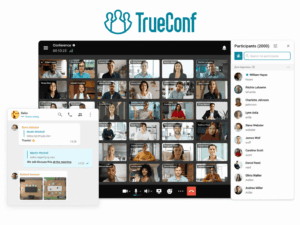
Best for: organizations that need live video collaboration and persistent communication on customer-operated infrastructure.
TrueConf Server combines:
-
video conferencing;
-
persistent messaging;
-
screen and content sharing;
-
webinars;
-
room-system interoperability.
It can operate inside an organization’s network without an Internet connection for core communication, support large conferences, and integrate with SIP/H.323 environments.
Why it fits: live video collaboration can remain part of a broader organization-controlled communication environment.
Trade-off: the organization needs infrastructure and administrative resources.
It is less relevant when professional video-asset review, frame-specific annotation, and version approval are the primary workflow.
Secumeet
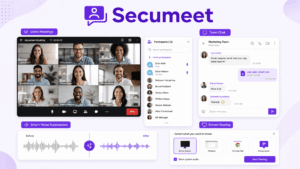
Best for: teams that want messaging and video collaboration inside one server-based communication environment.
Secumeet combines:
-
personal and group messaging;
-
video meetings;
-
screen sharing;
-
content collaboration;
-
meeting transcription;
-
selected AI-assisted meeting functions.
Why it fits: communication does not need to be split between a separate messenger and a separate meeting tool.
Trade-off: Secumeet is designed for business communication rather than frame-accurate media review and production approval.
If video assets themselves move through a professional review, versioning, and approval workflow, a specialized creative tool is more appropriate.
Microsoft Teams
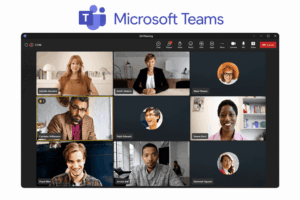
Best for: organizations where video collaboration already sits inside Microsoft 365 teamwork.
Teams connects meetings with:
-
channels;
-
files;
-
persistent conversations;
-
broader organizational collaboration.
Channel-based communication can keep meeting discussions connected to the surrounding project context.
Why it fits: live video remains part of the wider communication and file environment.
The main limitation is that it is not primarily designed for frame-accurate creative review.
Zoom Workplace

Best for: meeting-heavy workflows that also need communication before and after the live session.
The workflow can extend beyond a single call:
chat → meeting → follow-up
Persistent communication helps maintain context after participants leave the video session.
Why it fits: the meeting is treated as part of an ongoing conversation rather than as an isolated event.
The limitation is that persistent meeting context is different from professional media versioning and approval.
For Video Review and Creative Workflows
Frame.io
Best for: creative teams that need structured media review and approval.
Relevant capabilities include:
-
time-specific comments;
-
frame-accurate navigation;
-
review links;
-
versions;
-
approval workflows;
-
file and asset management.
Why it fits: feedback remains attached to the media rather than being separated into email or general workplace chat.
Trade-off: a media review system is not a replacement for everyday employee meetings.
Descript
Best for: teams where collaboration is closely connected to editing recorded audio and video.
Descript represents a different model of collaboration on video: work can happen around a transcript-oriented editing process rather than only after a finished version has been exported for review.
Why it fits: collaboration occurs closer to the editing process.
Trade-off: it does not replace a general enterprise communication platform.
Live Collaboration vs Video Review: What Should You Test?
Feature lists are less useful than testing the actual workflow.
For Live Video Collaboration
For Video Review Collaboration
These criteria solve different problems. Frame accuracy, for example, matters far more than participant capacity when the task is reviewing media.
When One Video Collaboration Platform Is Not Enough
A common mistake is assuming that one platform should cover every form of video collaboration equally well.
In practice, an organization might use:
business communication platform + specialized video review tool
For example, a marketing team may use live meetings and persistent chat for project coordination but move finished media into a dedicated review system for precise comments and approval.
Likewise, a production team may need a specialized asset workflow but still rely on a separate meeting platform for live client discussions.
The question is therefore not always:
Which single video collaboration tool has the most features?
Sometimes the better question is:
Which parts of the workflow should remain together, and which require specialized software?
What About AI in Video Collaboration?
AI features increasingly appear in both communication and media-production tools.
But “AI-powered” is not a useful selection category by itself.
The better question is:
What part of the video workflow is AI actually improving?
For live collaboration, AI may assist with:
-
transcription;
-
summaries;
-
meeting notes;
-
search;
-
follow-up.
For video production, it may assist with:
-
transcription;
-
editing;
-
asset analysis;
-
content generation;
-
media processing.
For sensitive content, ask one additional question:
Where does the processing happen, and which media does the AI service receive?
That question can matter more than the number of AI features available.
FAQ
What Is Video Collaboration Software?
Video collaboration software allows people to work together using video either as a communication channel or as a shared media asset. Depending on the workflow, this can include meetings, screen sharing, messaging, recorded updates, media review, annotations, versions, and approvals.
What Is the Difference Between Video Collaboration and Video Conferencing?
Video conferencing focuses mainly on live audiovisual meetings. Video collaboration is broader and can include live meetings, persistent communication, asynchronous video, media review, version management, and approval workflows.
Can Video Collaboration Be Asynchronous?
Yes. Recorded updates, walkthroughs, media review, time-coded comments, and approval workflows can all happen without participants being online at the same time.
What Should I Look for in a Video Collaboration Tool?
Start with the workflow. Determine whether video is primarily a communication channel or a work product, whether collaboration is synchronous or asynchronous, what level of feedback precision is required, and where the platform needs to run.
Conclusion
The term video collaboration software covers more than one software category.
The first decision is not which vendor offers the longest feature list. It is whether people are collaborating through video or collaborating on video.
If video is the communication channel, prioritize meeting quality, screen sharing, messaging, identity, administration, and deployment.
If video is the work product, prioritize precise feedback, version management, approvals, asset handling, and production workflow.
Then decide whether the work needs to happen live, asynchronously, or in both modes.
That sequence makes selecting a video collaboration tool much simpler and avoids comparing products that were designed to solve fundamentally different problems.
Author
Helga Afon is a technology writer specializing in video conferencing, collaboration software, and workplace communication. She writes articles and reviews that help readers better understand enterprise communication tools and industry trends.