Updated August 2026
Business video conferencing is the technology infrastructure and software that allows employees, partners, and clients to hold real-time audio and video meetings over the internet, regardless of their physical location. It replaces or supplements in-person meetings with live video, screen sharing, chat, and recording capabilities, and it is now a core part of daily operations for organizations of every size.
Key Takeaways
-
Business video conferencing combines hardware, software, and network infrastructure to deliver real-time face-to-face communication over the internet.
-
Cloud, on-premise, and hybrid deployment models exist, each with different trade-offs for cost, control, and data security.
-
Enterprise-grade platforms use encryption standards such as AES-256, SRTP, and DTLS to protect meeting data.
-
The right platform depends on team size, compliance requirements (GDPR, HIPAA, or national data protection laws), and integration needs with existing IT systems (SIP/H.323 devices, calendars, messaging tools).
-
Video conferencing reduces travel costs and meeting overhead but introduces new risks around fatigue, connectivity dependency, and security if left unmanaged.
Table of Contents
What Is Business Video Conferencing?
Business video conferencing is a category of communication technology that enables two or more people in different locations to see, hear, and interact with each other in real time using video and audio transmitted over a network. Unlike consumer video chat apps, business-grade platforms are designed for scale, security, administration, and integration with corporate IT systems such as directory services, calendars, and telephony infrastructure.
At its core, business video conferencing serves three purposes:
-
Internal collaboration: team meetings, project reviews, and all-hands sessions across offices and time zones.
-
External communication: client calls, sales demos, vendor negotiations, and partner onboarding.
-
Large-scale broadcasting: webinars, training sessions, town halls, and public events with hundreds or thousands of viewers.
A business video conferencing solution typically consists of a client application (desktop, mobile, or web browser), a signaling and media server (cloud-hosted or on-premise), and supporting hardware such as cameras, microphones, and room systems.
How Does Video Conferencing Work?
Video conferencing works by capturing audio and video from each participant's device, compressing that data, sending it over the internet or a private network, and decoding it on the receiving end in near real time. The process relies on a combination of protocols and server-side processing to keep latency low and quality high, even across different networks and devices.
The typical technical flow includes:
-
Capture: A camera and microphone record video and audio locally.
-
Encoding: Codecs (such as H.264, VP8/VP9, or AV1 for video, and Opus for audio) compress the raw stream to reduce bandwidth needs.
-
Transmission: The compressed stream is sent to a media server using protocols like WebRTC, SIP, H.323, or RTSP.
-
Server processing: The server authenticates users, manages the call session, and often uses Scalable Video Coding (SVC) to adapt stream quality dynamically based on each participant's bandwidth and device performance.
-
Distribution: The server relays encoded streams to all other participants.
-
Decoding and display: Each receiving device decodes the stream and displays video/audio with minimal delay.
Enterprise servers also handle authentication and authorization, support multiple simultaneous logins under one account, store call and chat history, and maintain connectivity across NAT and proxy servers so that calls work reliably even inside restrictive corporate networks.
Types of Video Conferencing Systems
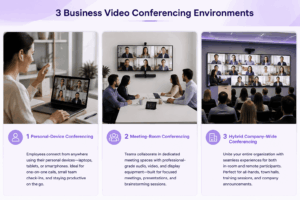
Not all video conferencing systems are built the same way. Organizations generally choose between the following deployment types based on control, cost, and compliance needs.
On-premise systems like TrueConf Server can be deployed in a company's own data center or private cloud, giving organizations full control over where video, audio, and chat data is stored and processed.
Common Features of Business Video Conferencing Software
Most business-grade video conferencing platforms share a common set of features, though the depth and reliability of each feature varies by vendor.
-
HD/4K video and audio quality, often up to Ultra HD resolution and 60 frames per second in premium tiers.
-
Screen and content sharing for presentations, documents, and applications.
-
Recording and playback of meetings for later review or compliance archiving.
-
Multiple meeting layouts, including full-screen view, grid view, and moderated/selector layouts for large conferences.
-
Chat and messaging integrated directly into the meeting interface.
-
Calendar and directory integration, including Single Sign-On (SSO) and Active Directory Federation Services (AD FS) for centralized authentication.
-
Gateway support for legacy hardware, allowing SIP, H.323, and RTSP devices (such as conference room systems, PBXs, and IP cameras) to join the same meeting as software users.
-
Automatic reconnection, which keeps participants in a call automatically if their connection briefly drops, without requiring a manual redial.
-
Meeting analytics, including participation statistics and engagement data for administrators.
-
Mobile and cross-platform apps for joining meetings from desktop, smartphone, or web browser.
10 Advantages of Using Video Conferencing
1. Reduced Travel Costs
Video conferencing eliminates the need for flights, hotels, ground transportation, and per-diem expenses associated with in-person meetings. For companies with multiple offices, remote employees, or international clients, this can translate into significant annual savings, especially for recurring meetings such as weekly client check-ins or quarterly reviews that previously required travel. Beyond direct costs, it also removes the indirect expense of employee time spent traveling instead of working, which further improves overall productivity per dollar spent on communication. Organizations that shift even a portion of their in-person meetings to video can reallocate that travel budget toward technology upgrades, training, or other strategic investments.
2. Faster Decision-Making
Real-time video discussion allows stakeholders to raise questions, clarify misunderstandings, and reach consensus within a single session, rather than waiting hours or days for email replies to accumulate. Visual cues such as tone, facial expression, and body language help participants interpret intent more accurately than text alone, which reduces the back-and-forth typically needed to resolve ambiguity. This is particularly valuable for time-sensitive decisions, such as approving budgets, resolving client escalations, or aligning cross-functional teams before a deadline. Screen sharing during these calls also allows teams to review documents, dashboards, or proposals together in real time, so decisions are based on shared context rather than fragmented information.
3. Improved Collaboration Across Locations
Distributed and hybrid teams can share screens, co-edit documents, brainstorm using virtual whiteboards, and discuss projects with the same immediacy as an in-person meeting, regardless of whether participants are in the same building or on different continents. This levels the playing field between office-based and remote employees, ensuring that geographic location does not determine who gets included in key discussions. Over time, this strengthens team cohesion and reduces the communication silos that often form between headquarters and satellite offices. For global organizations, it also enables faster onboarding of new regional teams, since managers can run consistent training and alignment sessions without waiting for in-person visits.
4. Higher Meeting Attendance
Because participants can join from any location using a laptop, tablet, or smartphone, video conferencing removes the logistical barriers, such as travel time, scheduling conflicts, or venue capacity, that often reduce attendance at in-person events. This is especially beneficial for large all-hands meetings, training sessions, or webinars, where physically gathering hundreds or thousands of people would be impractical or impossible. Remote access also makes it easier for part-time employees, field staff, or team members in different time zones to participate, ensuring that important updates reach a wider and more representative audience.
5. Recorded Meetings for Accountability
Most business video conferencing platforms allow sessions to be recorded and stored for later review, creating a reliable record of what was discussed, decided, and assigned. This is valuable for onboarding new employees who missed a training session, for compliance-driven industries that must document client interactions, and for resolving disputes about what was agreed upon during a call. Recordings also support knowledge retention: instead of relying on meeting notes alone, teams can revisit the exact context, tone, and visual materials shared during the original discussion, which reduces miscommunication and improves follow-through on action items.
6. Scalable Communication
A single video conferencing platform can support use cases ranging from a simple one-on-one call to a large-scale conference or webinar with hundreds or even thousands of participants, depending on the platform and server configuration. This scalability means organizations do not need separate tools for small team meetings, department-wide briefings, and company-wide town halls. As a business grows, the same infrastructure can typically be expanded, whether by upgrading a cloud subscription tier or adding server capacity in an on-premise deployment, without requiring a complete platform change.
7. Better Integration with Existing Hardware
Modern business video conferencing systems often include gateways that connect legacy SIP, H.323, and RTSP devices, such as older conference room systems, PBX phone systems, and IP cameras, directly into the same meetings as software-based participants. This means organizations do not need to immediately replace existing investments in conference room hardware or telephony infrastructure when adopting a new platform. It also allows mixed environments, where some employees join from modern laptops while others use dedicated room systems or IP-based devices, to communicate seamlessly within a single unified meeting.
8. Lower Environmental Impact
By replacing a significant share of business travel with virtual meetings, organizations can meaningfully reduce their carbon footprint associated with flights, car travel, and hotel stays. This contributes directly to corporate sustainability goals and can support environmental, social, and governance (ESG) reporting commitments that are increasingly expected by investors, regulators, and clients. Even partial adoption, such as replacing routine internal travel with video calls while reserving in-person visits for high-value client meetings, can produce a measurable reduction in an organization's overall emissions over time.
9. Consistent Communication with Global Teams
Video communication conveys tone, emphasis, and emotional context far more effectively than text-based channels like email or chat, which reduces the risk of misinterpretation across cultural and linguistic differences common in global teams. Seeing facial expressions and body language helps participants gauge understanding, agreement, or concern in real time, allowing misunderstandings to be addressed immediately rather than discovered days later. This consistency is especially important for multinational organizations, where teams may communicate in a shared second language and benefit from the additional clarity that visual cues provide.
10. Stronger Client Relationships
Face-to-face video interaction builds rapport and trust more effectively than phone calls or written correspondence, since clients can see the people they are working with and engage in more natural, personal conversation. This is particularly valuable during sales negotiations, account reviews, or relationship-sensitive discussions, where tone and sincerity matter as much as the content being discussed. Regular video check-ins also signal a higher level of attentiveness and professionalism, helping service providers differentiate themselves from competitors who rely solely on email or phone-based client communication.
Video Conferencing Use Cases in Business
Security in Video Conferencing
Security is one of the most important factors when selecting a business video conferencing platform, since meetings often contain sensitive strategic, financial, legal, or personal data.
Key security layers to evaluate include:
-
Media encryption: Look for AES-256 encoding of video, audio, and content, ideally with hardware-accelerated support across common CPU architectures for minimal performance impact.
-
Transport-level protection: Protocols such as DTLS and SRTP (for WebRTC and SIP) and H.235 (for H.323) protect data in transit between endpoints and servers.
-
Authentication and access control: SSO, Active Directory/LDAP integration, and multi-account authorization help enforce identity-based access to meetings.
-
Data sovereignty: On-premise deployment ensures video, chat, and call history remain within an organization's own infrastructure rather than a third-party cloud.
-
Regulatory compliance: Depending on industry and geography, platforms may need to support GDPR, HIPAA, or national data protection frameworks, particularly for healthcare, legal, and government use cases.
-
Certified cryptography options: Some platforms support pluggable cryptographic libraries certified to national standards (such as GOST-certified modules) for markets with specific regulatory requirements.
Organizations handling regulated or highly confidential communication should prioritize self-hosted or private-cloud platforms that keep full control over encryption keys and data residency, rather than relying solely on public SaaS tools.
Choosing the Right Video Conferencing Platform
Selecting a platform requires balancing scale, security, budget, and integration needs. Use the following criteria as a decision framework:
-
Deployment model: Does your organization require cloud simplicity, or on-premise/hybrid control over data?
-
Maximum participant capacity: Does the platform support your largest expected meeting or webinar size?
-
Security and compliance: Does it meet your industry's encryption and regulatory requirements?
-
Integration: Can it connect with your existing calendar, directory (LDAP/AD), PBX, or legacy SIP/H.323 room hardware?
-
Scalability: Can the vendor support growth from a single office to an enterprise-wide, multi-server deployment?
-
Total cost of ownership: Consider licensing, hardware, IT staffing, and support costs together, not just the subscription price.
-
Reliability guarantees: Enterprise deployments should look for high-availability architectures with redundant infrastructure and documented uptime commitments.
The Best Video Conferencing Systems for Business
Below is a detailed breakdown of notable business video conferencing vendors, covering mainstream cloud platforms and specialized secure/on-premise solutions.
Zoom
Zoom is one of the most widely adopted cloud video conferencing platforms, built around simplicity, reliability at scale, and a large ecosystem of third-party integrations. It became a default choice for many organizations during the shift to remote and hybrid work and remains a common standard for external-facing meetings, webinars, and large virtual events.
Pros and Cons
Pros:
-
Very easy to learn and deploy, even for non-technical users
-
Reliable performance across a wide range of devices and network conditions
-
Large marketplace of integrations (calendar, CRM, Slack, and more)
-
Strong webinar and large-event capabilities as paid add-ons
Cons:
-
Advanced security controls typically require higher-tier plans
-
Per-host pricing can become expensive as the organization scales
-
Limited native on-premise deployment options compared to specialized enterprise platforms
Why we listed it
Zoom is included because it remains the most recognized and broadly compatible cloud video conferencing tool, making it a practical default for organizations that need fast deployment and effortless communication with external clients and partners.
Key features:
-
HD video and audio with adaptive quality
-
Breakout rooms for splitting large meetings into smaller groups
-
Cloud recording with automatic transcription
-
Virtual backgrounds and AI-powered noise suppression
-
Zoom Whiteboard for real-time visual collaboration
-
Webinar and large-event add-ons for audiences of thousands
Best suited for:
Small to large businesses that need a fast, widely compatible cloud platform for both internal meetings and external client-facing calls.
Microsoft Teams
Microsoft Teams combines video conferencing with persistent chat, file collaboration, and deep integration into the Microsoft 365 suite. Rather than functioning as a standalone meeting tool, it acts as a communication hub where meetings, documents, and conversations live in the same workspace.
Pros and Cons
Pros:
-
Deep integration with Outlook, SharePoint, OneDrive, and the wider Microsoft 365 suite
-
Often included at no extra cost within existing Microsoft 365 licensing
-
Strong enterprise administration and compliance tooling
-
Persistent chat and file collaboration alongside meetings
Cons:
-
Can feel resource-heavy on lower-spec devices
-
Less optimal for organizations not already using Microsoft 365
-
External guest access can involve extra configuration and friction
Why we listed it
Teams is included because it is the natural choice for organizations already standardized on Microsoft 365, offering a single workspace that unifies meetings, chat, and document collaboration.
Key features:
-
Integrated meetings, chat, and file storage in one application
-
Together Mode and AI-powered meeting features (live captions, notes, summaries)
-
Whiteboard and breakout rooms
-
PSTN calling as an add-on for dial-in/dial-out capability
-
Microsoft Teams Rooms hardware for dedicated meeting spaces
Best suited for:
Organizations already using Microsoft 365 that want meetings, chat, and document collaboration unified in a single platform.
Google Meet
Google Meet offers browser-based video conferencing tightly integrated with Google Workspace tools such as Gmail, Calendar, and Docs. It is designed around simplicity, requiring no software installation and allowing meetings to be joined directly from a browser link.
Pros and Cons
Pros:
-
No installation required; runs directly in the browser
-
Seamless scheduling through Google Calendar
-
Clean, simple interface with a low learning curve
-
Built-in live captions and real-time translation in supported plans
Cons:
-
Fewer advanced enterprise security and compliance controls compared to some competitors
-
Limited on-premise or private-hosting options
-
Historically fewer advanced meeting management features (e.g., granular breakout room controls) compared to Teams or Zoom
Why we listed it
Google Meet is included as the simplest, most lightweight option for organizations that want no-install, browser-first meetings tightly connected to their existing Google Workspace environment.
Key features:
-
One-click scheduling from Google Calendar
-
Live captions and real-time translation
-
AI-based noise cancellation
-
Automatic recording to Google Drive
-
Adaptive video layouts for different meeting sizes
Best suited for:
Google Workspace users and small to mid-size businesses that prioritize simplicity and browser-based access over advanced enterprise controls.
Cisco Webex
Cisco Webex targets enterprises and regulated industries with strong security certifications, AI-powered meeting intelligence, and tight integration with Cisco’s broader collaboration and networking hardware. It positions itself as a security-first alternative to consumer-friendly platforms.
Pros and Cons
Pros:
-
Strong compliance and security certifications favored by regulated industries
-
AI features such as real-time translation, noise removal, and transcription
-
Deep integration with Cisco hardware and networking infrastructure
-
Centralized administration through Webex Control Hub
Cons:
-
Steeper learning curve compared to more consumer-oriented platforms
-
Can be more expensive, especially with hardware and premium AI features
-
Historically viewed as less intuitive for casual, non-technical users
Why we listed it
Webex is included because it is a preferred choice for enterprises and regulated sectors where certified security, compliance reporting, and integrated hardware ecosystems are non-negotiable requirements.
Key features:
-
End-to-end encryption options for sensitive meetings
-
Webex AI: noise removal, live transcription, and real-time translation
-
Webex Rooms and dedicated hardware devices
-
Webex Control Hub for centralized administration and analytics
-
Interoperability with SIP/H.323 endpoints
Best suited for:
Large enterprises and regulated industries that require certified security, compliance reporting, and integration with dedicated conferencing hardware.
TrueConf
TrueConf is a video conferencing platform built around flexible deployment, available either as a public cloud service (TrueConf Online) or as a fully on-premise solution (TrueConf Server), which the vendor recommends for organizations needing maximum functionality and full infrastructure control. It is positioned toward enterprises, government bodies, and organizations with strict data sovereignty requirements.
Pros and Cons
Pros:
-
Full on-premise deployment option for complete control over data location
-
AES-256 media encryption with hardware acceleration support
-
Built-in SIP/H.323/RTSP gateway for connecting legacy hardware, PBXs, and IP cameras directly into meetings
-
Enterprise clustering (TrueConf Enterprise) with full node redundancy for high availability
-
Supports certified cryptographic libraries for markets with specific regulatory requirements
Cons:
-
On-premise deployment requires internal IT resources to install, configure, and maintain server infrastructure
-
Smaller global brand recognition and third-party app marketplace compared to Zoom or Teams
-
Some advanced features may differ between the cloud (TrueConf Online) and on-premise (TrueConf Server) versions
Why we listed it
TrueConf is included as a strong example of a security- and control-focused platform for organizations that need on-premise deployment, legacy hardware integration, and enterprise-grade encryption without giving up modern video conferencing functionality.
Key features:
-
Video calls and conferences up to 4K resolution and 60 frames per second, with SSO/AD FS based authentication
-
Built-in SIP/H.323/RTSP gateway for connecting VoIP hardware, PBXs, IP cameras, and video surveillance systems directly into meetings
-
In-client meeting recording
-
Screen and presentation sharing, including simultaneous sharing from multiple presenters
-
AI-powered virtual and blurred backgrounds
-
Integration with corporate calendars (Outlook/Exchange) and third-party communication platforms
-
Optional TrueConf AI Server integration for automatic meeting transcription
-
TrueConf Enterprise: clustered deployment with full node redundancy, dynamic license-based load balancing, premium support, and client application branding, designed for organizations with 500+ employees
Best suited for:
Enterprises, government bodies, and organizations that require full data sovereignty, high-capacity conferencing, and integration with existing legacy communication hardware.
RingCentral Video
RingCentral Video is part of a broader unified communications suite that bundles video conferencing with cloud telephony and team messaging. Rather than being a standalone meeting app, it is designed to work as one component of a company’s overall phone and messaging infrastructure.
Pros and Cons
Pros:
-
Combines phone system, messaging, and video meetings under a single vendor and contract
-
AI-generated meeting notes and highlights
-
Consistent experience across desk phones, mobile apps, and desktop clients
-
Strong fit for businesses already using RingCentral’s cloud PBX
Cons:
-
Video conferencing features are generally secondary to the platform’s core telephony focus
-
Smaller webinar and large-event ecosystem compared to Zoom or Webex
-
May be excessive for organizations that only need video meetings without a full phone system overhaul
Why we listed it
RingCentral Video is included for organizations that want to consolidate phone calls, team messaging, and video meetings into a single unified communications vendor rather than managing separate tools.
Key features:
-
Video meetings integrated with the RingEX cloud phone system
-
Team messaging and file sharing within the same platform
-
AI-powered meeting summaries and task extraction
-
Virtual whiteboard for collaborative sessions
-
Mobile, desktop, and desk phone consistency
Best suited for:
Businesses seeking a single unified communications vendor that covers phone, messaging, and video conferencing together.
Secumeet
Secumeet is a secure video conferencing solution positioned around data protection and privacy-first communication for organizations that cannot rely on standard public cloud tools. It focuses on encrypted meeting sessions and controlled data handling designed to minimize exposure of sensitive conversations to third-party infrastructure.
Pros and Cons
Pros:
-
Privacy-first architecture aimed at minimizing third-party data exposure
-
Deployment approach designed for confidentiality-sensitive sectors
-
Relevant for organizations facing strict regulatory or contractual data handling requirements
Cons:
-
Smaller brand recognition and integration marketplace compared to mainstream platforms
-
Feature set and compliance certifications should be verified directly with the vendor, as details are less broadly documented publicly
-
May require more direct vendor engagement to confirm hosting location, certifications, and specific integration options
Why we listed it
Secumeet is included as a specialized, security-first alternative for organizations that cannot use mainstream public cloud video tools due to confidentiality, regulatory, or data residency requirements.
Key features:
-
Encrypted meeting sessions designed to protect sensitive conversations
-
Controlled data handling and hosting options aimed at limiting third-party exposure
-
Access management features suited to confidential communication
-
Deployment options oriented toward regulated and confidentiality-sensitive use cases
Best suited for:
Legal, financial, healthcare, and government organizations that require strict confidentiality and tightly controlled data handling.
GoTo Meeting
GoTo Meeting emphasizes simplicity and reliability for small and mid-size businesses, focusing on straightforward scheduling, one-click join links, and mobile-friendly meeting controls rather than a large feature set.
Pros and Cons
Pros:
-
Very simple to set up and join, with minimal learning curve
-
Reliable audio and video performance
-
Can be bundled with GoToWebinar and GoToTraining for broader use cases
-
Mobile apps with consistent functionality
Cons:
-
Fewer advanced collaboration features compared to Teams or Zoom
-
Smaller third-party integration ecosystem
-
Less suited to very large-scale enterprise deployments
Why we listed it
GoTo Meeting is included as a dependable, no-frills option for smaller organizations that want quick, simple meetings without a complex feature set or steep learning curve.
Key features:
-
One-click meeting links for instant joining
-
HD video and audio quality
-
Cloud recording and basic transcription
-
Drawing and annotation tools during screen sharing
-
Companion apps for webinars (GoToWebinar) and training sessions (GoToTraining)
Best suited for:
Small and mid-size businesses that want quick, dependable meetings without complex setup or advanced administration needs.
BlueJeans by Verizon
BlueJeans focuses on interoperability with a wide range of hardware and software conferencing endpoints, making it a practical bridge solution for organizations with a mix of legacy and modern video systems.
Pros and Cons
Pros:
-
Strong interoperability with third-party room systems and hardware endpoints
-
Dolby Voice technology for improved audio clarity
-
Meeting analytics through a dedicated command center
-
Useful bridge for organizations transitioning between different conferencing ecosystems
Cons:
-
Smaller market share and brand visibility compared to Zoom, Teams, or Webex
-
Fewer consumer-facing features and integrations
-
Long-term product roadmap has drawn some uncertainty following changes in corporate ownership
Why we listed it
BlueJeans is included as a practical option for organizations that need to bridge legacy conferencing hardware with modern software clients without replacing existing room investments.
Key features:
-
Dolby Voice audio for clearer group conversations
-
Broad interoperability with third-party room systems (including other vendors’ hardware)
-
Smart Meetings with automated highlights and transcripts
-
BlueJeans Command Center for meeting analytics and quality monitoring
Best suited for:
Organizations with a mix of legacy video conferencing hardware and modern software clients that need a flexible bridging solution.
Disadvantages of Video Conferencing
-
Connectivity dependency: Poor internet connections can degrade audio/video quality or disconnect participants.
-
Meeting fatigue: Back-to-back video calls can be more mentally draining than in-person or audio-only meetings.
-
Security risks if misconfigured: Without proper encryption and access controls, meetings can be vulnerable to unauthorized access.
-
Hardware and IT overhead: On-premise deployments require server infrastructure, maintenance, and IT expertise.
-
Limited non-verbal communication: Video still misses some nuance available in face-to-face interaction.
-
Scaling costs: Large-scale or high-capacity deployments may require significant infrastructure investment, especially for on-premise systems supporting hundreds or thousands of concurrent users.
What Equipment Do You Need for Video Conferencing?
Video Conferencing Best Practices
-
Test equipment before important calls, including camera, microphone, and internet connection.
-
Use wired internet connections for high-stakes or large meetings whenever possible.
-
Mute when not speaking to reduce background noise in group calls.
-
Enable recording for important meetings so absent stakeholders can review discussions later.
-
Set clear agendas to keep meetings focused and reduce meeting fatigue.
-
Apply access controls, such as meeting passwords or waiting rooms, for sensitive discussions.
-
Keep software updated to maintain security patches and feature reliability.
-
Choose the right layout mode for the meeting type: presentation-style for training, grid-view for open discussion, and moderated/selector layouts for large events.
Conclusion
Business video conferencing is now foundational infrastructure for modern organizations, enabling real-time collaboration across offices, countries, and time zones while reducing travel costs and accelerating decision-making. The right platform depends heavily on an organization’s deployment preferences, security and compliance obligations, and expected scale, ranging from simple cloud tools for small teams to fully on-premise, high-capacity systems for enterprises and regulated industries that need full control over encryption and data residency.
Organizations evaluating options should weigh ease of use against security depth, confirm that a platform can integrate with existing hardware and directory systems, and verify that it can scale reliably as usage grows. Solutions like TrueConf demonstrate how on-premise deployment, strong encryption, and legacy hardware integration can be combined for enterprise-grade reliability, while cloud-first platforms and privacy-focused providers like Secumeet address different priorities around simplicity or data protection. Choosing carefully upfront prevents costly platform migrations later and ensures video conferencing genuinely strengthens, rather than complicates, business communication.
FAQ
Is business video conferencing the same as a regular video call app?
No. Business video conferencing platforms are built for scale, administration, and security, offering features like directory integration, encryption standards, meeting analytics, and support for legacy hardware through gateways, which consumer video chat apps typically lack.
What is the difference between cloud and on-premise video conferencing?
Cloud platforms are hosted by the vendor and require no internal server, making them faster to deploy but giving less control over data location. On-premise platforms run on the organization’s own infrastructure, offering greater control over security, compliance, and customization, at the cost of requiring internal IT management.
How many participants can a business video conferencing platform support?
This varies widely by platform and server configuration. Some on-premise systems support up to 2,000 participants in a single conference on capable hardware, while recommended server-level guidance often cites a few hundred concurrent WebRTC participants per physical server, scaling further with additional servers or clustering.
Can video conferencing software connect with older SIP or H.323 hardware?
Yes, many enterprise platforms include a built-in gateway that allows SIP, H.323, and RTSP devices, such as legacy conference room systems, PBXs, and IP cameras, to join the same meetings as regular software participants.
What encryption should a business video conferencing platform use?
AES-256 is considered a strong baseline for media encryption, often paired with DTLS/SRTP for WebRTC and SIP traffic, and H.235 for H.323 traffic. Hardware-accelerated AES support in modern processors allows this level of encryption without a significant performance cost.
Which video conferencing platform is best for high-security or regulated industries?
Platforms offering on-premise or private-cloud deployment, strong encryption, and directory-based access control are generally preferred for regulated sectors. TrueConf and Secumeet are examples of vendors positioned around this kind of security-first, data-sovereignty-focused approach.
Do I need special equipment to start using business video conferencing?
At minimum, you need a device with a camera, microphone, speakers, a stable internet connection, and the platform’s client software. Dedicated room systems or 4K cameras and array microphones are recommended for larger conference rooms or high-quality broadcasts.
Author
Helga Afon is a technology writer specializing in video conferencing, collaboration software, and workplace communication. She writes articles and reviews that help readers better understand enterprise communication tools and industry trends.