
Most video meeting apps already support the same visible basics: video, audio, screen sharing, meeting links, chat, and host controls.
That is why comparing them only by feature count is increasingly unhelpful.
The more useful question is:
Where does the meeting begin, and where does it end?
For some platforms, a meeting is primarily a temporary room that people enter through a link. For others, it sits inside a persistent workspace. Enterprise systems extend the meeting into identity, administration, rooms, and policies. Private platforms can extend that boundary even further into the infrastructure that operates the communication service.
For a group video meeting or business video meeting, these differences often matter more than whether two products both support screen sharing.
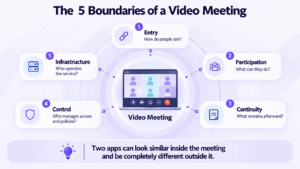
The Five Boundaries of a Video Meeting
A practical way to compare video meeting apps is to look at five boundaries.
Two products can offer almost identical live meeting features while producing very different answers to these questions.
That is the main reason a conventional feature checklist often fails to identify the right video meeting app.
Video Meeting Apps Compared by Meeting Boundary
The distinction is not that each platform supports only one workflow.
It is about the default object around which the product is organized.
For Zoom, that object is usually the meeting. For Google Meet, it is closely tied to the calendar. For Teams, it is the Microsoft workspace. Webex extends further into managed enterprise collaboration. Jitsi emphasizes deployment flexibility. TrueConf Server treats video meetings as part of enterprise communications infrastructure. Secumeet places them inside a persistent private communication environment.
The Meeting Starts Before the Camera Turns On
The live session is only the middle of the meeting experience.
Before anyone speaks, participants usually move through something like this:
Invitation → Identity → Client → Permission → Meeting
Each step can create friction.
Employees and Guests Experience the Same Meeting Differently
An employee may already have:
-
a corporate identity;
-
a desktop application;
-
directory access;
-
permissions;
-
calendar integration.
For that user, account-based joining may be almost invisible.
A customer, candidate, supplier, or consultant may have none of those things.
Their experience may look more like:
Email → Account prompt → Installation → Authentication → Meeting
This creates one of the main design tensions in business video meeting software:
Employees benefit from stronger identity integration. Guests usually benefit from less joining friction.
A platform that feels effortless internally can still be inconvenient for external participants.
That is why business video meeting software should be tested through at least two entry paths:
employee path and guest path.
Group Size Is Not the Same as Meeting Capacity
A platform may advertise support for hundreds or thousands of participants.
That tells only part of the story.
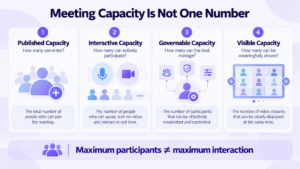
A group video meeting has at least four different capacities.
Published Capacity
This is the number shown in product documentation or the subscription plan.
Zoom currently lists 100 participants for Basic and Pro, 300 for Business, and 500 for Enterprise by default, with larger-meeting add-ons available. Zoom
Microsoft Teams supports a full meeting experience for roughly the first 1,000 attendees in supported plans and can extend larger meetings with a more restricted view-only experience. Microsoft Learn
Webex Meetings can support up to 1,000 participants depending on the license and meeting environment. Webex Help Center
But published capacity is only the first number to check.
Interactive Capacity
How many participants can actively:
-
speak;
-
use video;
-
share content;
-
participate in chat;
-
interact with the session?
A large attendee limit does not necessarily mean that every participant receives the same experience.
Governable Capacity
How many people can the organizer realistically manage?
A session may technically admit hundreds of attendees but still require:
-
speaking roles;
-
mute control;
-
presenter permissions;
-
lobby management;
-
structured questions;
-
moderation.
This is partly a human limit rather than a software limit.
Visible Capacity
How many people can be represented meaningfully on screen at once?
A system may admit a large audience while showing only a subset as active video participants.
The practical rule is:
“Supports 1,000 participants” tells you how many people may enter. It does not tell you how 1,000 people can participate.
That difference matters especially for business and group video meetings.
Business Video Meetings Have Two Audiences
Business meeting software often has to satisfy two almost opposite requirements.
Internal Participants Need More Context
Employees benefit from:
-
directory-based identities;
-
persistent groups;
-
previous messages;
-
company policies;
-
calendar integration;
-
known devices;
-
recurring workflows.
The system already knows who they are and how they belong to the organization.
External Participants Need Less Commitment
Guests usually need:
-
a clear invitation;
-
easy browser access;
-
limited setup;
-
simple permissions;
-
minimal onboarding.
The system may know almost nothing about them.
This creates a useful decision rule:
Do not evaluate guest access by testing the meeting as an employee.
The same platform may provide an excellent internal workflow and a much weaker external one.
The reverse can also happen: a lightweight link-based meeting service may be excellent for customers but provide little continuity for permanent teams.
When Does a Business Video Meeting Actually End?
There are two different answers.
Technical End
The host clicks End Meeting.
Audio and video stop.
Operational End
The result of the meeting enters the business workflow.
That may mean:
Decision recorded → File updated → Task assigned → Follow-up clear
These moments are not necessarily the same.
Consider a typical project meeting:
-
The team discusses a problem in chat.
-
Someone starts a video meeting.
-
A document is shared.
-
A decision is made verbally.
-
The meeting ends.
-
Someone updates the document.
-
Another participant creates a task.
-
Follow-up returns to the original conversation.
The video meeting itself may have worked perfectly.
The workflow may still be fragmented.
The more useful question is:
Where does the decision live after the meeting ends?
It may live in:
-
a chat;
-
a recording;
-
meeting notes;
-
a document;
-
a task;
-
nowhere.
For recurring business teams, this can matter more than adding another live-meeting feature.
Four Ways a Video Meeting Can Fail Without Losing Video
A video meeting does not have to suffer packet loss or poor audio to fail.
1. Entry Failure
The correct participant cannot get in.
Typical causes include:
-
account requirements;
-
client installation;
-
guest restrictions;
-
incorrect invitations;
-
lobby configuration.
2. Identity Failure
The system does not correctly map access to the intended people.
This can mean either:
-
an authorized participant is blocked;
-
an unintended participant receives access.
3. Context Failure
The meeting works, but the result becomes disconnected from the surrounding work.
Afterward, participants ask:
-
Where is the final file?
-
Was that decision written down?
-
Was it in the meeting chat or group chat?
-
Where is the recording?
-
Who owns the next action?
4. Infrastructure Failure
The meeting depends on an architecture that does not match organizational requirements.
Examples can include:
-
restricted networks;
-
private infrastructure requirements;
-
vendor-hosted service dependency;
-
existing room systems;
-
operational control requirements.
The software itself may be functioning correctly.
The problem is simply that the architecture and the use case do not match.
Which Video Meeting Model Fits the Job?
One organization may need several of these patterns.
A sales department can prioritize external access while IT or operations requires managed internal communication.
That is why a single company-wide feature checklist can hide important differences between real meeting scenarios.
7 Video Meeting Apps and the Model Behind Each One
Zoom: When the Meeting Is the Main Object
Zoom remains strongly meeting-centered.
The typical workflow is simple:
Create meeting → Send link → Join → Meet
This makes the platform well suited to situations where the participants do not need to belong to the same permanent workspace.
Common examples include:
-
customer calls;
-
consultations;
-
interviews;
-
partner meetings;
-
cross-company sessions.
Current Zoom meeting capacity varies by subscription, from 100 participants on Basic and Pro to 300 on Business and 500 on Enterprise by default, with additional capacity available through add-ons. Zoom
Decision edge: the meeting can remain a distinct object instead of requiring everyone to share the same long-term workspace.
Trade-off: organizations that communicate continuously between meetings may need more of the surrounding collaboration environment or additional systems to preserve context.
Google Meet: When the Calendar Is the Main Object
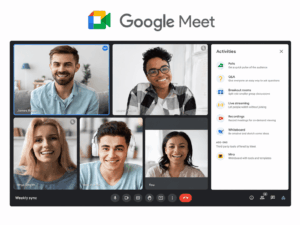
Google Meet naturally fits an environment where meetings originate from Google Calendar and surrounding work already happens in Google Workspace.
Its strongest workflow is less about building a separate communication world and more about connecting a scheduled meeting to an existing productivity environment.
This works especially well when employees already use:
-
Google Calendar;
-
Gmail;
-
Google Docs;
-
Google Drive;
-
Google identities.
Decision edge: low friction inside a Google Workspace-centered organization.
Trade-off: companies that do not already depend on the Google ecosystem receive less benefit from that surrounding context.
Microsoft Teams: When the Workspace Is the Main Object

Microsoft Teams treats meetings as part of a persistent Microsoft 365 communication environment.
A conversation can exist before the meeting, continue during it, and remain available afterward.
For supported configurations, Microsoft documents a full meeting experience for up to roughly 1,000 attendees before additional users move into a more restricted view-only experience. Microsoft Learn
Teams is especially relevant where daily work already depends on:
-
Microsoft identities;
-
Outlook;
-
SharePoint;
-
OneDrive;
-
Microsoft 365 administration.
Decision edge: continuity inside the Microsoft 365 workspace.
Trade-off: the deeper the organization standardizes on Microsoft 365, the more the meeting environment becomes tied to that ecosystem.
Webex: When the Managed Enterprise Environment Is the Main Object
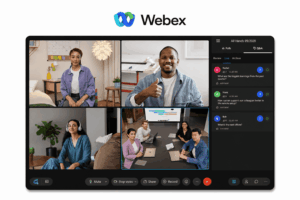
Webex approaches video meetings as part of a broader enterprise collaboration environment.
Its meeting architecture extends beyond desktop users into:
-
centralized administration;
-
corporate users;
-
conference rooms;
-
video endpoints;
-
enterprise meeting policies.
Webex Meetings can support up to 1,000 participants depending on the purchased license and platform configuration. Webex Help Center
This makes it particularly relevant when video meetings are already connected to managed AV and enterprise communication infrastructure.
Decision edge: enterprise meeting management beyond individual laptops.
Trade-off: the breadth of the platform may be unnecessary for small teams that need only occasional browser meetings.
Jitsi Meet: When Deployment Choice Is the Main Object
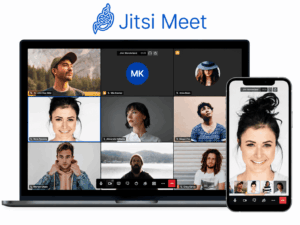
Jitsi represents a different approach.
It is open source and can be deployed independently, while a public service is also available through meet.jit.si.
That makes deployment flexibility one of its defining characteristics.
Jitsi’s public meet.jit.si service introduced a 95-minute meeting limit in October 2026. This change applies to that public service and does not define the behavior of independently self-hosted installations. Jitsi
Decision edge: open-source deployment flexibility.
Trade-off: running Jitsi independently means the organization assumes responsibility for deployment, maintenance, capacity, and operations.
TrueConf Server: When Video Meetings Become Enterprise Infrastructure
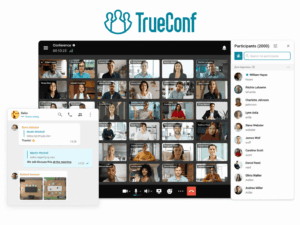
TrueConf Server approaches video meetings as part of a self-hosted enterprise communication system.
The full version can operate autonomously inside a corporate network without requiring an Internet connection for internal communication. It combines video conferencing with messaging and built-in integration for SIP and H.323 systems. trueconf.com
The meeting boundary therefore extends beyond a browser or desktop application.
It can look more like:
Corporate identity → Communication server → Users → Video meetings → Meeting rooms → SIP/H.323 infrastructure
TrueConf Server supports conferences with up to 2,000 participants, with available layouts, speaker behavior, and conference modes depending on configuration. trueconf.com
SIP and H.323 gateways allow existing video endpoints and conference rooms to connect to meetings rather than operating as a completely separate environment. trueconf.com
This model is particularly relevant for:
-
internal corporate video meetings;
-
private or isolated networks;
-
managed employee communication;
-
existing SIP/H.323 infrastructure;
-
large enterprise conferences;
-
organizations that want to operate their own video conferencing server.
Decision edge: the organization controls the core communication server while software users, browser participants, rooms, and third-party video systems can remain part of the same environment.
Trade-off: self-hosted infrastructure requires server resources, network planning, updates, administration, and capacity management.
TrueConf is therefore a stronger fit when video conferencing is an infrastructure decision, not simply a choice of meeting app.
Secumeet: When the Private Communication Environment Is the Main Object

Secumeet draws the boundary differently.
Its focus is not only the live video session but the persistent communication environment around it.
The platform connects:
Messaging → Discussion → Video meeting → Shared content → Follow-up
Secumeet currently describes support for meetings with up to 1,500 participants and persistent personal and group messaging before, during, and after meetings. Secure Meetings
That makes it more relevant to organizations where the same groups communicate repeatedly rather than simply joining isolated meetings.
The distinction from TrueConf is useful.
TrueConf Server: enterprise video infrastructure, rooms, interoperability, large managed conferencing.
Secumeet: private persistent business communication around messaging and meetings.
Decision edge: live meetings remain part of the same private communication environment as ongoing team discussions.
Trade-off: this model may be unnecessary for users who need only occasional one-off external meetings.
Why the Best Video Meeting App Can Change Inside the Same Company
A single company can legitimately reach different answers for different workflows.
Sales
Sales teams may invite new external participants every day.
The main requirement becomes:
minimum guest friction
A link-centered meeting platform may make sense.
Project Teams
The same employees communicate continuously.
Their main requirement becomes:
persistent context
A workspace-oriented system becomes more useful.
Corporate Video Infrastructure
Some organizations already operate:
-
meeting rooms;
-
SIP/H.323 endpoints;
-
corporate directories;
-
private networks;
-
centralized IT administration.
Here, the requirement is larger than choosing a laptop application.
A platform such as TrueConf Server becomes relevant because video meetings can be integrated with organization-controlled communication infrastructure and third-party SIP/H.323 endpoints. trueconf.com
The priority becomes:
interoperability + infrastructure control + centralized administration
rather than simply:
send a meeting link
Private Internal Communication
Another organization may care less about room infrastructure and more about keeping recurring employee communication inside a private environment.
In that case, the priority becomes:
persistent messaging + meetings + controlled deployment
This is where Secumeet occupies a different position.
A Business Video Meeting Has Three Surfaces
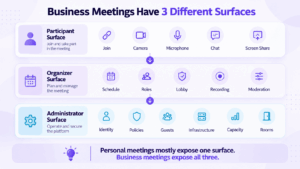
Many comparisons evaluate only what attendees see.
Business meetings have at least three separate surfaces.
Participant Surface
This includes:
-
joining;
-
camera;
-
microphone;
-
chat;
-
screen sharing;
-
content;
-
reactions.
This is where most consumer comparisons stop.
Organizer Surface
The host needs a different toolset:
-
scheduling;
-
roles;
-
lobby controls;
-
mute management;
-
presenter permissions;
-
recording;
-
layouts;
-
attendance controls.
Two products may feel similar to participants but very different to meeting organizers.
Administrator Surface
At business scale, another layer appears:
-
users;
-
authentication;
-
guest policies;
-
retention;
-
infrastructure;
-
capacity;
-
updates;
-
room integration;
-
system monitoring.
A personal video meeting can be evaluated almost entirely from the participant surface.
A business video meeting cannot.
When a Private Communication Environment Makes More Sense
Private deployment changes more than where the server is installed.
It changes the operational boundary.
With a conventional hosted meeting service:
Organization → Provider’s communication service
With a private communication platform:
Organization → Organization-controlled communication environment
This model becomes relevant when the organization needs:
-
private deployment;
-
internal network operation;
-
centralized employee communication;
-
persistent messaging and meetings;
-
greater control over communication infrastructure.
Secumeet fits this category.
The advantage is not that private deployment automatically makes every meeting better.
The advantage is that the organization can choose where the communication environment operates and how it fits into internal infrastructure.
Otherwise, it may simply transfer more operational responsibility to the internal IT team.
Meetings with 1,500 users
Let your team naturally flow from a chat conversation to an immersive 4K meeting in just one click! Bring up to 1,500 participants to your call.
Team messaging
Connect with colleagues and teams before, during and after meetings in personal and group chats.
Collaboration Tools & AI
Collaborate on projects with AI: share a screen with sound, show presentations and manage remote computers.
Questions to Answer Before Choosing a Video Meeting App
Before comparing subscriptions or minor features, answer these questions:
-
Who joins most often? Employees, customers, partners, candidates, or public attendees?
-
How should guests enter? Browser, application, account, or managed invitation?
-
How interactive is the largest normal meeting? Does everyone participate or do most people watch?
-
What must remain after the meeting? Messages, files, recordings, decisions, or tasks?
-
Does the group continue to exist between meetings?
-
Does the organization need meeting-room or SIP/H.323 integration?
-
Who needs to administer the environment?
-
Who should operate the communication infrastructure?
These questions usually eliminate unsuitable platforms faster than comparing dozens of overlapping features.
FAQ
What are video meeting apps?
Video meeting apps are software platforms used to create, join, and manage live online meetings with video and audio. Business platforms may also include messaging, guest access, screen sharing, recordings, meeting-room integration, centralized administration, and persistent collaboration.
What is a video meeting?
A video meeting is a live online session in which two or more participants communicate using video and audio. It may also include screen sharing, messaging, presentations, recording, and participant management.
What is the best video meeting app for business?
There is no universal best option. Zoom is well suited to meeting-centered and external sessions, Google Meet fits Google Workspace organizations, Microsoft Teams fits Microsoft 365 environments, Webex targets managed enterprise collaboration, Jitsi provides open-source deployment flexibility, TrueConf Server is suited to self-hosted enterprise video infrastructure, and Secumeet fits private persistent business communication.
What is a group video meeting?
A group video meeting is a live video session involving multiple participants. Requirements change as the group grows: a small discussion may need little moderation, while larger meetings require roles, permissions, participant controls, and more structured interaction.
What should a business video meeting app include?
The platform should match the organization’s meeting model. Important areas include guest joining, host controls, participant behavior at the required scale, persistent context, administration, meeting-room integration, and the infrastructure model.
Does participant capacity tell me how many people can actively participate?
Not necessarily. Maximum capacity usually describes how many people can enter a meeting. Interactive capabilities, visible video participants, moderation, and presenter roles can change as the audience becomes larger.
Can video meeting platforms be self-hosted?
Yes. Jitsi Meet can be deployed independently, while systems such as TrueConf Server and Secumeet use customer-controlled deployment models. Self-hosting provides more infrastructure control but also transfers deployment, capacity planning, maintenance, and administration responsibilities to the organization.
What is the difference between TrueConf Server and Secumeet?
Both can operate in organization-controlled environments, but they solve slightly different problems. TrueConf Server is positioned more strongly around enterprise video infrastructure, large conferences, meeting rooms, and SIP/H.323 interoperability. Secumeet focuses more heavily on persistent private business communication that connects messaging and video meetings.
Conclusion
The main difference between video meeting apps is no longer whether they can transmit video, carry audio, or share a screen.
The more useful distinction is where each platform draws the meeting boundary.
A meeting-centered service may optimize the path from invitation to live session.
A workspace platform may extend that boundary into chats, calendars, files, and follow-up.
An enterprise video platform may extend it into rooms, endpoints, identity, and centralized administration.
A private platform may extend it further into the infrastructure operating the communication service itself.
For a group video meeting, these differences determine how interaction changes as the audience grows.
For a business video meeting, they determine how guests enter, how employees preserve context, how administrators govern communication, and what remains after the host clicks End Meeting.
The best video meeting app is therefore not the one with the largest feature list.
It is the one whose boundaries match the way the organization actually meets.