
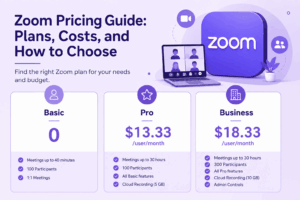
Zoom Workplace, the company’s unified video conferencing and collaboration platform, offers five pricing tiers in 2026: Basic (free), Pro, Business, Business Plus, and Enterprise. Paid plans range from roughly $13 to $22 per user per month on annual billing, with Enterprise priced by custom quote and requiring a minimum of 100 licenses. The right plan depends less on company size alone and more on three factors: how many people need to host meetings, whether you need admin controls like single sign on, and whether you also need a phone system built in.
For most small teams and freelancers, Pro is the entry point that removes the 40 minute meeting cap. For growing companies that need centralized IT control, Business is the practical default. For organizations layering in calling, webinars, or room hardware, the real cost lives in the add ons, not the base license.
Zoom Pricing at a Glance
Prices reflect Zoom’s published list rates as of mid 2026 and can shift with promotions, region, and negotiated enterprise terms. Always confirm the checkout price before purchasing, since Zoom periodically runs discounts, particularly on Pro and first year Business terms.
How Zoom’s Core Plans Actually Differ
Basic (Free)
-
Unlimited one on one meetings
-
Group meetings capped at 40 minutes, up to 100 participants
-
Local recording only, no cloud recording
-
Limited AI Companion access, with a small number of AI notetaking uses per month
-
Basic whiteboard and team chat
Pro ($13.33/user/month annual, $16.99 monthly)
-
Removes the 40 minute time limit; meetings run up to 30 hours
-
5 to 10 GB of cloud recording storage per license, depending on source and current allocation
-
Full AI Companion access at no extra charge, including meeting summaries, action items, and chat drafting
-
Custom Personal Meeting ID and Clips Plus
-
Capped at 99 licenses per account
Business ($18.33/user/month annual, $21.99 monthly)
-
Participant cap rises to 300
-
Single sign on (SSO) and managed domains
-
Unlimited whiteboards and a scheduling assistant
-
Company branding and an admin dashboard
-
Up to 250 licenses per account
Business Plus ($22.49/user/month)
-
Everything in Business, bundled with Zoom Phone Unlimited domestic calling
-
Unlimited domestic online fax
-
Designed for teams that need meetings and a phone system under one line item rather than two separate subscriptions
Enterprise (custom pricing, 100+ licenses)
-
Meeting capacity up to 1,000 participants, or higher on Enterprise+
-
Unlimited cloud storage
-
Dedicated customer success manager and extended transcription features
-
Advanced security, translated captions, and negotiated volume discounts
Insight: The jump from Pro to Business is rarely about meeting size alone. Most teams that upgrade do so for SSO and centralized admin control, not because 100 participants stopped being enough. If your team is under 20 people and doesn’t need centralized user management, staying on Pro and adding a Large Meeting license only when needed is usually cheaper than a blanket Business upgrade.
Add-Ons: Where the Real Cost Lives
Zoom’s base license only covers meetings, chat, and whiteboard. Phone systems, large scale events, and physical conference rooms are priced and billed separately, and this is where budgets tend to expand faster than expected.
Zoom Phone
International calls are metered separately on most tiers unless an unlimited international add on is purchased.
Zoom Webinars and Events
-
Webinars starts around $66.67/month for a 300 attendee tier
-
Webinars Plus starts around $99/month for 100 attendees, with more production and AI features
-
Events starts around $149/month for 100 attendees, built for multi session hybrid events
-
A paid Workplace license, minimum Pro, is required before Webinars can be added, which effectively adds the webinar cost on top of an existing per user fee
Zoom Rooms
-
Roughly $41 to $49 per room, per month for the software license, billed annually
-
Compatible hardware, including camera, display, and room controller, is a separate purchase and commonly runs $1,000 to $5,000 or more per room
-
Optional add ons include Enhanced Media around $25/month and Conference Room Connector around $49/month for SIP/H.323 interoperability
AI Companion and Contact Center
-
AI Companion’s core features, including summaries, action items, and chat drafting, are included at no extra cost on all paid Workplace plans
-
A standalone AI Companion tier, priced around $10/user/month, is available for organizations on the free Basic plan that want AI features without a full paid license
-
A Custom AI Companion add on, around $12/user/month, adds cross platform meeting notes for Google Meet and Microsoft Teams, custom summary templates, and a personal AI coach
-
Zoom Contact Center is priced per agent: Essentials around $69/agent/month, Premium around $99/agent/month, and Elite around $149/agent/month for advanced analytics and AI assisted support
Insight: Because AI Companion’s core functionality is bundled free into every paid plan, Zoom’s effective AI cost is lower than platforms that charge separately. Microsoft 365 Copilot, by comparison, is commonly priced around $30/user/month as an add on. This narrows the practical price gap between Zoom and Microsoft Teams once AI features are counted on both sides.
Realistic Total Cost by Team Size
List prices only tell part of the story. Below are illustrative annual costs based on common team profiles and typical add on needs.
Median contract data compiled from buyer negotiation platforms puts the typical annual Zoom spend for organizations that negotiate their own contracts at roughly $11,000 to $12,000 per year, though this varies enormously with seat count and add ons.
Insight: Unused seats are a common and quietly expensive problem. Industry license management data suggests roughly half of assigned Zoom licenses across organizations go underused or unused in a given period. Before adding seats or upgrading tiers, an audit of actual host activity, meaning who is starting meetings versus only joining them, typically finds more savings than switching plans.
Annual vs. Monthly Billing
Annual billing consistently costs less per user per month, generally saving 16 to 21 percent compared to paying monthly. The tradeoff is commitment: annual plans lock in a license count and payment for twelve months, while monthly billing allows faster scaling down if headcount shrinks. Teams with unstable or seasonal headcount, such as agencies with contract staff, often find monthly billing worth the premium for the flexibility, while stable teams should default to annual.
Zoom vs. Common Alternatives
Zoom sits in the middle of the market: more expensive than bundled office suite options like Google Meet or Microsoft Teams Essentials, but competitive with dedicated collaboration platforms like Webex, especially once AI features are factored into the comparison.
More Affordable Zoom Alternatives
Zoom is not always the cheapest or most appropriate option, particularly for teams with tight budgets or strict data control requirements. Below are five alternatives worth evaluating, ranging from lower cost cloud tools to self-hosted platforms with no per-seat license fee.
TrueConf is a self-hosted video conferencing platform with a free server license supporting up to 1,000 registered users and up to 250 simultaneous participants, with no time limits on meetings. Because there is no per-seat subscription fee, total cost comes primarily from server hardware and IT administration rather than recurring licensing, which can make it considerably cheaper than Zoom at scale for organizations that already have the IT capacity to run and maintain a server.
Secumeet operates as a certified distributor of self-hosted video conferencing infrastructure, aimed at government agencies, defense contractors, financial institutions, and other organizations where meeting data cannot touch third-party cloud infrastructure. Pricing is quote-based rather than published, since deployment typically includes localized support, compliance documentation, and hardware integration rather than a simple software license.
Google Meet and Microsoft Teams Essentials remain the lowest-cost cloud options for teams that only need straightforward video meetings and are already inside the Google Workspace or Microsoft 365 ecosystem, since conferencing is bundled into a subscription many organizations already pay for.
GoToMeeting sits close to Zoom Pro in price but includes unlimited cloud recording without additional storage fees, which can offset Zoom’s cost once recording needs grow.
Insight: The cheapest option on paper is not always the cheapest in practice. Self-hosted platforms like TrueConf and Secumeet eliminate per-seat fees, but shift cost into server infrastructure and IT staff time. For organizations under roughly 50 users with no compliance mandate, a cloud subscription is typically still cheaper and faster to deploy than standing up and maintaining a self-hosted server.
Who Should Choose Each Plan
-
Choose Basic if you only join meetings occasionally, rarely host, and don’t need cloud recording or AI notes beyond a handful of uses per month.
-
Choose Pro if you are a freelancer, consultant, or small team under roughly 20 people who needs unlimited meeting length and basic AI features without administrative overhead.
-
Choose Business if your organization needs centralized user management, SSO, and expects to scale past 20 to 30 regular hosts.
-
Choose Business Plus if your team needs both meetings and a business phone system and would rather manage one bundled bill than two separate subscriptions.
-
Choose Enterprise if you have more than 250 users, compliance or data residency requirements, or need dedicated support and unlimited storage.
Author
Helga Afon is a technology writer specializing in video conferencing, collaboration software, and workplace communication. She writes articles and reviews that help readers better understand enterprise communication tools and industry trends.