
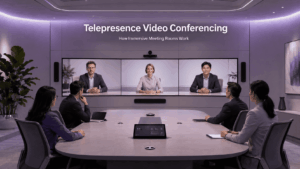
Telepresence video conferencing is a form of video communication designed to make remote participants feel more naturally present in the same meeting space.
Unlike standard video conferencing, which mainly focuses on connecting people through reliable audio and video, telepresence coordinates the entire meeting environment: cameras, displays, microphones, speakers, participant positioning, room geometry, lighting and network performance.
The broader term telepresence can also describe robotic, remote-operation, AR or VR systems that create a sense of presence in another physical location. This article focuses specifically on video telepresence for business meetings and conference rooms.
A useful distinction is simple:
Video conferencing connects remote participants. Telepresence tries to reproduce the experience of sharing a room with them.
Telepresence Video Conferencing at a Glance
What Is Telepresence Video Conferencing?
Telepresence video conferencing combines audiovisual communication with a carefully designed physical and technical environment.
The goal is not simply to produce a sharper video image. A telepresence system tries to preserve visual and auditory cues that make a meeting feel more natural, including participant scale, eye-line alignment, predictable positioning, consistent lighting and spatially appropriate audio.
A traditional meeting-room system may show several remote participants in a conventional layout. A telepresence environment goes further by trying to make those participants appear to occupy a natural position across the meeting table or within the room.
A 4K webcam call is therefore not automatically telepresence.
Telepresence vs Video Conferencing
All telepresence systems use video conferencing technology, but not every video conference creates a telepresence experience.
The distinction is less rigid than it was during the era of purpose-built immersive rooms. Modern meeting-room systems can reproduce several telepresence characteristics through intelligent cameras, speaker framing, large displays, better audio and software-driven layouts without requiring two identical dedicated rooms.
Classic Telepresence vs Modern Meeting Rooms
Classic telepresence systems were usually purpose-built environments.
Two or more rooms could be designed to match each other in table shape, participant positions, display height, camera placement, lighting and audio positioning. The aim was to make the physical meeting table appear to continue through the displays into the remote room.
Modern meeting rooms are more flexible.
They may use:
-
automatic speaker framing;
-
multi-camera room views;
-
large or multiple displays;
-
intelligent audio processing;
-
participant-aware layouts;
-
browser and mobile participation.
The result may not reproduce a classic immersive telepresence room exactly, but it can deliver many of the same benefits with less specialized infrastructure.
Telepresence today is therefore better understood as a meeting experience objective rather than one fixed product category.
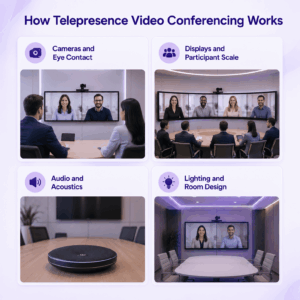
How Telepresence Video Conferencing Works
Telepresence works by coordinating the way participants are captured and reproduced at the remote location.
Cameras and Eye Contact
Camera placement strongly affects how natural a remote conversation feels.
Participants usually look at the remote person’s image rather than directly into the camera, which can create an eye-contact mismatch. Telepresence systems reduce this effect by aligning camera position, participant seating, display position and eye level.
Displays and Participant Scale
Telepresence often uses large displays so remote participants appear close to natural human scale.
The result depends on display size, seating distance, camera framing and field of view rather than screen size alone.
Some immersive rooms use multiple displays to preserve predictable spatial relationships between remote participants, but multiple screens are not required.
Audio and Acoustics
Natural visual positioning works best when audio supports the same spatial relationship.
If a participant appears on the left but their voice comes from a central speaker, the visual and auditory cues conflict.
Room acoustics also matter. Echo, reverberation, HVAC noise, microphone placement and speaker positioning can all affect how natural the conversation feels.
Lighting and Room Design
The physical room is part of the system.
Lighting should provide clear, consistent facial detail without strong backlighting or deep shadows. Table position, camera height, background, viewing distance and display placement also affect the sense of presence.
The objective is to make the local and remote meeting environments feel visually coherent.
What Equipment Does a Telepresence System Need?
A telepresence installation can include:
-
one or more cameras;
-
large displays;
-
microphones or microphone arrays;
-
speakers;
-
a conferencing codec or room computer;
-
room-control equipment;
-
suitable lighting;
-
network connectivity.
More advanced systems may use multiple cameras and displays, but hardware alone does not create telepresence.
The equipment has to be positioned and configured as one coordinated audiovisual environment.
Telepresence Network and Interoperability
Telepresence generally places greater emphasis on predictable network performance than a basic video call.
Multiple high-quality camera streams can increase bandwidth requirements, while latency can make conversation feel unnatural even when image quality remains acceptable. Jitter and packet loss can also affect audio and video continuity.
The network therefore needs to support the media quality and number of streams required by the room design, not simply meet a generic video-conferencing bandwidth target.
Interoperability is equally important because telepresence rooms rarely communicate only with identical systems.
Enterprise environments may also contain:
-
ordinary meeting rooms;
-
desktop applications;
-
browsers;
-
mobile users;
-
H.323 equipment;
-
external meeting platforms.
The important question is not only whether two systems can establish a call. Organizations should also test whether media quality, content sharing, layouts, multi-camera behavior, security and meeting controls remain usable across the connection.
A telepresence room can fall back to an ordinary single-stream video conference and remain technically connected while losing much of the immersive experience.
Telepresence and Modern Video Conferencing Platforms
Modern telepresence can be implemented through several types of meeting-room platforms.
These platforms do not all represent classic immersive telepresence.
Modern systems increasingly separate the conferencing platform from the room experience. Telepresence characteristics may come from the cameras, displays, audio design, lighting and room geometry rather than from the meeting software alone.
Where Secumeet Fits
Secumeet provides customer-operated video meetings, messaging, screen sharing, presentations, file collaboration and remote assistance.
In a telepresence deployment, its role is best understood as the video communication and collaboration layer, not as a complete immersive room by itself.
An organization can combine the platform with separately selected cameras, displays, microphones, speakers and room infrastructure. Whether the resulting environment qualifies as telepresence depends on the complete audiovisual design and user experience.
Public technical documentation does not provide enough detail to make broader claims about dedicated telepresence hardware, spatial audio or advanced multi-camera orchestration, so those requirements should be validated for a specific deployment.
Meetings with 1,500 users
Let your team naturally flow from a chat conversation to an immersive 4K meeting in just one click! Bring up to 1,500 participants to your call.
Team messaging
Connect with colleagues and teams before, during and after meetings in personal and group chats.
Collaboration Tools & AI
Collaborate on projects with AI: share a screen with sound, show presentations and manage remote computers.
When Is Telepresence Worth It?
Telepresence makes the most sense when better remote interaction has enough business value to justify additional room design and infrastructure.
A permanent telepresence environment is easier to justify when the same locations communicate repeatedly and face-to-face travel would otherwise be frequent or expensive.
It is harder to justify when users mainly join from laptops, change locations often or only need simple operational meetings.
The useful question is whether the additional sense of presence improves the meeting enough to justify the additional room and infrastructure requirements.
What to Consider When Designing a Telepresence Room
A telepresence design should be evaluated as a complete room experience rather than as a collection of hardware specifications.
A larger display does not fix poor eye-line alignment. A high-resolution camera does not compensate for bad acoustics. A well-designed room should also work acceptably when ordinary laptops, browsers or mobile users join the meeting.
Frequently Asked Questions
What is telepresence video conferencing?
Telepresence video conferencing combines video communication with coordinated cameras, displays, audio, room design and networking to create a stronger sense that remote participants are physically present in the meeting.
What is the difference between telepresence and video conferencing?
Video conferencing primarily enables remote audiovisual communication.
Telepresence also considers participant scale, eye contact, audio positioning, room geometry and other environmental cues that affect the sense of presence.
Is telepresence still used today?
Yes, although the category has changed.
Classic purpose-built telepresence rooms still exist, but many capabilities associated with them are now provided through more flexible modern meeting-room systems.
Does telepresence require multiple screens?
No.
Multiple displays are common in immersive room systems because they can help preserve participant scale and spatial relationships, but they are not an absolute requirement.
What equipment is needed for telepresence?
A telepresence system may include cameras, displays, microphones, speakers, room-control equipment, a conferencing system and reliable network connectivity.
The exact configuration depends on the room and desired level of immersion.
Is telepresence the same as virtual reality?
No.
Virtual reality can create some forms of telepresence, but business video telepresence usually relies on cameras, displays, microphones and speakers without requiring VR headsets.
Conclusion
Telepresence video conferencing is designed to make remote meetings feel more like shared physical meetings.
That experience depends on the combined design of cameras, displays, audio, participant positioning, room conditions and network performance rather than on resolution or screen size alone.
Classic immersive rooms are no longer the only way to achieve telepresence-like results. Modern meeting-room systems can reproduce many of the same characteristics with more flexible hardware and software.
Telepresence is most valuable when the quality of face-to-face interaction matters enough to justify the additional room and infrastructure requirements.
Author
Helga Afon is a technology writer specializing in video conferencing, collaboration software, and workplace communication. She writes articles and reviews that help readers better understand enterprise communication tools and industry trends.