
Healthcare organizations searching for HIPAA-compliant video conferencing tools need to verify more than encryption or the presence of a Business Associate Agreement.
A video platform does not make a healthcare organization HIPAA compliant by itself.
HIPAA compliance depends on the complete workflow:
PHI → vendor role → BAA scope → platform configuration → users → recordings and transcripts → integrations → retention
The U.S. Department of Health and Human Services requires regulated organizations to protect electronic protected health information, or ePHI, through appropriate administrative, physical, and technical safeguards. HHS also treats risk analysis as a foundational part of Security Rule compliance.
This means the better purchasing question is not:
Is this video platform HIPAA compliant?
It is:
Can this exact service, contract, configuration, and data flow support our HIPAA obligations?
Key Findings
-
There is no HHS-approved certification that automatically makes a software product or customer deployment “HIPAA compliant.” Microsoft explicitly notes that no HHS-approved HIPAA certification standard exists and that customers remain responsible for their own compliance program.
-
A BAA is important when a video vendor acts as a Business Associate, but having a BAA does not remove the healthcare organization’s own compliance responsibilities.
-
The scope of the BAA matters as much as its availability. Buyers should confirm that the exact services they plan to use are covered.
-
PHI can appear outside the live video stream, including chat, recordings, transcripts, files, meeting names, participant information, and AI-generated notes.
-
Recording or transcribing a meeting can create a different data flow from the live call itself.
-
General collaboration platforms such as Zoom, Microsoft Teams, Cisco Webex, and TrueConf solve a different healthcare problem from purpose-built telehealth systems such as Doxy.me, VSee, SimplePractice, and Healthie.
-
Patient experience matters. Browser joining, waiting rooms, mobile access, and the number of steps required before an appointment can affect whether a platform works in clinical practice.
-
Customer-hosted infrastructure can reduce reliance on a conferencing vendor’s cloud, but self-hosting does not remove the healthcare organization’s responsibility for HIPAA safeguards, risk analysis, access control, backups, and administration.

What HIPAA-Compliant Video Conferencing Actually Means
HIPAA does not contain a list of approved video conferencing products.
Instead, the Security Rule requires covered entities and business associates to protect the confidentiality, integrity, and availability of ePHI using appropriate safeguards. HHS specifically identifies areas such as access management, authentication, audit controls, integrity, and transmission security.
For video conferencing, this means organizations need to evaluate both the software and the way it will be used.
A platform may provide suitable technical controls while the organization still exposes PHI through:
-
incorrect guest permissions;
-
inappropriate recording settings;
-
weak account management;
-
unmanaged devices;
-
third-party applications;
-
inappropriate retention;
-
accidental screen sharing;
-
unnecessary AI processing.
Conversely, the absence of a particular marketing label does not by itself determine whether a deployment can satisfy HIPAA requirements.
The compliance question belongs to the complete processing activity.
Map PHI Before Comparing Video Platforms
The most useful first step is to identify where ePHI can appear.
Do not limit the analysis to the camera and microphone.
HHS risk-analysis guidance requires organizations to identify all ePHI they create, receive, maintain, or transmit and to consider external sources and vendors that interact with it.
This makes a PHI map more useful than starting with:
AES-256: Yes
Waiting room: Yes
HIPAA: Yes
Those features only make sense after the organization understands which data is moving where.
Four Checks to Make Before Approving a Video Platform
1. What Role Does the Vendor Have?
For a typical cloud video platform processing PHI on behalf of a healthcare organization, the provider may act as a Business Associate.
In that case, a BAA is generally required.
HHS notes, however, that a BAA is required when the vendor is acting as a Business Associate, not simply because any telecommunications provider carries data. Its guidance describes a narrow conduit situation where a provider has only transient access and does not create, receive, or maintain PHI on behalf of the covered entity.
This distinction matters most when comparing:
-
SaaS video services;
-
customer-hosted systems;
-
telecommunications providers;
-
recording services;
-
transcription tools;
-
AI assistants.
Do not infer the contractual relationship from the product category alone.
2. Is the Exact Service Covered?
“Vendor offers a BAA” is not precise enough.
Check:
-
the exact product;
-
your subscription;
-
video meetings;
-
messaging;
-
cloud recordings;
-
transcription;
-
AI;
-
storage;
-
APIs;
-
integrations.
Microsoft, for example, publishes an explicit list of cloud services that fall within the scope of its HIPAA BAA. Microsoft Teams is currently listed among the in-scope Office 365 services.
Zoom likewise provides current documentation describing how healthcare customers and customers on other eligible paid plans can enter into a BAA.
3. Is the Platform Configured for the Workflow?
Contracts do not configure accounts.
Healthcare organizations still need to determine appropriate settings for:
-
identity;
-
meeting access;
-
guest admission;
-
recordings;
-
transcripts;
-
chat;
-
file sharing;
-
retention;
-
administrator privileges;
-
third-party applications.
HHS specifically requires regulated entities to evaluate risks and implement safeguards appropriate to their environment rather than following one universal technical configuration.
4. What Happens After the Call?
The live meeting may be only the beginning of the PHI lifecycle.
Consider:
live media → recording → transcript → AI summary → storage → export → deletion
Each arrow can introduce:
-
another service;
-
another storage location;
-
another user;
-
another retention period;
-
another vendor relationship.
This is one of the most important checks when comparing modern video platforms.
BAA Available vs BAA Scope
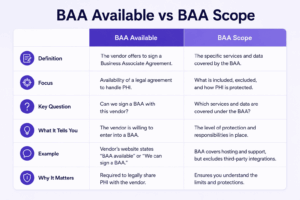
A checkbox saying BAA available hides too much information.
Use a scope checklist instead.
Zoom provides a useful example of why this distinction matters.
Its current BAA documentation not only describes BAA availability but also has a separate section for AI Feature Availability Under BAA. Zoom states that AI functionality is available to customers with BAAs, while noting that some AI features may not currently be available to healthcare and higher-education customers with BAAs.
That is more actionable information than a generic AI: Yes.
Live Meetings Are Not the Same as Recordings, Transcripts, and AI
A healthcare organization may approve a platform for live consultations but apply different rules to recordings or AI.
Consider four workflows.
Live Consultation
Data primarily consists of:
-
audio;
-
video;
-
screen content;
-
participant identity.
Recorded Consultation
Now the organization has created stored ePHI.
Questions change to:
-
Where is the recording stored?
-
Who can download it?
-
How long is it retained?
-
Is it backed up?
-
Can it be shared externally?
Automatic Transcript
The system creates a searchable written representation of the consultation.
This can make PHI easier to:
-
search;
-
copy;
-
export;
-
integrate.
The retention and access model therefore matters.
AI Meeting Notes
AI may process:
-
transcript;
-
audio;
-
chat;
-
screen content;
-
attachments.
Healthcare buyers should verify the exact AI feature rather than assuming that because meetings are covered, every AI function follows the same data path.
Three Types of Healthcare Video Platform
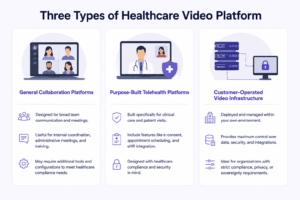
The products commonly described as HIPAA-compliant video conferencing tools actually represent several different architectures.
General Collaboration Platforms
Examples:
-
Zoom;
-
Microsoft Teams;
-
Cisco Webex.
These are useful when the healthcare organization needs more than telemedicine.
Typical workflows include:
-
staff meetings;
-
patient consultations;
-
multidisciplinary care;
-
training;
-
administration;
-
messaging.
The trade-off is that administrators may need to configure a broad collaboration environment for healthcare use.
Purpose-Built Telehealth Platforms
Examples:
-
Doxy.me;
-
VSee;
-
SimplePractice;
-
Healthie.
Their workflows start closer to the clinical process.
Depending on the platform, this can include:
-
patient scheduling;
-
waiting rooms;
-
client portals;
-
intake;
-
billing;
-
clinical records;
-
telehealth appointments.
These platforms can reduce the amount of healthcare-specific workflow that has to be assembled separately.
Customer-Operated Video Infrastructure
TrueConf represents a different procurement path.
Instead of sending all core conferencing workloads to a general SaaS service, the healthcare organization can operate TrueConf Server in its own infrastructure, including LAN/VPN environments without an Internet connection. TrueConf also publishes healthcare-specific use cases such as telemedicine integration and medical content sharing.
This can change the PHI data flow significantly.
HIPAA Video Conferencing Tools Compared
1. TrueConf

Best for: Healthcare organizations that want to operate video conferencing and related communication infrastructure themselves.
TrueConf Server can be deployed on infrastructure controlled by the healthcare organization and can work in LAN or VPN environments without requiring Internet connectivity for core operation. TrueConf also provides APIs that can be used to integrate video communication into external applications and telemedicine systems.
Its healthcare materials describe use cases involving:
-
telemedicine;
-
medical content sharing;
-
integration into telehealth applications;
-
communication from desktop, mobile, and browser clients.
Why it fits
The primary advantage is infrastructure control.
A healthcare organization can design the communication environment around its own:
-
network;
-
identity;
-
server;
-
access;
-
retention;
-
integration policies.
This differs from purchasing a SaaS video account where core conferencing services are operated by the vendor.
What to verify
Do not assume that self-hosting automatically answers every HIPAA question.
Determine:
-
whether TrueConf or a partner will have administrative or support access to PHI;
-
whether external integrations process PHI;
-
where backups are stored;
-
how recordings and messages are retained;
-
who administers the servers.
The BAA analysis should follow the actual vendor relationship and data flow.
Trade-off
The healthcare organization takes on infrastructure responsibility, including deployment, availability, updates, backups, and administration.
Do not choose it when: The practice wants a turnkey patient scheduling, billing, intake, and telehealth environment with minimal infrastructure administration.
2. Zoom

Best for: Healthcare organizations that want a general-purpose cloud communication platform for patient and staff video workflows.
Zoom currently allows healthcare customers to use Zoom Workplace under a BAA arrangement. Its current documentation states that Pro, Business, Business Plus, and Enterprise plans are offered to customers in healthcare and that Zoom also enters into BAAs with customers subscribed to other eligible paid plans.
This is important because the older assumption that only one special “Zoom for Healthcare” subscription can ever be covered by a BAA is no longer accurate.
Why it fits
Zoom can support several communication classes:
-
patient video visits;
-
internal meetings;
-
multidisciplinary discussions;
-
staff training;
-
messaging.
It also provides administrative controls for managing healthcare deployments.
BAA and AI
Zoom’s current BAA documentation specifically addresses AI.
AI features are available to customers with BAAs, although Zoom notes that individual AI functions may have different availability for healthcare customers. Administrators also have controls for managing those capabilities.
That means the compliance review should examine the exact AI feature, not merely whether AI Companion exists.
Trade-off
Core services use Zoom-operated infrastructure. Healthcare organizations that require customer-operated conferencing infrastructure should evaluate a different architecture.
Do not choose it when: A hard requirement says core communications must operate independently inside the healthcare organization’s own network.
3. Microsoft Teams

Best for: Hospitals and healthcare organizations already centered on Microsoft 365.
Microsoft Teams is currently listed as an in-scope Office 365 service under Microsoft’s HIPAA/HITECH offering. Microsoft makes its HIPAA BAA available to covered entities and business associates for in-scope services.
Microsoft also makes one point especially clear:
The BAA does not make the customer’s organization HIPAA compliant.
Customers remain responsible for determining that their use of Microsoft services is consistent with their HIPAA obligations.
Why it fits
Teams can connect video communication with:
-
organizational identity;
-
employee messaging;
-
files;
-
calendars;
-
Microsoft 365 collaboration.
This can make it a practical choice when clinicians and administrative staff already work inside Microsoft 365.
What to verify
Pay particular attention to the services connected to Teams.
A workflow can involve:
-
Teams;
-
SharePoint;
-
OneDrive;
-
Microsoft 365 Copilot;
-
Power Automate;
-
external applications.
Microsoft publishes the services in scope for its BAA, which makes it possible to verify the architecture more precisely.
Trade-off
The wider Microsoft ecosystem introduces more administrative decisions than a telehealth service built around a simple patient appointment.
Do not choose it when: A small practice only wants simple browser-based patient visits and does not otherwise use Microsoft 365.
4. Cisco Webex

Best for: Larger healthcare organizations that want enterprise collaboration and video communication across employees, rooms, and care teams.
Cisco’s current Webex Trust Center has a dedicated healthcare section describing Webex as supporting HIPAA use and providing a path for customers that need a BAA.
Cisco also publishes Webex controls covering areas such as:
-
identity and access;
-
encryption;
-
retention;
-
data-loss protection;
-
compliance tooling.
Why it fits
Webex is more than a patient telemedicine interface.
It can fit healthcare organizations where communication needs include:
-
clinical teams;
-
administrative meetings;
-
conference rooms;
-
external consultations;
-
organization-wide collaboration.
Trade-off
The breadth of the enterprise environment can be unnecessary for an independent clinician whose primary workflow is simply:
appointment → waiting room → patient call
Do not choose it when: The practice primarily needs lightweight telehealth rather than an enterprise communications system.
5. Doxy.me
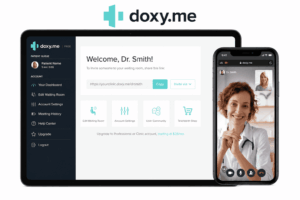
Best for: Clinicians and practices that prioritize a simple telehealth-specific patient experience.
Doxy.me was built around telemedicine rather than general enterprise collaboration.
Its current support documentation states that Doxy.me operates a HIPAA compliance program and provides BAAs. Its BAA guidance says individual providers can obtain a BAA through Free and Professional accounts, while organizations with multiple providers should use the appropriate Clinic BAA arrangement.
Why it fits
The patient workflow is intentionally simple.
Instead of introducing patients into a workplace collaboration environment, the interaction centers on a telehealth visit and waiting room.
This makes Doxy.me especially relevant when patient adoption is more important than broad internal collaboration.
Evidence and controls
Doxy.me also reports undergoing a SOC 2 Type 2 audit that included HIPAA Security Rule controls.
Its documentation describes BAAs with relevant vendors used in the service as part of its HIPAA program.
Trade-off
Organizations that need extensive employee collaboration, document workspaces, enterprise room systems, or broader unified communications may need additional products.
Do not choose it when: The objective is one communication platform for a large healthcare organization’s patient, employee, room, and administrative workflows.
6. VSee

Best for: Telehealth programs requiring more healthcare-specific workflows than a general meeting application provides.
VSee combines video communication with a clinical telehealth environment.
VSee’s current support documentation states that it offers a BAA and describes its video communication as supporting HIPAA use when the appropriate agreement and safeguards are in place.
Why it fits
The product is organized around remote healthcare rather than office collaboration.
VSee Clinic includes patient-facing workflows and waiting-room functionality, and its account setup allows providers to request a BAA when needed.
Security and media
VSee’s technical documentation describes encrypted audio/video communication and includes recording and screen-sharing functionality.
Recording creates a separate ePHI lifecycle, so organizations should determine whether they will use local or cloud recording and apply suitable retention and access policies.
Trade-off
Organizations standardized on Microsoft, Cisco, or another enterprise communications ecosystem may find that a separate telehealth platform adds another identity and administrative environment.
Do not choose it when: The primary objective is general employee collaboration rather than patient-centered telehealth.
7. SimplePractice
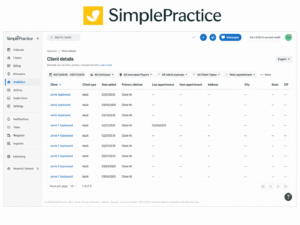
Best for: Private practices that want telehealth inside a broader EHR and practice-management workflow.
SimplePractice is substantially different from Zoom, Teams, and Webex.
Video is not the entire product.
Telehealth sits alongside:
-
appointments;
-
client records;
-
reminders;
-
portal access;
-
billing and practice management.
SimplePractice states that its BAA applies to its customers and that telehealth is covered within that agreement.
Why it fits
The video session can begin from the same environment that manages the rest of the practice.
Its current telehealth features include:
-
appointment links;
-
client portal workflows;
-
virtual waiting rooms;
-
secure chat;
-
screen sharing;
-
whiteboard functionality.
This can reduce the number of separate healthcare systems a smaller practice needs to connect.
AI requires its own review
SimplePractice now also provides AI functionality associated with clinical workflows.
Its documentation includes separate terms and guidance covering AI products, transcripts, and third-party vendors.
That is exactly why an organization should verify post-call and AI processing independently from live video.
Trade-off
A large hospital that already operates enterprise EHR, identity, communications, and scheduling systems may not need another complete practice-management environment.
Do not choose it when: The organization only needs an enterprise video communication layer to integrate into infrastructure it already operates.
8. Healthie
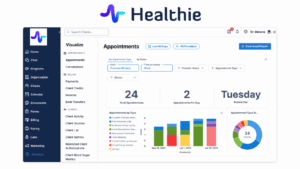
Best for: Health and wellness practices that want telehealth combined with broader patient and practice workflows.
Healthie provides a healthcare-specific platform rather than a standalone meeting application.
Its current FAQ states that Healthie signs BAAs with providers and describes the platform as operating under HIPAA requirements for protecting health information.
Why it fits
The platform is designed around ongoing provider-client relationships rather than isolated video calls.
This makes it more relevant when a healthcare organization needs video as part of a broader workflow that may also involve:
-
patient engagement;
-
scheduling;
-
records;
-
integrations;
-
ongoing care management.
Trade-off
An organization already operating its own EHR and enterprise collaboration stack may not benefit from adopting another full healthcare workflow platform simply to obtain video meetings.
Do not choose it when: The organization only needs a standalone communication layer or customer-operated conferencing infrastructure.
General Collaboration vs Purpose-Built Telehealth
One of the most useful purchasing decisions is to determine whether healthcare itself should be the center of the product.
Neither model is inherently more compliant.
The difference is how much healthcare-specific workflow the organization must build around the video platform.
A solo therapist and a 20,000-person hospital should not necessarily begin with the same shortlist.
How to Evaluate Patient Experience
HIPAA is not the only requirement.
A technically appropriate platform can still fail operationally if patients cannot use it.
Joining
Test whether the patient must:
-
create an account;
-
install an application;
-
remember a password;
-
navigate several screens.
Waiting Room
Clinical workflows often benefit from a virtual waiting state where the provider controls when the patient enters the consultation.
Mobile Access
Test actual patient devices, not only organization-managed laptops.
Accessibility
Consider patients who may require:
-
captions;
-
assistive technology;
-
language assistance;
-
larger interface elements.
HHS notes that telehealth identity-verification and communication processes still need to account for obligations to provide effective communication to people with disabilities and meaningful access for people with limited English proficiency.
Weak Networks
Test rural and mobile connections where relevant.
Patient experience should be evaluated under the networks patients actually use.
Technical Controls to Evaluate
HIPAA does not prescribe one universal list of video-product features.
HHS instead requires appropriate safeguards based on risk.
For a video environment, evaluate at least the following.
Identity and Access
Check:
-
unique employee identities;
-
administrator roles;
-
MFA;
-
SSO;
-
guest controls;
-
waiting rooms.
HHS requires procedures to verify that persons seeking access to ePHI are who they claim to be and limits access to authorized users.
Auditability
Determine what activities can be logged and reviewed.
HHS requires mechanisms to record and examine activity in systems that contain or use ePHI.
Transmission Protection
Evaluate the protection of ePHI transmitted over electronic networks.
Do not reduce this to:
Does it have E2EE?
HHS requires appropriate transmission-security measures and treats encryption decisions within the broader risk-management framework.
Integrity
Organizations need controls that protect ePHI against improper alteration or destruction.
For video workflows, this may affect:
-
recordings;
-
transcripts;
-
shared files;
-
exported records.
Retention
Decide what actually needs to be retained.
More stored data is not automatically better.
Avoid creating unnecessary copies of:
-
recordings;
-
chat histories;
-
transcripts;
-
AI notes.
How to Run a HIPAA Video Conferencing Pilot
A pilot should test the PHI workflow, not merely whether the camera works.
Test 1: Patient Joining
Ask a test participant with no existing account to join from:
-
laptop;
-
smartphone;
-
weaker network.
Document every step.
Test 2: Access Control
Attempt to join:
-
before admission;
-
with the wrong account;
-
through an expired invitation where applicable.
Test 3: Screen Sharing
Simulate a clinician with several records open.
Verify that staff understand how to avoid disclosing information belonging to another patient.
Test 4: Recording
Create a recording and document:
-
where it goes;
-
who gains access;
-
how it is downloaded;
-
when it is deleted.
Test 5: Transcription and AI
Turn on the exact functions the organization plans to use.
Document:
audio/video → processor → transcript → summary → storage
Then verify that each part of that workflow is approved.
Test 6: Offboarding
Remove a staff account.
Confirm:
-
login access;
-
active sessions;
-
recordings;
-
chats;
-
file permissions.
Test 7: Audit Review
Ask a compliance or security administrator to reconstruct the test activity from available logs.
Decision Matrix
This is a starting point, not a compliance determination.
The organization still needs to evaluate its exact service configuration, contracts, and PHI lifecycle.
Common HIPAA Video Conferencing Mistakes
Assuming the Product Is “HIPAA Certified”
There is no HHS-approved certification standard that automatically establishes HIPAA compliance for a video conferencing product. Microsoft explicitly warns against interpreting its compliance offering this way.
Treating a BAA as the Final Step
The BAA addresses responsibilities between parties.
It does not:
-
configure the meeting;
-
train staff;
-
set retention;
-
control guests;
-
perform the organization’s risk analysis.
Asking Only Whether a BAA Exists
Ask what it covers.
A BAA that covers meetings but not a separate external AI or integration workflow may not answer the organization’s actual question.
Treating Encryption and E2EE as the Same Compliance Test
HIPAA security requirements are risk-based and broader than one encryption architecture.
Access management, auditability, integrity, transmission security, policies, and administrative controls all matter.
Forgetting About Chat
A patient may type medical information into meeting chat.
That chat is part of the PHI analysis.
Forgetting About Metadata
Meeting titles such as:
John Smith – Oncology Follow-Up
can themselves reveal health-related information.
Automatically Recording Every Consultation
A recording creates stored ePHI that did not need to exist before recording began.
Only record when the clinical or organizational workflow requires it and appropriate policies are in place.
Turning On AI Without Mapping Its Data Flow
Do not approve “AI Companion”, “Copilot”, or another AI category generically.
Approve the exact feature and understand:
-
input;
-
processor;
-
output;
-
storage;
-
retention.
Assuming Self-Hosting Equals HIPAA Compliance
Self-hosting changes infrastructure responsibility.
It does not remove:
-
risk analysis;
-
access requirements;
-
workforce policies;
-
audit controls;
-
backup obligations;
-
physical safeguards.
Frequently Asked Questions
What makes a video conferencing tool suitable for HIPAA-regulated use?
A tool should provide capabilities that allow a covered entity or Business Associate to protect ePHI appropriately, while the surrounding vendor relationship, contracts, configuration, and operational processes must also meet the organization’s HIPAA obligations.
The Security Rule focuses on administrative, physical, and technical safeguards rather than a single product label.
Does a HIPAA-compliant video conferencing tool need end-to-end encryption?
HIPAA does not establish a universal requirement that every video conference use a specific end-to-end encryption architecture.
Organizations must protect ePHI during transmission and determine reasonable and appropriate safeguards through their risk-analysis and risk-management process.
Do I need a BAA with every video conferencing provider?
Usually when the provider is acting as a Business Associate by creating, receiving, maintaining, or transmitting PHI on behalf of the covered entity.
Not every carrier of data automatically becomes a Business Associate. HHS describes a limited conduit exception where a telecommunications provider has only transient access and does not create, receive, or maintain PHI on behalf of the organization.
For conventional cloud video platforms used to handle PHI, verify the Business Associate relationship and BAA requirements before deployment.
Is Zoom suitable for HIPAA-regulated video calls?
Zoom provides a BAA path for eligible paid healthcare customers and customers on other eligible paid plans. Its current documentation also addresses the availability of AI features for accounts operating under a BAA.
The healthcare organization remains responsible for determining that its use and configuration satisfy its HIPAA obligations.
Is Microsoft Teams covered by a HIPAA BAA?
Microsoft currently lists Teams as an in-scope service under its Office 365 HIPAA/HITECH offering. Microsoft’s BAA is available to covered entities and Business Associates using in-scope services.
Microsoft explicitly states that having its BAA does not itself make the customer’s organization HIPAA compliant.
Is Doxy.me suitable for HIPAA telehealth?
Doxy.me states that it operates according to HIPAA requirements and provides BAAs. Individual-provider and clinic BAA arrangements differ, so organizations should use the agreement appropriate to their structure.
Should a healthcare organization use a general video platform or telehealth software?
Use a general collaboration platform when the organization needs video as part of a broader employee and enterprise communication environment.
Consider purpose-built telehealth software when the workflow primarily revolves around:
-
patients;
-
waiting rooms;
-
scheduling;
-
clinical documentation;
-
practice management.
Does self-hosted video conferencing eliminate the need for a BAA?
Not necessarily.
A BAA is required when another organization qualifies as a Business Associate under the actual relationship and PHI processing involved.
With customer-operated software, the healthcare organization should map which vendors, support providers, hosting companies, integrations, and other parties can create, receive, maintain, or transmit PHI.
Can healthcare organizations use AI meeting summaries with HIPAA-regulated calls?
Potentially, but the exact AI service must be evaluated.
For example, Zoom currently documents AI availability for customers with BAAs and notes that some features may have healthcare-specific availability restrictions.
Healthcare organizations should determine:
-
what data the AI receives;
-
whether the service is within the relevant contractual scope;
-
where output is stored;
-
who can access it;
-
how long it remains available.
Final Checklist Before Approval
Before approving a video platform for workflows involving PHI, confirm:
-
Where PHI can appear.
-
Which organizations create, receive, maintain, or transmit it.
-
Which vendors are acting as Business Associates.
-
Whether the required BAA is in place.
-
Whether the exact services are covered by that BAA.
-
How live media is protected.
-
Where recordings, chats, files, and transcripts are stored.
-
What AI functions process.
-
How users and guests are authenticated and authorized.
-
What audit information is available.
-
How employees are onboarded and removed.
-
What retention and deletion rules apply.
-
Whether integrations create additional PHI flows.
-
Whether the configuration has been included in the organization’s HIPAA risk analysis.
HHS describes risk analysis as the first step in identifying and implementing appropriate Security Rule safeguards and requires the process to cover all ePHI an organization creates, receives, maintains, or transmits.
Conclusion
There is no useful universal HIPAA compliant: Yes / No checkbox for video conferencing.
A healthcare organization needs to evaluate the complete workflow:
PHI → vendor → agreement → configuration → meeting → recording/transcript/AI → storage → access → deletion
For general cloud collaboration, Zoom, Microsoft Teams, and Cisco Webex provide healthcare organizations with established HIPAA and BAA paths under applicable services and agreements.
For patient-centered telehealth, Doxy.me and VSee begin closer to the clinical consultation workflow, while SimplePractice and Healthie combine telehealth with broader practice-management functions.
TrueConf represents a different architecture: the healthcare organization can operate its own video communication infrastructure and integrate it into existing telemedicine systems.
The deciding question should therefore not be:
Which vendor says it is HIPAA compliant?
It should be:
Can we document how PHI moves through this exact workflow, who handles it, which agreement covers it, and which safeguards protect it at every stage?
Author
Helga Afon is a technology writer specializing in video conferencing, collaboration software, and workplace communication. She writes articles and reviews that help readers better understand enterprise communication tools and industry trends.