
Video conferencing pricing is often reduced to a simple monthly number: $4 per user, $7 per user, $14 per user. That makes comparisons look straightforward, but those prices do not always describe the same thing.
Some platforms charge for every licensed employee, while others are closer to a host-based model. A low-cost plan may support only relatively small meetings, while a more expensive one may include recording, AI features, larger participant limits, advanced administration, or additional storage. Self-hosted platforms introduce another model entirely because the organization pays not only for software, but also for the infrastructure required to operate it.
For that reason, video conferencing pricing is easier to understand when you separate four elements: licenses, meeting capacity, features, and infrastructure. Before comparing any of them, however, you need to know who is actually being licensed.
Video Conferencing Pricing at a Glance
The table below compares several common pricing models using current standard US list prices where public pricing is available.
Microsoft Teams Essentials currently starts at $4 per user per month with annual billing and supports meetings with up to 300 participants. Google Workspace Starter costs $7 per user per month on an annual commitment and includes Google Meet for up to 100 participants. Webex Meet is priced from $12 per host license per month when billed annually, while Zoom Workplace Pro starts at $14.16 per licensed user per month with annual billing.
These numbers are useful as a starting point, but they should not be treated as equivalent units. A $4 Teams license, a $12 Webex host license, and a self-hosted server license can represent very different patterns of use.
How Much Does Video Conferencing Cost?
For mainstream business SaaS platforms, entry-level paid plans typically start at around $4–$15 per user or host per month. That range can increase once a company needs larger meetings, webinars, cloud recording, AI summaries, advanced identity management, compliance controls, extra storage, or enterprise administration.
The advertised monthly price therefore answers only one part of the purchasing question. It tells you what the base license costs, but not necessarily what the meeting environment you actually need will cost.
The cheapest plan is not necessarily the cheapest meeting.
A better comparison starts with the licensing unit.
Who Are You Actually Paying For?
One of the most common pricing mistakes is treating total employees, licensed users, hosts, participants, and concurrent users as if they were the same number.
They are not.
Employee
An employee is simply someone who works for the organization. That person may never need to schedule a meeting or consume a paid conferencing license.
Licensed User
A licensed user is an account that consumes a paid license. Some platforms are designed around broad per-user licensing, while others can be used more selectively.
Host or Organizer
A host creates and manages meetings. In host-oriented pricing models, this distinction can have a major effect on total cost.
For example, a company may have 500 employees but only 30 people who regularly organize external meetings.
Participant
A participant joins a meeting but may not need a paid host license. Participants can include employees, customers, partners, students, or guests.
Concurrent User
A concurrent user is someone actively connected at the same time. This concept becomes especially important in self-hosted and server-based licensing models.
The practical implication is simple:
Employee count is not the same as licensed-user count, and licensed-user count is not the same as meeting capacity.
A company with 1,000 employees may need only a small number of regular hosts. Another company with 50 employees may regularly run 500-person customer events.
That is why usage topology often matters more than headcount alone.
The Four Layers of Video Conferencing Cost
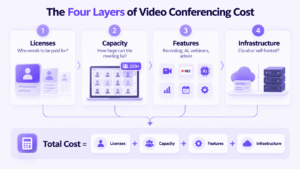
Once the licensing unit is clear, the total cost usually comes from four layers.
1. License Cost
The first layer is the recurring subscription or software license.
For a typical SaaS platform, the calculation is:
Licensed users × monthly price × 12
For example, 100 licenses at $7 per month equal about $8,400 per year.
That figure is useful, but only if those 100 licenses are actually required. If only 20 people need host rights, a host-based product may produce a very different annual total from a platform licensed across all users.
2. Meeting Capacity
The next question is how many people need to be in the same meeting.
This number can change the required plan even when employee count stays exactly the same.
Zoom Pro supports 100 participants by default, while Zoom Business increases that limit to 300. Microsoft Teams Essentials supports up to 300 participants, and selected Microsoft enterprise plans support larger interactive meetings. Google Workspace also increases capacity by plan: Starter supports 100 participants, Standard 150, and Business Plus 500.
The largest meeting can matter more than total headcount.
If a company needs a 500-person event once a month, a low-cost 100-participant plan may not be relevant even if most everyday meetings involve only 10 people.
3. Feature Cost
Companies also move to higher plans because one required feature is missing from the entry tier.
Common triggers include:
-
cloud recording;
-
transcription;
-
AI summaries;
-
webinars;
-
attendance tracking;
-
storage;
-
SSO;
-
analytics;
-
compliance controls;
-
data residency.
The important point is that the upgrade may have little to do with the quality of basic video meetings. A company may be comfortable with the participant limit but still need a higher tier because recording, governance, or administration is unavailable below it.
That is why the right comparison is between the lowest plans that satisfy the same requirements, not the lowest prices shown on each vendor’s website.
4. Infrastructure Cost
The fourth layer becomes important when comparing cloud and self-hosted conferencing.
With a cloud service, much of the infrastructure is already included in the subscription. The vendor operates meeting servers, backend services, and part of the storage and availability layer.
Self-hosted systems move more of that responsibility to the organization. The total cost may therefore include software licensing, server resources, storage, network capacity, administration, maintenance, backups, and monitoring.
The two models are structurally different:
Cloud SaaS:
Users or hosts × subscription × time
Self-hosted video conferencing:
Software + capacity + infrastructure + operations
Neither model is automatically cheaper.
Cloud and self-hosted pricing use different cost models.
The Cheapest Plan Is Not Always the Cheapest Meeting
Pricing pages are designed around plans, while organizations buy for specific use cases.
Imagine one platform costs $7 per user per month but does not include a required recording capability in that tier. Another costs $14 per user and already includes it. If recording is mandatory, comparing $7 with $14 tells you very little.
The same problem appears with participant capacity. A platform may look inexpensive until the company needs a 500-person event, webinar licensing, or a large-meeting add-on.
The more useful rule is:
Compare the cheapest plans that support the same meeting model, not the cheapest plans on the pricing page.
That means defining requirements first and only then comparing prices.
Three Companies With the Same Headcount Can Pay Very Different Prices
Consider three organizations with 100 employees.
The first company has only 10 people who regularly host meetings. Most other employees simply join when invited. A host-based licensing model may therefore require relatively few paid licenses.
The second company also has 100 employees, but almost everyone schedules internal or customer meetings. Its paid-license requirement may be close to the full employee count.
The third company has the same 100 employees but regularly runs customer events for 500 participants. Here, seat count is not the main pricing pressure at all. Meeting capacity is.
All three companies have identical headcount, yet their video conferencing budgets can be very different. This is one of the clearest reasons not to treat cost per employee as a universal pricing metric.
What Does Video Conferencing Cost at Different Team Sizes?
The table below shows how several representative monthly SaaS prices scale if every user requires a paid license.
These figures are simple annualized examples based on current representative list prices. They are useful for showing how per-user pricing scales, but they are not actual quotes. Enterprise agreements, regional pricing, discounts, minimum license requirements, and negotiated terms can all change the final total.
More importantly, not every organization needs to license every employee.
How Much Video Conferencing Can You Get for Free?
Free plans are useful for small teams, occasional meetings, and initial testing. They usually become restrictive in one of four areas:
duration, capacity, recording, or administration.
Zoom Basic supports up to 100 participants and limits group meetings to 40 minutes. Google Meet allows personal users to host meetings for up to 100 participants, with group meetings limited to 60 minutes without a paid Workspace subscription. Webex Free also supports up to 100 attendees with a 40-minute meeting limit.
For occasional use, those limits may be completely acceptable. For organization-wide deployment, they become more significant because free tiers usually offer less control over storage, administration, reporting, and advanced meeting workflows.
The relevant question is not simply whether a free plan exists, but which limitation the organization will hit first.
Typical Meeting Size vs Maximum Meeting Size
Pricing decisions should use two different numbers:
-
the size of a normal meeting;
-
the size of the largest meeting the organization must support.
A company may hold mostly 10-person meetings while still needing a 500-person quarterly event. If procurement looks only at the typical meeting, it can choose a tier that fails the first time a large event is scheduled.
This is why maximum meeting size often becomes a pricing trigger. A larger event may require a higher plan, webinar product, enterprise tier, or additional capacity package.
The largest meeting does not need to happen every day to influence the cost model.
When Recording or AI Changes the Plan
Recording and AI are two common examples of features that can push an organization above the entry tier even when basic meeting capacity is sufficient.
Recording may be local or cloud-based, may include storage limits, and may become available only in certain paid tiers. Google Workspace, for example, introduces meeting recording above the Starter level, while Webex and Microsoft package recording differently.
AI works in a similar way. Some platforms include selected summaries, transcription, or meeting assistants in standard plans, while broader AI functionality may sit inside higher tiers or separate products.
For procurement, the useful question is not:
Does this platform have recording or AI?
It is:
Does the exact plan we need include the recording or AI workflow we require?
That distinction prevents feature pages from being mistaken for pricing pages.
Monthly vs Annual Billing
Many SaaS vendors offer lower effective monthly prices in exchange for an annual commitment.
Annual billing is attractive for stable deployments because it reduces the per-user rate and makes budgeting predictable. Flexible monthly billing can cost more but may be useful for temporary teams, changing headcount, or organizations that do not want to commit for a full year.
The better option therefore depends on both price and expected license stability.
A lower annual rate is not necessarily better if the organization expects to remove a large number of seats before renewal.
Cloud vs Self-Hosted Video Conferencing Pricing
Cloud and self-hosted platforms often appear in the same comparison tables, but their economics are different.
Cloud pricing is usually easier to estimate because infrastructure is bundled into the subscription. Self-hosting requires a broader total-cost calculation, but it can separate cost from simple employee count.
This distinction becomes more important in organizations where registered users, simultaneous users, and meeting participants are very different numbers.
How TrueConf Server Changes the Cost Model
TrueConf Server is self-hosted, so it does not fit neatly into a simple monthly per-seat comparison with Zoom, Teams, or Google Meet.
A more useful way to understand its pricing is to ask how many users need to be connected simultaneously, how much conferencing capacity is required, and which additional functions the deployment needs.
TrueConf Server licensing distinguishes between concepts such as registered users, online users, PRO users, conferencing capacity, and additional licensed capabilities. Depending on the deployment, organizations may also need functionality for SIP/H.323 integration, guest access, or other scenarios.
The purchasing model is therefore closer to:
required concurrency + meeting capacity + functionality + infrastructure
rather than:
every employee × one monthly SaaS subscription
This distinction can matter when an organization has a large registered user base but only part of it is connected at the same time.
TrueConf also provides a free server edition, while larger deployments use paid licensing. The important point is not that self-hosting is automatically cheaper, but that capacity-based and seat-based models measure different things.
When a Self-Hosted Model Can Make More Sense
A self-hosted approach becomes more relevant when infrastructure itself is part of the purchasing requirement.
That can include organizations where only a fraction of registered users are online simultaneously, where conferencing must operate inside a private or isolated network, or where SIP/H.323 systems and meeting rooms need to be integrated into the same communication environment.
It can also be worth evaluating when per-user SaaS costs continue growing with headcount while actual simultaneous usage remains relatively stable.
Self-hosting does not eliminate operating cost. The organization still needs server resources, administration, storage, monitoring, updates, backup, and network capacity. The difference is that those costs are managed directly rather than bundled into a vendor subscription.
When Cloud Video Conferencing Is Simpler
Cloud conferencing remains a natural fit for many organizations, especially when meeting requirements are straightforward and infrastructure control is not a priority.
A SaaS platform can be easier to operate when the company wants minimal server administration, already relies on a broader productivity ecosystem, and prefers predictable subscription billing.
For smaller teams, that simplicity may outweigh the advantages of running private conferencing infrastructure. The calculation becomes more interesting as usage scale, participant capacity, and infrastructure requirements increase.
Five Questions Most Pricing Tables Miss
Before comparing video conferencing prices, it is worth answering five questions that are often absent from vendor tables.
Who actually needs a paid license?
If only hosts need paid accounts, total headcount may overstate the budget.
How many people need to meet at the same time?
The largest meeting can determine the required tier even when there are few internal users.
Which feature forces the upgrade?
Recording, webinars, AI, SSO, storage, or compliance may matter more than participant limits.
Which costs are add-ons?
Large meetings, webinar packages, room licenses, extra storage, telephony, and advanced AI may sit outside the headline price.
Are you buying a service or operating infrastructure?
SaaS bundles infrastructure into recurring fees, while self-hosted systems move more cost and responsibility to the organization.
These questions are usually more useful than comparing advertised starting prices directly.
How to Compare Video Conferencing Pricing Correctly
A practical comparison should start with usage rather than with vendor pricing pages.
First, determine how many people genuinely need paid licenses. Then define both the typical and maximum meeting size. After that, list the functions that are mandatory: recording, webinars, AI summaries, SIP/H.323, guest access, transcription, room integration, or compliance controls.
Only then should you identify the lowest plan on each platform that meets all those requirements.
Once the viable plans are known, add any additional costs such as storage, large-meeting packages, server infrastructure, support, or administration. Finally, model how the cost changes if user count or meeting capacity increases by 25–50%.
This produces a more realistic comparison than multiplying total headcount by the cheapest monthly price shown on a landing page.
FAQ
How much does video conferencing cost?
Business video conferencing commonly starts at around $4–$15 per paid user or host per month for entry SaaS plans. The final cost can be higher when larger meetings, recording, AI, webinars, storage, or advanced administration are required.
What is the cheapest paid video conferencing plan?
Among major business platforms with public US pricing, Microsoft Teams Essentials starts at $4 per user per month with annual billing. However, the lowest monthly price is not always the cheapest option for the required meeting size and feature set.
Is video conferencing free?
Yes. Zoom, Google Meet, Microsoft Teams, Webex, and TrueConf provide free options, although their limits differ by meeting duration, participant capacity, administration, storage, and advanced capabilities.
Does every participant need a paid license?
Not necessarily. Many platforms allow guests or participants to join without purchasing their own paid host license. The exact licensing rules depend on the product.
What is the difference between a host and a participant?
A host creates and manages a meeting, while a participant joins it. Some video conferencing platforms base paid licensing more heavily on hosts than on total participants.
Does video conferencing cost more for large meetings?
Often yes. Larger meetings may require a higher plan, enterprise tier, webinar license, or additional capacity package.
Is annual billing cheaper?
Usually. Many SaaS providers offer lower effective monthly pricing when customers commit to annual billing, although this reduces flexibility if license needs change.
Is self-hosted video conferencing cheaper?
Not automatically. Self-hosted platforms can use a different licensing model, but organizations also need to account for server infrastructure, administration, storage, monitoring, and maintenance.
How is TrueConf Server pricing different from SaaS video conferencing?
TrueConf Server uses a self-hosted licensing model where concurrency, capacity, and licensed functionality are important variables. This differs from SaaS products that primarily multiply a subscription price by the number of licensed users or hosts.
Conclusion
Video conferencing pricing becomes much easier to compare once four elements are separated: licenses, meeting capacity, features, and infrastructure.
The headline monthly price is only the starting point. Employee count, licensed users, hosts, and participants may all be different numbers, while the largest meeting or one missing feature can push an organization onto a more expensive tier.
Cloud and self-hosted platforms also use different cost models, so reducing both to a single price-per-user number can be misleading.
The more useful question is not simply:
Which platform has the lowest price?
It is:
What does it cost to support the meeting model the organization actually needs?
Once that requirement is clear, pricing comparisons become far more meaningful.
Author
Helga Afon is a technology writer specializing in video conferencing, collaboration software, and workplace communication. She writes articles and reviews that help readers better understand enterprise communication tools and industry trends.