
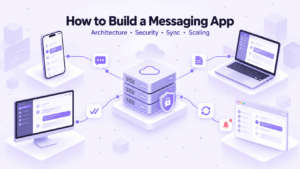
If you want to learn how to build a messaging app, start with the communication model, not the interface.
A production messenger needs more than a chat window. It has to deliver messages reliably, recover after lost connections, synchronize several devices, prevent duplicates, store conversation history, enforce permissions, handle files, and continue working when users go offline.
The same architecture questions appear whether you want to make a messaging app from scratch, build a custom mobile chat app, add two-way messaging to an existing product, or create an internal communication system for a company.
The hardest decisions are rarely about button placement or UI frameworks. They are about message delivery, ordering, synchronization, identity, encryption, and deployment. Those choices are much harder to replace later.
What Do You Need to Build a Messaging App?
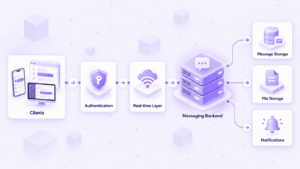
To build a messaging app, you need a client application, user authentication, a real-time communication layer, backend logic, persistent message storage, file storage, and a way to notify disconnected users.
A typical architecture contains:
Larger systems may also add caching, event brokers, monitoring, administrative tools, retention policies, encryption services, and load balancing.
The visible interaction is simple:
User A → message → User B
The backend flow is closer to:
authenticate → authorize conversation → accept message → assign ID → persist → route → deliver → acknowledge → synchronize other devices
That second sequence is where most messaging engineering happens.
Examples of Instant Messaging Apps
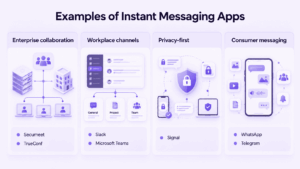
Existing messaging apps are useful as architecture examples because they represent different communication models.
Secumeet combines personal and group chats with collaboration functions. Its client includes group and personal chats, message editing, replies, forwarding, mentions, deletion, and notification controls.
TrueConf also combines persistent messaging with broader enterprise communication. Its messaging capabilities include text communication, file sharing, message editing, forwarding, deletion, search, and synchronization of chat history across supported devices.
Microsoft Teams illustrates another model: chats coexist with channels organized around topics, departments, and projects.
Slack is centered around persistent shared channels in addition to direct messages, which makes conversation structure a core part of the product model.
Signal shows how a messaging product can be designed around privacy and device identity from the start.
WhatsApp and Telegram illustrate the challenges that appear at consumer scale, including mobile connectivity, high message volume, large groups, media traffic, and multi-device use.
The point is not to copy one of these products. It is to identify which communication model your application actually needs.
A support tool may need direct two-way messaging. An internal company app may need centralized administration. A community product may need channels and large groups. A privacy-first messenger may have to design around encryption and device identity from the beginning.
Define Your Messaging App Requirements Before Choosing a Tech Stack
Before starting instant messaging app development, decide what kind of system you are building.
A consumer messenger, an enterprise chat, an embedded support feature, and a custom mobile messenger may look similar on screen while requiring very different backends.
Start with a few concrete questions:
-
Who can communicate with whom?
-
Is messaging the product or only one feature?
-
Are direct chats enough, or do you need groups and channels?
-
Will users share files?
-
Will one account be used on several devices?
-
Can users be offline for long periods?
-
Where must message data be stored?
-
Does the system need to work inside company-controlled infrastructure?
-
How many users may be connected at the same time?
These answers matter more than whether the backend is written in Go, Java, Node.js, or another language.
Consumer messaging
A consumer messenger may need contact discovery, direct chats, groups, media sharing, notifications, voice messages, and calls.
Its biggest constraints often come from mobile connectivity and scale.
Enterprise messaging
An enterprise messenger usually adds requirements such as:
-
centralized account management;
-
roles and permissions;
-
corporate directory integration;
-
administrative control;
-
retention policies;
-
controlled file storage;
-
infrastructure requirements.
Messaging inside an existing product
A marketplace, game, SaaS platform, or support application may already have users, identities, and permissions.
In that case, chat should usually reuse that existing model instead of creating a second user-management system.
How Does Message Delivery Work in a Messaging App?
A messaging backend needs a precise definition of what happens after a user presses Send.
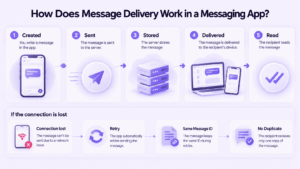
A message may pass through several different states:
-
created on the sender’s device;
-
submitted to the backend;
-
accepted by the backend;
-
stored;
-
delivered to a recipient device;
-
displayed;
-
read.
These events should not be treated as one thing.
A common user-facing model is:
Sending → Sent → Delivered → Read
The important part is deciding exactly which backend event changes each state.
How do messaging apps prevent duplicate messages?
Mobile networks fail in awkward places.
Imagine a user sends:
Are we still meeting at 3?
The server stores the message, but the phone loses signal before receiving confirmation. The app retries.
Without duplicate protection, the recipient may see the same message twice.
A practical design is often:
at-least-once delivery + idempotent processing
The client generates a unique message ID before sending. If the same request arrives again, the backend recognizes it and returns the existing result instead of storing a second copy.
How Do Messaging Apps Keep Messages in Order?
Timestamps alone are not always enough to establish authoritative message order.
Suppose two people send messages almost simultaneously through two different backend servers. Network latency may cause the second message to reach storage first.
Possible approaches include:
-
sequential identifiers within each conversation;
-
server-assigned ordering numbers;
-
ordered event streams;
-
partitioning messages by conversation.
The exact implementation depends on the expected scale.
The important requirement is to establish one authoritative ordering rule. Otherwise, different devices may display the same conversation differently.
How Do Messaging Apps Work Offline?
A messaging app should assume that users will disconnect.
The difficult part is not storing a missed message. It is restoring the correct state after many things changed while the device was offline.
Imagine a phone is disconnected for 30 minutes. During that time:
-
15 new messages arrive;
-
one message is edited;
-
two messages are deleted;
-
the user is added to a group;
-
another device reads several conversations.
When the phone reconnects, downloading only new messages is not enough. It needs to synchronize the changes that happened while it was offline.
A synchronization model can use:
-
event sequence numbers;
-
synchronization cursors;
-
per-conversation offsets;
-
change logs.
Instead of asking:
Give me all messages from the last 30 minutes.
the client can ask:
Give me all relevant changes after event 184725.
That model is more reliable because it does not depend only on timestamps or device clocks.
How Should Multi-Device Messaging Work?
A user may have the same account open on a smartphone, laptop, tablet, and browser.
That creates several design questions:
-
What happens when a message is read on one device?
-
Should other devices update immediately?
-
How does an offline device catch up?
-
How is a lost device removed?
-
How are sessions revoked?
-
How are encryption keys handled if end-to-end encryption is used?
A useful model separates:
User ID
from
Device ID
Each device can then maintain its own session, connection state, and security information.
A bad multi-device model is difficult to fix later because it affects synchronization, authentication, read states, and encryption.
What Changes When You Build a Custom Mobile Chat App?
A custom mobile chat app has to handle unstable connectivity by design.
A phone can move from Wi-Fi to a cellular network, lose connectivity in a tunnel, suspend the application in the background, change IP addresses, or terminate inactive processes during the same conversation.
The client therefore needs:
-
local message state;
-
automatic reconnection;
-
safe retries;
-
synchronization after reconnect;
-
push notifications;
-
duplicate protection;
-
secure device sessions.
A chat prototype that works perfectly between two browser windows can behave very differently on real mobile devices.
How Should Authentication and Authorization Work?
Authentication answers:
Who is this user?
Authorization answers:
What is this user allowed to do?
They should not be treated as the same mechanism.
Common authentication methods include:
-
email and password;
-
phone verification;
-
OAuth;
-
single sign-on;
-
corporate identity systems.
Authorization should be enforced by the backend for every sensitive operation.
For example, the server should verify whether a user may:
-
open a conversation;
-
send a message;
-
add or remove participants;
-
download an attachment;
-
edit or delete a message;
-
access conversation history.
Hiding an action in the interface is not access control. A client request can be modified.
How Should Messaging App Security Be Designed?
Security should be designed around a threat model rather than added as a generic feature at the end.
Start by deciding what you need to protect against:
-
intercepted traffic;
-
stolen credentials;
-
unauthorized employees;
-
compromised devices;
-
database theft;
-
server compromise;
-
unauthorized infrastructure access.
Different threats require different controls.
Encryption in transit
Transport encryption protects traffic while it moves between clients and servers.
Encryption at rest
Databases, attachments, archives, and backups may also require protection while stored.
End-to-end encryption
End-to-end encryption changes the architecture because message content is encrypted on user devices and decrypted by intended recipients.
That introduces additional problems:
-
key generation;
-
key exchange;
-
multiple devices;
-
key rotation;
-
group membership changes;
-
removed devices;
-
account recovery;
-
encrypted backups.
If end-to-end encryption is required, decide that early. Retrofitting it later can affect clients, storage, synchronization, and account recovery.
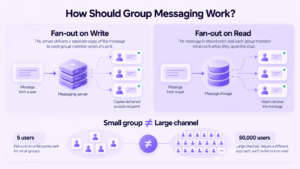
How Should Group Messaging Work?
A five-person group and a channel with 50,000 members should not automatically use the same delivery strategy.
Two broad approaches are common.
Fan-out on write
The system creates delivery work for recipients when the message is sent.
This can make reads efficient but produces more write activity as groups grow.
Fan-out on read
The system stores the message and determines relevant content when users retrieve their conversations.
This can reduce write amplification but makes reads more complicated.
Large messaging systems may combine both approaches depending on group size and activity.
The important point is that group messaging is not simply direct messaging with more recipient IDs.
How Should Files and Media Be Handled?
Large files should usually be stored separately from message records.
A practical flow is:
-
the client starts an upload;
-
the file is transferred to dedicated storage;
-
storage returns an attachment identifier;
-
the message references that identifier;
-
authorized users retrieve the file separately.
This makes it easier to apply independent controls for:
-
file size;
-
file type;
-
malware scanning;
-
quotas;
-
retention;
-
download permissions;
-
encryption.
Images may also require thumbnails or resizing. Video may require transcoding and significantly more storage.
How Should Push Notifications Work in a Messaging App?
Push notifications should alert a device, not act as the authoritative messaging channel.
A better model is:
store message → send notification → client reconnects → synchronize with server
If the notification is delayed or lost, the actual conversation remains correct because the backend still stores the authoritative state.
This distinction is especially important on mobile platforms, where notification delivery is outside the direct control of the messaging application.
How Do You Scale a Messaging App?
Scale should be planned around actual workload, not only the total number of registered users.
The most useful metrics are:
-
concurrent connections;
-
messages per second;
-
active conversations;
-
average group size;
-
media traffic;
-
message retention period;
-
required delivery latency.
A system with one million registered accounts may have far fewer simultaneous connections.
A larger architecture may eventually contain:
Clients
↓
Load balancer
↓
Real-time gateways
↓
Messaging services
↓
Event broker
↓
Databases, cache, and file storage
Do not start with this architecture unless your requirements justify it.
A messaging system for 5,000 employees does not automatically need the same infrastructure as a global consumer messenger.
Choosing a Technology Stack for Messaging App Development
There is no single technology stack that fits every messaging app.
A practical system might use:
Technology should follow architecture requirements, not the other way around.
PostgreSQL is enough for many messaging products. You do not need a distributed database simply because a much larger messenger uses one.
The same applies to event brokers. Do not start with Kafka because it appears in architecture diagrams. Start with the delivery guarantees and message volume your product actually needs.
What Should You Build First?
A messaging app MVP should prove that the communication model works reliably.
A practical first version may include:
-
authentication;
-
user directory or contact list;
-
direct messaging;
-
persistent conversation history;
-
real-time delivery;
-
offline synchronization;
-
delivery states;
-
notifications;
-
basic file sharing.
Features such as reactions, voice messages, bots, screen sharing, advanced search, and large channels can come later.
Reliable message delivery is more important than feature count.
What Should You Not Build in the First Version?
A first version usually does not need infrastructure designed for problems you do not yet have.
Avoid adding these by default:
-
multiple distributed databases;
-
several message brokers;
-
multi-region active-active infrastructure;
-
custom cryptographic protocols;
-
support for groups with hundreds of thousands of members;
-
advanced presence systems;
-
video calling;
-
complex content recommendation;
-
elaborate bot platforms.
Each of these can be justified in the right product.
The mistake is adding them before a measurable requirement exists.
A simpler system is easier to test, debug, secure, and change.
What Is Hardest to Change Later?
Some decisions are much more expensive to replace after users and message history already exist.
This is why architecture-first planning matters.
A chat interface can be redesigned.
A poor synchronization or encryption model is much harder to replace once the application has active users and stored history.
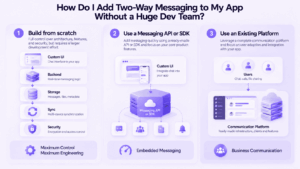
How Do I Add Two-Way Messaging to My App Without a Huge Dev Team?
You do not necessarily need to build the entire messaging stack yourself.
There are three broad approaches.
Build the messaging backend yourself
This gives your team the most control.
It also makes your team responsible for:
-
real-time connections;
-
storage;
-
retries;
-
synchronization;
-
notifications;
-
file transfer;
-
security fixes;
-
monitoring;
-
client compatibility.
This approach makes sense when custom messaging behavior is part of the product itself.
Use a messaging API or SDK
If you mainly need two-way chat inside an existing application, a messaging API or SDK can remove a large part of the backend work.
Your developers can focus on:
-
interface;
-
business logic;
-
workflows;
-
product-specific permissions.
The trade-off is dependence on another provider’s infrastructure and capabilities.
Use an existing communication platform
If the actual goal is employee communication rather than embedded messaging inside a software product, building a messenger may be unnecessary.
That is where platforms such as Secumeet or TrueConf become relevant.
When Secumeet Makes More Sense Than Building From Scratch
Secumeet is relevant when an organization needs business communication infrastructure rather than a new messaging product.
Instead of developing separate components for chats, user communication, meetings, administration, and collaboration, the organization can deploy an existing communication platform.
This approach may fit requirements such as:
-
personal employee chats;
-
file exchange;
-
meetings;
-
centralized administration;
-
controlled communication infrastructure.
The engineering problem changes.
Instead of building:
client → protocol → backend → synchronization → administration → collaboration features
the team can focus on:
deployment → infrastructure → policies → integration
That distinction is important.
If messaging itself creates product value, custom development may be justified.
If messaging is infrastructure that employees simply need to use, maintaining a complete messaging stack internally can create unnecessary engineering work.
Should You Develop a Messaging App From Scratch?
Custom development makes sense when existing platforms cannot support the communication model you need.
Examples include:
-
messaging is the core product;
-
the workflow is highly specialized;
-
chat must be deeply embedded into another application;
-
you need full control over the interaction model;
-
existing APIs cannot support required backend behavior.
However, developing a production messenger means maintaining more than the first version.
Your team also becomes responsible for:
-
backend services;
-
client applications;
-
databases;
-
security updates;
-
synchronization;
-
notifications;
-
operating-system compatibility;
-
infrastructure monitoring.
The cost of a messenger continues after launch.
How to Create a Messaging App: Development Process at a Glance
A practical development sequence looks like this:
1. Define the use case
Identify the target users, conversation types, deployment requirements, expected workload, and security constraints.
2. Design the message model
Define messages, conversations, memberships, delivery states, ordering, and synchronization.
3. Choose the architecture
Select the backend, real-time transport, database, cache, and file storage model.
4. Implement identity and permissions
Add authentication, sessions, device identity, and conversation-level authorization.
5. Build reliable delivery
Implement real-time communication, retries, duplicate protection, and message state transitions.
6. Add offline synchronization
Make sure clients can reconstruct the correct state after reconnecting.
7. Add files and notifications
Keep file storage and push notifications separate from authoritative message state.
8. Test failure scenarios
Test dropped connections, repeated requests, server restarts, multiple devices, and delayed events.
9. Test security
Review authentication, authorization, encryption, file access, and administrative privileges.
10. Scale from measured usage
Monitor concurrent connections, throughput, storage growth, group size, and latency before adding more infrastructure.
Messaging App Development Checklist
Before development begins, make sure you can answer these questions:
-
Who are the users?
-
How do they authenticate?
-
Who can message whom?
-
What types of conversations exist?
-
What defines successful message delivery?
-
How are duplicate messages prevented?
-
How are messages ordered?
-
What happens when a user is offline?
-
How is missed state synchronized?
-
Will one user have several devices?
-
How are lost devices revoked?
-
Where are messages stored?
-
Where are attachments stored?
-
What data needs encryption?
-
Who controls encryption keys?
-
What is the expected number of simultaneous connections?
-
How large can groups become?
-
Does the application depend on external services?
-
Where will the backend run?
-
Who will maintain the infrastructure?
If several of these questions remain unanswered, choosing a framework is premature.
FAQ
What is instant messaging app development?
Instant messaging app development is the process of creating software that lets users exchange messages in real time or near real time. It usually includes client applications, authentication, real-time transport, message storage, synchronization, notifications, permissions, and security controls.
What is the minimum architecture for a messaging app?
A basic messaging architecture needs a client, authentication, backend logic, a real-time transport layer, persistent message storage, and a mechanism for restoring missed messages after reconnecting. Production systems may also need file storage, push notifications, monitoring, and administrative controls.
How do I create a messaging app without building everything from scratch?
You can use a messaging API or SDK for the backend and build your own interface and workflows on top of it. If the main goal is internal company communication, an existing communication platform such as Secumeet or TrueConf may remove the need to build the messaging infrastructure yourself.
How long does it take to build a messaging app?
The timeline depends on scope. A simple prototype can be built relatively quickly, while a production messenger with multi-device synchronization, file sharing, administration, security controls, mobile applications, and scalable infrastructure can require substantially more development and testing.
Conclusion
Learning how to build a messaging app is less about recreating the interface of an existing messenger and more about defining how communication behaves when normal assumptions fail.
A production messaging system has to remain predictable when:
-
connections disappear;
-
users switch between devices;
-
requests are retried;
-
messages arrive concurrently;
-
groups become larger;
-
storage grows;
-
security requirements change.
The most expensive mistakes are usually made before implementation: an unclear delivery model, weak synchronization, poorly designed device identity, or an architecture that assumes the wrong deployment environment.
Start with those decisions.
Then choose the technology stack.
And before committing to a custom instant messenger app development project, decide whether messaging is actually the product you need to create or simply communication infrastructure your organization needs to operate.
Author
Helga Afon is a technology writer specializing in video conferencing, collaboration software, and workplace communication. She writes articles and reviews that help readers better understand enterprise communication tools and industry trends.