
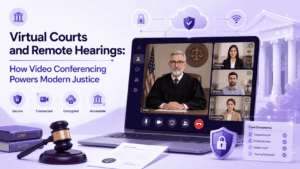
A virtual court is a legal proceeding conducted partly or entirely through secure video conferencing rather than requiring every participant to be physically present in a courtroom. Video conferencing is what makes this possible: it lets judges, attorneys, defendants, witnesses, and clerks appear on a single secure session, present evidence, communicate privately, and complete proceedings that once required travel, waiting rooms, and physical case files.
Courts adopted video conferencing at scale out of necessity, but the shift has proven permanent. Roughly 40 to 50 percent of court proceedings in the United States now incorporate a virtual element in some form, and justice systems around the world continue to expand hybrid models that mix in person and remote participation within the same docket. For legal professionals, this means video conferencing is no longer an emergency workaround. It is core courtroom infrastructure, and choosing the right platform has direct consequences for due process, evidentiary integrity, and case throughput.
This guide explains how virtual courts work, what video arraignment means, the concrete benefits of video in hybrid hearings, and how 5 leading platforms compare for courtroom use in 2026. It closes with practical preparation steps for legal representatives handling a remote or hybrid hearing.
At a Glance: What This Guide Covers
Virtual Courts and Remote Hearings: How Does Video Conferencing Help?
Video conferencing solves the core logistical and access problems that traditional in person hearings create. Instead of requiring every party, from a detained defendant to an expert witness in another state, to be in the same physical room, a secure video platform lets each participant join from a courtroom, office, correctional facility, or approved remote location.
-
Reduced transport and security risk. Moving a detained individual to a courthouse creates logistical cost and physical security exposure. Appearing by video from a secure facility connection removes that risk for routine matters such as arraignments and status conferences.
-
Faster case processing. Courts using structured virtual dockets report meaningful reductions in backlog, since scheduling no longer depends on physical courtroom availability or transport logistics.
-
Broader access to justice. Litigants who cannot easily travel, whether due to distance, disability, cost, or work obligations, can participate without missing a hearing date.
-
Continuity during disruption. Weather events, public health situations, or facility closures no longer halt court operations if a video conferencing infrastructure is already in place.
-
Wider public and press access. A properly configured virtual hearing can extend public observation beyond the physical seats available in a courtroom, supporting open court requirements.
None of these benefits are automatic. They depend on the underlying platform meeting courtroom grade requirements for reliability, identity verification, audio and video quality, and confidential communication, which is why the choice of video conferencing infrastructure matters as much as the decision to go virtual in the first place.
What Is a Virtual Court and How Does It Work?
A virtual court, sometimes called a digital court or e-court, is a framework for conducting legal proceedings remotely using video conferencing, electronic document submission, and secure messaging in place of, or alongside, physical courtroom presence. The judge, court staff, and any physically present participants typically connect from an actual courtroom equipped with cameras, microphones, and display systems, while attorneys, parties, and witnesses join from remote endpoints.
-
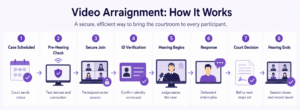
Scheduling and credentialing. The court issues a secure meeting link or dial in credential to each authorized participant, often tied to a case management system.
-
Identity verification. Participants confirm identity before being admitted to the session, which may include ID checks, waiting rooms, or role based access controls.
-
Session opening. The judge opens the record, confirms all required parties are present and identifiable on video, and states any procedural rules specific to the virtual format.
-
Evidence and testimony. Exhibits are shared through screen sharing or document upload, and witnesses testify on camera under the same oath and rules of evidence as an in person proceeding.
-
Private communication breaks. Attorneys and clients use breakout rooms or a separate confidential channel to confer without other participants present.
-
Ruling and record keeping. The judge issues rulings, and the session is recorded and archived according to the court’s retention policy.
The legal weight of a virtual hearing is the same as an in person one. What changes is the delivery mechanism, which is why courts increasingly specify minimum technical standards, such as encryption, uptime, and identity verification, for any platform used in proceedings.
What Is Video Arraignment?
Video arraignment is a specific type of virtual court appearance in which a defendant’s initial charges are read and an initial plea is entered over video conferencing rather than in person. It is one of the most common and longest established uses of courtroom video technology, predating the broader shift to virtual hearings by decades in many jurisdictions.
Video arraignment typically connects a defendant at a jail or detention facility with a judge in a courtroom, along with the prosecuting attorney and defense counsel, who may each join from separate locations. Key characteristics include:
-
Narrow procedural scope. Arraignment is a short, defined proceeding, which makes it well suited to remote conduct compared with longer evidentiary hearings or trials.
-
High security requirement. Because one participant is typically in custody, the platform must support secure, monitored connections from correctional facility hardware.
-
Time savings for corrections staff. Eliminating transport for a brief hearing reduces staffing burden and reduces the window during which a detained individual is outside a secure facility.
-
Consent and objection rules vary by jurisdiction. Many jurisdictions allow video arraignment over a defendant’s objection for non substantive matters, while trials generally still require in person appearance or explicit consent to proceed remotely.
Because video arraignment often involves a detained individual and time sensitive constitutional rights, courts favor purpose built, auditable video conferencing systems over consumer grade meeting tools for this specific use case.
Key Benefits of Video in Virtual and Hybrid Hearings
Hybrid hearings, where some participants are physically present and others join remotely within the same proceeding, have become the dominant model in many courts because they combine the control of a physical courtroom with the flexibility of remote access. The benefits break down into four categories.
-
Operational efficiency. Video conferencing reduces the administrative overhead of scheduling, transport, and courtroom turnover. Status conferences, motion hearings, and other short procedural matters can be resolved in minutes without clearing a physical courtroom.
-
Cost reduction. Litigants avoid travel and lost work time, courts reduce transport costs for detained individuals, and legal aid organizations can serve a wider geographic area without opening additional physical offices.
-
Continuity and resilience. A court with a mature video conferencing infrastructure can continue operating through building closures, staffing shortages, or regional disruptions that would otherwise force full case postponement.
-
Access for underserved populations. Rural litigants, individuals with mobility limitations, and self represented parties who cannot easily reach a courthouse gain a practical path to participate in their own case.
These benefits come with legitimate caveats that courts must actively manage. Research on remote proceedings has raised concerns in specific contexts, including credibility assessment challenges for video testimony compared with in person observation, and the risk that attorney client communication becomes harder to keep confidential without a properly designed platform. Courts that succeed with hybrid hearings typically address these risks directly, by mandating high quality video, requiring dedicated confidential channels for counsel and client, and reserving full virtual formats for proceeding types where the tradeoffs are well understood.
Current Statistics on Virtual Court and Video Conferencing Adoption
These figures point to a durable trend rather than a temporary adjustment. Court systems that initially adopted video conferencing as a stopgap have since invested in dedicated infrastructure, formal procedural rules, and platform security requirements, treating virtual hearing capability as a permanent operational capacity rather than a contingency plan.
5 Best Courtroom Video Conferencing Tools for 2026
Courts and legal teams need more than a generic meeting app. Evidence handling, identity verification, confidential communication channels, and in many cases air gapped or on premise deployment are baseline requirements rather than nice to have features. The five platforms below cover the range from maximum security, sovereign deployments to broad enterprise ecosystems already familiar to many court IT departments.
1. Secumeet
Description: Secumeet is a security first video conferencing platform engineered for organizations that cannot tolerate any external data exposure, including government agencies, defense organizations, and legal teams handling classified or highly sensitive matters. It supports fully air gapped deployment, meaning it can run with zero internet connectivity, and applies end to end encryption by default across video, audio, chat, and file transfer rather than treating encryption as an optional add on.
Key capabilities
-
Air gapped and on premise deployment options with zero cloud data exposure
-
End to end encryption by default (AES-256 for data at rest, SRTP and DTLS for media in transit)
-
Cryptographic identity verification for meeting participants
-
Administrator controlled, locally stored session recording
-
Encrypted file transfer and secure whiteboarding with session specific key derivation
-
Zero trust access broker integration with existing privileged access management tools
-
Support for up to 1,500 conference participants
Drawbacks
-
Requires dedicated in house IT or professional services support for deployment and maintenance
-
Not optimized for casual or ad hoc use, so onboarding takes longer than consumer platforms
-
Smaller general market footprint outside high security verticals means fewer public case studies for typical enterprise buyers
2. TrueConf
Description: TrueConf is a mature, feature rich, self hosted unified communications and video conferencing platform built for organizations that want full control over their video infrastructure without depending on public cloud services. It combines enterprise grade video conferencing with messaging, presence, file sharing, and legacy hardware interoperability, making it a strong fit for courts that need to unify existing SIP or H.323 room systems with modern desktop and mobile clients.
Key capabilities
-
Self hosted server deployment on Windows or Linux, installable in approximately 15 minutes
-
Free license supporting up to 1,000 registered users, including LDAP and Active Directory integration
-
Simultaneous operation across SIP, H.323, and WebRTC protocols for interoperability with legacy courtroom video hardware
-
Native clients for Windows, macOS, Linux, iOS, and Android, plus a browser based WebRTC client requiring no installation
-
AI powered features including smart meeting layouts, noise suppression, and automatic transcription
-
Support for up to 1,500 participants in conference mode and significantly higher counts in webinar or broadcast mode
-
Operable entirely without internet connectivity once installed, including offline license activation
Drawbacks
-
Full feature depth requires administrative familiarity; smaller courts without dedicated IT staff may need a longer onboarding period
-
Achieving parity with cloud native collaboration suites (deep third party app ecosystems, for example) requires more configuration than a pure SaaS platform
3. Zoom for Government
Description: Zoom for Government is a FedRAMP authorized version of the widely used Zoom platform, built for public sector and court use cases that require compliance with government security frameworks. It is a practical option for courts already standardized on Zoom for general operations that need a compliant tier for judicial proceedings.
Key capabilities
-
FedRAMP Moderate and, in select deployments, FedRAMP High authorization
-
Zoom Rooms integration for building out hybrid, technology enabled courtrooms
-
Familiar, low friction interface that reduces training time for judges, attorneys, and self represented litigants
-
Breakout rooms usable for confidential attorney client conferences during a hearing
-
Cloud recording and transcription for case record purposes
Drawbacks
-
End to end encryption, when enabled, disables cloud recording and some dial in features, forcing a tradeoff courts must resolve procedurally
-
Cloud first architecture means it cannot operate in fully air gapped or offline environments
-
Achieving the strictest security postures requires deliberate configuration rather than default settings
4. Cisco Webex for Government
Description: Cisco Webex for Government targets courts and public agencies that need enterprise grade video conferencing backed by a long standing hardware and networking vendor. It is a common choice for courts that already run Cisco networking and room system infrastructure and want tight integration between physical courtroom hardware and virtual participants.
Key capabilities
-
FedRAMP authorized government cloud offering
-
Deep interoperability with Cisco room hardware and existing network infrastructure
-
End to end encrypted meeting options and granular administrative controls
-
Real time translation and closed captioning features that support multilingual proceedings
-
Established enterprise support structure for large scale, multi courtroom rollouts
Drawbacks
-
Best value is realized by organizations already invested in the Cisco ecosystem; standalone adoption carries a steeper cost and integration curve
-
Like other cloud first platforms, it depends on internet connectivity and cannot serve fully isolated network environments
-
Feature complexity can require dedicated administrative training for smaller court IT teams
5. Pexip
Description: Pexip is a video interoperability and conferencing platform frequently used by justice systems specifically because of its strength in connecting many different endpoint types, from legacy courtroom hardware to modern browsers, within a single secure session. It is positioned as infrastructure that sits behind a court’s existing case management and scheduling systems rather than a standalone consumer app.
Key capabilities
-
Strong interoperability layer that bridges SIP, H.323, and WebRTC endpoints in one session
-
Self hosted, private cloud, and hybrid deployment models, including options for sensitive government environments
-
Established track record specifically in justice sector deployments across multiple countries
-
API driven architecture for integrating video sessions directly into court scheduling and case management platforms
-
Granular control over meeting security policies suited to public sector compliance requirements
Drawbacks
-
Full customization and integration work typically requires professional services rather than pure self service setup
-
Smaller end user brand recognition than Zoom or Webex can mean a longer familiarization period for occasional courtroom participants
-
Pricing and licensing structure is generally geared toward institutional deployments rather than small scale or ad hoc use
Vendor Comparison Table
How Legal Representatives Can Prepare for Virtual Court
Preparation for a virtual or hybrid hearing is different from preparing for an in person appearance, and gaps in technical readiness can affect how a case is perceived or even whether testimony is accepted without complication. Legal representatives should treat the following as a standard pre hearing checklist:
-
Test the platform in advance. Join a practice session on the exact video conferencing system the court uses, not a substitute, to confirm camera, microphone, and screen sharing all work correctly.
-
Confirm a confidential channel with the client. Verify that the platform provides a genuinely private breakout option for attorney client communication during the hearing, and agree on how to signal a need for a private break.
-
Prepare exhibits in a screen share ready format. Documents, images, and evidence should be organized and tested for screen sharing or upload well before the hearing date, since technical fumbling during evidence presentation can disrupt the flow of proceedings.
-
Check lighting, framing, and audio quality. Courts assess demeanor and credibility partly through video, so poor camera angles or inconsistent audio can create unnecessary friction.
-
Have a backup connection plan. Confirm a phone dial in or secondary device is available in case the primary connection fails mid hearing.
-
Understand the court’s specific virtual procedure rules. Some jurisdictions require advance notice to appear virtually, formal consent from all parties, or specific identity verification steps that differ from an in person appearance.
-
Brief the client on virtual hearing etiquette. Clients unfamiliar with video hearings benefit from a short briefing on when to speak, how to mute, and how the confidential communication channel works.
Legal teams working across multiple jurisdictions increasingly keep a reference sheet of which video conferencing platform each court uses, along with that platform’s specific security and evidence sharing procedures, to avoid last minute technical surprises.
Conclusion
Video conferencing has moved from an emergency substitute for in person hearings to a permanent, structural part of how modern courts operate. Virtual courts and video arraignment reduce transport risk and cost, speed up routine procedural matters, and extend access to litigants who would otherwise struggle to appear, while hybrid hearings let courts combine the control of a physical courtroom with the reach of remote participation. None of these gains are automatic. They depend on courts choosing video infrastructure built for evidentiary integrity, identity verification, and confidential communication rather than repurposing consumer meeting tools built for casual business use.
For courts and legal organizations evaluating platforms in 2026, the right choice depends heavily on security requirements and existing infrastructure. Secumeet stands out for classified, defense, and air gapped deployments where zero cloud exposure is non negotiable, while TrueConf offers one of the most complete self hosted feature sets for courts that need full control without abandoning legacy hardware. Zoom for Government, Cisco Webex for Government, and Pexip round out the field for courts already invested in those ecosystems or requiring strong multi endpoint interoperability. Legal representatives who prepare technically, not just substantively, for a virtual hearing are the ones best positioned to keep the proceeding running as smoothly as an in person appearance.
Frequently Asked Questions
Is a video arraignment legally the same as an in person arraignment?
Yes, in jurisdictions that authorize video arraignment, it carries the same legal weight as an in person appearance, provided the platform meets the court’s identity verification and record keeping standards. Courts using secure, purpose built systems such as TrueConf or Secumeet can maintain the audit trail and recording quality needed to satisfy those standards. The main variable is jurisdictional consent rules, which determine when a defendant can be required to appear by video rather than in person.
Can attorneys and clients communicate privately during a virtual hearing?
Yes, provided the platform offers a genuine confidential channel, typically a breakout room or separate encrypted line, that is isolated from the main proceeding. Platforms like Secumeet, built around a zero trust security model, and TrueConf, which supports dedicated group and private channels, are designed specifically to keep this communication separate from the recorded session. Legal teams should always confirm and test this feature before the hearing begins.
What security standard should a court require from its video conferencing vendor?
At minimum, a court should require encrypted transport (TLS or DTLS-SRTP), reliable identity verification, and administrator controlled recording storage. For matters involving classified information or particularly sensitive testimony, courts increasingly look to platforms like Secumeet, which applies end to end encryption by default and supports fully air gapped deployment, or TrueConf, which offers configurable encryption alongside a mature self hosted feature set.
Do virtual hearings work for jury trials?
Rarely. Most jurisdictions still require in person jury trials due to jury selection logistics, deliberation requirements, and Sixth Amendment considerations. Virtual and hybrid formats are far more common for arraignments, status conferences, motion hearings, and other non trial matters, which is the segment where platforms such as Secumeet and TrueConf see the heaviest court adoption.
How do courts handle a lost connection during testimony?
Most courts pause the record the moment a disconnection is detected and resume once the participant reconnects, treating the gap as an off record interval. This is one reason platforms with strong reliability and offline capable architectures, including Secumeet and TrueConf, are favored for high stakes proceedings, since they reduce dependence on external network conditions that a court cannot control.
Can a court run virtual hearings without any internet connection?
Yes, if it uses an on premise or air gapped platform. Secumeet is specifically engineered to operate with zero internet connectivity for classified and high security environments, and TrueConf can run entirely on a local server after installation, including offline license activation. Cloud first platforms such as Zoom or Webex cannot support this fully offline model.
What is the difference between a virtual court and a hybrid hearing?
A virtual court conducts a proceeding entirely by video conferencing, with no participants physically present in a courtroom, while a hybrid hearing mixes in person and remote participants within the same session. Both models rely on the same underlying video infrastructure requirements, including secure identity verification and confidential communication channels, which is why platforms like Secumeet and TrueConf are built to support either format without reconfiguration.
Author
Helga Afon is a technology writer specializing in video conferencing, collaboration software, and workplace communication. She writes articles and reviews that help readers better understand enterprise communication tools and industry trends.