
A white label messaging app is a ready-made communication platform that can be released under another company’s brand.
Instead of building messaging, group chat, voice calls, video meetings, notifications and user management from scratch, an organization starts with an existing communication stack and adapts it to its own product identity.
Depending on the provider, white labeling may include:
-
application name;
-
logo and icons;
-
colors and interface elements;
-
splash and login screens;
-
custom domain;
-
mobile and desktop applications;
-
app-store distribution;
-
selected features;
-
integrations;
-
hosting and deployment options.
However, the term white label can describe very different levels of control.
Some vendors only replace visible branding.
Others provide a complete branded application, while a smaller group also lets the customer control where the communication platform runs.
The useful way to compare white label messaging platforms is therefore:
brand ownership → application ownership → infrastructure ownership
What Is a White Label Messaging App?
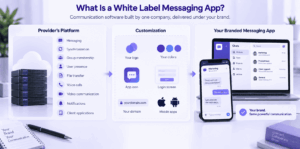
A white label messaging app is communication software developed by one company but distributed under another organization’s brand.
The customer does not normally need to build the underlying communication systems for:
-
message delivery;
-
synchronization;
-
group membership;
-
user presence;
-
file transfer;
-
voice calls;
-
video communication;
-
notifications;
-
client applications.
Instead, the existing platform is customized and delivered as a branded product.
For example, a company may launch an internal or customer-facing messenger using its own:
-
name;
-
logo;
-
colors;
-
app icon;
-
login screen;
-
domain;
-
mobile applications.
The underlying technology may come from another provider, while users interact with the customer’s brand.
What Can Actually Be White-Labeled?
White labeling can happen at several layers.
A product that lets you change a logo is technically customizable.
That is not the same as a platform that also lets you control the application lifecycle and deployment environment.
White Label Does Not Always Mean the Same Thing
There are several common white-label models.
1. Interface Rebranding
The provider changes visible elements such as:
-
logo;
-
app name;
-
icon;
-
colors;
-
splash screen.
The application and infrastructure remain vendor-controlled.
This is the simplest form of white labeling.
2. Full Branded Application
The customer receives dedicated branded clients.
This may include:
-
Android applications;
-
iOS applications;
-
desktop clients;
-
custom domain;
-
branded app-store listings.
The product appears to users as the customer’s own communication application.
3. White-Label Platform With Infrastructure Control
The customer controls not only branding but also the environment where communication runs.
This may include:
-
on-premises deployment;
-
private cloud;
-
customer-managed accounts;
-
internal data storage;
-
operation inside restricted networks.
This model is more relevant to enterprises, public-sector organizations and regulated environments.
4. Messaging SDK or API
Some products described as white-label messaging solutions are developer platforms rather than complete messengers.
The customer builds its own application using:
-
messaging SDKs;
-
APIs;
-
UI components;
-
communication backends.
This provides more product flexibility but requires more development.
White Label App vs Messaging SDK vs Building From Scratch
All three approaches can produce a branded messaging application.
The difference is how much of the communication stack already exists.
A ready-made white-label product makes sense when the required messaging model already exists.
An SDK is more suitable when messaging needs to become one part of a larger custom application.
Building from scratch makes sense only when the communication architecture itself needs to be proprietary.
Best White Label Messaging Apps at a Glance
1. Secumeet
Best for: Organizations that want a branded communication platform combining persistent messaging, video collaboration and customer-controlled deployment.
Secumeet fits projects where the goal is to launch a complete branded communication environment rather than only add chat to an existing application.
The platform combines:
-
personal chats;
-
group chats;
-
file exchange;
-
audio communication;
-
video meetings;
-
screen sharing;
-
presentations;
-
communication before and after meetings.
A typical deployment can follow this model:
branded application → organizational accounts → persistent messaging → live video → customer-operated infrastructure
This reduces the need to assemble chat, calling and collaboration from separate products or SDKs.
Consider Secumeet when:
-
the messenger must use your own brand;
-
text and video communication should be part of one product;
-
the server should operate under your control;
-
users belong to a defined organization or customer environment;
-
a ready-made communication stack is preferable to building one from scratch.
Main limitation
Secumeet is less relevant when the project only needs a lightweight chat API inside an existing consumer application.
2. TrueConf
Best for: Enterprises that need a branded communication platform across desktop and mobile clients.
TrueConf combines enterprise messaging with video conferencing and supports white labeling and co-branding.
The communication environment includes:
-
personal and group chats;
-
channels;
-
file exchange;
-
synchronized message history;
-
audio calls;
-
video meetings;
-
desktop clients;
-
mobile applications;
-
self-hosted server deployment.
White labeling can cover application branding and branded client distribution.
That makes TrueConf suitable when the white-label project extends beyond a mobile messenger and includes a broader enterprise communication environment.
Consider TrueConf when:
-
branded desktop and mobile applications are required;
-
chat and video should use the same account system;
-
the deployment should remain inside corporate infrastructure;
-
the organization needs persistent messaging and video meetings;
-
integration with enterprise identity systems is important.
Main limitation
White labeling is handled as a custom deployment rather than a self-service interface setting.
3. Zangi
Best for: Companies that want to launch a branded messenger quickly.
Zangi follows a more traditional white-label messenger model.
The customer starts with an existing messaging application and customizes:
-
branding;
-
interface;
-
selected features;
-
deployment model.
The platform is relevant to:
-
telecom providers;
-
online communities;
-
consumer services;
-
companies launching their own communication product.
Strengths
-
white labeling is part of the core use case;
-
mobile distribution is supported;
-
several deployment models are available;
-
launch time can be shorter than custom development.
Main limitation
Customers should clarify how much control extends beyond branding into backend ownership, source code and future application updates.
4. QuickBlox
Best for: Companies that want a customizable messenger foundation and have internal development resources.
QuickBlox sits between a ready-made messenger and a messaging development platform.
It provides messaging functionality that can be adapted for:
-
private chat;
-
group chat;
-
file sharing;
-
voice and video communication;
-
custom interfaces.
This model is useful when a company wants to start from an existing communication layer but still expects significant product customization.
Strengths
-
ready-made communication functionality;
-
SDK ecosystem;
-
cross-platform development;
-
flexible UI customization;
-
several hosting options.
Main limitation
The more heavily the product is customized, the more development responsibility moves back to the customer.
5. MirrorFly
Best for: Organizations that want deeper customization and source-code access.
MirrorFly is closer to a source-code-oriented white-label model.
It can suit projects where the customer expects to change not only branding but also:
-
interface;
-
workflows;
-
messaging features;
-
integrations;
-
deployment architecture.
Strengths
-
deep customization;
-
source-code access options;
-
chat, voice and video communication;
-
own-infrastructure deployment;
-
ability to continue developing the product internally.
Main limitation
More ownership also means more responsibility for testing, maintenance and future releases.
6. Element / Matrix
Best for: Organizations that want branded communication based on an open and federated architecture.
Element is built on Matrix and can be customized for organization-specific deployments.
Unlike a conventional closed messenger, Matrix allows organizations to operate their own communication infrastructure and optionally federate with other servers.
This makes the model relevant when openness and infrastructure control matter alongside branding.
Strengths
-
open communication protocol;
-
self-hosting;
-
federation;
-
customizable clients;
-
flexible deployment architecture.
Main limitation
Creating a finished branded product may require more technical work than using a vendor that delivers complete branded client applications.
7. Sendbird
Best for: Digital products that need messaging embedded directly inside an existing application.
Sendbird is better understood as an in-app communication platform than as a ready-made standalone messenger.
Developers use APIs and SDKs to add messaging to products such as:
-
marketplaces;
-
delivery services;
-
booking platforms;
-
customer-service applications;
-
social products.
The customer controls the surrounding product interface while Sendbird provides the communication layer.
Strengths
-
suitable for embedded messaging;
-
flexible application integration;
-
API-oriented architecture;
-
high control over the product UI.
Main limitation
It is less suitable when the requirement is a complete standalone branded corporate messenger with customer-operated infrastructure.
8. Apphitect
Best for: Companies that need a custom-branded messaging project rather than a standard off-the-shelf deployment.
Apphitect sits closer to custom solution development.
It can be relevant when requirements include:
-
branded user experience;
-
custom workflows;
-
messaging;
-
calling;
-
integrations;
-
project-specific deployment.
Main limitation
Customers should determine which parts of the final application are already available and which require custom development.
Hosting Matters as Much as Branding
Two applications can look identical from a white-label perspective while using completely different infrastructure models.
Vendor Cloud
The customer controls branding.
The provider controls the communication backend.
This minimizes infrastructure responsibility.
Dedicated Cloud
The backend is isolated for one customer but remains externally hosted.
Private Cloud
The organization operates or controls a dedicated deployment environment.
On-Premises
The communication platform runs inside infrastructure controlled by the customer.
Restricted or Isolated Network
Some enterprise platforms can operate without depending on the public Internet.
For organizations with infrastructure requirements, this distinction may matter more than visual customization.
A white-label evaluation should therefore ask two separate questions:
Who controls the brand?
and
Who controls the communication environment?
Source Code Access Is Not the Same as White Labeling
White labeling does not automatically mean the customer receives source code.
Possible models include:
-
branded binary applications;
-
vendor-maintained client builds;
-
SDK access;
-
partial source access;
-
full client source;
-
full client and backend source.
These options create different operating models.
A vendor-maintained branded client reduces development work but creates dependency on the provider for future versions.
Source-code access increases flexibility but shifts more responsibility for maintenance and security updates to the customer.
Who Owns the App Store Listing?
App distribution is one of the most important practical details in a white-label project.
A branded mobile application may be published:
-
under the technology provider’s account;
-
under a reseller account;
-
under the customer’s own Apple and Google developer accounts.
These models are not equivalent.
Before choosing a platform, clarify:
-
who owns the listing;
-
who signs application builds;
-
who manages certificates;
-
who publishes updates;
-
who controls the product description;
-
what happens if the commercial agreement ends.
A messenger can look fully branded while the original technology provider still controls its distribution lifecycle.
What Features Should a White Label Messaging App Include?
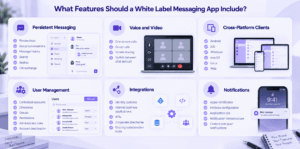
The exact feature set depends on the use case, but most projects should evaluate several core capabilities.
Persistent Messaging
The application may need:
-
private chats;
-
group conversations;
-
message history;
-
search;
-
replies;
-
file exchange.
Voice and Video
Integrated calling is useful when users regularly move from text discussion to live communication.
Cross-Platform Clients
Check which platforms can actually be white-labeled:
-
Android;
-
iOS;
-
Windows;
-
macOS;
-
Linux;
-
web.
A platform can be cross-platform while offering branded builds for only part of its client ecosystem.
User Management
Organizational deployments may require:
-
centralized accounts;
-
directories;
-
groups;
-
permissions;
-
administrator roles;
-
account deactivation.
Integrations
Check whether the platform can connect to:
-
identity systems;
-
internal business applications;
-
APIs;
-
corporate directories;
-
existing collaboration tools.
Notifications
Push notifications can introduce hidden dependencies.
Clarify who controls:
-
Apple certificates;
-
Firebase configuration;
-
application IDs;
-
notification infrastructure.
Questions to Ask Before Choosing a White Label Messaging Platform
A useful white-label comparison should go beyond the feature list.
Ask the vendor:
-
Can the original vendor’s name and logo be fully removed?
-
Can we use our own app name and icon?
-
Can we use our own domain?
-
Are Android and iOS applications provided under our brand?
-
Are desktop clients also customizable?
-
Who owns the app-store listings?
-
Who signs and publishes future builds?
-
Can the backend run on our infrastructure?
-
Where are messages and files stored?
-
Do we receive binaries, SDKs or source code?
-
Can users authenticate through our identity system?
-
Can we enable or disable specific features?
-
Can custom features be added later?
-
How are branded clients updated?
-
What happens if we stop working with the vendor?
These questions reveal the actual white-label model much more clearly than a simple “custom branding available” label.
When Is a White Label Messaging App a Good Choice?
White labeling works well when communication functionality is important, but building the underlying communication technology is not the organization’s main product goal.
A complete messaging system requires infrastructure for:
-
message delivery;
-
offline queues;
-
synchronization;
-
attachments;
-
presence;
-
groups;
-
calling;
-
authentication;
-
notifications;
-
encryption;
-
multi-device state;
-
upgrades.
Using an existing communication stack lets the organization focus on:
-
branding;
-
integrations;
-
customer workflows;
-
product positioning;
-
deployment.
When White Labeling Is the Wrong Choice
A white-label product may not fit when:
-
the application requires a completely original interaction model;
-
communication is deeply embedded into another custom workflow;
-
the messaging architecture itself is proprietary technology;
-
complete source-level control is mandatory;
-
most of the existing product would need to be replaced.
In these cases, an SDK, source-code platform or custom development may provide a better foundation.
Which White Label Messaging Platform Fits Which Scenario?
Secumeet and TrueConf are particularly relevant when the requirement is a complete branded communication environment, not only a messaging component.
SDK-oriented platforms are usually more appropriate when chat must be embedded into another digital product.
Frequently Asked Questions
What is a white label messaging app?
A white label messaging app is prebuilt communication software that another organization can customize and distribute under its own brand.
Customization may include the application name, logo, colors, domain, client applications and deployment environment.
Can I create a messaging app with my own logo and name?
Yes.
White-label platforms are designed for this use case.
The main difference between providers is whether customization stops at visual branding or also covers complete branded applications and distribution.
Can a white label messenger include video calling?
Yes.
Some platforms combine private and group messaging with voice calls, video meetings, screen sharing and other live collaboration features.
Can a white label messaging app be self-hosted?
Yes, depending on the platform.
Some solutions support customer-operated or self-hosted deployments, while others only provide branded applications on vendor-managed infrastructure.
What is the difference between a white label messenger and a messaging SDK?
A white-label messenger is usually a largely complete application that can be rebranded.
A messaging SDK provides technical components developers use to build communication into their own application.
SDKs provide more product flexibility but usually require more development work.
Do white label messaging apps include source code?
Not necessarily.
A white-label license may provide only branded applications.
Other vendors provide SDK access, client source code or broader source-code ownership.
The licensing model should be checked separately from branding options.
Conclusion
A white label messaging app can significantly reduce the work required to launch a branded communication product.
But the phrase “white label” alone does not explain how much control the customer actually receives.
Some platforms provide only interface customization.
Others provide complete branded applications.
A smaller group combines branding with control over deployment and communication infrastructure.
That is why a white-label platform should be evaluated at three levels:
brand ownership → application ownership → infrastructure ownership
For organizations that want a ready-made branded messenger with persistent chat, live video and customer-controlled deployment, Secumeet and TrueConf fit this model well.
For companies embedding messaging into an existing application, SDK-oriented platforms such as QuickBlox or Sendbird may be more appropriate.
The best option is the one that matches not only how the app should look, but also who controls the application, distribution and infrastructure behind it.
Author
Helga Afon is a technology writer specializing in video conferencing, collaboration software, and workplace communication. She writes articles and reviews that help readers better understand enterprise communication tools and industry trends.