
A lesson plan format is the structural skeleton a teacher uses to organize objectives, activities, materials, and assessment for a class session before it happens. It is not the content of the lesson itself, but the container that keeps that content usable, repeatable, and easy to hand off to a substitute, a co-teacher, or an administrator during review.
Most teachers do not need a completely custom format. They need one of a small number of proven structures, adapted to their subject, grade level, and the amount of planning time they actually have. A kindergarten teacher building phonics lessons and a high school teacher running a semester-long project need very different formats, even though both are technically “lesson plans.”
The table below summarizes the main format types covered in this guide so you can identify which one fits your situation before reading further.
Quick Comparison: Lesson Plan Format Types
What Is a Lesson Plan Format, Exactly?
A lesson plan format defines three things: what information you capture, in what order, and how detailed each section needs to be. It answers questions like whether you write full sentences or bullet points, whether timing is tracked minute by minute, and whether the format needs to satisfy an administrator’s observation checklist or is purely for your own use.
Two lesson plans covering the same content can look completely different depending on the format. A script-style format spells out what the teacher says almost word for word, which is useful for new teachers or for lessons being handed to a substitute. A skeleton format lists only the objective, key activities, and materials, trusting the teacher to fill in the delivery in real time. Neither is “correct.” The right choice depends on experience level, the complexity of the lesson, and whether anyone else needs to read the plan.
A useful way to think about format choice is along two axes: level of detail (skeleton versus script) and unit of planning (single session versus multi-session). Most disagreements between teachers about “the right way to plan” are really disagreements about where they sit on these two axes, not disagreements about lesson planning itself.
Insight: Teachers who standardize on one format across an entire school term save significantly more time than teachers who redesign their format for every unit. The time saved does not come from the format being simpler, it comes from removing the decision fatigue of deciding how to plan, which lets all remaining effort go into deciding what to teach.
Core Components Every Lesson Plan Format Should Include
Regardless of grade level or subject, a working lesson plan format needs these elements. Skipping any one of them tends to cause the same predictable problems: lessons that run long, activities with no clear purpose, or no way to tell afterward whether students actually learned anything.
-
Learning objective — a single, measurable statement of what students should be able to do by the end of the lesson, usually tied to a standard.
-
Materials and resources — everything needed to run the lesson, listed so nothing is discovered missing mid-class.
-
Opening/hook — a short activity that activates prior knowledge or captures attention, typically 3 to 7 minutes.
-
Direct instruction or modeling — the portion where the teacher demonstrates or explains new content.
-
Guided or independent practice — where students apply the new skill with decreasing levels of support.
-
Assessment or check for understanding — a way to verify learning happened, which can be as simple as an exit ticket.
-
Closure — a brief wrap-up that connects the lesson back to the objective.
-
Differentiation notes — adjustments for students who need more support or more challenge.
A format that includes all eight sections but no timing column tends to run over. A format with a timing column but no differentiation notes tends to leave struggling students behind. The sections work as a set, not individually.
Why Each Component Earns Its Place
It helps to understand what breaks when a component is missing, since that is usually a stronger argument for including it than an abstract description of its purpose.
Step-by-Step: How to Build Your Own Lesson Plan Format
-
Decide your unit of planning. Choose whether you are building a format for a single day, a week, or a full unit. This decision drives every other choice, since a daily format needs granular timing and a unit format needs pacing across sessions instead.
-
List the non-negotiable fields your school requires. Many schools mandate specific fields for observation or accreditation, such as standards alignment or accommodation notes. Confirm these before designing anything else, so you are not retrofitting compliance later.
-
Choose a layout: linear or grid. A linear format reads top to bottom like a script and suits detailed daily plans. A grid format (rows for days, columns for components) suits weekly or unit-level planning where you need to see a whole week at a glance.
-
Set a timing structure. Decide whether you will track exact minutes, rough blocks (opening, body, close), or no timing at all. Exact minutes help new teachers pace lessons; experienced teachers often drop this in favor of activity order alone.
-
Add a differentiation or accommodation row. Even a single line per lesson noting “extension for early finishers” or “sentence starters for ELL students” prevents this step from being skipped under time pressure.
-
Build in a reflection field. A short space to note what worked and what did not turns the format into a tool for improving future lessons, not just documenting past ones.
-
Pilot it for one week before committing. Use the format on real lessons, then revise anything that felt redundant or that you kept leaving blank.
-
Store it somewhere reusable. Save the blank template separately from any filled-in version, either as a cloud document, a spreadsheet template, or a printed master copy, so you are never rebuilding the structure from memory.
Insight: The single biggest predictor of whether a teacher keeps using a lesson plan format past the first month is whether it fits on one page. Formats that spill onto a second page get abandoned at a noticeably higher rate, because the physical or digital friction of scrolling or flipping discourages daily use, even when the extra content is genuinely useful.
Common Lesson Plan Formats Compared
How the 5E Model Breaks Down in Practice
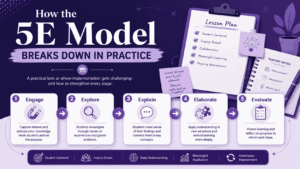
Because the 5E model is one of the most widely adopted formats outside direct instruction, it is worth showing its internal structure separately.
-
Engage: A short activity or question that surfaces what students already believe or know about the topic, often designed to expose a misconception.
-
Explore: Students investigate a phenomenon or problem hands-on before receiving formal explanation, usually in small groups.
-
Explain: The teacher introduces vocabulary and formal concepts, connecting them to what students observed during the explore phase.
-
Elaborate: Students apply the concept to a new context or a more complex version of the original problem.
-
Evaluate: A formative or summative check, which can run throughout the lesson rather than only at the end.
Ready-to-Use Lesson Plan Templates
Below are template structures you can copy directly into a document, spreadsheet, or planning tool. Each is built around a different planning unit, so pick the one that matches the decision you made in Step 1 above.
Daily Lesson Plan Template
-
Subject and grade level
-
Date and class period
-
Standard(s) addressed
-
Objective (student-facing language)
-
Materials
-
Opening (time estimate)
-
Instruction/modeling (time estimate)
-
Practice (time estimate)
-
Assessment/exit ticket
-
Closure
-
Differentiation notes
-
Reflection (filled in after teaching)
Filled-In Example: Daily Template
Weekly Grid Template
Rows: Monday through Friday. Columns: Standard, Objective, Main Activity, Homework, Assessment, Notes.
This layout lets a teacher or a substitute see the entire week’s arc in one view, which is why it is common in elementary settings where a single teacher covers multiple subjects daily.
Unit Plan Template
-
Unit title and duration (number of sessions)
-
Enduring understanding / big idea
-
Unit-level objectives (3 to 5 maximum)
-
Standards alignment
-
Formative assessments (listed by session)
-
Summative assessment description
-
Resource list
-
Session-by-session outline (can reference daily templates)
Project-Based Learning (PBL) Template
-
Driving question (an open-ended, real-world question that frames the whole project)
-
Final product or presentation format
-
Milestones (checkpoints with target dates)
-
Skills and standards addressed across the project
-
Rubric criteria (usually 4 to 6 criteria, each with performance levels)
-
Reflection prompts for students at the midpoint and the end
Insight: Project-based lesson plans fail most often not because the driving question is weak, but because the milestone checkpoints are missing or too far apart. A driving question can sustain interest for a day or two on its own, but without checkpoints every few days, both the teacher and the students lose track of whether the project is actually on pace for the final deadline.
Examples by Grade Level and Subject
The right amount of detail in a format shifts by grade level. Younger grades typically need more explicit transition and routine notes; older grades typically need more content depth and less minute-by-minute scripting.
Digital vs. Paper Lesson Plan Formats
Insight: Teachers who reuse a digital format across multiple years report that the biggest time savings shows up in year two and three, not year one. The first year is spent building and adjusting the format itself; the payoff comes once the same structure can be copied and lightly edited rather than recreated from scratch each term.
Common Tools Used to Build and Store Lesson Plan Formats
Mistakes to Avoid When Designing a Lesson Plan Format
-
Building a format around a single “perfect” lesson instead of testing it on a routine, average one.
-
Including so many fields that filling out the format takes longer than the lesson itself.
-
Leaving out a differentiation field and relying on memory to adjust for struggling students.
-
Choosing a rigid minute-by-minute format for subjects that are inherently discussion-driven and hard to time precisely.
-
Designing the format for compliance only, with no field that actually helps you teach better, such as a reflection or notes section.
-
Copying a colleague’s format wholesale without adjusting it to your own subject, grade level, or planning habits.
-
Treating the format as fixed forever instead of revisiting it once a semester.
A Quick Self-Check Before You Finalize Your Format
Before committing to a format for the term, run it through these checks:
-
Does it fit on one page for a single-session format, or one screen for a digital format?
-
Could a substitute pick it up and run the lesson with no additional explanation from you?
-
Does every field earn its place, meaning you would notice its absence rather than just its presence?
-
Does it include a place to note what actually happened, not just what was planned?
-
Have you tested it on both an easy lesson and a difficult one, not just your strongest lesson of the year?
Author
Helga Afon is a technology writer specializing in video conferencing, collaboration software, and workplace communication. She writes articles and reviews that help readers better understand enterprise communication tools and industry trends.