

Teleconferencing is a way for people in different locations to participate in the same live meeting through telecommunications technology.
A teleconference may use:
-
audio only;
-
audio and video;
-
web-based content;
-
screen sharing;
-
shared data.
A video teleconference is one type of teleconference in which participants can both hear and see each other in real time.
The defining feature of teleconferencing is not video itself. It is live communication between participants in different locations.
A useful relationship is:
teleconferencing → audio conferencing, video conferencing, web conferencing
What Is Teleconferencing?
Teleconferencing is the practice of conducting a live meeting between people who are in different physical locations using telecommunications technology.
A teleconference can be:
-
audio-only;
-
video-based;
-
browser-based;
-
combined with screen sharing, presentations or chat.
The term describes a meeting format, not one specific application or technology.
For example:
Three managers in different offices join the same telephone conference.
That is teleconferencing.
A doctor and several specialists communicate through live video.
That is also teleconferencing.
Employees join a browser-based meeting with audio, video and screen sharing.
That is another form of teleconferencing.
What Is a Video Teleconference?
A video teleconference, often shortened to VTC, is a real-time meeting in which participants at different locations communicate using both audio and video.
A typical video teleconference may also include:
-
screen sharing;
-
presentations;
-
group messaging;
-
meeting controls;
-
recording.
For example, offices in Berlin, London and Singapore may join the same project meeting while remote employees connect from laptops or mobile devices.
All participants are part of one video teleconference.
Teleconference vs Video Conference
The terms are closely related, but they are not identical.
A teleconference is the broader category.
A video conference is one form of teleconferencing.
In everyday business use, video teleconference and video conference are often used to describe the same type of meeting.
Main Types of Teleconferencing
Three common forms of teleconferencing are audio, video and web conferencing.
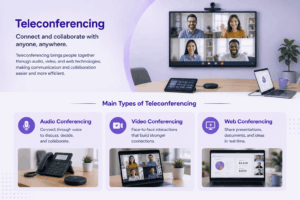
Audio Conferencing
Audio conferencing connects participants through voice.
It may use:
-
telephone networks;
-
VoIP;
-
desktop applications;
-
mobile apps.
Audio conferencing remains useful when visual communication is unnecessary or connectivity is limited.
Video Conferencing
Video conferencing adds live video to voice communication.
It is useful when participants need:
-
face-to-face interaction;
-
presentations;
-
visual demonstrations;
-
screen sharing.
Participants may join individually or from dedicated meeting rooms.
Web Conferencing
Web conferencing generally refers to meetings conducted through internet-based software.
Typical functions include:
-
browser joining;
-
screen sharing;
-
chat;
-
presentations;
-
document sharing.
Modern meeting platforms often combine web conferencing and video conferencing, so the terms overlap in practice.
How Does Teleconferencing Work?
A modern video teleconference follows a simple media flow:
capture → encode and transmit → route or process → receive and play
1. Capture
Microphones capture audio and cameras capture video.
2. Encode and Transmit
The conferencing application compresses the media and sends it across the network.
This may be:
-
the public internet;
-
a corporate LAN;
-
a VPN;
-
a private network.
3. Route or Process
The conferencing infrastructure determines which audio and video streams need to reach each participant.
4. Receive and Play
Participants’ applications receive and decode the media so remote audio and video can be played in real time.
The process happens continuously with low enough delay for natural conversation.
What Equipment Is Needed for a Video Teleconference?
The required equipment depends on whether an individual or a meeting room is joining.
Individual Participants
Most users need:
-
computer, tablet or smartphone;
-
microphone;
-
speakers or headphones;
-
camera;
-
network connection;
-
conferencing application or browser.
Most modern laptops and mobile devices already include the necessary camera and microphone.
Meeting Rooms
A meeting room may use:
-
camera;
-
microphones;
-
speakers;
-
one or more displays;
-
conferencing endpoint or room computer;
-
room controller.
The goal is to make people in the room easy for remote participants to see and hear without gathering around one laptop.
Video Teleconference Deployment Models
Video teleconferencing can be deployed in different ways.
Cloud services typically reduce infrastructure management.
Customer-hosted deployments provide more direct control over network, infrastructure and communication data.
Hybrid models can retain selected local components while using external services for others.
The right model depends on requirements for administration, remote access, integrations and infrastructure control.
Common Video Teleconference Features
Modern video teleconference platforms usually provide more than audio and video.
Enterprise environments may also require integration with existing conference-room infrastructure or communication systems.
What Is Teleconferencing Used For?
Teleconferencing is useful whenever people need live communication without meeting physically.
Business and Interoffice Meetings
Teams can hold:
-
project meetings;
-
management discussions;
-
customer meetings;
-
cross-office coordination.
Training and Education
Organizations can use teleconferencing for:
-
employee training;
-
remote classes;
-
workshops;
-
presentations.
Healthcare and Specialist Collaboration
Healthcare organizations may use video communication for remote consultations and collaboration between specialists.
Specific deployments may require additional privacy, security and regulatory controls.
Government and Public Sector
Government organizations can use video teleconferences to connect ministries, agencies, regional offices and administrative facilities.
Some environments may require customer-operated or private-network infrastructure.
Advantages and Limitations of Teleconferencing
Teleconferencing can reduce the need for participants to travel to the same location and make distributed expertise easier to access.
It also supports remote and geographically distributed teams by allowing people to communicate in real time across offices and regions.
Video teleconferencing adds visual interaction, screen sharing and presentations when audio alone is not enough.
However, teleconferencing also has limitations.
Poor network conditions can cause delay, audio interruptions or degraded video quality.
Audio quality is particularly important because unclear speech can make even high-quality video ineffective.
Not every discussion needs video, and unnecessary meetings can create additional overhead.
Organizations should also consider authentication, participant permissions, recording access, endpoint security and administrative controls.
Video Teleconference vs Phone Conference
A traditional conference call provides audio communication.
A video teleconference adds visual interaction.
Audio conferencing can still be the better choice when connectivity is weak, participants are traveling or visual information is unnecessary.
Video Teleconference vs Webinar
A video teleconference is usually designed for interaction between participants.
A webinar is usually designed for one-to-many presentation.
For example:
Teleconference: Ten department heads discuss quarterly priorities.
Webinar: One presenter gives a briefing to hundreds of attendees.
The technology may overlap, but the communication model is different:
teleconference = discussion
webinar = presentation to an audience
Choosing a Video Teleconference System
Start with the meeting environment rather than a vendor feature list.
Who Needs to Join?
Consider:
-
employees;
-
external guests;
-
remote workers;
-
meeting rooms;
-
mobile users.
How Large Are the Meetings?
A five-person project meeting has different requirements from:
-
large internal meetings;
-
training sessions;
-
company-wide events.
Where Should the System Run?
Decide whether the organization needs:
-
cloud service;
-
customer-hosted infrastructure;
-
private-network operation;
-
hybrid deployment.
What Existing Systems Must Remain?
Enterprise environments may already use:
-
room systems;
-
SIP endpoints;
-
H.323 equipment;
-
directories;
-
PBXs.
If the new platform can interoperate with existing infrastructure, replacing everything may be unnecessary.
Where Secumeet Fits
Secumeet is relevant to organizations looking for a customer-operated communication environment rather than a public meeting service.
The platform combines video meetings with personal and group messaging, file exchange, screen sharing, presentations and remote assistance.
Secumeet currently supports video meetings with up to 1,500 participants and is designed for deployment on customer infrastructure.
Its fit depends on the organization’s requirements for meeting size, messaging, collaboration, infrastructure ownership and administration.

Frequently Asked Questions
What is teleconferencing?
Teleconferencing is a way for people in different physical locations to participate in the same live meeting using telecommunications technology.
It can include audio, video and shared data.
What is a video teleconference?
A video teleconference is a teleconference in which participants communicate through live audio and video.
Modern systems may also include screen sharing, messaging, presentations and recording.
Is teleconferencing the same as video conferencing?
Not exactly.
Teleconferencing is the broader category and can include audio-only conferences as well as video meetings.
Video conferencing is one form of teleconferencing.
What are the main types of teleconferencing?
The three main forms are:
-
audio conferencing;
-
video conferencing;
-
web conferencing.
Modern platforms often combine several of these modes in one application.
What equipment is needed for teleconferencing?
An individual typically needs a computer or mobile device, microphone, speakers or headphones, a camera for video meetings and a network connection.
Meeting rooms may use dedicated cameras, microphones, displays and conferencing endpoints.
Does teleconferencing require the internet?
Not always.
Cloud teleconferencing services generally require internet connectivity.
Customer-hosted systems may also operate through private corporate networks, LANs or VPNs depending on their architecture.
Conclusion
Teleconferencing is the broad practice of connecting people in different locations for a live meeting through telecommunications technology.
A teleconference may use:
audio → video → web content → shared data
A video teleconference is the audiovisual form of that broader model.
The key distinction is:
teleconferencing is the category
video teleconferencing is one type
Modern platforms increasingly combine audio, video, screen sharing, messaging and other collaboration tools in the same environment, but the underlying purpose remains the same: enabling people in different places to participate in the same real-time conversation.
Author
Helga Afon is a technology writer specializing in video conferencing, collaboration software, and workplace communication. She writes articles and reviews that help readers better understand enterprise communication tools and industry trends.