
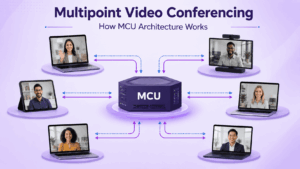
A point-to-point video call connects two endpoints. Once three or more locations join the same meeting, the system has to decide how audio and video streams are distributed, where layouts are created, and which component handles media processing.
That is the problem multipoint video conferencing solves.
An MCU, or Multipoint Control Unit, is one established architecture for handling multipoint meetings, but the terms are not interchangeable.
Multipoint is the meeting format. MCU is one way of processing multipoint media.
Modern conferencing systems may instead use SFU, SVC, simulcast, or hybrid architectures. The right choice depends on endpoints, bandwidth, interoperability requirements, server resources, and where media processing should occur.
What Is Multipoint Video Conferencing?
Multipoint video conferencing connects three or more participants or locations in one audiovisual session.
Participants can include:
-
desktop and mobile users;
-
conference-room systems;
-
SIP endpoints;
-
H.323 endpoints;
-
browser users;
-
other conferencing systems.
The main technical challenge is distributing media between all participants without overwhelming the server, network, or endpoints.
Point-to-Point vs Multipoint Video Conferencing
A multipoint meeting does not automatically require a classic MCU. Modern systems can also use SFU, SVC, simulcast, or hybrid media architectures.
What Is an MCU and How Does It Work?
MCU stands for Multipoint Control Unit.
A classic MCU receives media from conference participants and processes it centrally before sending output streams back to endpoints.
Traditional H.323 terminology divides an MCU into two logical parts:
-
Multipoint Controller (MC) handles signaling, conference setup, media negotiation, and session control.
-
Multipoint Processor (MP) handles media tasks such as mixing, switching, and transcoding.
Cisco’s H.323 architecture describes the MC as handling conference setup, teardown, signaling, media negotiation, and control of one or more Multipoint Processors.
A simplified MCU conference works like this:
-
Each endpoint connects to the MCU.
-
Participants send audio and video to the server.
-
The MCU processes the incoming streams.
-
Audio may be mixed.
-
Video may be decoded and composed into a layout.
-
Output is adapted to the endpoint.
-
The resulting stream is sent back.
The central trade-off is simple:
The endpoint does less media-processing work, but the MCU does more.
What an MCU Does to Media
An MCU can perform several different operations.
Mixing
Audio or other media from multiple participants can be combined into a common output.
Video Composition
The MCU can generate layouts such as:
-
grid;
-
active speaker;
-
speaker plus thumbnails;
-
lecture layout;
-
operator-defined composition.
The endpoint may therefore receive one already-composed video instead of decoding many separate participant streams.
Transcoding
Transcoding converts media between different codec profiles, resolutions, or other formats.
This is particularly useful when older and newer room systems need to participate in the same conference.
Transrating
Transrating changes media bitrate to match network conditions or endpoint capability.
Switching
Instead of fully composing all video, the MCU may switch between selected streams depending on the conference mode or active speaker.
MCU vs SFU vs SVC
The important architecture question is not whether the meeting is multipoint, but where the media-processing work happens.
MCU
The server performs most of the difficult media work.
This is useful when endpoints have limited capabilities or need a single composed output.
SFU
An SFU, or Selective Forwarding Unit, forwards selected participant streams without performing the same full decode-compose-encode cycle.
Clients decode several incoming tracks and build layouts locally.
This reduces server-side transcoding but increases endpoint and downstream bandwidth requirements.
SVC
Scalable Video Coding divides a video stream into layers.
The conferencing server can select appropriate layers according to:
-
network bandwidth;
-
endpoint capability;
-
requested resolution;
-
current layout.
Real Platforms Can Be Hybrid
A modern conferencing system can combine several approaches.
For example, it may:
-
use scalable streams for native clients;
-
transcode standards-based room systems;
-
generate a composed stream for recording;
-
use another path for WebRTC users.
Architecture labels therefore describe how media is processed, not necessarily every connection inside a product.
When an MCU Makes Sense
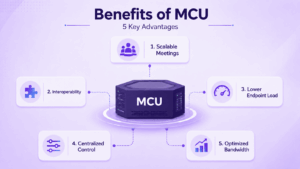
MCU architecture remains useful when centralized media processing solves a real technical requirement.
Existing SIP and H.323 Rooms
Many organizations already own standards-based conference-room systems.
An MCU can connect those systems into multipoint meetings without requiring every room to be replaced.
Mixed Endpoint Capabilities
Central transcoding can normalize differences in:
-
codec;
-
resolution;
-
bitrate;
-
media format;
-
device performance.
Server-Controlled Layouts
An MCU is useful when a moderator or operator must determine what participants see.
This can matter for:
-
executive meetings;
-
command centers;
-
lecture scenarios;
-
centrally managed room conferences.
Weak or Fixed-Function Endpoints
Hardware room endpoints may have limited ability to decode many simultaneous streams.
Receiving one composed stream can reduce endpoint requirements.
When SFU or SVC May Be Better
SFU or SVC architectures often fit better when most participants use:
-
browsers;
-
mobile devices;
-
modern desktop applications;
-
WebRTC;
-
client-controlled layouts.
These architectures reduce expensive server-side transcoding and let endpoints handle more of the layout and decoding work.
The decision should therefore not be framed as:
MCU is old, SFU is modern.
The better question is:
Where should media processing happen for the devices and network you actually have?
Bandwidth, MCU Placement and WAN Topology
An MCU changes traffic patterns.
Endpoint Side
An endpoint may send one primary stream and receive one composed output.
This can reduce the number of separate incoming video streams required at the client.
Server Side
All media converges on the MCU.
The server therefore needs enough bandwidth for:
-
participant video;
-
audio;
-
content sharing;
-
recording;
-
streaming.
WAN Topology
MCU location matters.
Suppose several conference rooms are located in the same branch office but the MCU sits in a central data center.
A local point-to-point call may remain inside the branch. Once the call becomes multipoint, media may need to travel from every room to the central MCU and back.
That means MCU placement is also a network-design decision.
Common deployment options include:
-
central data center;
-
private cloud;
-
regional server;
-
distributed or cascaded infrastructure;
-
MCU built into a room endpoint.
How to Size an MCU
Maximum participant count alone is not enough.
Actual MCU capacity depends on the media workload.
Important variables include:
-
resolution;
-
FPS;
-
codec;
-
transcoding;
-
number of video windows;
-
individual layouts;
-
simultaneous conferences;
-
recording;
-
content sharing;
-
virtualization overhead.
Why Participant Count Is Not Enough
A specification saying:
250 participants
does not tell you whether all 250 can simultaneously use:
-
Full HD;
-
multiple codecs;
-
individual layouts;
-
recording;
-
presentation streams.
Capacity should be evaluated against the actual media profile rather than a single participant limit.
Hardware MCU vs Software MCU
Software MCU does not mean unlimited capacity. Transcoding still requires substantial compute, memory, and network resources.
SIP/H.323 and MCU Interoperability
MCUs remain closely associated with SIP and H.323 because many deployments center on existing conference-room systems.
A multipoint platform may need to handle:
-
SIP signaling;
-
H.323 signaling;
-
audio and video codecs;
-
presentation sharing;
-
camera control;
-
NAT traversal.
However, protocol compatibility does not guarantee complete feature parity.
Always test:
-
codecs;
-
presentation sharing;
-
encryption;
-
camera control;
-
layouts;
-
meeting controls.
Cascading, Recording and Distributed Deployments
MCU Cascading
Cascading connects one conferencing server to another:
MCU A ↔ MCU B
It can help connect:
-
regional systems;
-
separate offices;
-
existing conferencing infrastructure;
-
conferences hosted on different servers.
Cascading should be tested for:
-
bandwidth;
-
layout behavior;
-
content sharing;
-
transcoding;
-
failure handling.
Recording
A classic MCU can be convenient for recording because it already produces centrally processed conference media.
When evaluating a system, verify:
-
which layout is recorded;
-
recording resolution;
-
content-sharing behavior;
-
storage requirements;
-
whether recording reduces available MCU capacity.
How to Choose a Multipoint Video Conferencing Architecture
Use six questions.
1. Which Endpoints Must Remain in Service?
Inventory:
-
SIP;
-
H.323;
-
browsers;
-
desktop applications;
-
mobile clients;
-
room systems.
2. Is Transcoding Required?
Mixed codecs and older endpoints make MCU processing more relevant.
3. Where Should Layouts Be Created?
Choose between:
-
server-controlled composition;
-
client-controlled layouts.
4. What Can the Endpoints Process?
Limited hardware endpoints favor centralized processing more than modern desktop clients.
5. What Does the Network Topology Look Like?
Map:
-
branches;
-
WAN;
-
data centers;
-
server location;
-
available bandwidth.
6. What Is the Real Media Workload?
Calculate:
-
concurrent calls;
-
codecs;
-
resolutions;
-
FPS;
-
recording;
-
content sharing.
Only then compare MCU, SFU, SVC, or hybrid designs.
Video Conferencing Platforms That Support MCU or Multipoint Server Architectures
Several enterprise video conferencing systems provide classic MCU functionality or a server-based multipoint architecture suitable for standards-based room systems.
1. TrueConf MCU

TrueConf MCU is a software-based classic transcoding MCU designed specifically for multipoint conferences involving SIP and H.323 endpoints.
It can be deployed on a physical server or hypervisor and provides centralized media processing, transcoding, conference layouts, recording, cascading, and interoperability with room systems from vendors such as Cisco, Poly, Lifesize, and Huawei.
This makes it most relevant when an organization already has standards-based conference-room infrastructure and wants multipoint processing to remain on its own server rather than rely on a public meeting cloud.
2. Secumeet Server

Secumeet Server supports large multipoint video meetings and provides native SIP/H.323 integration for connecting conferencing and telephony equipment. It supports conferences for up to 1,500 participants together with messaging, video meetings, screen sharing, and room-system interoperability.
Secumeet is most relevant when multipoint conferencing is required as part of a wider server-connected communication environment rather than as a standalone MCU appliance.
3. Cisco Meeting Server

Cisco Meeting Server is an on-premises conferencing platform for multiparty video, audio, and web meetings.
It works with third-party devices and supports premises-based enterprise video environments. Cisco currently offers software and server-based deployment options, including Meeting Server platforms sized for different numbers of simultaneous HD video calls.
It is particularly relevant to organizations with existing Cisco collaboration and room infrastructure that want centrally managed multipoint conferencing rather than replacing their entire endpoint estate.
4. Pexip Infinity
Pexip Infinity is a self-hosted, virtualized, and distributed multipoint video conferencing platform.
It can run:
-
on-premises;
-
in a private cloud;
-
in public cloud infrastructure;
-
across hybrid deployments.
Pexip uses distributed Conferencing Nodes that can host one conference across multiple nodes, allowing conferencing capacity to be placed close to participants.
It also supports SIP and H.323 room systems and automatically transcodes major audio and video codecs.
Pexip is especially relevant when the requirement extends beyond a single centralized MCU and includes distributed conferencing, cross-platform interoperability, or large multi-site deployments.
5. Yealink Meeting Server
Yealink Meeting Server, or YMS, is an all-in-one video conferencing infrastructure platform with an integrated MCU.
Yealink documents YMS as combining:
-
MCU;
-
registrar server;
-
directory services;
-
traversal;
-
SIP trunking;
-
WebRTC;
-
H.323 gatekeeper functions;
-
recording;
-
conference and device management.
Yealink also states that YMS supports MCU stacking for expanding conferencing capacity and provides participant-specific layouts and other centralized conference controls.
It is particularly relevant when Yealink room endpoints are already part of the environment and the organization wants the MCU, device management, call control, and conferencing functions within the same infrastructure.
Common MCU and Multipoint Conferencing Mistakes
Assuming Multipoint Means MCU
Multipoint is the meeting type. MCU is one architecture.
Comparing Only Maximum Participants
Capacity also depends on media complexity.
Ignoring Transcoding Load
Transcoding can be one of the most CPU-intensive parts of conferencing.
Ignoring WAN Topology
A poorly located MCU can create unnecessary network traffic.
Assuming SIP/H.323 Means Full Compatibility
Protocol support does not guarantee identical media and control features.
Frequently Asked Questions
Is an MCU required for multipoint video conferencing?
No. Multipoint systems can use MCU, SFU, SVC, simulcast, or hybrid architectures.
What does an MCU do?
A classic MCU centrally processes participant media. It can mix audio, compose layouts, transcode video, adjust bitrate, and generate endpoint-specific output.
What is the difference between MCU and SFU?
An MCU performs more server-side media processing and can create a composed output.
An SFU primarily forwards selected participant streams and leaves more decoding and layout work to the client.
Is an MCU hardware or software?
Both models exist.
Modern software MCUs can run on standard physical servers or virtual infrastructure.
Can SIP and H.323 endpoints join the same multipoint conference?
Yes, when the conferencing system supports both protocols and provides the necessary media interoperability.
Conclusion
Multipoint video conferencing describes a meeting with three or more participants. An MCU is one architecture for making that meeting work.
Its defining feature is centralized media processing.
That makes MCU architecture particularly useful for:
-
SIP/H.323 rooms;
-
mixed endpoint capabilities;
-
server-controlled layouts;
-
fixed-function hardware;
-
centralized recording.
SFU and SVC architectures move more processing toward modern clients and reduce the need for full server-side transcoding.
The core decision is therefore not:
Do we need multipoint video conferencing?
It is:
Where should media processing happen for our endpoints, network, and conferencing workflows?
Author
Helga Afon is a technology writer specializing in video conferencing, collaboration software, and workplace communication. She writes articles and reviews that help readers better understand enterprise communication tools and industry trends.