

Government collaboration software helps public-sector employees, departments, agencies and external partners communicate, share information and coordinate work.
But the category is broader than secure team chat.
A government organization may need software for:
-
internal messaging and meetings;
-
case and records workflows;
-
collaboration between agencies;
-
work with contractors and external partners;
-
controlled access to sensitive information.
That means products appearing under the same government collaboration software label may solve very different problems.
The useful starting question is:
What needs to move across the collaboration boundary, conversations, documents, tasks or formal government processes?
Only after that should an organization compare platforms.
Government Collaboration Software Compared
These platforms should not be ranked on one universal scale.
Microsoft 365 Government and GovSlack primarily create employee collaboration environments. TrueConf and Secumeet provide communication environments that can be operated by the organization. OnBase is much more document and workflow centered. Granicus addresses government-specific processes. Smartsheet Gov focuses on work coordination.
The right shortlist depends on which collaboration layer the agency is actually trying to improve.
What Is Government Collaboration Software?
Government collaboration software is technology used to help public-sector organizations exchange information and coordinate work across employees, teams, departments and organizational boundaries.
The core functions can include:
communication → content → coordination → formal process
The fourth layer is particularly important.
In ordinary workplace collaboration, a discussion may only need to result in a document or task.
Government collaboration may also involve:
-
case records;
-
formal approvals;
-
retention requirements;
-
public requests;
-
controlled information;
-
inter-agency processes;
-
audit trails.
This is one reason search results for government collaboration software contain both conventional workplace tools and government-specific workflow products.
A product should therefore not be considered suitable for government simply because it supports chat, video or shared documents.
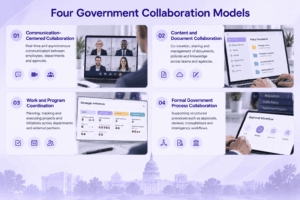
Four Government Collaboration Models
Communication-Centered Collaboration
This layer handles everyday interaction between people.
It may include:
-
personal messaging;
-
group chats;
-
channels;
-
voice;
-
video meetings;
-
screen sharing;
-
file exchange.
Platforms such as GovSlack, Teams, TrueConf and Secumeet emphasize this area in different deployment models.
The main question is whether employees need only rapid communication or a persistent environment where conversations and meetings remain connected.
Content and Document Collaboration
Some government work centers on documents rather than conversations.
Examples include:
-
policy drafts;
-
reports;
-
case materials;
-
meeting papers;
-
forms;
-
controlled files.
Here, versioning, permissions, retention and document workflows may matter more than rich video meetings.
This is where products such as Microsoft 365 Government, Box-style government environments and document-management platforms become more relevant.
Work and Program Coordination
Government agencies also run:
-
transformation programs;
-
infrastructure projects;
-
procurement processes;
-
cross-department initiatives;
-
policy implementation programs.
These activities need tasks, ownership, deadlines, status and approvals.
Smartsheet Gov and similar work-management systems focus more strongly on this collaboration model.
Formal Government Process Collaboration
Some work cannot be represented adequately as generic chat, files or tasks.
Government processes may require:
-
structured intake;
-
routing;
-
approvals;
-
records;
-
case history;
-
auditability;
-
controlled publishing;
-
formal decision workflows.
Products such as Hyland OnBase and Granicus operate closer to this layer.
This distinction matters because a platform can be excellent for employee teamwork while being unsuitable for a formal case or records process.
Microsoft 365 Government and Teams
Best for: Government organizations already standardized on the Microsoft ecosystem.
Microsoft Teams provides persistent chat, meetings, calls and channels, while Microsoft 365 connects collaboration with SharePoint, OneDrive and Office applications.
The result is a broad environment covering both communication and content collaboration.
Government-specific Microsoft offerings are designed for public-sector deployment requirements rather than simply using the standard consumer or commercial environment.
A current CMS technology guidance page, for example, identifies Microsoft Teams as part of the agency’s Microsoft 365 Government subscription and describes Teams as a centralized environment for communication, file sharing, chat and meetings.
Main consideration: Microsoft can cover many collaboration layers, but governance is still needed to avoid duplicated Teams, SharePoint sites, file locations and overlapping tools.
GovSlack
Best for: Government teams that want persistent messaging and application-centered collaboration.
GovSlack adapts Slack’s channel-based collaboration model for government environments.
Slack currently states that GovSlack targets government security and compliance requirements and lists FedRAMP High, FIPS 140-2 validation and DoD SRG IL4 among its certifications and authorizations.
The main collaboration model remains familiar:
channel → discussion → files/apps → live communication → follow-up
Its strength is acting as a communication layer that connects people with other work systems.
Main consideration: Agencies still need separate systems for document governance, formal records processes or specialized government workflows where Slack is not the system of record.
TrueConf
Best for: Public-sector organizations that need persistent messaging and video collaboration on customer-operated infrastructure.
TrueConf combines personal chats, group chats, channels, file exchange, voice calls and video meetings within one organization-managed communication environment.
This makes it relevant when government collaboration primarily means employee and inter-team communication rather than document case management.
TrueConf also supports meeting-room environments and SIP/H.323 interoperability, which can matter where public-sector organizations already operate conference rooms or standards-based video infrastructure.
Its main role in a government collaboration architecture is therefore the communication layer.
Main consideration: Formal document workflows, project management and records management may still require separate systems.
Secumeet
Best for: Government teams that want persistent messaging and video meetings on customer-operated infrastructure.
Secumeet combines personal and group messaging with video meetings, screen sharing, presentations and content collaboration.
Its main government collaboration role is:
persistent communication + live meetings + customer-operated deployment
rather than replacing specialized case, records or project-management systems.
This can make it relevant where a public-sector organization wants the employee communication layer to operate on infrastructure it controls.
Main consideration: Agencies with specific telephony, workflow, identity or third-party integration requirements should validate those requirements for the planned deployment.
openDesk
Best for: Public administrations prioritizing an open-source and digitally sovereign workplace environment.
openDesk is specifically designed for public administration and combines a wider range of workplace functions than a communication-only platform.
Its current product environment includes chat, contacts, documents, email, file storage, identity management, knowledge functions, projects, tasks and video calls. openDesk was developed from Germany’s Sovereign Workplace initiative and is now developed by the Centre for Digital Sovereignty of the Public Administration, ZenDiS.
That makes it particularly relevant to European public-sector discussions around sovereign workplace infrastructure.
Main consideration: Its model is broader than a conventional collaboration app, so adoption can involve decisions across office productivity, identity and other workplace components.
Hyland OnBase
Best for: Government work where documents, cases and formal workflows are central.
OnBase represents a different category from Teams, Slack or TrueConf.
Its collaboration value is tied more closely to controlled information and process execution than to ongoing conversational collaboration.
Current government-software rankings emphasize OnBase for document-heavy government casework, workflow routing and traceable records.
This makes it relevant when the collaboration problem is:
document → review → routing → decision → record
rather than:
message → meeting → follow-up
Main consideration: Agencies still need a separate communication layer if employees require rich persistent messaging and conferencing.
Granicus
Best for: Government-specific processes that connect internal workflows with public or constituent-facing activity.
Granicus is relevant to a different part of the market from general workplace collaboration.
Its value is closer to formal government processes, communications and public-sector workflows.
Current government collaboration comparisons place Granicus alongside tools for agenda, intake and process-oriented collaboration rather than ordinary internal chat.
This makes it useful when the collaboration boundary extends beyond employees into structured government processes.
Main consideration: It should not be treated as a direct substitute for an internal UC or team-messaging environment.
Smartsheet Gov
Best for: Government organizations coordinating programs, projects and work across departments.
Smartsheet Gov approaches collaboration from the work-management side.
Instead of making chat or meetings the primary object, teams organize collaboration around:
-
work items;
-
ownership;
-
timelines;
-
status;
-
approvals;
-
reporting.
This model fits public-sector projects where accountability and cross-department visibility matter more than replacing the main communication platform.
Main consideration: Real-time messaging and rich video collaboration usually remain the responsibility of a separate communication environment.
What Makes Government Collaboration Different?
Government buyers often evaluate software against requirements that are less important for small commercial teams.
Information Boundaries
Not every employee, contractor or partner should have access to every collaboration space.
The platform may need clear controls around:
-
user roles;
-
departments;
-
external participants;
-
specific information sets;
-
administrative access.
Auditability
Government workflows may need to show:
-
who accessed information;
-
who changed something;
-
who approved an action;
-
when an event occurred.
This becomes especially important when collaboration overlaps with formal processes.
Records and Retention
A conversation, file or decision may later become part of an official record.
Agencies should therefore determine what happens to collaboration data after the immediate work ends.
External and Inter-Agency Collaboration
Government teams frequently need to work with:
-
other agencies;
-
municipalities;
-
contractors;
-
suppliers;
-
public organizations.
A platform that works well for internal teams may still create difficulties when users cross organizational boundaries.
Deployment and Data Control
Some public-sector organizations use government-specific cloud services.
Others require private or customer-operated infrastructure.
European public administration also increasingly considers digital sovereignty, open standards and supplier dependency as part of collaboration architecture. openDesk is one current example of a government initiative explicitly built around these goals.
Government Collaboration Is Usually More Than One Platform
A public-sector organization may use several collaboration systems because the functions have different governance requirements.
For example:
communication
Teams, GovSlack, TrueConf or Secumeet
documents
Microsoft 365, document management or records systems
coordination
Smartsheet Gov or another work-management platform
formal processes
OnBase, Granicus or specialized government applications
Trying to force all four functions into one product can create another problem: the general-purpose collaboration system becomes responsible for processes it was never designed to govern.
The better question is:
Which system should be authoritative for each type of government work?
A chat system may own conversations.
A document system may own official files.
A work-management platform may own tasks.
A case-management system may own formal case history.
This division of responsibility can be more important than reducing the number of products.
How to Choose Government Collaboration Software
Start with the collaboration problem rather than the vendor.
Then apply government-scale requirements.
Check:
-
identity and user provisioning;
-
roles and permissions;
-
audit requirements;
-
retention;
-
external collaboration;
-
integrations;
-
deployment model;
-
interoperability;
-
information discovery;
-
administration.
A generic feature checklist is less useful than determining whether the platform fits the agency’s collaboration boundary and governance model.
Government Collaboration Software vs Government Communication Software
The terms overlap but are not identical.
Government communication software focuses mainly on:
-
messaging;
-
voice;
-
video meetings;
-
channels;
-
alerts.
Government collaboration software is broader.
It may also include:
-
documents;
-
tasks;
-
case processes;
-
approvals;
-
records;
-
knowledge.
This explains why Microsoft Teams, TrueConf and Secumeet can appear in the same broad topic as OnBase or Smartsheet Gov without being direct substitutes.
Communication is one collaboration layer.
It is not the entire category.
Frequently Asked Questions
What is government collaboration software?
Government collaboration software helps public-sector employees, departments and external partners communicate, share information and coordinate work.
Depending on the product, it may focus on messaging, meetings, documents, projects or formal government workflows.
What are examples of government collaboration software?
Examples include Microsoft 365 Government and Teams, GovSlack, TrueConf, Secumeet, openDesk, Hyland OnBase, Granicus and Smartsheet Gov.
They solve different collaboration problems and should not all be treated as direct alternatives.
What should government agencies look for in collaboration software?
Important factors can include access control, auditability, records and retention requirements, external collaboration, administration, integrations and deployment.
The exact requirements depend on the information and process being handled.
Is government collaboration software different from standard business collaboration software?
The core collaboration functions can be similar, but public-sector deployments may require stricter information boundaries, records controls, government-specific compliance requirements, interoperability or infrastructure control.
Can government collaboration software run on customer-operated infrastructure?
Yes.
TrueConf and Secumeet are examples of customer-operated communication environments. Other government collaboration products use government cloud, private cloud, on-premises or hybrid deployment models depending on the product.
Does one platform need to handle all government collaboration?
No.
An agency may use different authoritative systems for communication, documents, project coordination and formal government processes.
The important issue is how clearly responsibility is divided between those systems and how information moves between them.
Conclusion
Government collaboration software is not one product category with one universal feature checklist.
It can support four different kinds of work:
communication → content → coordination → formal process
The correct platform depends on what needs to cross the collaboration boundary and what controls must remain around that exchange.
Communication platforms such as Teams, GovSlack, TrueConf and Secumeet address employee interaction. Microsoft 365 Government and openDesk extend further into workplace productivity. Smartsheet Gov emphasizes work coordination, while OnBase and Granicus address more structured government processes.
The strongest shortlist therefore starts with the government’s collaboration model, information boundary and operating requirements, not with the product that offers the largest number of features.
Author
Helga Afon is a technology writer specializing in video conferencing, collaboration software, and workplace communication. She writes articles and reviews that help readers better understand enterprise communication tools and industry trends.