Audio Conferencing Software: The Complete Guide and 15 Best Tools for 2026

Audio Conferencing

Audio conferencing software lets three or more people hold a live voice meeting over the internet or a phone network, without requiring anyone to switch on a camera. It is the backbone of dial-in meetings, investor calls, customer support lines, and any scenario where clear voice communication matters more than visual presence. In 2026, the category sits at the intersection of classic telephony and modern cloud collaboration: providers are folding audio bridges into unified communication suites, adding AI transcription, and offering both cloud-hosted and on-premises deployment models for organizations with strict data control requirements.

This guide explains what audio conferencing is, how it differs from video conferencing, which types and features matter, and which platforms are worth shortlisting in 2026. It also gives a full profile of Secumeet and TrueConf, two on-premises-capable platforms built for organizations that need audio and video meetings to stay inside their own infrastructure, alongside major cloud vendors such as Zoom, Microsoft Teams, and Google Meet.

At a Glance

Question

Short Answer

What is audio conferencing?

A voice-only meeting between three or more participants, held over VoIP or PSTN phone lines.

How is it different from video conferencing?

No camera feed; lower bandwidth needs; works over a basic phone line as well as the internet.

Who needs a dedicated tool?

Sales and support teams, distributed companies, boards and investor relations, regulated industries, and anyone running large-scale dial-in events.

Best for data control and compliance

Secumeet, TrueConf (on-premises deployment, no third-party data access)

Best for existing Microsoft 365 users

Microsoft Teams

Best for simple, fast external meetings

Zoom, Google Meet

Best free option for small teams

FreeConferenceCall, Google Meet

Typical must-have features

HD audio codecs, dial-in numbers, recording, noise suppression, calendar integration, admin controls

What Is Audio Conferencing?

Audio conferencing is a communication method that connects multiple participants in a single voice call using VoIP (Voice over Internet Protocol), traditional telephone lines (PSTN), or a combination of both. Unlike a simple three-way phone call, audio conferencing software is built to handle dozens or hundreds of simultaneous participants, with features such as dial-in access numbers, PIN-protected rooms, mute controls, and call recording.

The category includes:

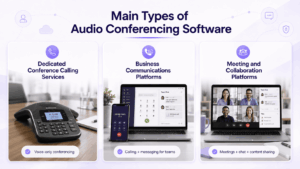
  • Standalone audio bridges: services whose only function is voice conferencing, often billed by the minute or by seat.

  • Audio-only mode inside video platforms: most modern meeting tools (Zoom, Teams, Webex, TrueConf, Secumeet) allow any participant to join audio-only, either from the app or by dialing a phone number.

  • Enterprise voice conferencing systems: on-premises or hybrid platforms that route audio through a company’s own servers for compliance or network-control reasons.

Difference Between Video and Audio Conferencing

The two categories overlap heavily in software today, but they solve different problems and have different technical requirements.

Factor

Audio Conferencing

Video Conferencing

Core medium

Voice only

Voice + live video feed

Bandwidth requirement

Low (as little as 30-60 Kbps per participant)

Moderate to high (500 Kbps-several Mbps per participant)

Device requirements

Any phone or basic microphone

Camera, adequate lighting, stable connection

Best for

Large dial-in calls, quick check-ins, low-bandwidth regions, accessibility needs

Client-facing meetings, interviews, training, anything needing visual cues

Fatigue factor

Lower, allows multitasking and walking meetings

Higher, “video call fatigue” is a documented workplace issue

Typical scale

Can support very large groups (500-1,500+) cost-effectively

Scales further with more compute and bandwidth overhead

Data sensitivity

Generally lower footprint, easier to secure and log

More metadata (video streams, recordings) to protect and store

In short: choose audio conferencing when the priority is reliability, reach (including participants with poor internet or those dialing from a landline), and low resource use. Choose video conferencing when visual presence, screen sharing, or body language matter to the outcome of the meeting.

Types of Audio Conferencing

  • Reservation-based conferencing: a moderator books a specific time slot with an operator or automated system; participants receive a dial-in number and access code for that window.

  • Reservationless (on-demand) conferencing: participants have a permanent dial-in number and PIN they can use at any time, without pre-booking. This is now the dominant model, accounting for roughly 40% of the audio conferencing services market in 2026 according to industry estimates.

  • Operator-assisted conferencing: a live operator manages large or high-stakes calls (earnings calls, all-hands events), handling roll calls, Q&A queues, and technical issues in real time.

  • VoIP audio conferencing: calls carried entirely over the internet through a software client, typically bundled into a broader collaboration platform such as Zoom, Teams, TrueConf, or Secumeet.

  • PSTN dial-in conferencing: participants join via a standard phone number, useful for attendees without reliable internet or app access.

  • Hybrid audio conferencing: a blend of VoIP and PSTN in the same call, letting some participants join via app and others via a phone line, all bridged into one session.

Advantages of Audio Conferencing

  • Lower bandwidth and device requirements, which makes it more reliable in areas with weak internet infrastructure and more accessible to participants without cameras or high-end devices.

  • Faster to join, since there is no need to check lighting, framing, or video settings.

  • Reduced meeting fatigue, because participants are not required to stay visually “on” for the full call.

  • Cost efficiency at scale, since audio-only sessions consume far less bandwidth and server resources than video, which keeps large dial-in events affordable.

  • Better accessibility, supporting participants with visual impairments or those who prefer not to appear on camera.

  • Works during commutes or travel, since a phone line is often all that is required.

  • Simple compliance and archiving, since audio recordings and transcripts are lighter to store and review than video files.

Key Features to Look for in Audio Conferencing Software

  • HD voice codecs and echo/noise cancellation to keep calls intelligible with multiple speakers and background noise.

  • Dial-in numbers with local or toll-free access in the regions where your participants are based.

  • PIN and waiting-room controls to prevent unauthorized access to sensitive calls.

  • Recording and transcription, ideally with searchable transcripts and AI-generated summaries.

  • Admin and host controls, including mute-all, remove participant, and speaker-queue management.

  • Calendar and CRM integration so meetings can be scheduled and logged without manual work.

  • Scalability, from a five-person huddle to a 1,000+ participant town hall or investor call.

  • Deployment flexibility: cloud, hybrid, or fully on-premises for organizations bound by data residency or sector-specific compliance rules (healthcare, government, finance, defense).

  • SIP/H.323 interoperability for organizations that already operate conference room hardware and don’t want to replace it.

  • Encryption in transit and at rest, with TLS/DTLS-SRTP as a baseline and end-to-end encryption as an advanced option.

Audio Conferencing by the Numbers (2026)

  • The global audio conferencing services market is estimated in the range of roughly USD 23-28 billion in 2026, depending on methodology, with most forecasts projecting continued growth through the early 2030s at a compound annual growth rate between roughly 5% and 10%.

  • On-demand (reservationless) services account for around 40% of the services segment in 2026, reflecting the shift away from pre-booked, operator-managed calls.

  • Large enterprises represent the majority of spend, with estimates putting their share of the enterprise-size segment at roughly 65%.

  • Cloud-based deployment continues to dominate new purchases, though on-premises and self-hosted platforms are seeing renewed demand in regulated sectors such as government, defense, healthcare, and financial services, driven by data-sovereignty requirements and scrutiny of third-party cloud access.

  • Remote and hybrid work remain the primary demand driver: government labor data in several regions shows the share of employees working hybrid schedules continuing to rise year over year, sustaining demand for both audio and video conferencing tools.

Audio Conferencing by the Numbers

15 Best Audio Conferencing Software for 2026

Each entry below covers what the platform is, its core capabilities, and its main limitations, so you can compare them on equal terms.

1. Secumeet

Description: Secumeet is an enterprise conferencing platform built around a self-hosted, on-premises deployment model. It combines audio and video conferencing, secure messaging, and screen sharing in a single server that organizations install and control on their own infrastructure, making it a strong fit for teams that cannot allow meeting data to touch third-party cloud servers.

Key features:

  • Native SIP/H.323 support for interoperability with existing conference room hardware

  • AES-256-GCM encryption in transit, TLS 1.3 signaling, and an available true end-to-end encryption mode

  • Mandatory multi-factor authentication and LDAP/Active Directory integration with role-based access control

  • AI-powered noise suppression, background blur, and virtual backgrounds

  • Support for large-scale conferences with more than 1,000 simultaneous participants

  • Deployable as a hardware appliance, virtual machine, or software install with no mandatory internet dependency

Cons:

  • Requires internal IT resources to deploy, patch, and maintain, unlike plug-and-play SaaS tools

  • Smaller ecosystem of third-party integrations compared with Zoom or Teams

  • Less brand recognition among casual or first-time external participants

2. TrueConf

Description: TrueConf is an enterprise video and audio conferencing platform available in both cloud and fully on-premises editions. It is aimed at organizations that need complete control over where meeting data is processed, and it is frequently shortlisted alongside Secumeet by IT teams evaluating self-hosted alternatives to mainstream cloud platforms.

Key features:

  • Hybrid SFU/MCU media processing that adapts to conference size and participant device capabilities

  • Native H.323/SIP gateway for direct interoperability with legacy room hardware from major vendors

  • On-premises AI module for transcription, meeting summaries, and keyword extraction, keeping audio processing inside the customer’s network

  • Offline license activation, suited to air-gapped or classified environments

  • Desktop clients for Windows, macOS, and Linux, plus mobile apps and a browser-based WebRTC client

  • Perpetual licensing option in addition to subscription pricing

Cons:

  • On-premises deployment requires more upfront setup than a pure cloud tool

  • AI features are strongest in the on-premises configuration; cloud-only users get a lighter feature set

  • Smaller app marketplace than Zoom or Microsoft Teams

3. Zoom

Description: Zoom is one of the most widely adopted cloud meeting platforms, known for fast onboarding and broad name recognition among external participants.

Key features:

  • One-click meeting join with dial-in numbers in dozens of countries

  • AI Companion for meeting summaries and note-taking

  • Zoom Phone for integrated cloud telephony

  • Large webinar and events add-ons

Cons:

  • All meeting content is processed on Zoom’s own cloud infrastructure, which can conflict with strict data-residency policies

  • Advanced AI and telephony features require add-on subscriptions

  • Frequent feature changes can require ongoing admin retraining

4. Microsoft Teams

Description: Teams is Microsoft’s collaboration hub, bundling chat, file storage, and meetings, including audio conferencing with dial-in numbers, into the Microsoft 365 ecosystem.

Key features:

  • Deep integration with Outlook, SharePoint, and the wider Microsoft 365 suite

  • Audio Conferencing add-on with dial-in numbers for external and phone-only participants

  • Copilot-based AI meeting summaries

  • Enterprise-grade compliance certifications

Cons:

  • Full audio conferencing functionality often requires a separate add-on license

  • Best value only materializes for organizations already committed to Microsoft 365

  • Interface can feel heavier than lightweight, single-purpose conferencing tools

5. Google Meet

Description: Google Meet is a browser-first meeting tool tightly integrated with Google Workspace, popular for its simplicity and low-friction joining experience.

Key features:

  • No software install required to join, works directly in the browser

  • Live captions and AI-generated notes through Gemini integration

  • Tight Calendar and Gmail integration

  • Dial-in numbers available on paid Workspace tiers

Cons:

  • Advanced features are gated behind specific Google Workspace plans

  • Limited hardware/SIP interoperability compared with enterprise-focused platforms

  • Fewer host and moderation controls than some competitors

6. Cisco Webex

Description: Webex is Cisco’s conferencing suite, strong in enterprises that already run Cisco networking and room hardware, with dedicated audio conferencing and event capabilities.

Key features:

  • Deep interoperability with Cisco room systems and network hardware

  • Dolby Voice-class audio processing on supported devices

  • Strong multilingual and real-time translation support

  • Dedicated large-event and webinar tools

Cons:

  • Pricing and packaging can be complex for smaller teams

  • Full value is concentrated in organizations with existing Cisco infrastructure

  • Interface is less minimalist than newer cloud-first competitors

7. RingCentral

Description: RingCentral is a cloud communications platform combining phone, messaging, and video/audio meetings, popular with sales and support-heavy organizations.

Key features:

  • Unified phone system (RingCentral MVP) alongside meetings

  • Automatic call recording and AI-based conversation intelligence

  • Wide range of dial-in and toll-free number coverage

  • CRM and helpdesk integrations

Cons:

  • The breadth of the platform can mean a steeper learning curve

  • Meeting-specific features can feel secondary to the phone system

  • Enterprise pricing scales quickly with add-ons

8. GoTo Meeting (GoTo Connect)

Description: GoTo Meeting is a long-standing conferencing tool aimed at small and mid-sized businesses, now folded into the broader GoTo Connect communications suite.

Key features:

  • Simple scheduling and one-click join

  • Built-in dial-in audio conferencing with toll-free options

  • Meeting transcription and recording

  • Integrated with GoTo’s broader phone system

Cons:

  • Smaller feature set for large-scale webinars compared with Zoom or Webex

  • Less common among enterprise buyers than the market leaders

  • Mobile app experience trails the top three platforms

9. Dialpad Meetings

Description: Dialpad is an AI-driven business communications platform offering phone, meetings, and contact center tools, with real-time transcription as a signature feature.

Key features:

  • Real-time call and meeting transcription with AI-generated action items

  • Native VoIP phone system integrated with meetings

  • Sentiment and coaching analytics for sales/support teams

  • Simple, modern interface

Cons:

  • Smaller global dial-in coverage than legacy conferencing providers

  • AI processing runs in Dialpad’s cloud, a consideration for compliance-sensitive teams

  • Fewer large-scale webinar features

10. 8×8

Description: 8×8 provides a unified communications platform bundling voice, video, chat, and contact center capabilities, aimed at mid-market and enterprise buyers.

Key features:

  • Global PSTN reach with extensive international dial-in numbers

  • Combined phone system and meeting platform on one contract

  • Compliance certifications relevant to regulated industries

  • Built-in analytics and quality-of-service monitoring

Cons:

  • Interface and admin console can feel dated next to newer entrants

  • Some advanced features require higher-tier plans

  • Onboarding is heavier than lightweight single-purpose tools

11. Zoho Meeting

Description: Zoho Meeting is a budget-friendly conferencing and webinar tool that is part of the wider Zoho business software ecosystem.

Key features:

  • Straightforward audio and video conferencing with recording

  • Integrated with Zoho CRM and other Zoho apps

  • Affordable pricing for small and mid-sized teams

  • Simple webinar registration pages

Cons:

  • Smaller feature depth than enterprise-focused platforms

  • Limited global dial-in number coverage

  • Fewer AI-driven features than newer competitors

12. ClickMeeting

Description: ClickMeeting is a European-based webinar and meeting platform focused on marketing teams and educators running structured online events.

Key features:

  • Purpose-built webinar tools: registration pages, automated events, polls

  • Audio conferencing bundled with video and screen sharing

  • GDPR-oriented data handling practices

  • Custom branding options for hosted events

Cons:

  • Less suited to ad-hoc, everyday team meetings than dedicated webinar use cases

  • Smaller ecosystem of integrations

  • Pricing scales with attendee count, which can add up for large events

13. Vonage Meetings

Description: Vonage, part of Ericsson, offers a business communications suite that includes audio/video meetings alongside its well-known cloud phone and API business.

Key features:

  • Solid integration with Vonage’s business phone system

  • Programmable communications APIs for custom integrations

  • Reasonable dial-in coverage across major regions

  • Straightforward scheduling and recording

Cons:

  • Meetings product is less feature-rich than Vonage’s core telephony offering

  • Smaller market share means a smaller user community and fewer third-party guides

  • AI and transcription features are less mature than category leaders

14. FreeConferenceCall

Description: FreeConferenceCall is a no-cost audio (and optional video) conferencing service popular with small businesses, nonprofits, and community groups that need a reliable dial-in bridge without a subscription.

Key features:

  • Free reservationless dial-in conferencing with a permanent access code

  • Recording, screen sharing, and simple scheduling included at no cost

  • Wide range of international dial-in numbers, some at local rates

  • No participant caps on the core free plan for most use cases

Cons:

  • Interface and admin controls are basic compared with paid enterprise tools

  • Limited support for advanced compliance or on-premises requirements

  • Ad-supported or upsell prompts on some regional numbers

15. Skype

Description: Skype remains in use as a lightweight, familiar audio and video calling tool, particularly for informal or personal-scale business calls, though its enterprise conferencing role has shrunk in favor of Teams.

Key features:

  • Free voice and video calling between Skype users

  • Low-cost calling to landlines and mobiles in many countries

  • Simple, widely recognized interface

  • Group call support for smaller teams

Cons:

  • Not designed for large-scale enterprise conferencing or webinars

  • Feature development has slowed as Microsoft has prioritized Teams

  • Lacks the admin, compliance, and integration depth of business-first platforms

Where Audio Conferencing Works Best

  • Sales and customer support: quick calls that don’t require video, logged and recorded for quality assurance.

  • Investor and board calls: operator-assisted or large reservationless bridges for earnings calls and shareholder meetings.

  • Distributed and remote-first teams: daily stand-ups and check-ins where video isn’t necessary.

  • Regulated industries: government, defense, healthcare, and financial services, where on-premises platforms such as Secumeet and TrueConf keep audio and meeting data inside the organization’s own network.

  • Low-bandwidth or mobile-heavy environments: field teams, international offices, or regions with inconsistent internet access.

  • Large-scale town halls and webinars: audio-first formats that need to scale to hundreds or thousands of listeners cost-effectively.

How to Choose the Right Tool

  • Start with your data governance requirements. If meeting audio and transcripts cannot legally or contractually leave your infrastructure, the shortlist narrows to on-premises or self-hosted platforms such as Secumeet or TrueConf before any other feature comparison matters.

  • Map your existing stack. Heavy Microsoft 365 users will get outsized value from Teams; Cisco-hardware shops will get more from Webex.

  • Check scale requirements. Confirm the platform comfortably supports your largest expected call, whether that’s a 10-person stand-up or a 1,000-person all-hands.

  • Verify dial-in coverage in every country your participants call from, including toll-free options where needed.

  • Test audio quality under real conditions, not just in a quiet demo room; noise suppression and echo cancellation quality vary significantly between vendors.

  • Evaluate AI features against your privacy requirements, since cloud-processed transcription differs meaningfully from on-premises AI processing in terms of where audio content travels.

  • Compare total cost of ownership over three to five years, not just the advertised monthly price, since self-hosted or perpetual-license models can reach cost parity with subscriptions well before year two for larger teams.

  • Pilot with a real, representative meeting before committing to an organization-wide rollout.

Equipment for Audio Conferencing

  • Conference phones and speakerphones with built-in echo cancellation for shared rooms.

  • USB or wireless headsets for individual users, reducing background noise picked up by open-room microphones.

  • Dedicated microphones (tabletop or ceiling-mounted) for larger meeting rooms, from brands commonly cited in enterprise deployments such as Shure, Sennheiser, Jabra, Poly, and Bose.

  • SIP/H.323 gateways for organizations bridging legacy conference room hardware into modern software platforms.

  • Stable, prioritized network connections, ideally wired for fixed conference rooms, since real-time audio degrades noticeably above roughly 150ms of round-trip latency.

  • Acoustic treatment in physical meeting rooms, since hardware alone cannot fully offset a room with heavy echo or HVAC noise.

Conclusion

Audio conferencing software has evolved from a simple phone bridge into a full category of its own, sitting alongside video conferencing as a deliberate choice rather than a fallback. The right platform depends less on a feature checklist and more on three questions: how large and how frequent are your calls, what compliance and data-control requirements govern your organization, and how much of your existing infrastructure (phone systems, room hardware, productivity suite) the new tool needs to work with.

For organizations where data sovereignty and full control over meeting infrastructure are non-negotiable, on-premises platforms like Secumeet and TrueConf stand out from the cloud-first majority, offering audio and video conferencing that never has to leave the customer’s own network. For teams prioritizing fast external adoption or deep integration with an existing productivity suite, Zoom, Microsoft Teams, and Google Meet remain the practical default. Whichever direction fits your organization, the 2026 market gives buyers a genuinely broad set of mature, well-supported options across cloud, hybrid, and fully self-hosted deployment models.

Frequently Asked Questions

Is audio conferencing software still relevant now that video conferencing dominates most meetings?

Yes. Audio-only calls remain the practical choice whenever video isn’t necessary or bandwidth is limited, and nearly every modern platform, including TrueConf and Secumeet, supports a dedicated audio-only join mode alongside full video conferencing.

What’s the main difference between a cloud audio conferencing tool and an on-premises one like TrueConf or Secumeet?

A cloud tool processes and stores your call data on the vendor’s own servers, while an on-premises platform such as TrueConf or Secumeet runs entirely on infrastructure the organization controls, which matters for industries with strict data-residency or compliance requirements.

Can audio conferencing software integrate with existing conference room hardware?

Many enterprise platforms support this through SIP or H.323 gateways. Secumeet Server and TrueConf Server both include native SIP/H.323 support, which lets organizations connect existing room systems without replacing hardware.

Is free audio conferencing software reliable enough for business use?

Free tools like FreeConferenceCall or the free tiers of Google Meet and Zoom work well for small teams and occasional calls, but larger organizations, or those with compliance needs, typically move to paid platforms such as Teams, Webex, or self-hosted options like Secumeet or TrueConf as usage grows.

How many participants can a typical audio conferencing platform support?

This varies widely by vendor and plan. Consumer-oriented tools often cap out in the dozens to low hundreds, while enterprise platforms, including TrueConf and Secumeet, are built to support conferences with well over 1,000 simultaneous participants.

Does audio conferencing software support call recording and transcription?

Yes, recording and AI-generated transcription are now standard features across most major platforms. The key difference is where transcription happens: cloud vendors typically process audio on their own servers, while TrueConf and Secumeet offer on-premises AI processing that keeps transcripts inside the customer’s network.

How do I decide between a subscription-based tool and a self-hosted platform like Secumeet or TrueConf?

Base the decision on your data governance requirements first, then on cost over a multi-year horizon. If regulatory or contractual rules require full control over meeting data, self-hosted platforms are usually the only viable option; if not, the choice often comes down to total cost of ownership and how well the tool fits your existing software ecosystem.

Author

Helga Afon

Helga Afon is a technology writer specializing in video conferencing, collaboration software, and workplace communication. She writes articles and reviews that help readers better understand enterprise communication tools and industry trends.