
Modern meeting rooms are often equipped with professional cameras, microphones, speakers, and large displays. The challenge appears when employees or guests need to join meetings hosted on different conferencing platforms.
BYOM technology solves this problem by separating the meeting application from the meeting room.
BYOM stands for Bring Your Own Meeting. It is a meeting-room model in which the user’s laptop runs the conferencing application while the room provides the camera, microphones, speakers, and display. The laptop connects to these peripherals through a wired or wireless BYOM interface.
This allows the same room hardware to be used with different meeting applications instead of tying the room permanently to one conferencing platform.
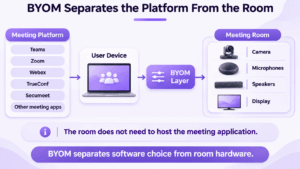
BYOM separates the meeting platform from the meeting room: the user’s device determines which conferencing application is used, while the room provides shared professional AV equipment.
Quick Answer
In a BYOM setup, the user’s laptop remains the meeting computer. The laptop joins Microsoft Teams, Zoom, Webex, Google Meet, TrueConf, Secumeet, or another supported conferencing application and connects that meeting to the room’s camera, microphone, speakers, and display.
BYOM is especially useful when employees and external guests regularly use different conferencing platforms. It gives users more application flexibility than a dedicated single-platform room while still allowing them to use professional room equipment.
BYOM can be wired or wireless, and it can work with both cloud conferencing services and private communication platforms.
What Is BYOM Technology?
Bring Your Own Meeting allows a user to bring the meeting application into a conference room through their own device.
A typical workflow is simple. The participant enters the room, connects a laptop to the BYOM system, opens the required conferencing application, and joins the meeting. The application can then use the installed room camera and audio devices instead of the laptop’s built-in webcam, microphone, and speakers.
The architecture can be summarized as:
Laptop → BYOM connection → Room camera, microphone, speakers, and display
The laptop remains responsible for the meeting application. The room provides the audiovisual environment.
This differs from a dedicated meeting-room system, where the room itself contains the computer or appliance that runs the call.
How BYOM Works
A BYOM environment normally combines three layers: the user’s device, the connection layer, and the meeting-room AV system.
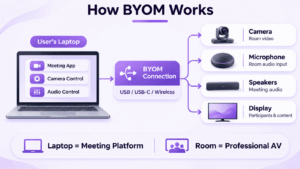
The user’s laptop runs the conferencing software. This could be Microsoft Teams, Zoom, Google Meet, Cisco Webex, TrueConf, Secumeet, or another compatible application. The room camera, microphones, and speakers then appear to the operating system as external AV devices.
The connection layer links the laptop to those room peripherals. Depending on the design, this may use USB, USB-C, HDMI plus USB, a docking system, or a wireless conferencing solution.
The room itself contains the physical AV equipment. Small rooms may use an integrated video bar, while larger spaces may have separate PTZ cameras, ceiling microphones, speakers, and multiple displays.
The defining characteristic remains the same: the room provides the hardware, but the user’s device hosts the meeting.
BYOM vs BYOD
BYOM and BYOD are related concepts, but they describe different things.
BYOD, or Bring Your Own Device, focuses on who provides or owns the device used for work. BYOM focuses on which device runs the meeting inside the room.
This means BYOM does not require employees to use personally owned laptops. A company-managed laptop can be used in a BYOM workflow just as easily.
The practical distinction is:
BYOD → bring the device into the workplace
BYOM → bring the meeting application into the room
This distinction matters when organizations define security policies. A BYOM room may support only managed corporate laptops, even though the room still follows the Bring Your Own Meeting model.
BYOM vs Dedicated Room Systems
In a dedicated room system, the room has its own conferencing computer, appliance, or endpoint. Meetings are launched directly from the room, often through a touch controller or dedicated interface.
BYOM reverses that relationship.
In BYOM, the user’s laptop hosts the meeting. In a dedicated room system, the room’s own computer or appliance hosts it.
A dedicated room is usually stronger when the organization wants a consistent experience across every meeting. BYOM is more useful when platform flexibility is the priority.
Many organizations use both approaches rather than choosing one for every room.
BYOM vs Wireless Presentation
Wireless presentation and wireless BYOM are not the same thing.
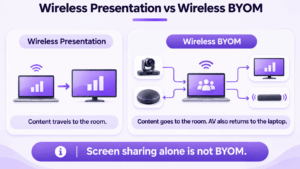
Wireless presentation sends content from the laptop to the room. Wireless BYOM also makes the room’s camera, microphone, and speakers available to the laptop.
A presentation system may support:
Laptop → Display
A wireless BYOM system needs a bidirectional connection:
Laptop → Display and speakers
Room camera and microphone → Laptop
This distinction is important because not every wireless screen-sharing product can be used for video conferencing.
Wired vs Wireless BYOM
BYOM can be implemented through wired or wireless connections.
A wired room may use USB-C as a single connection for the display and AV peripherals, or combine HDMI for video with USB for the camera and audio devices. This approach is relatively predictable and does not depend heavily on wireless network conditions.
The main drawback is physical complexity. Users may need different adapters, and shared meeting spaces can accumulate several cables.
Wireless BYOM removes much of that cable management. Compatible systems can expose the room peripherals to the user’s laptop without requiring multiple direct connections.
The trade-off is that wireless performance, compatibility, latency, security policies, and software support become more important.
For many organizations, the most practical design is not strictly wired or wireless. Wireless BYOM can be the primary workflow, while a physical connection remains available as a fallback.
What Equipment Does a BYOM Room Need?
A BYOM room typically uses the same basic AV equipment as other modern meeting spaces.
The room needs a display for remote participants and shared content, a camera appropriate for the room size, microphones capable of capturing local participants clearly, and speakers for meeting audio.
Small rooms may use an integrated video bar containing the camera, microphones, and speakers. Larger rooms may require separate cameras, ceiling or table microphones, installed speakers, and more advanced audio processing.
The additional component is the BYOM interface that connects the user’s laptop to this equipment. This may be a USB or USB-C connection, a switcher, dock, or wireless conferencing system.
The best BYOM room does not require users to understand how the AV infrastructure is built. They should only need to connect and select the correct room devices.
Why Companies Use BYOM
The main reason organizations deploy BYOM is platform flexibility.
Most companies no longer operate in a single conferencing ecosystem. Internal meetings may use one platform, while customers, suppliers, contractors, and partner organizations send invitations from others.
A dedicated single-platform room can make these external meetings difficult. BYOM reduces that dependency because the conferencing application follows the user rather than being permanently installed in the room.
This also preserves a familiar user experience. Employees already know how to mute themselves, share content, invite participants, and manage meetings in the applications they use every day. BYOM lets them keep that interface while improving the quality of the room audio and video.
Another benefit is better use of existing AV equipment. Instead of joining an external meeting through a laptop webcam in a room that already contains professional cameras and microphones, the user can connect the same meeting to the installed hardware.
Limitations and Security Considerations
BYOM flexibility introduces more variability because the user’s device becomes part of the meeting-room environment.
A dedicated room system is controlled almost entirely by IT. In a BYOM room, meeting quality can also depend on the laptop’s operating system, conferencing client, drivers, available ports, security policies, and hardware performance.
This is why poorly designed BYOM rooms can shift complexity from the room interface to the participant. Users may struggle with adapters, device selection, software installation, or wireless pairing even though the room technically supports BYOM.
A good implementation minimizes these differences through a standardized connection workflow and clear device naming.
Security should also be considered because corporate-managed devices and guest laptops do not necessarily have the same trust level. Organizations may need policies for wireless access, USB devices, guest connections, and which conferencing applications may be used.
The room should expose only the resources required for the meeting. Access to a camera or microphone should not automatically provide access to the wider corporate network.
It is also important to separate BYOM from the security model of the conferencing service itself.
BYOM controls how a user’s device connects to meeting-room equipment. The conferencing platform still determines where the meeting is processed and where communication data is stored.
BYOM with Cloud and Private Communication Platforms
BYOM is a room-access model, not a conferencing deployment model.
A BYOM meeting can use either a cloud conferencing service or a private or self-hosted communication platform.
This means an organization can separate two decisions. The first is whether users should be able to bring different meeting applications into the room. The second is whether the underlying conferencing infrastructure should be vendor-hosted or operated privately.
TrueConf
TrueConf is particularly relevant when organizations want both self-hosted communications and flexible meeting-room deployment.
TrueConf Server provides a customer-controlled conferencing and messaging environment, while TrueConf Room provides a dedicated software-based room solution for Windows and Linux. Organizations can therefore use dedicated TrueConf rooms in spaces where a standardized experience is required while also supporting BYOM-style workflows in rooms where employees need more application flexibility.
This allows different room types to use different operating models without requiring the organization to move its primary communication infrastructure to a public cloud.
Secumeet
Secumeet fits the BYOM model differently. It should not be treated as a dedicated BYOM room product; instead, its desktop client can participate in a BYOM-style workflow when the user’s operating system makes the room camera, microphone, speakers, and display available to the application.
In this scenario, the laptop hosts the Secumeet meeting while the room provides the professional AV environment. This can be useful where organizations want messaging, meetings, files, and internal collaboration to remain inside a controlled communication environment while still using laptop-based meeting rooms.
The broader architectural point is that room hardware and meeting infrastructure do not have to come from the same system.
Meetings with 1,500 users
Let your team naturally flow from a chat conversation to an immersive 4K meeting in just one click! Bring up to 1,500 participants to your call.
Team messaging
Connect with colleagues and teams before, during and after meetings in personal and group chats.
Collaboration Tools & AI
Collaborate on projects with AI: share a screen with sound, show presentations and manage remote computers.
BYOM, Dedicated Rooms, or Both?
The right model depends on how predictable the meeting workflow is.
BYOM is well suited to rooms where employees regularly join meetings from different platforms, external invitations are common, and most participants already use laptops during meetings.
Dedicated room systems are more appropriate where meetings need to start in a consistent way without relying on a participant’s device. Executive rooms, boardrooms, training spaces, and heavily managed conference rooms often benefit from this model.
Many organizations combine the two. A dedicated endpoint handles normal internal meetings, while BYOM remains available when someone needs to join an external meeting through another conferencing application.
This hybrid approach avoids forcing every meeting room into the same technical model.
How to Plan a BYOM Deployment
A successful BYOM project should begin with meeting behavior rather than hardware specifications.
First, identify which conferencing platforms employees and guests actually use. This should include customer, supplier, partner, candidate, and contractor meetings rather than only the company’s primary internal platform.
Next, audit the equipment already installed in each room. Existing displays, cameras, microphones, speakers, and room computers may already provide most of the required AV infrastructure.
The organization can then decide whether a wired, wireless, or hybrid connection model is appropriate for each room type. A small huddle room may work well with one USB-C connection, while a frequently used collaboration space may benefit from wireless conferencing with a wired fallback.
The user workflow should be standardized wherever possible. An employee entering any BYOM room should immediately understand how to connect, which room devices to select, and how to disconnect after the meeting.
Finally, test the room with real external meetings. A BYOM deployment should be validated against the different conferencing applications that employees actually encounter, not only the organization’s standard platform.
BYOM Meeting Room Checklist
FAQ
What does BYOM stand for?
BYOM stands for Bring Your Own Meeting. It is a meeting-room model in which the user’s laptop runs the conferencing application while the room provides professional camera, microphone, speaker, and display equipment.
How does BYOM work?
The user’s laptop connects to the room AV system through USB, USB-C, HDMI, wireless conferencing technology, or a combination of these methods. The laptop runs the meeting application while the room devices become available as its camera, microphone, speakers, and display.
What is the difference between BYOM and BYOD?
BYOD focuses on who provides or owns the device used for work. BYOM focuses on which device runs the meeting inside a conference room. A company-managed laptop can therefore be used in a BYOM setup.
What is the difference between BYOM and a dedicated room system?
In BYOM, the user’s laptop hosts the meeting. In a dedicated room system, the room’s own computer or appliance hosts the meeting and usually provides a more standardized experience.
Is BYOM the same as wireless presentation?
No. Wireless presentation primarily sends content from a laptop to a display. Wireless BYOM also makes the room’s camera, microphone, and speakers available to the conferencing application running on the laptop.
What equipment is needed for BYOM?
A typical BYOM room needs a display, camera, microphones, speakers, and a wired or wireless connection that allows the user’s laptop to access those room peripherals.
Can BYOM work with private communication platforms?
Yes. BYOM describes how the user’s device connects to the room rather than where the meeting service is hosted. A BYOM workflow can therefore use either public cloud conferencing or private and self-hosted communication platforms.
Is BYOM better than a dedicated meeting room system?
Not always. BYOM provides more conferencing-platform flexibility, while dedicated room systems usually provide a more consistent and centrally managed experience. Many organizations use both approaches for different room types.
Conclusion
BYOM technology addresses a simple but increasingly common meeting-room problem: employees and guests may need to join meetings from many different conferencing platforms while the room already contains much better cameras, microphones, speakers, and displays than their laptops.
BYOM separates these two layers. The user’s device determines which conferencing application is used, while the room provides the shared AV equipment.
That flexibility makes BYOM useful in mixed-platform environments, but it also means organizations need to think carefully about device compatibility, connection design, guest access, and security.
BYOM also does not require a particular conferencing deployment model. The same room-access concept can be used with mainstream cloud meeting services or with private communication environments such as TrueConf and Secumeet.
For practical deployment, the most useful test is straightforward: an authorized user should be able to enter the room, connect the meeting they already have, use the installed AV equipment, and disconnect afterward without needing help from IT.
When that workflow is consistent, BYOM achieves its main goal: making the physical meeting room less dependent on a single conferencing platform.
Author
Helga Afon is a technology writer specializing in video conferencing, collaboration software, and workplace communication. She writes articles and reviews that help readers better understand enterprise communication tools and industry trends.