
Sending a document is easy. Managing what happens after it is shared is the harder part.
A business may need to give an employee editing rights, let a client view a proposal, provide an auditor with temporary access, or keep project files available inside an internal conversation. In each case, the organization needs more than simple file delivery.
Business document sharing is the controlled exchange of work-related documents between employees, departments, customers, suppliers, contractors, and other authorized users.
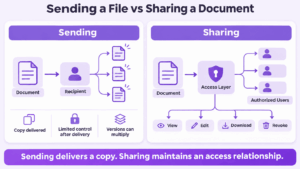
A useful distinction is:
Business document sharing is controlled access to information, not simply file delivery.
The right platform therefore depends on what happens around the document: who receives it, what they can do with it, whether access can be changed later, where the content is stored, and whether it needs to remain connected to conversations and meetings.
Best Business Document Sharing Platforms at a Glance
These platforms solve different problems. Egnyte and Box emphasize content governance, Microsoft 365 and Google Workspace combine sharing with productivity, ShareFile focuses heavily on client exchange, while Secumeet and TrueConf keep files connected to the communication workflows around them.
What Is Business Document Sharing?
Business document sharing means giving selected users access to work-related content under defined conditions.
Typical documents include:
-
contracts;
-
reports;
-
presentations;
-
spreadsheets;
-
invoices;
-
project files;
-
HR documents;
-
proposals;
-
policies;
-
technical documentation.
In simple workflows, another person may only need to open a file. More advanced workflows may need to control whether users can edit, download, comment on, forward, or continue accessing it later.
This is what separates business sharing from simply sending an attachment.
With a managed sharing platform, the organization may retain some control over the resource after the initial delivery.
The difference between sending and sharing is that sharing can preserve a control relationship after delivery.
Document Sharing vs File Transfer vs Collaboration
The terms are related, but they solve different business problems.
A transfer service may be enough for sending a large final PDF.
A shared workspace is more useful when employees need ongoing access.
Document collaboration becomes important when several people need to edit, comment on, or discuss the same content.
A full document management system is appropriate when the organization also needs formal retention, classification, records management, approval processes, or broader governance.
8 Best Business Document Sharing Platforms
1. Egnyte
Best for: secure enterprise file sharing and governance
Egnyte is designed for organizations that need centralized control over business files shared between employees and external users. Its sharing model combines managed links, permissions, external-user access, activity visibility, and broader content governance.
The platform is particularly relevant when IT needs to understand where sensitive documents are stored and who can access them instead of allowing file sharing to develop into a collection of unmanaged folders and links. Egnyte is therefore a strong fit for organizations where document sharing, security, and governance need to operate together.
2. Microsoft 365
Best for: document sharing across Microsoft-centric organizations
Microsoft 365 handles business document sharing mainly through OneDrive and SharePoint. OneDrive is suited to individual work files and selective sharing, while SharePoint provides more persistent team and organizational document spaces.
The main advantage is integration with the broader Microsoft environment. Employees can move between documents, Teams conversations, calendars, email, and other Microsoft 365 workflows while administrators manage external sharing and access policies centrally.
3. Secumeet
Best for: private document exchange inside business communication
Secumeet is not a traditional document management system. Its advantage is keeping document exchange inside the communication workflow around the file.
Employees can combine files with messaging, meetings, presentations, and screen sharing instead of moving every discussion to a separate document platform. This model is particularly relevant when organizations want internal collaboration to remain inside a controlled environment and when the document itself is only one part of a broader conversation.
4. TrueConf Server
Best for: self-hosted business document sharing in private networks
TrueConf Server combines corporate messaging, video conferencing, and file exchange inside a self-hosted communication environment. Employees can share documents through personal and group chats while keeping the surrounding discussion, meetings, and corporate communication inside the same platform.
Its main differentiator is deployment. Organizations can run TrueConf on their own infrastructure and use it inside private corporate networks. This makes it particularly relevant when files need to remain connected to internal communication while the organization retains control over infrastructure, directories, users, and enterprise communication systems.
5. Box
Best for: enterprise content management and governance
Box focuses on business content rather than simple file synchronization. Organizations can use it to store, share, review, and govern documents across teams, projects, departments, and external relationships.
It is especially useful when document sharing must sit inside a broader enterprise content strategy. Instead of treating every file as an isolated exchange, teams can organize content into managed workspaces with consistent access and governance policies.
6. ShareFile
Best for: sharing documents with clients and external partners
ShareFile is built around business workflows where documents regularly move beyond the organization. This includes sending files to clients, collecting documents, managing secure links, and supporting recurring external exchanges.
It is particularly relevant to legal, accounting, financial, consulting, and professional-services organizations where customer document exchange is part of everyday work. The platform provides a more controlled alternative to using email attachments for repeated sensitive exchanges.
7. Google Workspace
Best for: collaborative document sharing
Google Workspace is strongest when document sharing and document editing are part of the same workflow. Google Drive provides the access layer, while Docs, Sheets, and Slides allow multiple users to work with the same content without creating separate file versions.
This makes the platform suitable for distributed teams that collaborate heavily in the browser. Its main value is not simply sending files but keeping employees working on a shared version of the document while permissions determine who can view or edit it.
8. Dropbox Business
Best for: straightforward file synchronization and sharing
Dropbox Business provides a relatively simple model for synchronizing business files across devices and sharing them through folders or direct access.
Its main strength is ease of use. Teams that primarily need reliable file synchronization, shared folders, and uncomplicated external sharing may not require the broader governance or workflow capabilities of more complex enterprise content platforms.
Meetings with 1,500 users
Let your team naturally flow from a chat conversation to an immersive 4K meeting in just one click! Bring up to 1,500 participants to your call.
Team messaging
Connect with colleagues and teams before, during and after meetings in personal and group chats.
Collaboration Tools & AI
Collaborate on projects with AI: share a screen with sound, show presentations and manage remote computers.
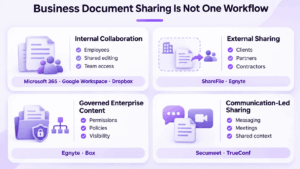
Four Types of Business Document Sharing
The best platform becomes easier to choose when the sharing model is defined first.
These models can overlap, but they represent different priorities.
Internal Collaboration
Here, the document is primarily shared between employees who already have organizational identities.
Important requirements may include:
-
team access;
-
editing;
-
shared folders;
-
synchronization;
-
co-authoring.
Microsoft 365 and Google Workspace are particularly strong in this model.
External Sharing
External sharing focuses on recipients who may not belong to the organization.
Examples include:
-
clients;
-
contractors;
-
suppliers;
-
auditors;
-
consultants.
The main questions become how recipients are identified, what permissions they receive, and how easily access can later be removed.
Governed Enterprise Content
In this model, document sharing is part of a broader content-management requirement.
Organizations may need consistent rules for:
-
permissions;
-
sensitive information;
-
external access;
-
activity tracking;
-
retention;
-
content governance.
Egnyte and Box are more naturally aligned with this type of requirement.
Communication-Led Sharing
Communication-led sharing starts from a different assumption:
the file exists because people are already working together.
A document may be shared in a chat, discussed in a meeting, presented on screen, and referenced again afterward.
This is where platforms such as Secumeet and TrueConf differ from conventional file repositories.
Most document-sharing platforms organize collaboration around the file. Communication platforms can keep the file inside the conversation where business decisions are made.
The Document Access Lifecycle
A practical way to evaluate document sharing is to follow what happens after someone decides to share a file.
The lifecycle can be represented as:
Share → Authenticate → Use → Review → Revoke
Share
Who receives access?
The file may be shared with:
-
an individual;
-
a department;
-
a project team;
-
an external customer;
-
anyone with a link.
The sharing model determines the level of control that remains afterward.
Authenticate
How does the system know who the recipient is?
Access may rely on:
-
a corporate account;
-
a guest account;
-
an invitation;
-
a password;
-
a verification mechanism;
-
a public link.
For sensitive documents, identifying the intended recipient usually provides more control than unrestricted links.
Use
What can the recipient actually do?
Possible permissions include:
-
view;
-
download;
-
edit;
-
comment;
-
upload;
-
reshare.
Access should match the business task.
A customer reviewing a proposal may need view access, while a colleague preparing it may need editing rights.
Review
Can the organization understand what remains shared?
As the number of documents and external relationships grows, businesses may need visibility into active access rather than relying on employees to remember which links they created months earlier.
Revoke
What happens when access is no longer appropriate?
A project may end, an employee may leave, or a contractor may no longer need the document.
The ability to revoke or expire access is therefore an important difference between managed sharing and permanent file delivery.
File-Centered vs Communication-Centered Sharing
Most document-sharing platforms start with the document itself.
The workflow looks roughly like:
Document → Permissions → Users → Collaboration
This works well when the document is the main object around which work is organized.
Communication platforms start from a different place:
Conversation → Document → Meeting → Decision
For example, an employee may receive a project file in a group chat, ask a question about it, move the discussion into a video meeting, present the document, and then continue the conversation afterward.
If every stage happens in a different application, the document and the reasoning around it become separated.
Communication-led sharing is therefore useful when preserving context matters as much as storing the file.
Secumeet
Secumeet fits the communication-centered model when organizations want messaging, meetings, and shared content to remain inside one controlled collaboration environment.
Its strongest use case is not formal document management but ongoing internal teamwork around documents.
TrueConf Server
TrueConf applies a similar model to self-hosted enterprise communications.
Documents can remain connected to corporate messaging and meetings while the organization also controls the underlying communication infrastructure.
This becomes particularly relevant in private networks and enterprise environments where public cloud document exchange may not fit internal requirements.
How to Choose a Business Document Sharing Platform
Rather than comparing every available feature, start with five questions.
1. Who needs access?
Determine whether documents are primarily shared with:
-
employees;
-
clients;
-
partners;
-
contractors;
-
mixed internal and external audiences.
External sharing usually requires a different access model from internal collaboration.
2. What should recipients be allowed to do?
Decide whether users need to:
-
view;
-
download;
-
edit;
-
comment;
-
upload;
-
reshare.
The platform should support permissions that reflect the actual business workflow.
3. Is the document the center of the workflow?
If teams primarily need storage, editing, and content governance, platforms such as Egnyte, Box, Microsoft 365, or Google Workspace may be the stronger fit.
If documents are mainly exchanged inside conversations and meetings, communication-led platforms such as Secumeet or TrueConf may be more appropriate.
4. Where should documents and communication data reside?
Some businesses are comfortable with public cloud platforms.
Others require:
-
private infrastructure;
-
tighter control over storage;
-
private corporate networks;
-
self-hosted communication.
Deployment requirements can therefore eliminate unsuitable platforms early.
5. What happens when access should end?
Check whether access can be:
-
reviewed;
-
changed;
-
revoked;
-
expired.
This becomes particularly important for temporary staff, clients, and external project participants.
FAQ
What is business document sharing?
Business document sharing is the controlled exchange of work-related documents between employees, departments, clients, suppliers, contractors, and other authorized users. Unlike simple file delivery, managed sharing can preserve permissions and access controls after the document is shared.
What is the best way to share business documents?
The best method depends on the workflow. Internal collaboration may require shared workspaces and co-editing, external exchange may require controlled guest access, and sensitive enterprise content may require stronger governance and administrative oversight.
What is the difference between document sharing and file sharing?
File sharing covers any digital file, including images, archives, software, and video. Document sharing focuses more specifically on business content such as contracts, reports, presentations, spreadsheets, policies, and proposals.
What is the difference between document sharing and document collaboration?
Document sharing determines who can access content. Document collaboration focuses on what people can do together after receiving access, such as editing, commenting, reviewing, presenting, or discussing the document.
Is email suitable for sharing business documents?
Email can be appropriate for simple, low-risk, final documents. For active or sensitive documents, managed sharing platforms usually provide better control over permissions, access, collaboration, and revocation.
Can business documents be shared without public cloud storage?
Yes. Self-hosted and private communication platforms can support document exchange inside organization-controlled infrastructure. This can be important for businesses that operate private networks or have stricter infrastructure requirements.
What features are important for secure business document sharing?
Important capabilities include controlled recipient access, suitable permissions, external-user management, access revocation, identity integration, activity visibility, and a deployment model appropriate to the organization’s security requirements.
Which platform is best for sharing documents with clients?
Platforms such as ShareFile and Egnyte are particularly suited to external document exchange. The best option depends on whether the organization prioritizes client workflows, enterprise content governance, temporary access, or broader collaboration.
Conclusion
Business document sharing is not simply a question of how to move a file from one device to another.
The more useful questions are:
Who should receive access?
How are they identified?
What can they do with the document?
Can that access be reviewed or revoked?
Does the file need to stay connected to the work around it?
For internal collaboration, Microsoft 365 and Google Workspace provide strong shared-document environments. Egnyte and Box are better aligned with governed enterprise content, while ShareFile focuses strongly on external client exchange.
Secumeet and TrueConf represent another model: communication-led document sharing.
Instead of making the file a separate destination, they keep documents closer to chats, meetings, and the conversations in which business decisions are made.
The best platform therefore depends not only on the document itself, but on the workflow that surrounds it.
Author
Helga Afon is a technology writer specializing in video conferencing, collaboration software, and workplace communication. She writes articles and reviews that help readers better understand enterprise communication tools and industry trends.