
Choosing the best texting app sounds simple until you ask what “texting” actually means.
For one person, it means sending SMS or RCS messages to a phone number. For another, it means using WhatsApp or Signal over the internet. Inside a company, texting may mean something different again: a managed business messenger where the organization controls employee accounts, communication history, access rights, and sometimes the infrastructure itself.
That is why there is no single best texting app for everyone.
For personal communication, the most important question is usually:
Can I reach the people I want to message?
For business communication, the question changes:
Who controls the identity, history, access, and infrastructure behind those messages?
Quick Answer: The Best Texting Apps in 2026
If you want a fast recommendation:
-
WhatsApp — best for everyday internet messaging
-
Google Messages — best for SMS and RCS on Android
-
Signal — best for private personal messaging
-
Apple Messages — best for Apple users who need iMessage, RCS, and SMS
-
Telegram — best for large groups, channels, and multi-device access
-
Messenger — best for reaching people through the Facebook ecosystem
-
Viber — best as a familiar WhatsApp-style alternative
-
TrueConf Server — best for self-hosted business messaging
-
Element — best for federated and sovereign messaging
-
Beeper — best for bringing several messaging networks into one app
The most important distinction is that these products do not all solve the same problem.
Some send messages to phone numbers.
Others send messages between accounts inside one service.
Business platforms add a third model: communication between identities managed by an organization.
Best Texting Apps at a Glance
The table also explains why a simple “best texting app” ranking can be misleading. Google Messages and TrueConf Server may both be used to exchange text messages, but they operate in completely different communication models.
1. WhatsApp — Best Texting App for Most People
For everyday personal messaging, WhatsApp remains one of the easiest recommendations because the network itself is its biggest advantage.
A messaging app is useful only if the people you want to contact already use it. That is why current comparisons such as Zapier’s 2026 guide still place WhatsApp at the top for general-purpose messaging.
WhatsApp supports the expected modern messaging features:
-
individual chats;
-
group conversations;
-
photos and videos;
-
voice messages;
-
file sharing;
-
voice and video calls;
-
desktop and web access.
For personal communication, this combination of reach and functionality is difficult to beat.
The main limitation is architectural: WhatsApp is an internet messenger, not an SMS application. Both sides generally need to use WhatsApp.
It also remains a provider-operated consumer platform. That is usually fine for personal communication, but it becomes more important when a company needs centralized employee identity, controlled offboarding, retention policies, or privately operated infrastructure.
Best for: friends, family, and general everyday messaging.
2. Google Messages — Best for SMS and RCS
Google Messages is the strongest choice when “texting” literally means sending messages to phone numbers.
It supports traditional SMS and MMS while also using RCS where available.
RCS adds features people normally associate with internet messengers, including:
-
typing indicators;
-
read receipts;
-
high-resolution photos and videos;
-
file sharing;
-
messaging over Wi-Fi or mobile data.
Google confirms that RCS is available for communication between Android devices and supported iPhones, depending on device, carrier, and region. If RCS is unavailable, Google Messages can fall back to SMS or MMS.
Eligible RCS conversations between Google Messages users can also use end-to-end encryption.
That makes Google Messages particularly useful when you do not want to ask every contact to install another app.
The trade-off is that the experience depends partly on the recipient’s device, carrier, RCS support, and messaging configuration.
Best for: people who want modern messaging without abandoning phone-number-based texting.
3. Signal — Best for Private Personal Messaging
Signal is one of the clearest choices when privacy matters more than ecosystem size.
Unlike platforms where end-to-end encryption applies only in certain modes, Signal makes E2EE the normal communication model for messages and calls. Signal states that its service cannot read users’ messages or listen to their calls.
It supports:
-
individual chats;
-
group chats;
-
voice messages;
-
photos and videos;
-
file sharing;
-
voice and video calling;
-
disappearing messages;
-
desktop use.
Its biggest practical limitation is the same one shared by most internet messengers: the person you want to contact also needs to use Signal.
That is why Signal may be technically preferable for privacy while WhatsApp remains more convenient when reach matters most.
Signal is also fundamentally a personal messaging service rather than a centrally administered enterprise messenger. A company looking for managed employee accounts, server control, corporate retention, or directory integration should evaluate a different category of product.
Best for: private personal conversations where both sides are willing to use the same app.
4. Apple Messages — Best for Apple Users
Apple Messages combines several messaging technologies inside one interface.
Depending on the recipient and network conditions, an iPhone can use:
-
iMessage;
-
RCS;
-
SMS;
-
MMS.
Apple’s current documentation confirms that RCS can be used to exchange richer messages with supported non-Apple devices, including high-resolution media, delivery information, read receipts, and typing indicators. Availability depends on carrier and region.
SMS and MMS remain useful as a fallback when richer messaging options are unavailable, but Apple notes that conventional SMS and MMS are not end-to-end encrypted.
This layered approach is convenient because the user does not need to decide which transport to use for every conversation.
For someone deeply inside the Apple ecosystem, Messages provides one of the smoothest combinations of internet messaging and phone-number-based texting.
The downside is that the experience is still strongest when communicating between Apple devices.
Best for: iPhone and Apple-device users who want one interface for multiple messaging standards.
5. Telegram — Best for Large Groups and Multi-Device Messaging
Telegram is a strong option when messaging needs to extend beyond small private conversations.
It is particularly useful for:
-
large groups;
-
channels;
-
communities;
-
multi-device access;
-
file-heavy communication.
One important security distinction is frequently misunderstood: Telegram’s standard Cloud Chats are not end-to-end encrypted in the same way as its Secret Chats.
Telegram’s own documentation explains that Cloud Chats use client-server/server-client encryption, while Secret Chats use end-to-end encryption and remain device-specific.
That architecture is part of why Telegram can make cloud conversation history easily available across devices.
So Telegram is a strong texting app when multi-device continuity, large conversations, and channels matter more than default E2EE for every message.
Best for: large groups, communities, channels, and users who frequently switch devices.
6. Messenger — Best for Reaching Facebook Contacts
Messenger’s main strength is not that it introduces a radically different messaging model.
Its advantage is reach inside Meta’s broader social ecosystem.
For users who already have a large network of Facebook contacts, Messenger can remove the friction of convincing everyone to install another dedicated messaging application.
It supports the familiar set of personal messaging tools:
-
direct messages;
-
group chats;
-
photos and media;
-
voice messages;
-
audio calls;
-
video calls.
That makes it useful when social-network identity matters more than phone-number-based texting.
For workplace communication, however, Messenger has the same structural limitation as other consumer apps: employee identity and communication governance are not primarily controlled by the employer.
Best for: contacting people already connected through Facebook.
7. Viber — Best Familiar Alternative to WhatsApp
Viber remains useful for people who want the familiar structure of a mainstream internet messenger without using WhatsApp.
Current texting-app comparisons continue to include Viber as one of the major WhatsApp alternatives.
It follows the standard consumer messaging model:
-
account-based messaging;
-
personal chats;
-
groups;
-
voice and video calls;
-
media sharing;
-
desktop support.
Whether Viber is the right option often comes down to geography and existing contact adoption.
That is an important recurring pattern across personal messaging:
A technically excellent messenger is not very useful if nobody you need to contact uses it.
Best for: users whose family, friends, or regional contacts already rely on Viber.
8. TrueConf Server — Best for Self-Hosted Business Messaging
TrueConf Server belongs to a different category from WhatsApp, Signal, or Google Messages.
It is not intended primarily for texting friends or sending carrier SMS.
Instead, it is designed for organizations that want messaging to operate as part of their own communications infrastructure.
TrueConf Server supports personal chats, group chats, channels, file exchange, and communication that continues outside video conferences. Its full server deployment can operate inside a private network without requiring an internet connection.
This changes the meaning of “best texting app.”
For a consumer, the question is:
Which app do my contacts already use?
For an organization, the question may instead be:
Who controls the accounts, data, history, and server?
TrueConf becomes relevant when a company needs:
-
self-hosted messaging;
-
private-network or LAN operation;
-
corporate user accounts;
-
centralized administration;
-
group and personal chats;
-
file exchange;
-
video meetings integrated with messaging;
-
existing SIP/H.323 communications infrastructure.
Its weakness for this broad query is obvious: it is not a replacement for SMS, WhatsApp, or Signal in everyday consumer communication.
But for internal business messaging, that is not the problem it is trying to solve.
Best for: companies that need self-hosted employee messaging integrated with video communications.
9. Element — Best for Federated and Sovereign Messaging
Element is another option that becomes more relevant when the conversation moves from personal texting toward infrastructure ownership.
It is built on the decentralized Matrix standard and supports self-hosted as well as managed deployment.
Element’s architecture is especially interesting because different organizations can maintain control over their own infrastructure while still participating in a federated communication network.
Element also positions its messaging platform around:
-
end-to-end encrypted communication;
-
self-hosting;
-
open standards;
-
interoperability;
-
sovereign deployments;
-
isolated and air-gapped environments.
This makes Element substantially different from a conventional consumer messenger.
It is a strong fit when organizations do not want communication locked inside one vendor-controlled messaging network.
Best for: organizations that prioritize federation, open standards, sovereignty, and self-hosting.
10. Beeper — Best for a Unified Messaging Inbox
The problem Beeper tries to solve is different again.
Instead of convincing all your contacts to move to one messaging network, the idea is to bring conversations from multiple services into a more unified interface.
That is attractive for users who regularly switch between different communication platforms.
The trade-off is that Beeper does not eliminate the underlying networks. The capabilities and security characteristics of a conversation still depend in part on the service being connected.
This makes Beeper less of a replacement messaging network and more of a messaging aggregation layer.
Best for: users who already communicate across several messaging services and want fewer separate inboxes.
What Does “Texting App” Actually Mean?
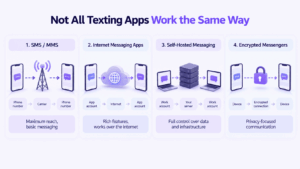
The phrase covers several technically different systems.
Understanding the distinction makes it much easier to choose the right app.
SMS and MMS
Traditional SMS and MMS are carrier-based.
You send a message to a phone number, and the mobile network handles delivery.
The advantage is reach. The recipient does not need to install the same proprietary messenger.
The downside is that traditional SMS lacks many modern messaging capabilities and is not end-to-end encrypted. Google and Apple both distinguish conventional SMS/MMS from richer RCS communication.
RCS
RCS modernizes phone-number-based messaging.
It can add:
-
high-resolution media;
-
typing indicators;
-
read receipts;
-
Wi-Fi/data messaging;
-
richer groups.
Unlike WhatsApp or Signal, RCS is a messaging standard rather than one single proprietary social network.
Its actual capabilities can still depend on app, carrier, region, and the other participant’s configuration.
Internet Messenger
Apps such as WhatsApp, Signal, Telegram, and Viber send messages through the internet.
Communication takes place inside the provider’s messaging ecosystem rather than through traditional SMS delivery.
This enables much richer features, but both sides normally need compatible accounts.
Managed Business Messenger
Enterprise messaging adds another layer.
Instead of simply connecting individual users, the organization can manage communication identities and policies.
The model becomes:
employee identity → company communication environment → employee identity
That is why TrueConf Server or Element should not be compared with Google Messages purely by counting chat features.
The architectural question is different.
Texting App vs SMS App vs Messenger
A simple way to think about the difference is:
This distinction matters because every model optimizes for a different thing.
What Makes a Good Texting App?
Instead of asking which product has the longest feature list, evaluate five things.
1. Reach
Can you actually contact the people you need?
For personal messaging, this is often the most important criterion.
A perfect app that none of your friends use is less useful than a merely good app that everyone already has.
That is why mainstream consumer comparisons emphasize network adoption so heavily. Zapier’s current guide makes essentially the same point: messaging apps are valuable because of the people you can reach through them.
2. Addressing
How do you find the person?
Some apps revolve around:
-
phone numbers;
-
usernames;
-
social accounts;
-
enterprise directory identities.
This affects how easy it is to reach new contacts and who ultimately controls the account.
3. Privacy
Ask what happens to message content.
Useful questions include:
-
Is E2EE enabled by default?
-
Does it apply to every conversation?
-
Are backups protected?
-
Who operates the service?
-
What metadata remains visible?
Signal and Telegram illustrate why simply asking “is it encrypted?” is not enough: Signal uses E2EE as its standard messaging architecture, while Telegram distinguishes between Cloud Chats and E2EE Secret Chats.
4. Continuity
Can you access the conversation on another device?
What happens when you:
-
replace your phone;
-
add a laptop;
-
lose a device;
-
restore history?
Convenience and confidentiality sometimes pull in opposite directions here.
Cloud synchronization makes history easier to recover, while stronger device-bound encryption models can make recovery more complicated.
5. Control
For personal communication, this criterion may barely matter.
For businesses, it can become the most important one.
Ask:
-
Who creates the account?
-
Who disables it?
-
Who owns the conversation history?
-
Can access be revoked?
-
Can admins manage groups?
-
Where is data stored?
-
Can the company operate the server itself?
This is where the distinction between consumer texting and corporate messaging becomes much clearer.
Personal Texting vs Business Messaging
A personal messenger assumes the user owns the relationship.
A business messenger increasingly assumes the organization owns the communication environment.
Consider a simple example.
An employee discusses a project in a personal messenger. They leave the company six months later.
The business may now need to answer:
-
Does the account still belong to the former employee?
-
Can the company revoke access?
-
Where is the history stored?
-
Can another employee recover the project context?
-
Were files stored under a personal identity?
-
Can administrators preserve or delete the conversation according to policy?
Those questions barely appear in ordinary consumer texting comparisons.
But they become central once messaging contains business decisions.
The difference between personal texting and workplace messaging becomes clearest when someone joins or leaves the organization.
Who Owns the Messaging Identity?
Identity ownership is one of the most overlooked differences between messaging models.
This changes what happens during onboarding and offboarding.
With a consumer app, the employee may bring their existing identity into the company and keep it after leaving.
With a managed business messenger, the organization can create a work identity specifically for corporate communication.
What Happens When an Employee Leaves?
This is one of the simplest tests for whether a consumer messenger is appropriate for business communication.
Suppose an employee leaves tomorrow.
Can the organization immediately:
-
disable their messaging account;
-
remove access from work devices;
-
revoke group membership;
-
preserve required communication history;
-
transfer ownership of channels or groups;
-
prevent further access to internal files;
-
retain communication according to company policy?
If the answer depends entirely on the employee’s personal phone or account, the organization does not fully control its communication environment.
This does not make consumer messengers bad products.
It means they solve a different problem.
For Personal Texting, Reach Usually Wins
The consumer messaging market has a strong network effect.
You might prefer Signal’s privacy model, Telegram’s multi-device behavior, or another application’s interface.
But if everyone you know uses WhatsApp, that often settles the question.
That leads to a useful rule:
For personal texting, choose primarily based on who you can reach.
Features matter after the network requirement is satisfied.
For Business Texting, Control Matters More
Internal communication works differently.
Employees can be required to use a company platform, so existing consumer adoption matters less.
The organization can instead optimize for:
-
identity management;
-
private infrastructure;
-
searchable history;
-
compliance;
-
employee lifecycle;
-
integrations;
-
meetings;
-
access policy.
This creates the opposite rule:
For business texting, choose based on who controls identity, history, access, and infrastructure.
That is why TrueConf Server, Element, Teams, Slack, or Mattermost can be better choices for work even though they are not the apps most people would use to text their family.
Which Texting App Should You Choose?
Choose WhatsApp if you want a general-purpose internet messenger and most of your contacts already use it.
Choose Google Messages if you want to send SMS and RCS messages directly to phone numbers.
Choose Signal if private personal messaging is the main requirement.
Choose Apple Messages if you live mostly inside the Apple ecosystem but still need SMS and RCS compatibility.
Choose Telegram if large groups, channels, and multi-device cloud history matter most.
Choose Messenger if your social network is already built around Facebook.
Choose Viber if it is widely used among your contacts or in your region.
Choose TrueConf Server if messaging is company infrastructure and you need self-hosting, centralized control, private-network operation, and integrated video communication. TrueConf documentation confirms support for personal and group chats, channels, offline network operation, and self-hosted communications.
Choose Element if federation, open standards, E2EE, and self-hosted or sovereign communication are central requirements.
Choose Beeper if the real problem is having too many separate messaging apps.
FAQ
What is the best texting app?
There is no single best texting app for everyone. WhatsApp is a strong general-purpose choice, Google Messages is better for SMS and RCS, Signal is strong for private personal messaging, and business platforms such as TrueConf Server are more appropriate when an organization needs centralized control and self-hosting.
What is the best free texting app?
Most major personal messaging apps, including WhatsApp, Signal, Telegram, Messenger, Google Messages, and Apple Messages, can be used without paying a separate per-message fee for internet-based communication. SMS charges can still depend on the mobile plan.
What is the best texting app for Android?
Google Messages is a strong default when SMS and RCS are important because it supports both traditional mobile texting and richer RCS conversations. WhatsApp, Signal, Telegram, and other internet messengers are better when both participants use the same service.
What is the best private texting app?
Signal is one of the strongest choices for personal privacy because end-to-end encryption is the normal mode for its messages and calls rather than a separate optional chat type.
Is RCS better than SMS?
RCS supports features that SMS does not normally provide, including typing indicators, read receipts, higher-quality media, and data-based messaging. Availability and encryption depend on the apps, devices, carriers, and participants involved.
Is RCS the same as WhatsApp?
No. RCS is a messaging standard associated with phone-number-based communication, while WhatsApp is a proprietary internet messaging service where participants communicate inside the WhatsApp network.
Does Telegram use end-to-end encryption?
Telegram uses end-to-end encryption in Secret Chats. Standard Cloud Chats use client-server/server-client encryption and are stored in Telegram’s cloud so they can synchronize across devices.
What is the best texting app for business?
It depends on whether the business needs ordinary team chat or control over the communication infrastructure. TrueConf Server is relevant for self-hosted messaging and private-network communication, while Element is useful for federated and sovereign messaging. Cloud-first organizations may instead prefer platforms such as Teams or Slack.
Can a company use WhatsApp or Signal for internal communication?
Technically, yes, and small teams sometimes do. However, consumer messaging apps generally provide less organizational control over employee identity, offboarding, communication history, infrastructure, and administrative policies than a dedicated corporate messenger.
What is a self-hosted texting app?
A self-hosted messenger runs its server infrastructure under the organization’s control rather than relying entirely on a public messaging provider. TrueConf Server and Element are examples of platforms that support customer-controlled deployment.
Conclusion
The phrase “best texting app” hides several different communication problems.
If you are texting friends and family, network reach usually matters most.
If you need SMS or RCS, choose a phone-number-based messaging app.
If privacy is the priority, look carefully at the actual encryption model rather than assuming every secure-sounding messenger works the same way.
And if messaging has become part of company infrastructure, stop evaluating apps only as consumer chat tools.
The decision changes from:
Who can I text?
to:
Who controls the identity, conversation history, access, and infrastructure?
That gives a simple final rule:
For personal texting, choose based on reach. For business texting, choose based on control.
Author
Helga Afon is a technology writer specializing in video conferencing, collaboration software, and workplace communication. She writes articles and reviews that help readers better understand enterprise communication tools and industry trends.