
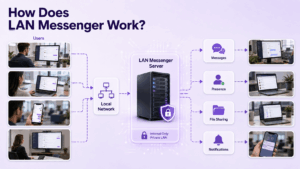
A LAN messenger is designed for one simple job: letting people communicate across the same local network without depending on a public messaging service.
In the traditional model, users install the application on their computers, the clients discover each other across the LAN, and messages travel directly between devices. A central server may not be required at all.
That makes LAN messaging useful in offices, workshops, schools, laboratories and other environments where employees need local communication even when Internet access is unavailable or unnecessary.
But not every organization needs the same architecture.
A small office may want a lightweight serverless messenger that starts working after installation.
A larger company may need centralized accounts, persistent group chats, administration, mobile access or communication across several offices.
The first question is therefore:
Do you need computers on the same LAN to communicate directly, or do you need a managed messaging platform that runs inside your private network?
LAN Messenger Software at a Glance
The first five products are closer to the traditional meaning of a LAN messenger.
The remaining platforms become more relevant when a basic peer-to-peer messenger is no longer enough.
1. Softros LAN Messenger
Best for: Offices that want a mature serverless LAN messenger with messaging, file transfer and support for more complex local networks.
Softros LAN Messenger is one of the clearest examples of a traditional LAN messaging application.
It does not require a central messaging server for basic operation, and communication can remain inside the organization’s LAN. The current product supports Windows, macOS and Android and can operate across LAN, intranet and WAN environments.
Its communication features include:
-
one-to-one messaging;
-
group conversations;
-
file transfer;
-
broadcast messages;
-
message history;
-
user groups.
Softros also provides options for connecting different subnets and supporting terminal-server environments, which makes it more suitable than many simple peer-to-peer tools for larger office networks.
Why choose it
Softros is a practical option when the requirement is specifically:
Install a messenger on office computers and let employees communicate locally without introducing a separate messaging server.
It is also one of the few traditional LAN messenger products still being actively presented and updated by its vendor in 2026.
2. LAN Messenger
Best for: Users looking for a simple free and open-source LAN chat application.
LAN Messenger is a classic open-source local network messenger.
It supports Windows, macOS and Linux and was designed to exchange messages through the local network without requiring a central server or Internet connection. It also supports file transfer and local message history.
Its main appeal is simplicity.
There is no need to deploy an application server before users can communicate.
Important limitation
The public project page exposes older builds, so organizations considering it today should check compatibility and maintenance status before deploying it across a current production environment.
That distinction matters because LAN software can continue to function for years even when active development slows down, but long-term deployment requirements are different from occasional local use.
3. Squiggle
Best for: Organizations looking for an open-source peer-to-peer LAN messenger, particularly in Windows environments.
Squiggle is another serverless LAN messaging project.
Peers discover each other using multicast and communicate directly across the local network rather than through a central server. Its feature set includes instant messaging, file transfer, voice chat, screen capture and sharing, chat history and cross-subnet bridging.
This makes Squiggle more feature-rich than a minimal text-only LAN chat tool.
Why choose it
Squiggle is useful when an organization wants:
-
peer-to-peer architecture;
-
open-source software;
-
file transfer;
-
additional collaboration features;
-
some support for communication beyond a single subnet.
Because it is an open-source project rather than a conventional commercial collaboration platform, IT teams should evaluate deployment, support and maintenance requirements themselves.
4. ChatLAN
Best for: Lightweight messaging between devices on a local network.
ChatLAN follows the traditional LAN messenger idea closely: local communication without depending on a public messaging cloud.
This category of tool is useful when the requirement is primarily to exchange messages between people already connected to the same network.
It is better suited to straightforward LAN communication than to enterprise workflows that need identity management, organization-wide administration or persistent collaboration across many locations.
Why choose it
Consider this type of messenger if your priorities are:
-
local communication;
-
low deployment complexity;
-
no dependence on a public chat service;
-
straightforward messaging between nearby users.
5. LanTalk
Best for: Windows-based offices looking for traditional local network messaging.
LanTalk belongs to the older office LAN messenger category, where the main goal is communication between users on the same corporate network rather than participation in a cloud workspace.
It can be appropriate for relatively simple Windows environments where employees mainly need direct office communication.
Before deploying it
With older LAN messaging products, check three things carefully:
-
current operating system compatibility;
-
recent maintenance status;
-
whether the software still fits your organization’s security and administration requirements.
A product can satisfy the basic LAN messaging requirement while still being a poor choice for a large modern enterprise.
Serverless vs Server-Based LAN Messaging
The term LAN messenger often gets used for two different architectures.
Understanding the difference helps avoid choosing a product that solves the wrong problem.
Serverless LAN Messenger
A traditional LAN messenger usually works like this:
device ↔ device
Clients discover each other across the network and exchange messages directly.
Advantages include:
-
little infrastructure to deploy;
-
no central messaging server;
-
local communication can work without Internet access;
-
quick setup for smaller networks.
The trade-off is that centralized management is usually limited.
As the network becomes more complex, organizations may run into problems with:
-
multiple subnets;
-
remote employees;
-
mobile users;
-
centralized identity;
-
persistent group communication;
-
access control;
-
organization-wide administration.
Server-Based Private Messenger
A managed messenger works differently:
users → organization-operated server → users
The server becomes the central point for identities, message delivery, policies and communication history.
This adds infrastructure, but it also makes features such as these easier to provide:
-
persistent personal chats;
-
group chats;
-
corporate directories;
-
centralized administration;
-
multi-office communication;
-
desktop and mobile clients;
-
voice and video meetings.
A server-based platform can still operate on a private LAN. It is simply not a traditional peer-to-peer LAN messenger.
That distinction is important.
Running a messenger inside a LAN does not automatically make it a LAN messenger in the traditional serverless sense.
When a Traditional LAN Messenger Is Not Enough
A classic LAN messenger works well when the network and communication requirements are simple.
For example:
30 office PCs → same network → text messages + files
The architecture becomes less convenient when the environment starts looking like:
headquarters + branch offices + VPN users + mobile devices + group chats + video meetings + centralized user management
At that point, a managed messaging platform may fit better.
The following products belong to that second category.
Secumeet
Best for: Organizations that need persistent messaging and real-time collaboration beyond simple peer-to-peer LAN chat.
Secumeet should not be treated as a traditional serverless LAN messenger.
Its value appears when the organization needs more than direct messaging between computers.
The platform combines:
-
personal chats;
-
group chats;
-
video meetings;
-
screen sharing;
-
presentations;
-
collaboration tools;
-
remote assistance.
That creates a different communication model.
A classic LAN messenger may look like:
discover colleague → send message → transfer file
A broader communication platform can support:
persistent chat → group discussion → video meeting → screen sharing → follow-up
Secumeet is therefore more relevant when local messaging is part of a broader business communication requirement rather than the only requirement.
TrueConf
Best for: Organizations that need internally operated messaging together with enterprise video communication.
TrueConf uses a server-based model rather than traditional peer-to-peer LAN discovery.
It combines persistent messaging with video meetings and supports integration with SIP/H.323 environments.
This makes it more appropriate when communication needs to extend across a managed corporate environment rather than only between computers on one subnet.
For organizations with existing meeting rooms, PBXs or enterprise video systems, that broader interoperability can matter more than serverless deployment.
Mattermost
Best for: Technical and operational teams that want a self-hosted team messaging platform.
Mattermost is built around server-based persistent team communication.
It is fundamentally different from a traditional LAN messenger because users communicate through a managed server rather than discovering nearby peers directly.
It becomes relevant when organizations need structured channels, centralized administration and persistent communication across a private environment.
Rocket.Chat
Best for: Organizations looking for a self-hosted collaboration and messaging environment.
Rocket.Chat also belongs to the managed server category.
It can be deployed on infrastructure controlled by an organization, allowing internal communication to remain within that deployment environment.
Compared with a simple LAN messenger, it is designed for a much broader communication model involving users, channels, administrative controls and integrations.
Element
Best for: Organizations interested in Matrix-based messaging and decentralized communication.
Element is another step away from traditional LAN chat.
Its Matrix foundation is designed around server-based messaging and federation rather than direct peer discovery on a local subnet.
It is relevant when the communication architecture needs to extend beyond a single office LAN.
For a company that only wants nearby PCs to exchange messages, it is usually much more infrastructure than necessary.
Does a LAN Messenger Work Without Internet?
Usually, yes, if the product is designed specifically for local network communication.
A classic serverless LAN messenger can often:
-
discover users;
-
exchange text messages;
-
transfer files;
-
maintain local presence
without reaching the public Internet.
Softros explicitly states that its local communication does not require an Internet connection, while the open-source LAN Messenger similarly describes operation without a server or Internet connection.
But this should not be generalized to every messenger that can be installed on-premises.
A server-based platform may still depend on external services for specific functions such as:
-
licensing;
-
updates;
-
push notifications;
-
external authentication;
-
integrations;
-
some calling scenarios.
That leads to an important distinction:
On-premises does not automatically mean fully independent of the Internet.
If offline operation is a requirement, test the complete deployed system rather than relying only on the terms self-hosted or on-premises.
Does LAN Messenger Mean Air-Gapped?
No.
A local network can still:
-
have Internet access;
-
connect to other networks;
-
use a VPN;
-
contain gateways;
-
communicate with remote services.
An air-gapped environment is a stricter network architecture.
If the requirement is operation inside an isolated network, verify whether every necessary function continues to work after all external connectivity is removed.
This should include more than text messages.
Check:
-
user authentication;
-
client startup;
-
licensing;
-
file transfer;
-
notifications;
-
voice/video functions;
-
administrative tools.
A product that works on a LAN is not automatically suitable for a fully isolated network.
Same Subnet or Multiple Subnets?
This is one of the most important technical questions for traditional LAN messengers.
Peer discovery often relies on broadcast or multicast traffic.
That works naturally inside a local broadcast domain, but routers do not necessarily forward the same discovery traffic between subnets.
As a result, a messenger that works immediately between computers on one office network may require additional configuration when users are separated by:
-
VLANs;
-
routed subnets;
-
branch networks;
-
VPN connections.
Softros, for example, documents support for connecting different subnets through its network configuration.
Before deploying any serverless messenger at scale, test user discovery across the actual network topology rather than only between two computers connected to the same switch.
What to Check Before Installing a LAN Messenger
You do not need a 40-point enterprise procurement checklist.
For most LAN messenger deployments, five questions eliminate unsuitable products quickly.
1. Does it need a server?
If the goal is simple local communication, a serverless messenger may be easier.
If the organization needs centralized management, a server is often an advantage rather than a disadvantage.
2. Does local messaging work without Internet access?
Do not assume.
Disconnect the test network from external connectivity and verify the functions you actually need.
3. Does it work across your network topology?
Test:
-
same subnet;
-
different VLANs;
-
branch offices;
-
VPN users
where relevant.
Automatic peer discovery that works on a small test LAN may not work across the complete production network.
4. Which operating systems are supported?
Check current support for the devices employees actually use.
This can be especially important with older LAN messenger applications that were originally created for earlier Windows versions.
5. What happens when the organization grows?
Ask whether you are likely to need:
-
mobile access;
-
centralized accounts;
-
persistent group chats;
-
remote offices;
-
directory integration;
-
video meetings;
-
administrative policies.
If most of those requirements already exist, starting with a basic peer-to-peer LAN messenger may create an unnecessary migration later.
LAN Messenger vs Team Messenger
These terms overlap, but they are not the same thing.
A LAN messenger is often the better tool when the requirement is narrow.
A team messenger becomes more useful when communication is persistent, structured and organization-wide.
Which Type Should You Choose?
Choose a traditional LAN messenger if:
-
most users are on the same local network;
-
Internet-independent text communication is the priority;
-
you want minimal infrastructure;
-
centralized administration is not critical;
-
desktop messaging and file transfer are sufficient.
Choose a managed private messaging platform if:
-
users are spread across several networks or locations;
-
persistent accounts and group chats are required;
-
IT needs centralized administration;
-
mobile access matters;
-
messaging needs to integrate with video or other collaboration workflows.
The important point is not that one architecture is more advanced.
It is that they solve different problems.
For a 20-person office on one LAN, a simple peer-to-peer messenger may be the cleaner solution.
For a company connecting multiple offices and communication workflows, the lack of a central server can become a limitation rather than a benefit.
Frequently Asked Questions
What is a LAN messenger?
A LAN messenger is an instant messaging application designed for communication between computers connected to a local area network.
Traditional LAN messengers often discover nearby users automatically and exchange messages without relying on a public Internet service.
Can LAN messenger work without Internet?
Yes. Many traditional LAN messenger applications are designed to exchange messages entirely through the local network.
However, individual features and products may have external dependencies, so offline operation should be tested before deployment.
Does a LAN messenger need a server?
Not necessarily.
Softros LAN Messenger, LAN Messenger and other peer-to-peer tools can operate without a central messaging server.
Managed enterprise messengers usually use a server to provide centralized accounts, history, policies and broader communication capabilities.
What is the best LAN messenger for an office?
Softros LAN Messenger is one of the most direct options for a traditional office LAN because it is designed for serverless local communication and supports messaging, file transfer, groups and more complex network configurations.
Open-source alternatives such as LAN Messenger and Squiggle may fit organizations that prefer free peer-to-peer software.
Can LAN messengers communicate across different subnets?
Some can, but peer discovery across routed networks often requires additional configuration.
Do not assume that a messenger tested successfully on one subnet will automatically discover users across VLANs or remote networks.
Is a LAN messenger secure?
Keeping messages inside a local network removes dependence on a public messaging service, but it does not automatically make communication secure.
The actual security model depends on factors such as message encryption, endpoint security, network access and how message history is stored.
Is a self-hosted messenger the same as a LAN messenger?
No.
A self-hosted messenger normally uses an organization-operated server.
A traditional LAN messenger may communicate directly between clients without any central messaging server.
Both can operate inside a private network, but their architectures and management models are different.
When should a business replace a traditional LAN messenger?
A managed platform becomes more appropriate when the organization needs centralized identities, multiple offices, mobile clients, persistent team spaces, video meetings or organization-wide administration.
At that point, products such as Secumeet, TrueConf, Mattermost or Rocket.Chat address a broader requirement than simple peer-to-peer LAN chat.
Conclusion
A LAN messenger is primarily a tool for local network communication.
For a small office, the simplest solution may be a serverless application such as Softros LAN Messenger, LAN Messenger or Squiggle. These tools keep the architecture straightforward: users connect to the same network and communicate directly without introducing a central messaging platform.
The decision changes as communication requirements grow.
Multiple offices, persistent group chats, mobile users, centralized administration and video meetings can make a server-based platform more appropriate.
That creates a useful boundary:
Use a traditional LAN messenger when the LAN itself is the communication environment. Use a managed messaging platform when the LAN is only one part of a larger communication environment.
For Secumeet, the relevant use case begins on the second side of that boundary. It is not a replacement for every simple peer-to-peer LAN utility. It becomes more relevant when an organization needs messaging to continue into group communication, video meetings, presentations, screen sharing and broader collaboration.
Author
Helga Afon is a technology writer specializing in video conferencing, collaboration software, and workplace communication. She writes articles and reviews that help readers better understand enterprise communication tools and industry trends.