

Hybrid meetings sit at the intersection of two forces that pulled in opposite directions for years: the undeniable energy of a room full of people and the accessibility of joining from anywhere. Today, most organizations don’t have the luxury of choosing one over the other — they need both working together reliably.
This guide covers what hybrid meeting solutions actually consist of, how to compare vendors, and what to prioritize when setting up your environment. The most critical information is front-loaded intentionally.
The Short Version: What You Need to Know First
Before exploring specific tools, here are the conclusions that matter most:
-
Hybrid meeting failure is almost always an audio problem, not a video problem. When remote participants drop out of conversations, it is rarely because the camera is bad. It is because conference room microphones pick up every ambient noise in a 30-foot radius while struggling to capture the person speaking two seats from the wall. Audio investment delivers a larger return than nearly any other hardware upgrade.
-
“Meeting equity” is the real benchmark. A hybrid meeting is only working well when remote participants can interrupt, read the room, and contribute spontaneously — not just present on a slides-sharing screen while the in-room group has a side conversation. Every tool decision should be evaluated against that standard.
-
On-premises vs. cloud is a data residency decision, not just a cost decision. Organizations in regulated industries — government, defense, healthcare, financial services — often need full control over where meeting data lives. This consideration narrows the vendor list significantly from the start.
Key Stats Worth Knowing
|
Metric |
Figure |
Source context |
|---|---|---|
|
Share of U.S. remote-capable employees in hybrid arrangements |
53%+ |
Bureau of Labor Statistics / industry surveys, 2024–2026 |
|
Organizations with no formal hybrid work plan |
~68% |
Business leadership surveys, 2024 |
|
Annual productivity loss from poor internal communication |
~$37 billion |
Industry estimates |
|
Typical participant capacity, enterprise on-premises servers |
1,500–2,000 |
TrueConf Server specs |
|
Typical minimum hardware budget for a functional small-room setup |
$300–$1,500 |
Market averages |
What “Hybrid Meeting” Actually Means
A hybrid meeting combines in-person and remote participants simultaneously in real time. Everyone — regardless of location — should be able to contribute, see shared content, and hear each other clearly.
There are two architectural models:
-
Symmetric hybrid: Every participant, in-room or remote, has roughly equal visibility and voice. Cameras track speakers. Remote faces appear on room screens. This is the gold standard and the hardest to execute.
-
Asymmetric hybrid: The in-room group is treated as the primary audience. Remote participants observe but have limited ability to interrupt. This model is common, but it creates a two-tier dynamic that erodes remote engagement over time.
Most organizations default to asymmetric hybrid without realizing it. The difference between the two is usually a combination of room camera placement, microphone coverage, and whether a dedicated screen shows remote participants to the in-room group.
Four Pillars of Any Hybrid Meeting Setup
1. Video
A laptop webcam works for one-on-ones. It does not work for a conference room with six people. For group environments, you need a camera that:
-
Covers the full room without distortion
-
Auto-tracks active speakers or has a wide enough angle that tracking is unnecessary
-
Produces 1080p minimum; 4K for larger rooms where individual faces need to be identifiable
PTZ (pan-tilt-zoom) cameras like Logitech Rally, Poly Studio, or OBSBOT systems handle medium and large rooms. All-in-one video bars combine camera and speaker/mic in a single device and are well-suited for huddle rooms and small meeting spaces.
2. Audio
The single biggest investment priority. Key considerations:
-
Ceiling or tabletop microphone arrays cover rooms better than a single speakerphone
-
Echo cancellation prevents the feedback loop that makes calls unusable
-
Noise suppression (hardware or software-based) filters HVAC, keyboard clicks, and hallway noise
-
Speaker placement matters — remote voices need to fill the room, not come from a laptop speaker on a table
Brands with proven track records: Shure, Bose, Jabra, Sennheiser, Poly.
3. Software Platform
The conferencing platform determines scheduling, recording, participant management, and collaboration features. See the vendor comparison below.
4. Network Infrastructure
Hybrid meetings demand consistent upload bandwidth — not just download. A room with six people streaming video simultaneously can consume 15–30 Mbps upload. Key recommendations:
-
Use a wired LAN connection for conference room equipment whenever possible
-
Segment meeting room traffic on a dedicated VLAN to prevent bandwidth competition
-
Test latency, not just speed — anything over 150ms round-trip degrades real-time interaction noticeably
Hybrid Meeting Software: Vendor Comparison
The table below covers the most widely deployed platforms along with notable enterprise-focused options.
|
Vendor |
Deployment |
Max Participants |
Key Differentiators |
Best For |
|---|---|---|---|---|
|
Microsoft Teams |
Cloud / Hybrid |
1,000 interactive |
Deep Microsoft 365 integration, Teams Rooms for hardware |
Organizations already in the Microsoft ecosystem |
|
Zoom |
Cloud |
1,000 (paid plans) |
Breakout rooms, polls, broad hardware compatibility, Zoom Rooms |
General business, education, events |
|
Google Meet |
Cloud |
1,000 |
Google Workspace integration, AI captions, simple setup |
Google Workspace users |
|
Cisco Webex |
Cloud / On-premises |
1,000 |
Strong security certifications, Webex Devices ecosystem, AI assistant |
Enterprise, regulated industries |
|
TrueConf Server |
On-premises / Private cloud / Hybrid |
1,500–3,000 |
Full LAN/VPN operation without internet, SIP/H.323 interoperability, 4K UHD, Active Directory integration |
Government, defense, financial services, high-security enterprise |
|
Secumeet Server |
On-premises |
1,500 |
SIP/H.323 native support, privacy-first architecture, flexible device compatibility |
Organizations needing private deployment with minimal third-party dependency |
|
Tixeo |
On-premises / Private cloud |
Varies |
CSPN-certified, ANSSI-qualified (French government security certification) |
European regulated sectors, government |
|
Jitsi (open source) |
Self-hosted |
~250 (standard), more with Jitsi Videobridge |
Open source, no licensing cost, full control |
Technical teams, privacy-focused SMBs |
|
Cisco Telepresence / Poly |
On-premises / Managed |
Varies |
Hardware-centric, boardroom quality |
Large conference rooms, boardrooms |
Secumeet: What It Is and When to Use It
Secumeet is a certified distribution of professional video conferencing infrastructure operated by Secure Meetings. The platform is built around self-hosted deployment, meaning all data — video streams, chat, recordings — stays within the organization’s own network perimeter.
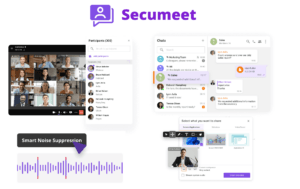
What it offers:
-
Up to 1,500 participants in a single conference
-
Native SIP/H.323 protocol support for interoperability with existing room systems and telephony infrastructure
-
AI-enhanced capabilities including noise suppression, background replacement, real-time transcription conversion, and meeting summaries
-
Screen sharing up to 4K, collaborative content presentation, remote desktop access
-
Multi-device access: desktop (Windows, macOS, Linux), mobile (iOS, Android), browser-based joining, and TV/room system clients
Best use case
Secumeet is positioned for organizations that need a self-hosted video conferencing system without building the underlying infrastructure from scratch. It suits mid-sized teams, remote consultation use cases, and organizations that want the operational simplicity of a managed distribution while retaining full data sovereignty.
Meetings with 1,500 users
Let your team naturally flow from a chat conversation to an immersive 4K meeting in just one click! Bring up to 1,500 participants to your call.
Team messaging
Connect with colleagues and teams before, during and after meetings in personal and group chats.
Collaboration Tools & AI
Collaborate on projects with AI: share a screen with sound, show presentations and manage remote computers.
TrueConf: Enterprise-Grade On-Premises Conferencing
TrueConf is one of the more fully documented enterprise on-premises video conferencing platforms, recognized in IDC MarketScape and Gartner Magic Quadrant for Meeting Solutions in multiple consecutive years.

Deployment model: TrueConf Server runs within a corporate LAN or VPN and does not require an internet connection to function — an important distinction for air-gapped environments, classified networks, or secure facilities.
Specifications:
-
Up to 2,000 participants per conference; up to 49 simultaneous on-screen video feeds
-
4K Ultra HD video quality
-
Active Directory / LDAP integration for centralized user management
-
SIP/H.323 gateway for interoperability with legacy room systems
-
On-premises AI: meeting summaries, noise suppression, face tracking, virtual backgrounds
-
RESTful API and SDK for integration with existing enterprise applications
-
Free tier available for up to 1,000 users (with limited features)
Use case profile: TrueConf is used by over 5,000 organizations globally, with strong adoption in banking, government, and defense. Organizations with strict data residency requirements — particularly those operating under national security frameworks or regulated financial environments — represent its primary user base.
Honest limitation: Organizations that prefer subscription-based cloud pricing or need out-of-the-box integration with Microsoft 365 or Google Workspace workflows may find TrueConf’s on-premises model adds IT overhead. Approximately 30% of organizations that evaluate TrueConf ultimately choose a cloud-first alternative based on these factors.
How to Choose: A Practical Decision Framework
Rather than evaluating every feature of every platform, work through these questions in order:
Step 1: Where must the data live?
If the answer is “on our own servers, in a specific country, or in an air-gapped network,” your shortlist is immediately: TrueConf Server, Secumeet Server, Tixeo, Jitsi (self-hosted), or Cisco on-premises deployments. If data residency is flexible, cloud platforms become viable.
Step 2: What ecosystem are you already in?
Microsoft 365 users get the most out of Teams. Google Workspace users get the most out of Meet. Forcing a parallel ecosystem adds friction and rarely adds value.
Step 3: What is the primary meeting format?
-
Small team standups (under 10 people): almost anything works
-
Mid-size company all-hands (50–300): Zoom, Teams, Google Meet, TrueConf Online
-
Large events or conferences (300–2,000+): Webex, TrueConf Server, Zoom Webinar, dedicated event platforms
-
Highly secure or classified: TrueConf Server, Secumeet, Tixeo
Step 4: What hardware are you replacing or adding?
SIP/H.323 rooms already exist at many enterprises. Platforms with native SIP/H.323 gateways (TrueConf, Secumeet, Cisco) can leverage this existing investment. Cloud-only platforms often require hardware replacement or third-party interoperability gateways.
Step 5: Who manages it?
Cloud platforms shift IT burden to the vendor. On-premises platforms require internal administration. Honest assessment of IT capacity is important here — an under-resourced IT team with an on-premises system is worse than a well-managed cloud deployment.
Room-by-Room Equipment Guide
Huddle rooms (2–4 people)
-
All-in-one video bar (camera + mic + speaker combined): Logitech Rally Bar Mini, Neat Bar, Poly Studio X30
-
Software: any platform with a room account
-
Network: wired preferred
Standard conference rooms (5–12 people)
-
Dedicated PTZ or wide-angle camera: Logitech Rally, Poly Studio X50, OBSBOT Tail Air
-
Ceiling or tabletop microphone array: Shure MXA310, Jabra PanaCast 50
-
Display: 65″+ screen, or dual screens (one for content, one for remote participants)
-
Room controller: dedicated touch panel for room management
Large boardrooms or training rooms (12–30+ people)
-
Multiple cameras or a high-end PTZ with auto-tracking
-
Distributed ceiling microphone system
-
Projection or large-format LED display
-
Codec/room system: Cisco Room Kit Pro, Poly G10-T, or software-based room PC
Three Best Practices That Actually Change Outcomes
-
Give remote participants a dedicated screen in the room. Displaying remote faces on a large screen — life-size or close to it — changes how in-room participants interact with them. When remote colleagues are represented by a thumbnail in the corner of a laptop, the in-room group stops unconsciously including them. This is less about technology and more about meeting culture, but the screen makes the culture possible.
-
Assign a remote-side facilitator for any meeting over 8 participants. One person in the room monitors the remote participant view, chat, and hand-raises. This role prevents the most common hybrid failure mode: the in-room group having a fast-paced conversation that remote participants cannot physically interrupt due to audio latency or the social awkwardness of speaking into a room they cannot fully see.
-
Test before every important meeting, not just initial setup. Most hybrid meeting failures are discovered three minutes after the meeting starts. A five-minute tech check 15 minutes before the meeting prevents the first seven minutes of “can everyone hear me?” that erodes credibility and wastes time.
Unique Insights
The “remote participant tax” is real and measurable
Research on hybrid work consistently shows that remote participants in asymmetric hybrid meetings receive less speaking time, are less likely to have their ideas attributed to them in meeting notes, and are more likely to disengage after the 30-minute mark. This is not a technology problem — it is a meeting design problem that technology can worsen or improve. Organizations that redesign their meeting formats before upgrading hardware see larger engagement improvements than those that buy new cameras and change nothing else.
On-premises video conferencing is growing in specific sectors
In government, defense, financial services, and healthcare, stricter data sovereignty legislation and growing skepticism about third-party cloud data access have driven renewed interest in self-hosted platforms. TrueConf, Secumeet, and Tixeo have all reported growth in these segments during 2024–2026. For organizations in regulated environments, the cloud-first assumption deserves scrutiny.
AI meeting features depend heavily on audio quality
AI transcription, auto-summaries, and action item detection perform significantly better when the audio input is clean. A $2,000 microphone upgrade delivers more value from your existing AI features than purchasing a premium AI add-on subscription for a room with a $50 USB speakerphone. The dependency chain runs: audio quality → transcription accuracy → AI summary quality.
FAQ: Everything You Need to Know
What is the difference between a hybrid meeting and a virtual meeting?
What is the minimum budget for a functional hybrid meeting room?
Which hybrid meeting platform works without an internet connection?
How many participants can TrueConf Server handle?
Is Secumeet suitable for enterprise compliance requirements like HIPAA or GDPR?
What hardware do I need for a hybrid meeting room?
How do I keep remote participants engaged in hybrid meetings?
What is the best platform for a highly secure government or defense hybrid meeting?
Can I use existing SIP or H.323 conference room equipment with modern platforms?
How is AI changing hybrid meeting software in 2026?
Author
Olga Afonina is a technology writer specializing in video conferencing, collaboration software, and workplace communication. She writes articles and reviews that help readers better understand enterprise communication tools and industry trends.