
Bottom line up front: Microsoft Teams wins for organizations already invested in Microsoft 365, offering seamless document collaboration and unified admin controls at a lower entry price. Webex leads in telephony reliability, hardware integration, and meeting quality for voice-first environments. For privacy-focused or self-hosted needs, Secumeet and TrueConf provide compelling alternatives with on-premises deployment options.
Quick verdict table
|
Criteria |
Microsoft Teams |
Cisco Webex |
Secumeet |
TrueConf |
|---|---|---|---|---|
|
Best for |
Microsoft 365 ecosystems, document collaboration |
Voice reliability, Cisco hardware estates |
Self-hosted privacy, GDPR compliance |
On-premises deployment, closed networks |
|
Starting price (per user/month) |
$4 (Essentials) |
$14 (Meet) |
Free tier + custom enterprise |
Quote-based on-premises |
|
Max meeting participants |
300 (Standard), 1,000 (Premium) |
1,000 (Enterprise) |
1,500 (self-hosted server) |
1,000 (Enterprise add-on) |
|
Native calling to PSTN |
Requires Teams Phone add-on |
Included in Suite/Enterprise |
Via SIP gateway integration |
Via SIP/H.323 interoperability |
|
AI features |
Copilot (separate $10 license) |
AI Assistant included in paid tiers |
Basic transcription (self-hosted) |
AI noise suppression (server-side) |
|
Data residency control |
Microsoft cloud regions |
Cisco cloud or hybrid |
Full on-premises or private cloud |
Full on-premises or private cloud |
Best use case
When to choose Microsoft Teams: Your organization uses Outlook, SharePoint, or Azure AD. You prioritize document co-editing and task management within meetings. You need flexible hardware options for conference rooms.
Best use case
When to choose Cisco Webex: Calling quality and uptime are non-negotiable. You operate Cisco room systems, desk phones, or contact centers. You need FedRAMP authorization or strict data sovereignty controls.
Best use case
When to consider Secumeet or TrueConf: Your security policy requires on-premises deployment. You operate in regulated sectors with data residency mandates. You need to avoid third-party cloud processing for sensitive communications.
Core Architecture and Integration Model
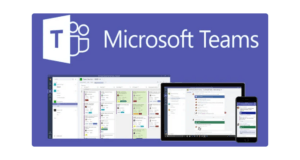
Microsoft Teams functions as a collaboration hub within the Microsoft 365 suite. The product shares authentication, compliance policies, and data storage with Outlook, SharePoint, and OneDrive. This integration reduces administrative overhead for IT teams managing Microsoft environments. Users access chat, meetings, and files through a single interface without switching authentication contexts.
Cisco Webex operates as a standalone unified communications platform. The brand emphasizes telephony heritage and hardware interoperability. Webex connects natively with Cisco room kits, desk devices, and contact center infrastructure. This architecture benefits organizations with existing Cisco investments or voice-first workflows.
Secumeet positions itself as a privacy-focused video conferencing category. The platform offers both cloud and self-hosted deployment models. Its function centers on end-to-end encryption and data minimization. Organizations with strict GDPR or data sovereignty requirements select this vendor for its transparent data handling.
TrueConf delivers an on-premises video conferencing server for enterprise networks. The product supports UltraHD 4K video and H.323/SIP interoperability. Its mechanism allows operation within closed corporate networks without internet dependency. This function appeals to government agencies and critical infrastructure operators.
Pricing Structure and Total Cost of Ownership
Microsoft Teams pricing starts at $4 per user per month for the Essentials plan. This tier includes chat, 60-minute meetings, and 100 participants. The Business Standard plan at $12.50 adds webinar hosting and meeting recording. Teams Phone calling requires an additional $8–12 per user per month. Copilot AI features need a separate $10 license. Organizations already on Microsoft 365 E3 or E5 incur minimal incremental cost for Teams adoption.
Cisco Webex offers a free Basic plan with 40-minute meetings and 100 participants. The Meet plan at $12 per user per month extends meeting duration and adds calling features. The Webex Suite at $22.50 includes unlimited domestic calling and advanced AI tools. Enterprise pricing is custom and covers FedRAMP compliance and 1,000-participant meetings. The AI Assistant is included across all paid tiers, reducing add-on complexity.
Secumeet operates on a freemium model with no time limits on free meetings. Enterprise pricing is quote-based and scales with self-hosted server capacity. The vendor emphasizes cost predictability by avoiding per-minute charges or feature gating. This pricing mechanism benefits organizations with variable meeting volumes.
TrueConf pricing is project-based and depends on server deployment scale. The vendor offers perpetual licenses for on-premises installations. This model eliminates recurring subscription costs for long-term deployments. Organizations with stable user counts and capital expenditure budgets find this structure advantageous.
Feature Comparison: Meetings, Calling, Collaboration
Video meetings
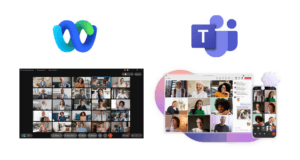
Webex maintains an edge in audio quality and noise cancellation, particularly in low-bandwidth conditions. Teams offers Together Mode and Speaker Coach for engagement enhancement. Both platforms support recording, transcription, and virtual backgrounds. Webex includes persistent whiteboards that survive meeting sessions. Teams integrates whiteboards with SharePoint for document continuity.
Voice calling
Webex Calling provides native PSTN connectivity in over 180 countries. Survivable Remote Site Telephony ensures call continuity during internet outages. Teams Phone requires Operator Connect or Direct Routing configuration for PSTN access. Webex includes a native contact center solution. Teams relies on certified partners like Genesys or Five9 for contact center functionality.
Team collaboration
Teams excels in real-time document co-editing through embedded Office apps. Chat threads link directly to files in OneDrive or SharePoint. Webex Spaces organize conversations around projects with integrated agendas and notes. Teams offers more granular permission controls for external guest access. Webex simplifies cross-organization collaboration with fewer configuration steps.
Administration and analytics
Webex consolidates user management, device configuration, and policy settings in the Control Hub. Teams distributes administration across multiple Microsoft 365 portals. Both platforms provide usage reports and quality metrics. Teams enables custom analytics exports to Power BI. Webex offers out-of-the-box sentiment analysis and AI-driven insights.
Security, Compliance, and Data Control
Microsoft Teams leverages the Microsoft 365 Compliance Center for eDiscovery, legal hold, and data loss prevention. The platform supports information barriers and retention policies aligned with financial and healthcare regulations. Data residency options cover multiple geographic regions.
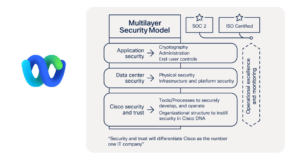
Cisco Webex provides FedRAMP High authorization and end-to-end encryption for government deployments. The vendor supports on-premises media processing for data sovereignty requirements. Compliance features integrate with Cisco Cloudlock for threat detection.
Secumeet implements zero-knowledge architecture where encryption keys remain with the customer. The platform avoids metadata collection and minimizes data retention. This mechanism supports GDPR Article 25 compliance by design.

TrueConf enables full network isolation for air-gapped environments. The product supports FIPS 140-2 validated cryptography modules. This function meets stringent requirements for defense and critical infrastructure sectors.

Hardware Ecosystem and Room Systems
Cisco manufactures first-party room systems, desk phones, and meeting boards that run natively on Webex. These devices offer tight integration with platform features like proximity pairing and one-touch join. Cisco hardware also supports Teams and Zoom through firmware updates, providing deployment flexibility.
Microsoft Teams Rooms works with certified hardware from Logitech, Poly, Yealink, and Crestron. This multi-vendor approach gives IT teams more price and feature options. Teams Rooms devices support intelligent camera framing and voice pickup optimization.
Secumeet and TrueConf focus on software compatibility with existing endpoints. Both platforms support standard SIP/H.323 devices and web browsers. This function reduces hardware refresh costs for organizations with legacy infrastructure.
Decision Framework: Match Your Requirements
Choose Microsoft Teams if:
• Your workforce already uses Outlook, SharePoint, or Azure AD
• Document collaboration and task management are primary meeting use cases
• You prefer flexible hardware sourcing for conference rooms
• Your IT team is experienced with Microsoft administration tools
Choose Cisco Webex if:
• Voice calling quality and uptime are critical business requirements
• You operate Cisco room systems, desk phones, or contact centers
• You need FedRAMP authorization or government-grade compliance
• Your meetings frequently include external participants with minimal setup friction
Choose Secumeet if:
• Your security policy requires end-to-end encryption with customer-held keys
• You need GDPR-compliant data processing with minimal metadata collection
• You prefer predictable pricing without per-feature add-ons
• Your organization values transparent data handling practices
Choose TrueConf if:
• Your network must operate without internet connectivity
• You require perpetual licensing for capital expenditure budgeting
• You need UltraHD 4K video with H.323/SIP interoperability
• Your compliance framework mandates on-premises media processing
FAQ
Which platform is cheaper for a 50-user team?
Can I use both Teams and Webex in the same organization?
Do Secumeet and TrueConf support mobile devices?
How does AI feature availability differ?
What about meeting recording storage?
Is there a free tier for enterprise evaluation?
Author
Olga Afonina is a technology writer specializing in video conferencing, collaboration software, and workplace communication. She writes articles and reviews that help readers better understand enterprise communication tools and industry trends.