
If you see “message encrypted”, it means the message content is protected with encryption so that it cannot simply be read by someone who does not have the required cryptographic access.
But there is an important distinction:
“Encrypted” does not automatically mean “end-to-end encrypted.”
A message can be encrypted while traveling between your device and a server, encrypted while stored, or protected with end-to-end encryption so that intermediary systems are not normally able to read the content.
The word encrypted tells you that protection exists.
The more important question is:
Where does the encryption boundary begin and end?
That boundary determines who can still read the message.
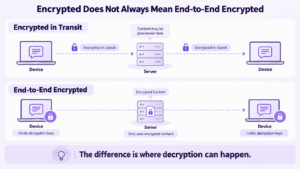
Encrypted Does Not Always Mean End-to-End Encrypted
People often use the words encrypted and end-to-end encrypted as if they mean the same thing.
They do not.
A message may be protected in several different ways.
The key difference is not whether encryption exists.
It is where decryption happens.
With transport encryption, the service may terminate the encrypted connection and process the readable message.
With end-to-end encryption, the service carrying the message should not normally possess the keys required to turn the content back into readable text.
Why Does My Chat Say “Encrypted”?
An encryption notice usually appears because the messaging application wants to tell you something about the security state of the conversation.
The exact meaning depends on the app, but common reasons include:
-
the conversation uses encrypted transport;
-
the chat uses end-to-end encryption;
-
a secure conversation has just been created;
-
a new device has been added;
-
encryption keys or security codes have changed;
-
the application has changed the security mode of the chat.
For example, an app may show a notice such as:
Messages are encrypted
or:
Messages are end-to-end encrypted
Those two statements are not necessarily equivalent.
The exact wording matters.
A useful rule is:
Do not interpret the word “encrypted” without checking what type of encryption the application means.
Can Anyone Read an Encrypted Message?
The intended participant must be able to read the message after decryption.
Whether anyone else can read it depends on the security model.
This is why encryption is better understood as a boundary of access rather than a promise that nobody can ever see the information.
Does Encrypted Mean Blocked?
No.
Encryption and blocking solve different problems.
Encryption determines how message data is protected.
Blocking determines whether one account is allowed to communicate with another.
An encryption notice does not mean that:
-
you have been blocked;
-
the message was rejected;
-
the recipient deleted the conversation;
-
the recipient cannot see your messages.
It usually describes the security properties of the communication channel.
Does Encrypted Mean Private?
Not automatically.
Encryption improves privacy, but it does not remove every possible way information can be exposed.
A message may be encrypted during transmission while:
-
the provider can still process it on the server;
-
the recipient can copy or forward it;
-
an unlocked device exposes readable content;
-
an account is compromised;
-
communication metadata remains available.
So:
Encrypted content is not the same thing as invisible communication.
Where Is a Message Actually Encrypted?
The word encrypted becomes easier to understand if you follow the message through its lifecycle.
A simplified path looks like this:
Sender → Network → Communication Server → Storage → Recipient
Each stage creates a different security question.
Sender Device
Before sending, the message exists as readable content inside the application.
For example:
Meeting moved to 3 PM.
The application can display those words because the device has access to the plaintext.
Depending on the security model, encryption may happen on the device before the message leaves.
Network
The message then travels across one or more networks.
Encryption in transit can protect the communication from someone who is monitoring that connection.
But that alone does not tell you what happens when the message reaches the server.
Communication Server
This is one of the most important boundaries.
One model may look like:
Device → Encrypted connection → Server → Encrypted connection → Recipient
The transport is encrypted, but the server may process the readable content.
Another model may look like:
Sender device → Encrypted content → Server → Encrypted content → Recipient device
The server transports the message but does not normally have the keys needed to decrypt it.
That is the basic idea behind end-to-end encryption.
Storage
Messages may continue to exist after delivery.
Possible storage locations include:
-
server databases;
-
device storage;
-
archives;
-
backups;
-
exported conversations.
These copies may not use exactly the same protection model as the live transmission.
A conversation can therefore be strongly protected while being sent but handled differently when backed up.
Recipient Device
Eventually, the recipient’s device decrypts the content so it can be displayed.
At that point, the message is readable again.
That leads to an important limitation:
Encryption protects a message while it crosses certain boundaries. It cannot stop an authorized recipient from seeing or sharing the message after decryption.
What Is End-to-End Encryption?
End-to-end encryption, or E2EE, is designed so that message content can be decrypted only at the communicating endpoints.
A simplified model looks like this:
Sender Device
Readable message
↓
Encryption
↓
Encrypted Content
↓
Messaging infrastructure
↓
Encrypted Content
↓
Decryption
↓
Recipient Device
Readable message
The defining property is not simply that encryption is used.
It is that the intermediary service should not normally possess the information required to decrypt the conversation.
This creates a different encryption boundary from conventional transport encryption.
How Can You Tell What “Encrypted” Actually Means?
Instead of relying on a lock icon or security label, ask four questions.
1. What Is Encrypted?
The protection may apply to:
-
text messages;
-
files;
-
photos;
-
voice messages;
-
calls;
-
backups.
Different types of content can use different protection models.
2. Where Is It Decrypted?
This is one of the most useful questions.
Does decryption happen:
on the provider’s server
or:
only on participant devices?
That difference often separates normal transport encryption from end-to-end encryption.
3. Who Controls the Keys?
Encryption depends on cryptographic keys.
Possible models include:
-
provider-controlled keys;
-
organization-controlled keys;
-
endpoint-generated keys;
-
combinations of several approaches.
The important issue is not simply that a key exists, but who can use it.
4. What Remains Outside the Encryption Boundary?
Message content is not the only data created by communication.
A service may also process information such as:
-
account identifiers;
-
sender and recipient information;
-
timestamps;
-
devices;
-
group membership;
-
IP or routing data;
-
delivery status;
-
message size.
The exact metadata depends on the platform.
This is why an encrypted message can still generate information about the communication itself.
What Encryption Does Not Protect Against
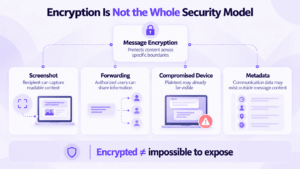
Encryption solves a specific problem: unauthorized access to protected data.
It does not solve every security problem.
Recipient Sharing
Once someone legitimately receives the message, they may still:
-
copy it;
-
forward it;
-
save it;
-
photograph the screen;
-
take a screenshot.
Encryption cannot fully control what an authorized recipient does after decryption.
Unlocked or Compromised Devices
If someone gains access to a device after the conversation has been decrypted, network encryption may no longer matter.
The attacker is seeing plaintext on the endpoint.
Account Compromise
A strong encryption protocol cannot compensate for every:
-
stolen credential;
-
malicious linked device;
-
account takeover;
-
social-engineering attack.
Cryptography is only one layer of the overall security model.
Metadata
Even if the message body is protected, the service may still need some information to route and manage communication.
That is why content confidentiality and metadata privacy should be evaluated separately.
What Does “Not Encrypted” Mean?
A not encrypted warning usually means that the conversation does not use the specific encryption protection expected by the application or mode.
However:
“Not end-to-end encrypted” does not necessarily mean “completely unencrypted.”
For example, an application may still protect network connections with transport encryption even when the message content is not protected end to end.
So the actual distinction may be:
Encrypted transport
versus
End-to-end encrypted content
rather than simply:
safe
versus
unsafe.
Why Do Encryption Keys or Security Codes Change?
Some messaging applications notify users when a contact’s cryptographic identity, key, or security code changes.
This can happen for legitimate reasons, including:
-
replacing a phone;
-
reinstalling an application;
-
resetting an account;
-
adding another device;
-
regenerating encryption keys.
A change does not automatically mean that someone has attacked the conversation.
Some applications allow users to compare QR codes, fingerprints, or security numbers to verify the identity of the other participant.
This highlights another important distinction:
Encryption protects the content. Authentication helps establish who is on the other end.
Both matter.
Why Does an Encrypted Message Still Look Like Normal Text?
Because modern messaging applications perform the cryptographic process automatically.
You may type:
Are you joining the meeting?
The communication system can transform that message into encrypted data before transmission.
When it reaches an authorized endpoint, the application decrypts it and displays the original text.
Users normally do not have to:
-
manually encrypt the message;
-
type a password for every conversation;
-
copy cryptographic keys;
-
read encoded ciphertext.
The security process happens beneath the normal chat interface.
What “Encrypted” Means for Business Messaging
For organizations, the question “Are the messages encrypted?” is important but incomplete.
Business communication has at least two separate boundaries:
Encryption Boundary
This determines where content is readable and who can decrypt it.
Infrastructure Boundary
This determines who operates the communication environment itself.
These are not the same thing.
A cloud messaging service can use strong encryption while the provider still operates the communication infrastructure.
A privately deployed platform can also encrypt communication while giving the organization control over the server, user management, storage, and network environment.
For business communication, a more complete model is:
Users → Clients → Identity → Communication Service → Storage → External Dependencies
Each stage creates a separate question:
-
Are messages encrypted?
-
Where is content decrypted?
-
Who controls the keys?
-
Where does the server run?
-
Where is message history stored?
-
Who administers access?
-
Which external systems are still required?
This is why:
Encryption describes how information is protected. Deployment describes who controls the system protecting it.
Private Messaging With Secumeet
Secumeet is designed as a private business communication environment that combines messaging, video meetings, file exchange, collaboration tools, and centralized administration.
For organizations evaluating encrypted messaging, the relevant question is therefore broader than the lock icon shown in a chat window.
They should evaluate both:
content protection
and:
infrastructure control
Secumeet addresses the second part by allowing the communication environment to operate under organizational control rather than as a separate public messaging service.
That does not make deployment and encryption interchangeable concepts.
They solve different security problems.
How to Evaluate an Encrypted Messaging App
When an application says messages are encrypted, ask:
-
Is the content encrypted only in transit or end to end?
-
Where does decryption occur?
-
Who controls the cryptographic keys?
-
Are files, calls, and backups protected in the same way?
-
What metadata remains outside the encryption boundary?
-
Who controls the communication infrastructure and storage?
These questions reveal much more than the word encrypted by itself.
FAQ
What does message encrypted mean?
It means the message content has been protected using encryption so that unauthorized parties cannot simply read it. The exact protection depends on where encryption is applied, where decryption occurs, and who controls the required keys.
Why does my chat say messages are encrypted?
The app may be informing you that the conversation uses encryption, that end-to-end encryption is enabled, or that the security state of the conversation has changed. The exact meaning depends on the application and the wording of the notice.
Does encrypted mean end-to-end encrypted?
No. A message can be encrypted while traveling between a device and a server without being end-to-end encrypted. End-to-end encryption is specifically designed so that intermediary systems cannot normally decrypt the message content.
Can someone read an encrypted message?
The intended recipient can read it after decryption. Whether anyone else can access the message depends on the encryption model, key management, account security, and security of the devices involved.
Does encrypted mean private?
Encryption improves privacy, but it does not guarantee complete privacy. Recipients can still copy or share messages, compromised devices can expose readable content, and some communication metadata may remain available.
Does encrypted mean blocked?
No. Encryption protects message data, while blocking determines whether two accounts can communicate. An encryption notice does not mean that you have been blocked.
Why can I read an encrypted message normally?
The messaging application handles encryption and decryption automatically. Authorized devices display the original readable message even though encrypted data may be transmitted between them.
Can encrypted messages still be screenshotted?
Yes. Encryption normally does not prevent an authorized recipient from taking a screenshot, copying text, saving an attachment, or otherwise sharing the message after it has been decrypted.
Conclusion
So, what does “message encrypted” mean?
It means the message is protected with encryption somewhere in the communication process.
But the word encrypted alone does not tell you the full security model.
The more useful questions are:
Where is plaintext visible?
Where does decryption happen?
Who controls the keys?
What remains outside the encrypted boundary?
That is the key distinction.
A lock icon tells you that encryption exists.
The encryption boundary tells you what that protection actually means.
Author
Helga Afon is a technology writer specializing in video conferencing, collaboration software, and workplace communication. She writes articles and reviews that help readers better understand enterprise communication tools and industry trends.