

Linux users searching for video conferencing software hit the same wall repeatedly: most vendor marketing is written with Windows in mind, native clients are an afterthought, and “Linux support” can mean anything from a polished dedicated app to a decade-old Electron wrapper that nobody has tested since Ubuntu 18.04. This guide cuts through that noise.
Quick Summary: What You Actually Need to Know
If you only read this section, take these points with you:
-
For enterprise self-hosting with full data control: Secumeet Server or TrueConf Server are the most complete options, both run natively on Linux, and support SIP/H.323 interoperability with legacy hardware.
-
For open-source, zero-budget teams: Jitsi Meet is the default choice. It requires no accounts, runs in a browser, and can be self-hosted on any Linux box in under 30 minutes.
-
For end-to-end encrypted, peer-to-peer calls: Jami or Signal cover small teams that prioritize privacy above everything else.
-
For organizations already in the Google ecosystem: Google Meet works perfectly in any Linux browser with no native install required.
-
Zoom and Teams both have native Linux clients, but their update cadence on Linux lags behind Windows/macOS by weeks or months, and some features (breakout rooms, AI-generated captions, certain plugins) land on Linux last or never.
At a Glance: Top Picks by Use Case
|
Use Case |
Recommended Tool |
Linux Client? |
Self-Hosted? |
|---|---|---|---|
|
Enterprise on-premise |
Secumeet Server / TrueConf Server |
Yes (native) |
Yes |
|
Open-source, self-hosted |
Jitsi Meet |
Browser / Electron |
Yes |
|
Privacy-first small team |
Jami |
Yes (native) |
P2P (no server) |
|
Corporate cloud (MS ecosystem) |
Microsoft Teams |
Yes (PWA) |
No |
|
Browser-only, no install |
Google Meet |
Browser |
No |
|
Hybrid open-source collab |
Nextcloud Talk |
Browser / mobile |
Yes |
|
Legacy SIP/H.323 hardware |
BigBlueButton |
Browser |
Yes |
Why Linux Video Conferencing Is a Different Problem
Linux dominates server infrastructure (over 90% of cloud workloads), developer workstations, and organizations where data sovereignty is non-negotiable. But it accounts for roughly 4% of desktop market share, which means most conferencing vendors assign it a lower testing priority.
The practical consequences are real:
-
Camera and microphone access through PulseAudio, PipeWire, or ALSA can behave differently depending on the distribution. A tool that works perfectly on Ubuntu 22.04 can produce silent audio on Fedora 38 without any configuration change.
-
Wayland compositors (increasingly the default on GNOME and KDE) break screen sharing in apps that only support X11 screen capture. This catches Zoom and Teams users off guard on fresh installs.
-
Some vendors ship .deb packages only. Users on Fedora, Arch, or openSUSE must rely on Flatpak, AppImage, or browser-based access as a workaround.
These are not hypothetical edge cases. They come up regularly in admin support queues, especially after distribution upgrades.
Meetings with 1,500 users
Let your team naturally flow from a chat conversation to an immersive 4K meeting in just one click! Bring up to 1,500 participants to your call.
Team messaging
Connect with colleagues and teams before, during and after meetings in personal and group chats.
Collaboration Tools & AI
Collaborate on projects with AI: share a screen with sound, show presentations and manage remote computers.
How to Choose: Key Criteria
Before looking at individual tools, decide where you stand on three axes:
-
Deployment model. Cloud-hosted tools (Zoom, Google Meet, Teams) are faster to set up but route your data through vendor infrastructure. Self-hosted tools give you control but require you to handle maintenance, SSL certificates, and capacity planning.
-
Participant scale. Browser-based WebRTC tools start struggling above 30-50 concurrent video streams on modest hardware. If you need 200+ participants with video, you need a purpose-built media server (Jitsi Videobridge, TrueConf’s SVC architecture, or a hosted SFU).
-
Legacy hardware compatibility. Many large organizations still operate room systems that speak SIP or H.323. Open-source tools like Jitsi support these protocols through gateways, while enterprise platforms like Secumeet Server and TrueConf Server include this support natively.
Vendor-by-Vendor Breakdown
Secumeet
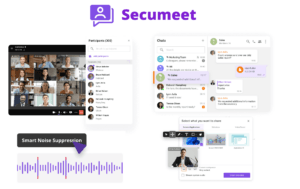
Secumeet operates as a certified distribution partner for enterprise video conferencing infrastructure. Its server runs on Linux and the client application is available as a native Linux package alongside Windows and macOS versions.
Key facts:
-
Supports up to 1,500 participants per conference
-
4K Ultra HD video when network conditions allow
-
AI noise suppression, virtual backgrounds, and automatic meeting transcription
-
Native SIP/H.323 integration for hardware room systems
-
Designed for fully air-gapped deployments (no internet dependency after install)
-
Positioned at enterprises where compliance audits matter: healthcare, finance, government
Secumeet is a good fit when procurement requires a vendor-certified product rather than a community project, and when the deployment team needs professional support SLAs.
TrueConf Server
TrueConf is a vendor with a long track record in the enterprise segment. Its server runs on Windows Server or Linux (Ubuntu, Debian, CentOS), and the Linux client is a first-class product maintained in parallel with other platforms.

Key differentiator: TrueConf uses proprietary SVC (Scalable Video Coding) that dynamically compresses streams per participant. A mobile user on 4G sees the same conference in a lower resolution while a desktop user on fiber sees it in 4K, and this happens without manual configuration. This matters in organizations with mixed-connectivity environments, such as field workers and office staff joining the same call.
-
Free version available: TrueConf Server Free supports up to 1,000 users (up to 12 in a single conference)
-
Deployment time: approximately 15 minutes
-
Works completely offline on a LAN or VPN
-
Integrates with Microsoft Exchange for calendar scheduling
Unique Insight #1: TrueConf’s offline-first architecture means it is one of the few conferencing solutions that works on a ship, at a remote research station, or in a military facility with no internet connection and no cloud dependencies. This is not a marketing claim but a consequence of how the server processes media internally.
Jitsi Meet
Jitsi is the benchmark open-source option. It is backed by 8×8, licensed under Apache 2.0, and can be deployed on any Linux server with a single shell command via Docker.
-
No accounts required for participants
-
End-to-end encryption available (uses the Insertable Streams API in Chrome/Edge)
-
Scales horizontally with Jitsi Videobridge on multi-server setups
-
Electron desktop app for Linux available; browser access works in Chromium/Firefox
-
Active development: regular releases, Google Summer of Code participation
The main limitation: Jitsi’s encryption model for large conferences uses SFU (Selective Forwarding Unit) architecture, which means the media server decrypts and re-encrypts streams. True end-to-end encryption is only available in two-person calls. This is worth understanding before presenting Jitsi to a security team as “fully E2EE.”
Jami (formerly Ring)
Jami is a peer-to-peer conferencing tool built as a GNU project by Savoir-faire Linux. It has no central server. Calls travel directly between participants over a distributed hash table (DHT), making it resistant to server-side outages or takedowns.

-
Native Linux packages available (.deb, .rpm, Flatpak, Snap)
-
End-to-end encrypted by design (no server to compromise)
-
No phone number or email required to create an account
-
File sharing, screen sharing, group calls included
Trade-off: the peer-to-peer model means call quality depends on both participants having solid connections. There is no media server to buffer or optimize streams. For small privacy-focused teams this is fine. For 50-person company-wide meetings, it is not the right tool.
Nextcloud Talk
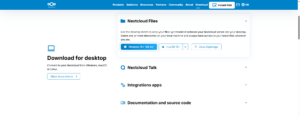
If your organization already runs a Nextcloud server, Talk is a natural addition. It integrates directly with Nextcloud Files, Contacts, and Calendar.
-
Self-hosted
-
End-to-end encryption available for 1:1 conversations
-
Screen sharing, guest access via public link
-
High Performance Backend available for larger calls (uses Janus WebRTC gateway)
-
TURN/STUN configuration required for reliable NAT traversal
For teams already invested in the Nextcloud ecosystem, Talk removes the need for a separate communication tool.
Zoom for Linux
Zoom maintains a Linux client, but it lags behind other platforms. The .deb and .rpm packages are updated on Zoom’s schedule, and features like auto-generated AI summaries, smart recordings, and some accessibility tools arrive on Linux later than on Windows or macOS.

Screen sharing on Wayland requires Zoom 5.17 or later and the PipeWire screen capture plugin. Older enterprise deployments with locked-down package versions may still be on builds that do not support this.
Despite these caveats, Zoom’s ubiquity means it is often the path of least resistance when your clients or partners choose the platform.
Microsoft Teams for Linux
Microsoft removed the native Linux desktop app in 2023 and replaced it with a Progressive Web App (PWA). The PWA runs in the browser and covers most meeting functions, but some admin features and phone integration require the web portal.

For organizations on Microsoft 365, Teams remains the practical choice since it is included in the license. Just set the expectation with Linux users that the experience is browser-based.
Google Meet
No install required. Google Meet runs in Chrome or Chromium and works correctly on all major Linux distributions. It handles screen sharing via the browser’s screen capture API, which works on both X11 and Wayland.
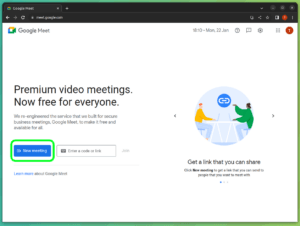
The limitation is the Google account requirement for hosts and the cloud-only deployment model.
BigBlueButton
BigBlueButton targets education and training. It runs on Ubuntu, integrates with Moodle and other LMS platforms, and includes whiteboards, polls, breakout rooms, and shared notes out of the box. It does not have a polished consumer-facing brand but is widely deployed in universities and corporate training departments.

Comparison Table: Full Feature Matrix
|
Tool |
Linux Client |
Self-Hosted |
E2EE |
Max Participants |
SIP/H.323 |
Open Source |
Price |
|---|---|---|---|---|---|---|---|
|
Secumeet Server |
Native app |
Yes |
Yes |
1,500 |
Yes |
No |
Commercial |
|
TrueConf Server |
Native app |
Yes |
Yes |
1,500 |
Yes |
No |
Free tier + Paid |
|
Jitsi Meet |
Browser / Electron |
Yes |
Partial |
Scalable |
Via gateway |
Yes (Apache 2.0) |
Free |
|
Jami |
Native app |
P2P |
Yes |
Limited |
No |
Yes (GPL) |
Free |
|
Nextcloud Talk |
Browser / mobile |
Yes |
Partial |
~50 (basic) |
No |
Yes (AGPL) |
Free + Paid |
|
Google Meet |
Browser only |
No |
In transit |
1,000 |
No |
No |
Free tier + Paid |
|
Zoom |
Native app |
No |
Yes (E2EE opt-in) |
1,000 |
No |
No |
Free tier + Paid |
|
Microsoft Teams |
PWA only |
No |
In transit |
1,000 |
Via Phone System |
No |
With M365 |
|
BigBlueButton |
Browser only |
Yes |
No |
300+ |
No |
Yes (LGPL) |
Free |
|
Signal |
Native app |
No |
Yes |
40 |
No |
Yes (AGPLv3) |
Free |
Open Source vs. Commercial: The Real Trade-Off
The open-source vs. commercial decision is usually framed around cost, but that framing misses the actual risks on each side.
With open-source tools like Jitsi or BigBlueButton, you own the deployment, which means you own every outage, every security patch, and every capacity bottleneck. The software costs nothing but the operational burden is real. A team of two admins running a 500-person Jitsi deployment will spend meaningful time on maintenance.
Commercial tools like Secumeet or TrueConf shift that burden to the vendor. You pay for the license and get support SLAs, tested upgrade paths, and hardware compatibility guarantees. The trade-off is that you accept a vendor relationship and licensing terms.
Unique Insight #2: Most organizations end up running both. Open-source tools handle internal teams where admins have tolerance for configuration work; commercial tools cover external-facing communications, board meetings, or regulated industries where the risk of an unplanned outage is unacceptable. Treating this as an either/or choice creates unnecessary constraints.
Self-Hosted Deployment: What to Actually Prepare For
If you go the self-hosted route, the technical requirements are straightforward. The organizational requirements are where most deployments stumble.
Technical checklist:
-
HTTPS with a valid SSL certificate (Let’s Encrypt works fine)
-
A TURN server (coturn) for NAT traversal in mixed network environments
-
Adequate upstream bandwidth: 1 Mbps per 720p video stream is a baseline estimate
-
Open ports: 443 TCP, 10000 UDP (for Jitsi); 443/80 TCP for TrueConf
-
Regular backup of the conference server database and recordings
What people underestimate:
-
Recording storage grows fast. A 1-hour meeting at 720p produces roughly 1-2 GB of raw video.
-
User onboarding. Even technically competent users need a short guide when switching platforms.
-
Calendar integration. Most self-hosted tools need manual work to send calendar invites with correct join links. Tools like TrueConf have native Exchange connectors; others require custom scripts.
Unique Insight #3: The Wayland Screen Sharing Problem Is Mostly Solved, But Unevenly. As of early 2025, most major conferencing tools support Wayland screen sharing via the PipeWire xdg-desktop-portal. Jitsi Meet in Chromium, Google Meet in Chromium, and Zoom 5.17+ all work. What remains broken: Some enterprise-locked versions of Zoom still use XWayland and silently fall back to a black screen. Firefox handles screen sharing differently from Chromium on Wayland. Virtual backgrounds in most native Linux apps still require X11 or explicit Wayland compositor support. The safest approach for admin teams: standardize on Chromium or Chrome for browser-based conferencing on Wayland, and verify the native app version before deploying any platform-wide.
Who Should Use What: Decision Matrix
-
Small team, tight budget, privacy matters: Jami for internal calls, Jitsi Meet (cloud instance) for external guests.
-
Mid-size organization, technical admin team, wants full control: Self-hosted Jitsi Meet or TrueConf Server Free tier.
-
Enterprise, regulated industry, hardware room systems in use: Secumeet Server or TrueConf Server commercial, both with SIP/H.323 integration.
-
Organization fully on Microsoft 365: Teams PWA, accept the browser-based Linux experience.
-
University or training department: BigBlueButton, integrated with your LMS.
-
Remote team with existing Nextcloud: Nextcloud Talk with High Performance Backend for calls above 10 participants.
FAQ: Everything You Need to Know
Does Zoom work properly on Linux in 2025?
Can I run a video conferencing server entirely offline, with no internet?
What is the difference between SFU and MCU video conferencing architectures?
Is end-to-end encryption actually available in group video calls on Linux?
What happens if I’m on a distribution that does not have a native package for my conferencing tool?
How many participants can a self-hosted Jitsi server handle?
Can I use a hardware SIP room system (like Cisco or Polycom) with open-source software?
Is Microsoft Teams still available as a native Linux app?
Author
Olga Afonina is a technology writer specializing in video conferencing, collaboration software, and workplace communication. She writes articles and reviews that help readers better understand enterprise communication tools and industry trends.